How to Fix iPhone X Stuck in Recovery Mode [3 Ways]
To get an iPhone X out of recovery mode, you can try a force restart or use iTunes to restore the device. For an easier, one-click experience, AnyFix can exit recovery mode smoothly without wiping your data.
After an iOS update or reset, an iPhone X may occasionally stop working and become trapped in recovery mode. This typically occurs when a software glitch in the system prevents the device from starting up properly. However, there are safe ways to restore your iPhone to normal that do not involve data loss. This tutorial will help you learn the leading causes of this issue as well as the three quick and simple methods to fix the problem in no time.
Common Reasons for iPhone X Stuck in Recovery Mode Issue
Before fixing the issue, it’s important to understand what typically causes an iPhone X to get stuck in recovery mode:
- The iOS update failed to install properly.
- Low battery during the update can trigger the recovery screen.
- Corrupted system files cause the device to crash and enter recovery mode automatically.
- Jailbreak errors break the software and stop normal booting.
- A simple software bug can push the phone into recovery mode.
- Overheating can also force the system to protect itself.
Quick Comparison
There are many methods to get the iPhone X out of recovery mode, but every approach has its own disadvantages and advantages. Some are quick and easy, while others may take more time and risk losing data. To make the right decision based on the factors of convenience, complexity, time, and data safety, take a look at this brief comparison.
| Methods | Ease | Success Rate | Data Loss Risk | Time Required |
| AnyFix | ⭐⭐⭐⭐⭐ | ⭐⭐⭐⭐⭐ | No data loss | Fast |
| Force Restart | ⭐⭐⭐⭐ | ⭐⭐ | No data loss | Fast |
| iTunes Restore | ⭐⭐ | ⭐⭐⭐ | High if no backup | Slow |
After this short overview, we’ll walk you through each method in detail to help you pick the one that works best for your situation.
Way 1. Fix iPhone X Stuck in Recovery Mode with AnyFix [One-click]
When your iPhone X is stuck in recovery mode and won’t boot up, AnyFix provides a fast and safe way to bring it back to normal. This powerful tool repairs iOS system crashes and recovery-loop errors in just a few clicks without erasing any data. Even when iTunes fails to restore your device, AnyFix can automatically detect the issue, rebuild the system, and reboot your iPhone successfully. It’s a beginner-friendly, one-click solution designed to save your time and protect your data.
Key Features of AnyFix:
- Instantly gets your iPhone X out of recovery mode and back to normal without using iTunes.
- Fixes system-level glitches that prevent your device from starting up properly.
- Just connect your iPhone and fix the issue in a few clicks, no technical skills required.
- Safely restores your iPhone without erasing photos, messages, or app data.
Free Download * 100% Clean & Safe
How to Fix iPhone X Stuck in Recovery Mode with AnyFix:
Step 1. Download the AnyFix tool on your computer. Plug your iPhone into the computer with a USB cable.
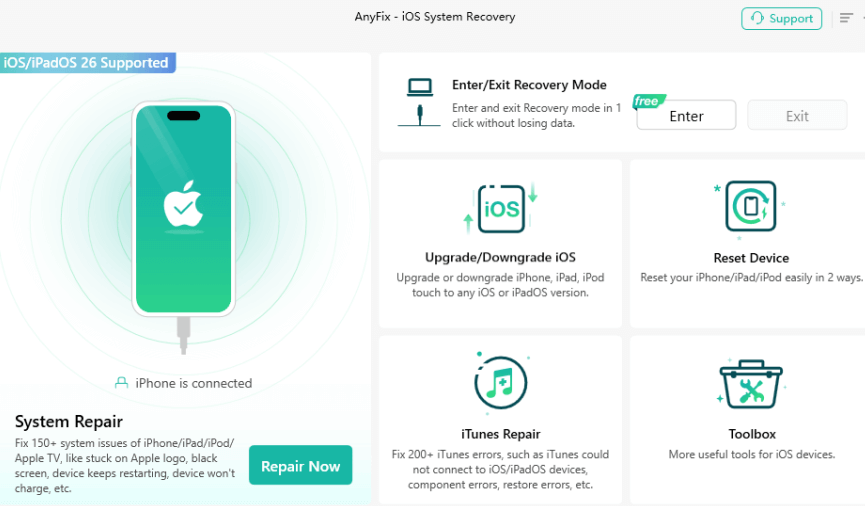
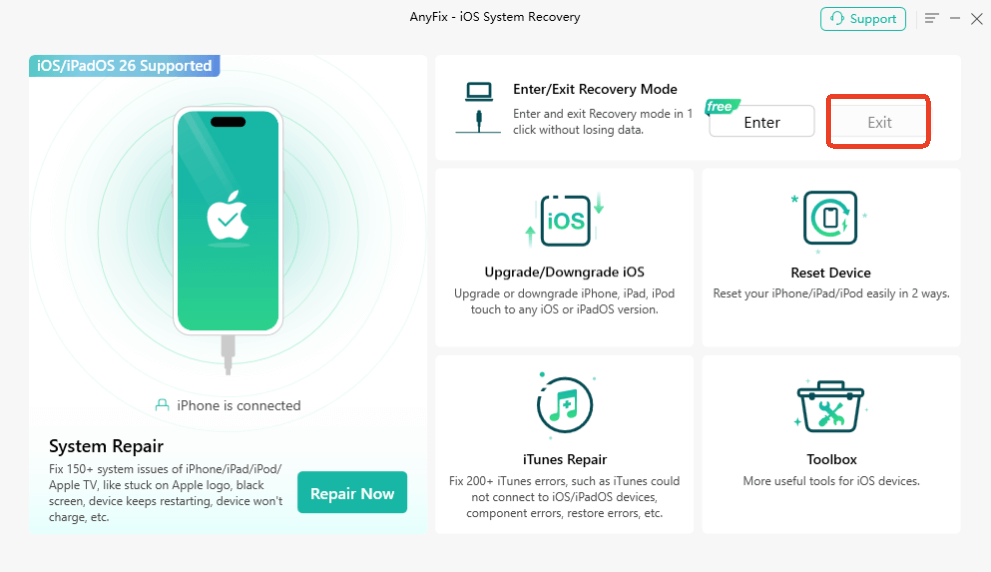
Step 2. When AnyFix detects your iPhone, click the Exit button. Your iPhone will get out of recovery mode immediately.
Way 2. Fix iPhone X Stuck in Recovery Mode by Force Restart
When your iPhone X gets stuck in recovery mode, one of the simplest first steps is to force restart the device. This quick action can often clear temporary software glitches that make the phone unresponsive at the recovery screen. However, it only works for minor issues. If the system is severely corrupted, the device may remain stuck even after restarting. Here is how to force restart your iPhone:
Step 1. Quickly press and release the volume up button.
Step 2. Quickly press and release the volume down button.
Step 3. Hold down the side button (power button).
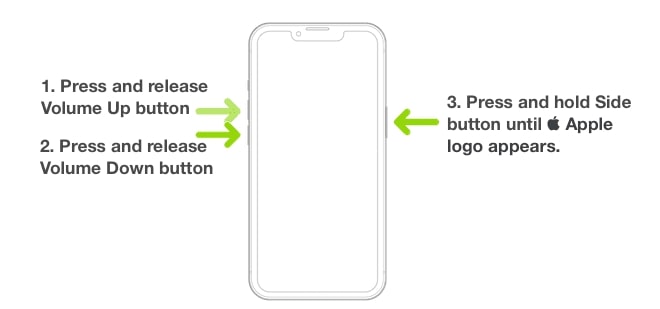
Step 4. Keep holding the Side button until the Apple logo appears, then release it and allow the iPhone to restart fully.
Way 3. Get iPhone X Out of Recovery Mode Loop with iTunes
To fix iPhone X stuck in recovery mode, iTunes or Finder is also a reliable method. It can reinstall iOS and bring your device back to normal operation. However, this approach comes with a limitation. If you haven’t backed up your data recently, restoring through iTunes may result in data loss. Here’s how to get it fixed using iTunes/Finder:
Step 1. To a computer, first, connect your iPhone with a Lightning cable and then open iTunes or Finder.
Step 2. Click on the device icon when it shows up to bring up the settings and information page.
Step 3. By clicking on Back Up Now, you will make a copy of your important information.
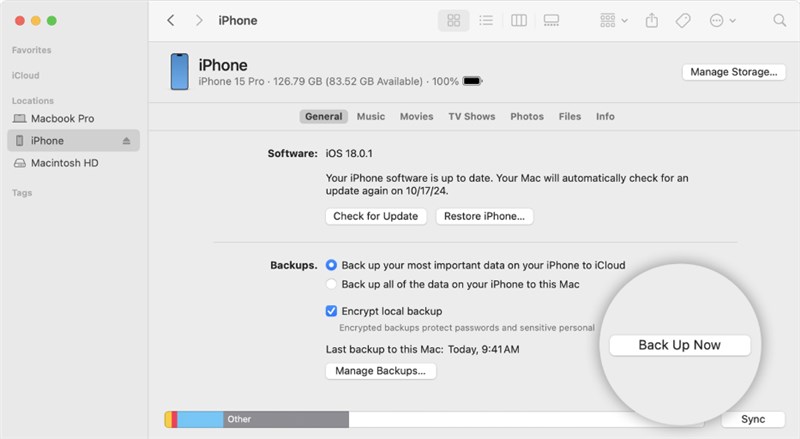
Step 4. In case iTunes displays a new iOS version, click on Update to install the system again and eliminate the bugs responsible for the loop.
Step 5. If you want the fix immediately, select the Download and Update option.
Step 6. Click on the Next button to proceed after looking into what the new software version includes.
Step 7. Hit the Agree button to initiate the downloading and updating process.
Step 8. iOS will be installed on your device. Then, it will be the turn of your iPhone X to restart normally and eventually come out of recovery mode.
FAQs about iPhone X Stuck in Recovery Mode
Q1. How do I get my iPhone X out of recovery mode?
To get my iPhone X out of recovery mode, force restart your iPhone by pressing rapidly Volume Up followed by Volume Down, and then hold the Side button until the Apple logo shows up.
Q2. How to fix iPhone stuck on recovery mode and won’t restore?
If your iPhone is acting up, start by updating or restoring it using iTunes or Finder. If that doesn’t work, try a different cable or computer. You can also use a trusted repair tool to get it working again.
Q3. How do I get my iPhone X into recovery mode?
To put your iPhone into recovery mode, connect it to a computer. Once done, press and hold the Side button while at the same time pressing Volume Up and Volume Down until the recovery mode screen shows up.
Conclusion
Getting your iPhone X stuck in recovery mode can be frustrating. If the issue is minor, a simple force restart or restoring your device with iTunes may bring it back to normal. For a quicker and safer solution, AnyFix, a professional iOS system repair tool, can help you exit recovery mode without wiping your data, all with just one click. Try AnyFix to get your iPhone back to normal safely and smoothly.
Free Download * 100% Clean & Safe



Joy Taylor is a seasoned technical writer with over a decade of experience in mobile technology. At iMobie, she specializes in producing in-depth content on iOS data recovery, iPhone unlocking solutions, and iOS troubleshooting.
Product-related questions? Contact Our Support Team to Get Quick Solution >
