
Installation Successful!
Up to 35% OFF, Special AnyTrans Offer for Today Only!
Family Plan
Unlimited Devices / 5 PCs & Macs
$79.99 $109.99
(Excl. Sales Tax)
- You Save 27% Today
- Plan for Lifetime
- Lifetime Free Updates
- 24/7 Free Customer Support
One-Time Purchase
Unlimited Devices / 1 PC
Unlimited Devices / 1 Mac
$59.99 $79.99
(Excl. Sales Tax)
- You Save 25% Today
- Plan for Lifetime
- Lifetime Free Updates
- 24/7 Free Customer Support
1-Year Subscription This is a subscription product that will be automatically renewed yearly. A reminder email will be sent before the renewal date. You can cancel your subscription at any time.
Unlimited Devices / 1 PC
Unlimited Devices / 1 Mac
$39.99 $59.99
(Excl. Sales Tax)
- You Save 33% Today
- Auto-Renewal 1-Year Subscription
- Cancel Subscription Anytime
- 24/7 Free Customer Support
3-Month Subscription This is a subscription product that will be automatically renewed quarterly. A reminder email will be sent before the renewal date. You can cancel your subscription at any time.
Unlimited Devices / 1 PC
Unlimited Devices / 1 Mac
$35.99 $55.99
(Excl. Sales Tax)
- You Save 35% Today
- Auto-Renewal 3-Month Subscription
- Cancel Subscription Anytime
- 24/7 Free Customer Support
We accept: 

Instant Activation
Your AnyTrans plan will be activated instantly after purchase.

Secure Payment Encryption
All transactions are secured from start to finish with SSL encryption.

60-Day Money-Back Guarantee
100% full refund guaranteed within 60 days 30-Day for 3-Month Subscription. from your purchase.

Confidentiality Guarantee
All data transfers are secured with advanced encryption technology.
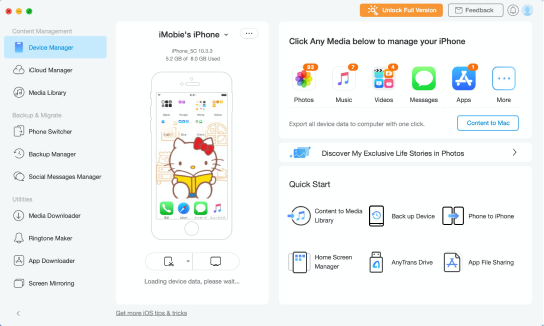
 Transfer and Manage Your Data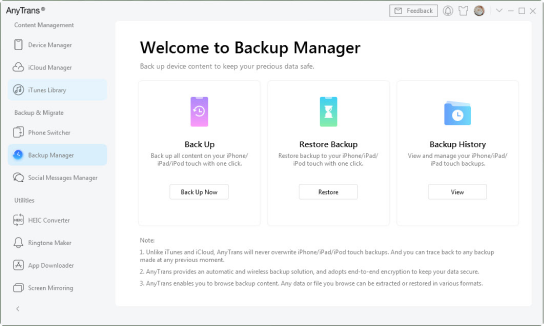
 Keep Your Data Safe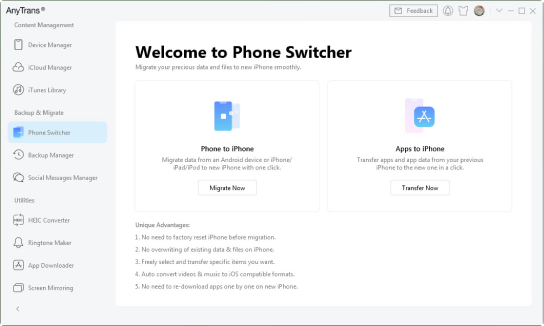
 Copy Your Content from Old Phone to New iPhone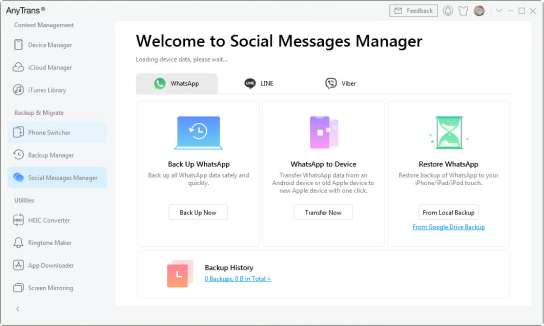
 Keep Your WhatsApp/LINE/Viber Chats within Reach







 Your information and the transaction are secured with SSL encryption.