تحسين تجربة iTunes الخاصة بك كما لم يحدث من قبل

يوفر لك iTunes مكانًا رائعًا للحصول على ملفات الوسائط وتنظيمها والاستمتاع بها. عندما يعمل AnyTrans مع iTunes، فإنه يعمل على ترقية تجربتك إلى حد كبير، ويجعل كل شيء أسهل بكثير وأكثر كفاءة. يمكنك مشاركة الموسيقى المفضلة لديك على جميع الأجهزة، ومشاهدة الأفلام والبرامج التلفزيونية دون الاتصال بالإنترنت في أي مكان، وإنشاء نغمات رنين مخصصة لـ iPhone في بضع خطوات، وعمل نسخة احتياطية واستعادة فقط ما تريده علىiPhone ، وما إلى ذلك. فقط استمتع بتجربة أفضل على iTunes باستخدام AnyTrans.

هل تعرف ماذا يحدث عندما تجمع بين iTunes وAnyTrans؟

الموسيقى

نغمة الرنين

الفيديوهات

الصور

التطبيقات

الكتب الصوتية/البودكاست

نسخ احتياطي/استعادة

أندرويد إلى جهاز iOS

استمتع إلى الموسيقى بدون قيود او حدود عكس برنامج ايتونز
  iTunes AnyTrans iTunes + AnyTrans
المربع الأزرق مع السهمFind Music Search & purchase music in iTunes Store Download music from YouTube and other 1000+ sites Enjoy a universe of music
المظروف الأزرق مع السهم الأيسرSync Music to iPhone Sync music only from a single iTunes library to iPhone Drag and drop music from any computer and multiple iTunes libraries to iPhone Enrich your iPhone music collection as you like
السهم لليسار على شاشة الكمبيوترExport Music from iPhone to Computer وجه حزين على خلفية زرقاء Export iPhone music to computer or iTunes library Rebuild and enrich iTunes library with one click
البناء باللون الأبيض الأزرقTransfer/Share Music from iPhone to iPhone وجه حزين على خلفية زرقاء Transfer music and playlists from one iPhone to another Enjoy your favorite music on new iPhone and share with friends easily
تعيين نغمة رنين ايفون بأغنيتك المفضلة وإدارتها
  iTunes AnyTrans iTunes + AnyTrans
مربع أرجواني وردي على أبيضCreate & Add Custom Tones Make and add ringtones or text tones to iPhone in a circuitous way Create ringtones or text tones with drag & drop, and save them straight to iPhone Personalize your iPhone with your unique ringtone
الجرس على خلفية حمراء زرقاءShare Custom Tones Between iPhones وجه حزين على اللون الوردي الأرجواني Transfer your favorite tones from one iPhone to another Take your favorite tones to new iPhone
نوتة موسيقية على اللون الوردي الأرجوانيManage Tones Library Remove custom tones from iPhone Transfer tones between iPhone and computer, and remove unwanted tones from iPhone/computer Enrich your tones libraries on both iPhone and computer, and keep them tidy as well
الاستمتاع بمقاطع الفيديو المفاضلة ومشاركتها
  iTunes AnyTrans iTunes + AnyTrans
زر التشغيل على خلفية زرقاءFind Videos Search and purchase movies and TV shows in iTunes Store Download videos from YouTube and other 1000+ sites A world of videos are right at your hand
السهم على خلفية خضراء زرقاءSync Videos to iPhone Sync videos only from one single iTunes library to iPhone Drag and drop videos from any computer and multiple iTunes libraries to iPhone Enjoy your favorite videos on the go
مجلد مع زر التشغيلConvert Videos to An iOS Compatible Format وجه حزين على خلفية خضراء زرقاء Automatically convert any videos to an iOS supported format during transfer Watch any videos you like on iPhone
السهم على خلفية خضراء زرقاءExport Videos from iPhone to Computer وجه حزين على خلفية خضراء زرقاء Export all types of videos from iPhone to computer or iTunes library Better immerse yourself with videos on a bigger screen
مشغل فيديو على الشاشةTransfer/Share Videos Between iPhones وجه حزين على خلفية خضراء زرقاء Transfer videos directly from one iPhone to another It’s a breeze to share videos with friends and family
نقل الصور إلى مكان تريد لحفظها
  iTunes AnyTrans iTunes + AnyTrans
مجلد برتقالي به سهم لليمينExport Photos from iPhone to Computer Export photos from camera roll only Export both camera roll photos and synced photos by category, as well as albums you created Keep a safe and well-organized backup of iPhone photos on computer
المربع البرتقالي مع jpgHEIC to JPG خلفية برتقالية مع وجه حزين Export and convert HEIC photos to JPGs Take HEIC photos without worrying about compatibility issues
مجلد برتقالي به سهمSync Photos to iPhone Sync all photos in a folder from computer to iPhone without choice Import the entire folder or just certain photos, as you prefer Keep only what you need to save precious iPhone storage
جبل مع خلفية الشمسTransfer/Share Photos Between iPhones خلفية برتقالية مع وجه حزين Transfer any photos you want from one iPhone to another Take your photos always with you or easily share with friends and family
نسخ احتياطي من التطبيقات وإدارتها على الكمبيوتر
  iTunes AnyTrans iTunes + AnyTrans
مربع أرجواني أزرق مع appBack Up Apps Not available since iTunes 12.7 Save both current and previous versions of Apps locally for backup Never worry about an app being removed from the App Store or needing a downgrade
شعار التطبيق باللون الأزرق البنفسجيDownload Apps Not available since iTunes 12.7 Download once and install on as many iOS devices as you want Save you a huge amount of bandwidth and time
شعار التطبيق باللون الأزرق الأرجوانيInstall/Update Apps Not available since iTunes 12.7 Install or update all apps in bulk with one click No more tedious one-by-one clicks
مربع أرجواني أزرق مع مركز أبيضArrange iPhone Apps Not available since iTunes 12.7 Smartly categorize apps in one click or easily arrange apps with drag & drop on the big screen of computer Keep your iPhone home screens tidy in no effort
صورة مربعة باللون الأزرق الأرجوانيBack Up / Restore Home Screen Layouts Not available since iTunes 12.7 Back up home screen layouts and restore the desired one anytime in a click The home screen layout you like is just a tap away
مشاركة الكتب الصوتية/البودكاست مع أصدقائك بسهولة
  iTunes AnyTrans iTunes + AnyTrans
مربع أبيض أخضر مع مكبر صوتGet Audiobooks & Podcasts Purchase audiobooks and podcasts in iTunes Store وجه حزين باللون الأبيض الأخضر Purchase once and enjoy on all your Apple devices
مجلد أصفر أخضر مع سهمSync from PC/Mac to iPhone Sync purchased audiobooks & podcasts Transfer downloaded or imported audiobooks and podcasts Enjoy any audiobooks and podcasts you like on the go
سهم أبيض أخضر لليمينExport to Computer Transfer purchased audiobooks and podcasts from iPhone to iTunes library Export non-purchased audiobooks and podcasts from iPhone to computer or iTunes library Access what you like on computer and enrich your iTunes library
صورة الساعة باللون الأخضر والأبيضShare Between iPhones وجه حزين باللون الأبيض الأخضر Share audiobooks and podcasts from one iPhone to another Feel free to share your favorites with friends and family
نسخ احتياطي للايفون واستعادته في أفضل طريقة
  iTunes AnyTrans iTunes + AnyTrans
مربع أخضر أزرق مع ساعةContent in Backups Check here Everything iTunes backups include + imported Photos/Videos + Music + Movies + TV Shows + Podcasts + Ringtones + iTunes U + Audiobooks Keep a more complete backup of iPhone
مربع أخضر أزرق على أبيضBackup Modes Full Backup Full Backup / Incremental Backup / Air Backup Feel free to choose the backup mode you like
مجلد أخضر أزرق مع علامة استفهامBackup History وجه حزين على خلفية زرقاء خضراء Maintain a history of backups and make them browsable Quickly go back to any specific backup and recover deleted data
خلفية خضراء زرقاء مع الطائرةSchedule Automatic Backups وجه حزين على خلفية زرقاء خضراء Set up backup schedule as your preferred frequency Enjoy the convenience of automatic and timely backups
بطاقة الائتمان مع وجه مبتسمPreview Backups وجه حزين على خلفية زرقاء خضراء Preview the backup before restore, making sure it contains what you need No more blind restore
أزرق أخضر مع علامة استفهامRestore from Backups Full restore Full restore or selective restore of what you want only Flexible restore options for your different demands
نقل البيانات من جهاز Android إلى جهاز iOS
  iTunes AnyTrans iTunes + AnyTrans
المربعات الزرقاء الأرجوانية على الأبيضTransferable Data وجه حزين على خلفية أرجوانية زرقاء Messages, photos, videos, contacts, call logs, music, ringtones, ebooks, calendars, and more files Bring all memories & essentials with you
صورة السهم الأزرق الأرجوانيTransfer Modes وجه حزين على خلفية أرجوانية زرقاء Move everything in a click or just transfer specific items you want, as you prefer Save a huge amount of time in transition and storage on iPhone
مربع أرجواني أزرق على أبيضConvert Videos & Music وجه حزين على خلفية أرجوانية زرقاء Convert videos and music to iOS compatible formats automatically Enjoy your favorite media files seamlessly on iPhone
مربع أرجواني أزرق مع مكدس البياناتData Safety وجه حزين على خلفية أرجوانية زرقاء No need to factory reset iPhone before migration, and never erase existing data during transfer Never lose a single piece of data
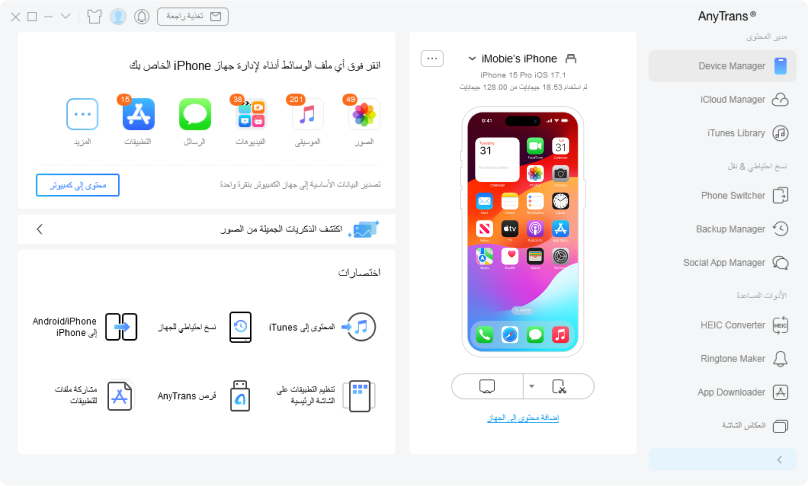
الهاتف الخليوي على شاشة الكمبيوتر

احصل على AnyTrans®

احصل على طريقة سهلة لإدارة جميع المحتويات الموجودة في iPhone أو iPad أو iPod أو iTunes أو iCloud أو الكمبيوتر ونقلها إلى أي مكان تريد. يجعل AnyTrans تجربتك على iPhone أو iPad أكثر متعة وسهولة.

تنزيلات وعدد

10,039,441

تصنيف 4.8/5

صورة الباركود باللون الأبيض والأسود

بناء على 7889 تقييم