How to Use Facebook Dating on PC
This guide teaches you how to use Facebook Dating on PC smoothly. It shows easy ways to do so, such as using AnyMiro, Web Developer Tools, or Emulators. These tools help you use Facebook Dating from your desktop or laptop. This is a complete and easy guide for anyone who wants to try Facebook Dating without a phone.

How to Use Facebook Dating on PC
Try AnyMiro to mirror iPhone to PC for free via USB and WiFi.
- Fast response time within 10 ms and 60fps frame rate.
- A stunning visual experience with no color difference.
- Lag-free screen mirroring and 4k resolution.
You’re relaxing at home with your laptop and want to try Facebook Dating. You open Facebook on your PC, but the Dating feature is missing. You wonder, “Can I use Facebook Dating on my computer?” The answer is yes, but not directly. Facebook dating is designed for mobile users, so it does not appear on the desktop website. But do not fret; there are simple methods to view it on your PC.
This article will guide you in using Facebook Dating on PC via easy software like AnyMiro, Web Developer Tools, and Android simulators. These processes allow you to access Facebook Dating from your desktop or laptop. You do not have to be a technology expert. Follow the processes and enjoy dating on a larger screen!
Table of ContentsHide
Why You Should Use Facebook Dating on PC?
Using Facebook Dating on a computer can make the experience more comfortable and easier. It provides better vision, smoother typing, and more control. Among some of the reasons why you should try it are:
- Larger Screen: A larger screen makes it easier to see profiles, photos, and messages clearly and comfortably.
- Typing Speed: Having a physical keyboard simplifies chatting and makes it faster and more natural compared to phone typing.
- Improved Multitasking: You can scroll through tabs, research, or chat while surfing without stepping away from the screen.
- More Battery Life: PCs usually have longer battery life or can stay plugged in, so you won’t have to worry about your phone dying.
- Comfortable Browsing: Sitting at a desk with a full setup can feel more relaxed than using a small phone screen.
- Broken or Lost Phone: If your phone is broken, lost, or unavailable, you can still access Facebook Dating using your computer.
How to Use Facebook Dating on PC
Now, let’s explore the methods to use Facebook Dating on PC:
Way 1. AnyMiro
AnyMiro is a robust yet easy-to-use screen mirroring app that assists you in accessing Facebook Dating on your PC. It supports Android and iPhone and allows you to seamlessly mirror your phone screen onto your computer. You enjoy a reliable connection, perfect for chatting or browsing without interruptions. It supports high-definition visuals up to 4K, making everything sharp and clear. With synchronized audio and video in real-time, the playback is present without lag, whether for viewing or streaming. Additionally, you can record, take a screenshot, and experience hours of lag-free streaming.
Free Download for all windows & 100% safe Free Download for all mac & 100% safe
Free Download100% Clean & Safe
Key Features:
- Displays your mobile phone screen at 4K quality with crisp, clear, and bright colors.
- Maintains audio and video perfectly synchronized without any delay problems.
- Sustain screen mirroring for as much as 10 hours of seamless and stable playback performance.
- Enables fast screenshots or screen recording at any time of usage without pause.
- Integrates smoothly with OBS, Twitch, Facebook, and other most-used streaming sites.
Below are the simple steps to use AnyMiro for Facebook Dating on PC:
From iPhone to PC
Step 1. Free download AnyMiro on your computer and launch the program.
Step 2. Connect your iPhone or iPad to the computer using a USB cable.
Step 3. In AnyMiro, select “iOS/iPadOS.”
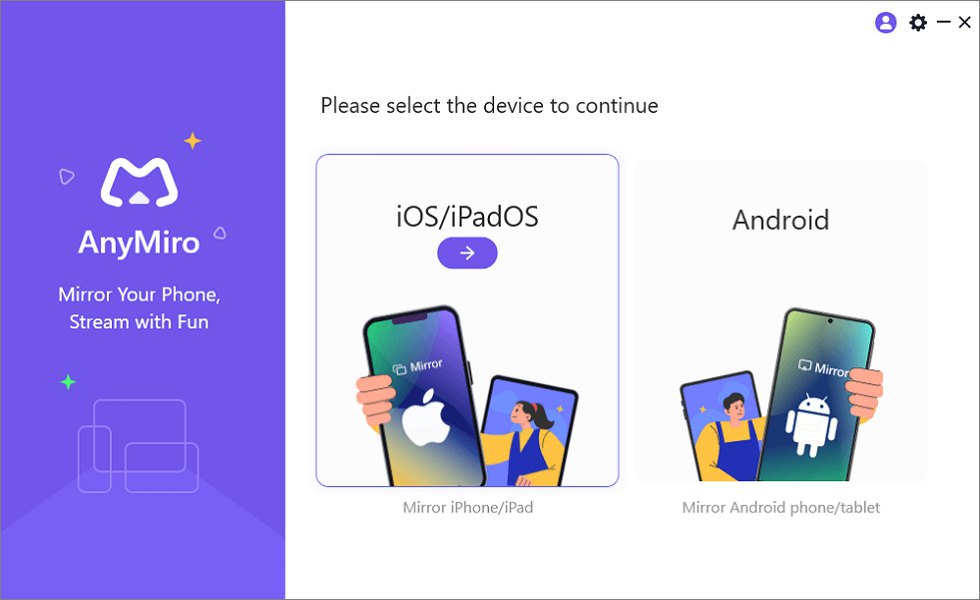
Mirror iPhone to Computer
Step 4. Click on “USB connection.”
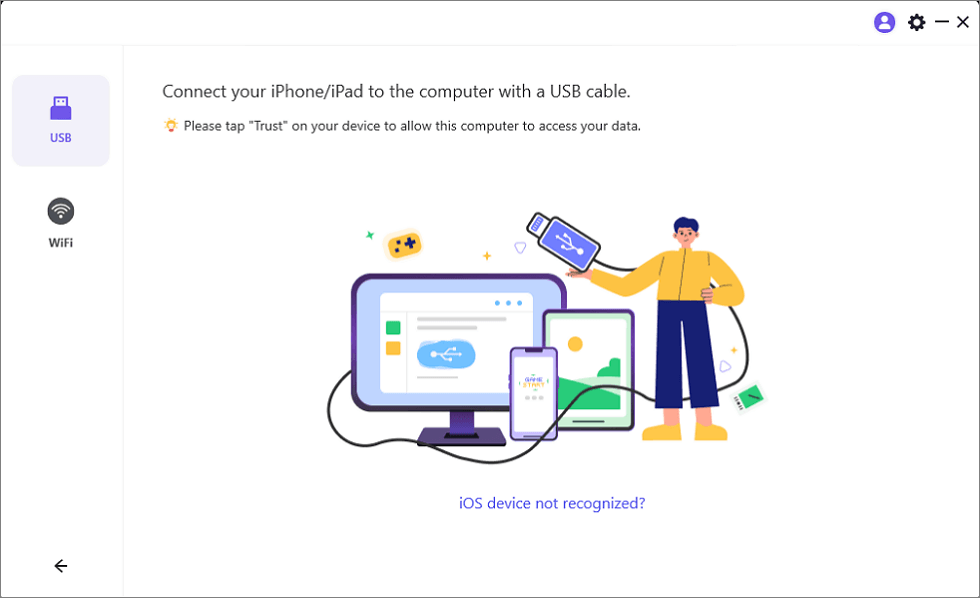
Connect Your iPhone/iPad with a USB Cable
Step 5. Tap “Trust” on your iPhone/iPad to allow the connection.
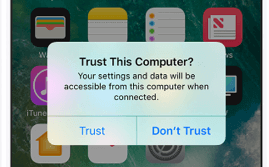
Trust Your Computer on iPhone
Step 6. If prompted, enter your device’s passcode, and your screen will mirror.
From Android to PC
Step 1. Open AnyMiro on your computer and select “Android.”
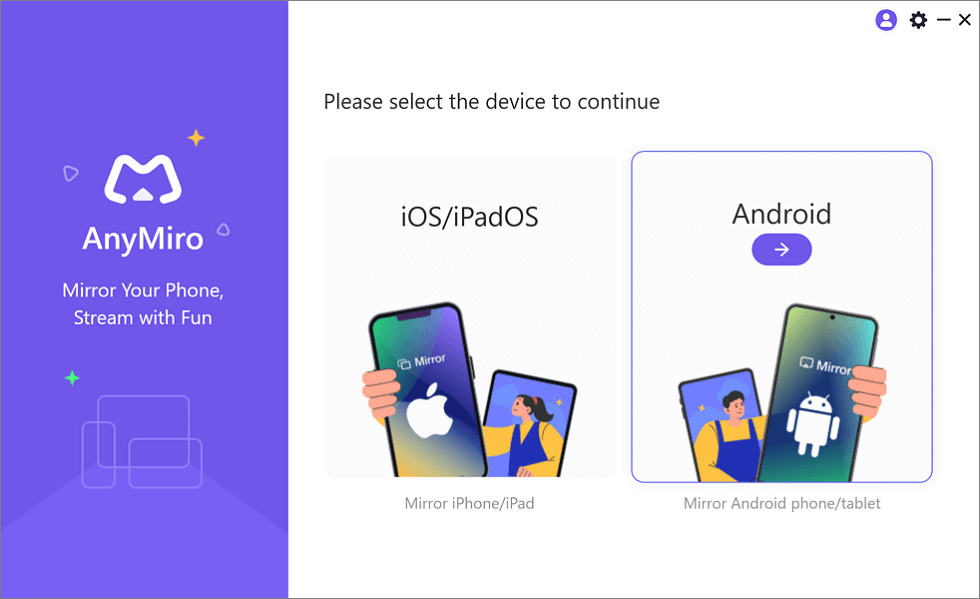
Mirror Android to Computer
Step 2. Click on “Wi-Fi” to start the wireless connection.
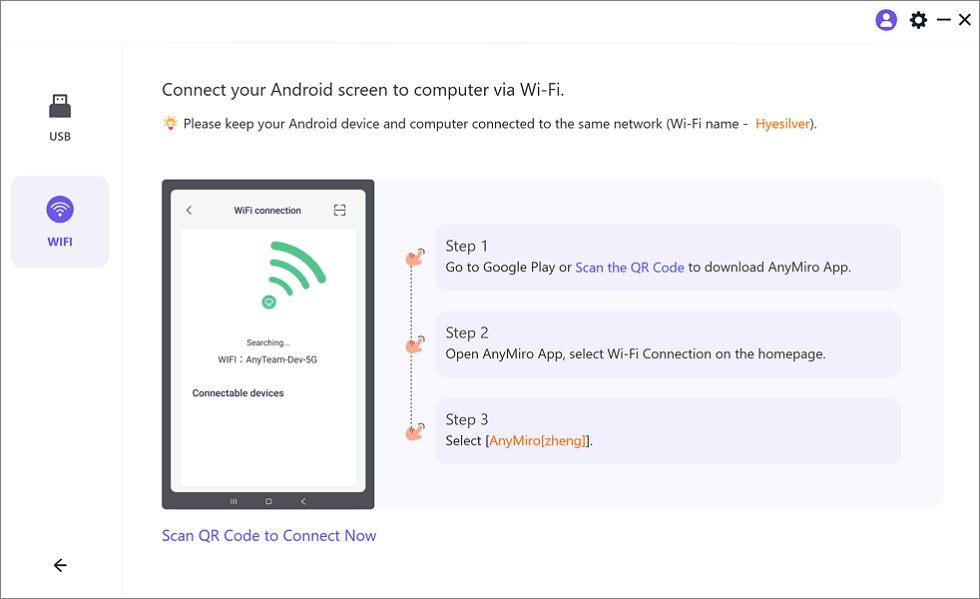
Mirror Android to Computer via WiFi
Step 3. Download the AnyMiro app from Google Play or scan the QR code.
Step 4. Open the app and select “Wi-Fi Connection.” Choose your computer’s name from the list to start mirroring.
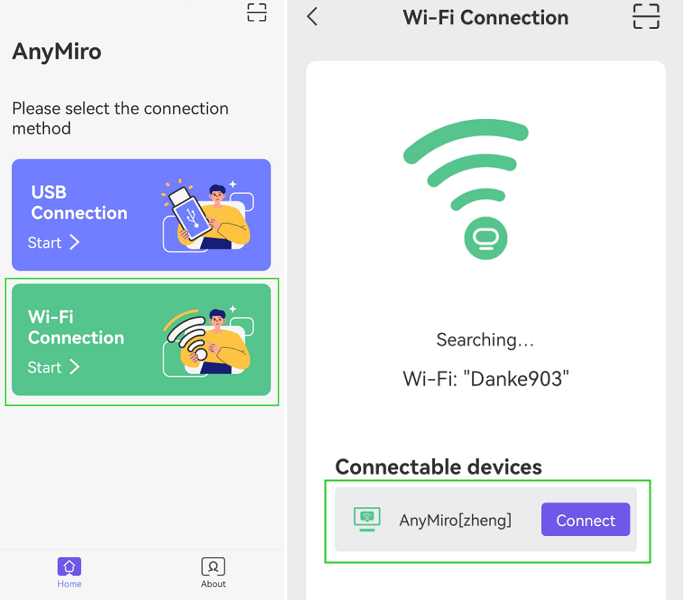
Tap WiFi Connection
Way 2. Web Developer Tools
Using Web Developer Tools to access Facebook Dating on PC offers several practical features. The tool enables mobile view emulation to let you experience Facebook Dating just like you were using a mobile device. Adjusting the screen sizes lets you match mobile devices precisely so that content displays properly. The tool helps users switch between different device types, creating authentic simulations of smartphones and tablets. The tool functions without additional software because it relies solely on built-in browser tools. The setup procedure is fast and cost-free, making this platform practical for all users. For this method:
Step 1. Launch your Chrome browser.
Step 2. Click on the three dots in the top-right corner, go to “More Tools,” and select “Developer Tools,” or press F12 on your keyboard.
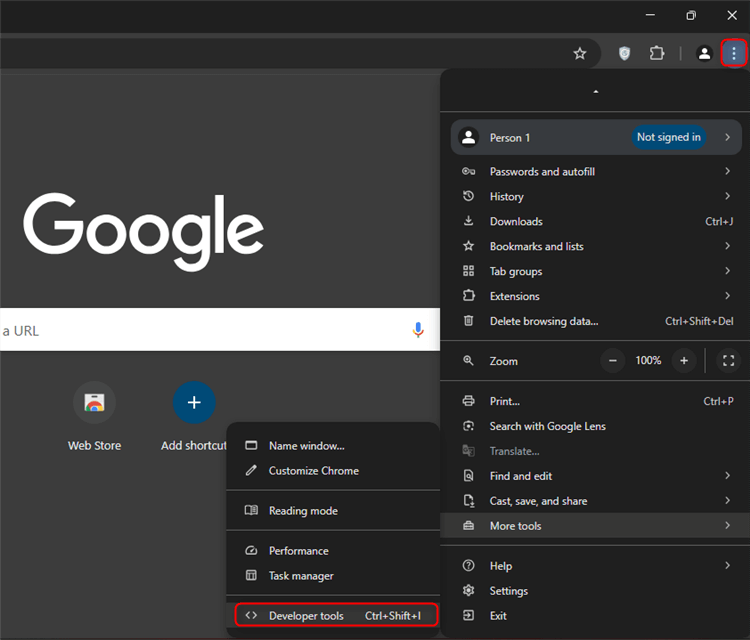
Select Developer Tools
Step 3. Tap the small phone/tablet icon at the top of the Developer Tools panel.
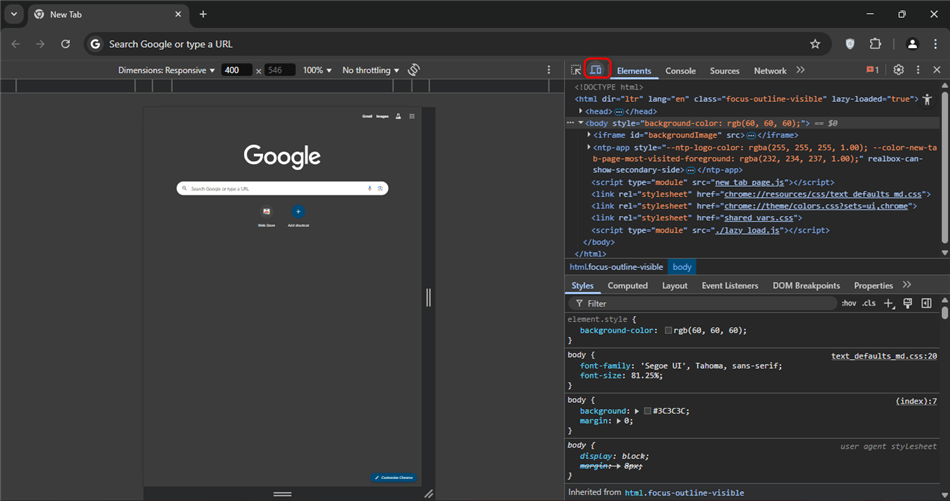
Click The Phone/Tablet Icon
Step 4. Select a device from the list to mimic its display on your browser.
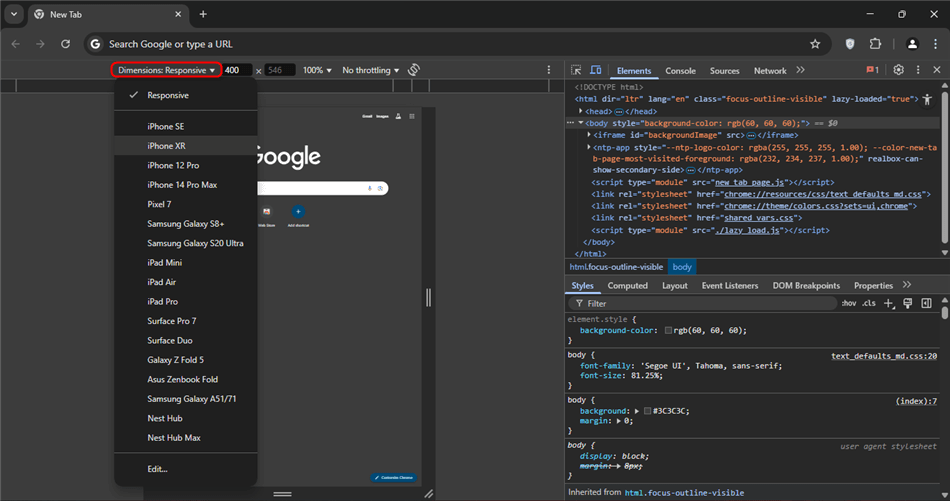
Select A Device
Way 3. Using Emulators
Android emulator LDPlayer enables PC users to execute Facebook Dating and other mobile applications through its platform. High performance in LDPlayer ensures that users can use the software without delay or interruptions to duplicate mobile apps on their desktop environment. Customizing controls enables users to set up optimal settings according to their preferences, and the multi-instance support allows the simultaneous running of multiple applications.
The free emulator enables users to access mobile-only applications efficiently at no additional cost. This tool offers exceptional applications and gaming support, making it a flexible platform solution suitable for all users. For using LDPlayer:
Step 1. Install LDPlayer on your PC by downloading it from the official site.
Step 2. Launch LDPlayer and log in with your Google account to access apps.
Step 3. Open the Google Play Store within LDPlayer and search for Facebook.
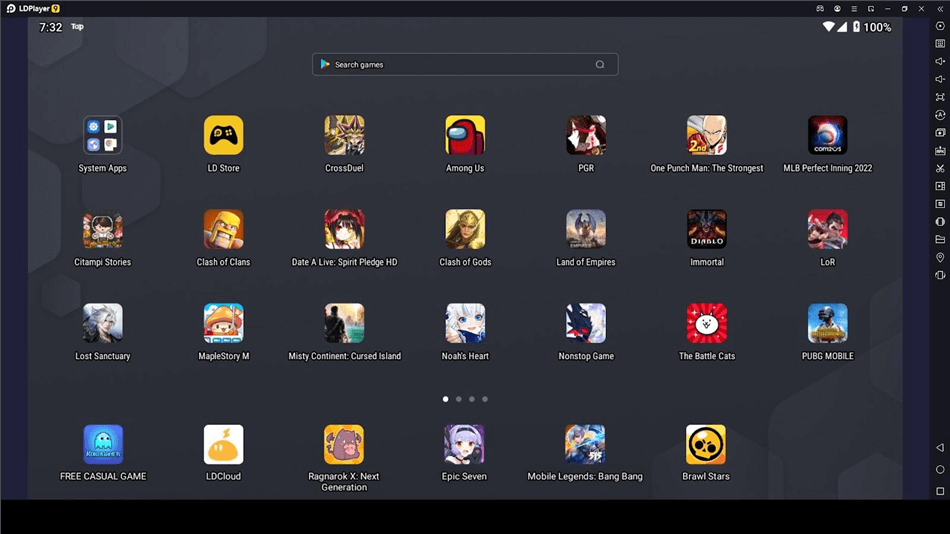
Search Facebook
Step 4. Install Facebook. Lastly, open it to begin using Facebook Dating.
FAQs on Facebook Dating on PC
Can I use Facebook Dating on PC directly?
No, there is no standalone PC website for Facebook Dating. But you can access it through means such as screen mirroring, employing emulators like LDPlayer, or the Web Developer Tools of Chrome to simulate a mobile experience on your computer.
How do I mirror my phone screen to PC for Facebook Dating?
AnyMiro software serves as a solution to cast your phone screen to your PC. This software makes it possible to have a smooth, lag-free display of your phone content directly on your computer to access Facebook Dating.
Can you access Facebook Dating through a Mac platform?
Users can access Facebook Dating through Mac computer systems using Android emulator applications like LDPlayer or screen mirror tools, including AnyMiro. These methods enable you to operate Facebook Dating just like how people do it on Android or iOS devices.
Does accessing Facebook Dating require having a Facebook account?
To access Facebook Dating you need an existing Facebook account where this dating service resides within the Facebook app. Log in after, and then proceed to set up your dating profile and initiate matchmaking with desired companions.
Final Words
Users can access Facebook Dating through their personal computers using screen mirroring, web developer tools, and emulation software like LDPlayer. Using alternate solutions, you can access Dating through Facebook, although the social network avoids native desktop access. Users seeking a smooth and effective solution should strongly consider using AnyMiro for screen mirroring. You can enjoy high-resolution window mirroring alongside a smooth and continuous connection to stream real-time mobile screen features to your PC. The AnyMiro application will enable you to easily access Facebook Dating without encountering problems on your computer system.
Product-related questions? Contact Our Support Team to Get Quick Solution >
