Billie Eilish AI Voice: Change Your Voice to Billie Eilish
What if you had Billie Eilish AI voice? You can experiment with different sounds for songs, videos, or jokes by changing your voice to amaze and entertain your friends and family. This article highlights how AI technology, like Vozard, can help transform your voice into Billie Eilish’s iconic style.

Consider chatting with friends on the internet when suddenly you start talking like Billie Eilish! Everyone is in awe as you sound exactly like the pop star. That’s what AI voice changers can do! You can use these tools to make your voice sound like Billie Eilish. Surprising people during online chats, live streams, or gaming is fun. Changing your voice to Billie Eilish is easy and exciting. You can vary the tone and pitch using the appropriate voice changer to sound like her. This Billie Eilish AI voice tutorial will teach you to use one of these incredible tools, such as Vozard, and get started. Let’s begin and discover how to mimic your favorite pop star’s voice!
Table of ContentsHide
Who is Billie Eilish?
Billie Eilish is a well-known singer and songwriter adored by millions worldwide. Born in Los Angeles in December 2001, she rose to fame at a young age. Her popular song “Ocean Eyes,” which she debuted at 13, helped her become popular. Billie’s distinctive voice, heartfelt vocals, and ima
ginative style have earned her recognition. Her music often blends different genres, such as pop, electronic, and alternative.
Her brother, Finneas, is her producer and co-songwriter. Some of her best-known tracks include “Lovely,” “Happier Than Ever,” and “Bad Guy.” With her numerous accolades, including Grammys, Billie is an example to growing musicians everywhere. Due to her skill, daring style, and relatable lyrics, she is one of this generation’s most recognizable stars.
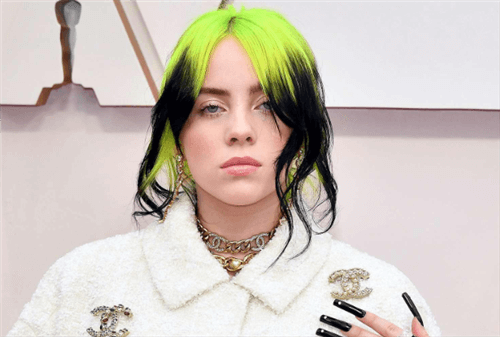
Billie Eilish
How to Get Billie Eilish Voice with Voice Changer? | Vozard
Vozard is a reliable voice changer that enables you to use your voice in countless ways. You can sound like Billie Eilish or other well-known celebrities and characters, thanks to its 180+ authentic sound effects. Due to its real-time voice-changing capability, you may instantly change your voice into Billie Eilish’s while playing games, chatting, or live streaming. Additionally, it facilitates the uploading of audio and video, which makes editing previously recorded content simple.
Whether you want to surprise teammates or captivate your audience with Billie Eilish’s voice, Vozard offers multiple audio input options, ensuring full control over your creativity. Vozard is compatible with platforms like Discord, Zoom, Twitch, Fortnite, and more, allowing you to prank, play, or enhance your gaming and streaming experience. It also includes background sound effects and trending sound memes to add extra fun. Safe, secure, and user-friendly, Vozard is the ultimate tool for exploring and transforming your voice into any character you imagine!
Key Features:
- Adds unique background sounds to make your voice effects more realistic and exciting.
- Supports both Windows and Mac, ensuring compatibility with most devices for hassle-free use.
- Perfect for creating fun content, from memes to unique audio projects, with simple steps.
- Allows voice recording and modulation, giving full control over creative voice transformations.
- An easy-to-use interface ensures that anyone can change their voice without technical skills.
- Works seamlessly with OBS and streaming tools for live shows and engaging audience interaction.
Let’s explore some easy steps to use Vozard and get Billie Eilish’s voice:
Step 1. Free download and install Vozard on your computer. Ensure you have a stable internet connection.
Free Download for all windows & 100% safe Free Download for all mac & 100% safe
Free Download100% Clean & Safe
Step 2. After installation, open Vozard. Go to “Settings” to set up your “Microphone” and “Speaker.”
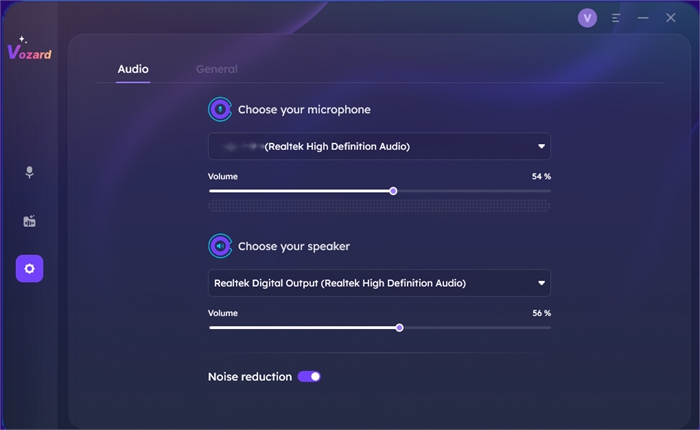
Configure Vozard’s Audio Settings
Step 3. Select the “Real-time Mode” option to start using the voice-changing features in Vozard.
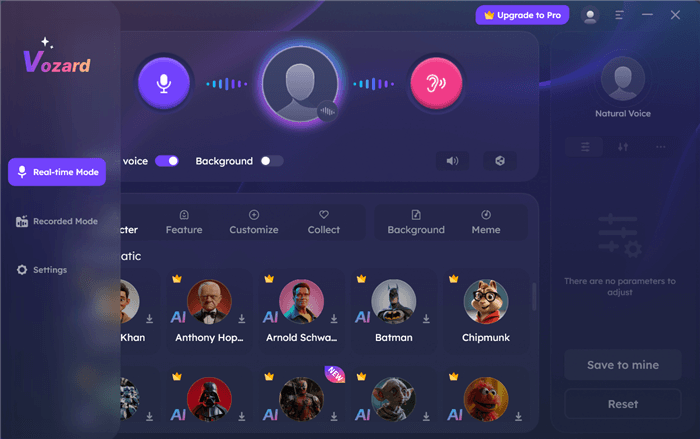
Activate Real-Time Mode in Vozard
Step 4. Use the icons in Real-time Mode to:
- Turn your “Microphone” on/off.
- Check the current voice effect.
- Preview background sounds.
- Listen to your modified voice.
- Enable/disable voice effects and background sounds.
- Share your voice on other platforms.
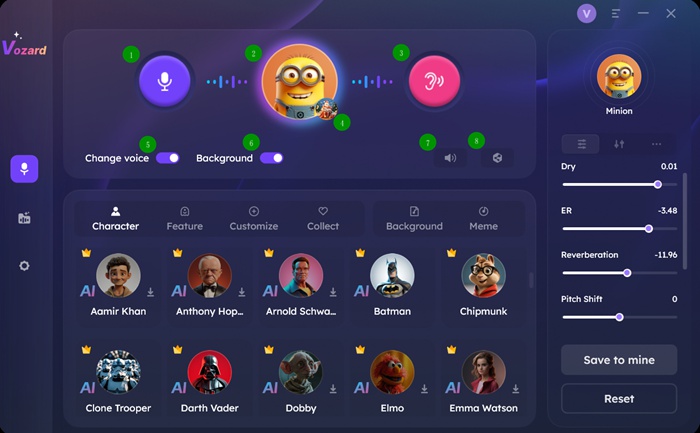
Real-Time Mode Interface
Step 5. Use the “Voice Volume” button to adjust the volume of your microphone, speaker, and background.
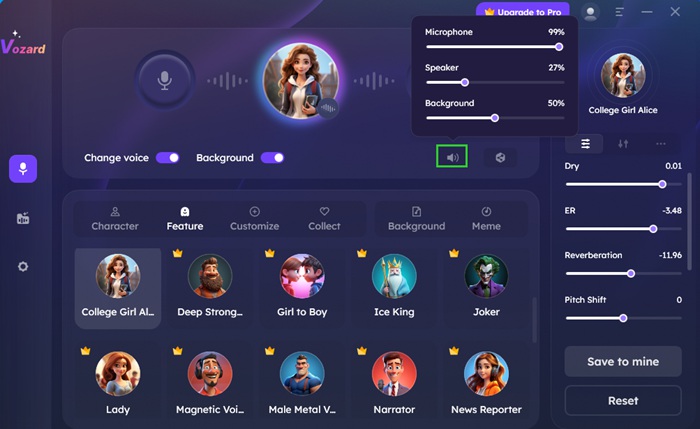
Adjust the Microphone Volume
Step 6. Choose the closest match effect. You can pick up the Billie Eilish voice effect as you need by customizing and adjusting the parameters.

Adjust Sound Parameters
Step 7. Click the “Share” button to sync and share your new voice on third-party platforms.
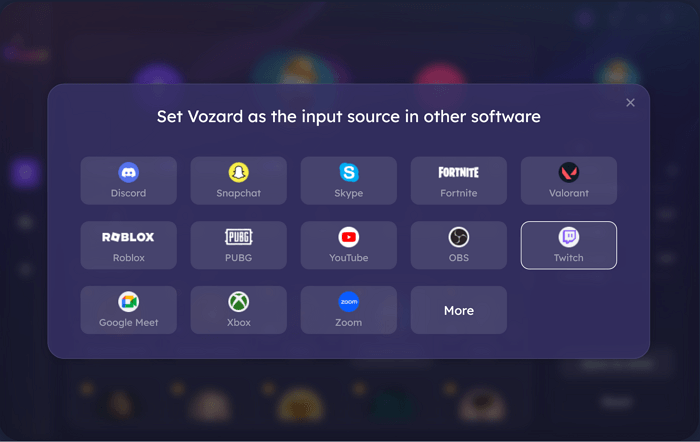
Set Vozard with Other Software
FAQs about Billie Eilish AI Voice
Can I use Billie Eilish’s AI voice for live streaming?
Billie Eilish’s AI voice is available for use during live streaming. Numerous voice changers work with websites like Zoom, Twitch, and Discord. This enables you to engage your audience innovatively and add entertaining effects.
How accurate is the Billie Eilish voice effect?
The accuracy of the Billie Eilish voice effect depends on the voice changer you use. Some tools are very advanced and provide a close match to her actual voice. You can adjust the tone and pitch for an even more authentic sound.
What additional well-known voices are available besides Billie Eilish?
Indeed, several AI voice changers offer a variety of celebrity voices, such as those of actors, musicians, and cartoon characters. These tools allow users to use hundreds of voices in games, pranks, and content creation. Vozard offers more than 180 voice effects, including cartoons, celebrities, and more.
Is it possible to use Billie Eilish’s voice across many platforms?
You can use Billie Eilish’s voice on several sites, including live streaming services, Zoom, and Discord. You can also alter your voice in real time on various platforms with tools like Vozard, which makes it ideal for live broadcasting, online chat, and gaming.
Final Words
In conclusion, AI voice changers make it simple to sound like Billie Eilish. These tools offer a fun and creative way to prank friends and entertain viewers. Whether gaming, chatting, or live streaming, they excite any experience. One of the best options is Vozard, which allows natural voice imitations like Billie Eilish, adjustable controls, and real-time voice changing. It is easy to use and extremely reliable for both beginners and advanced users. We recommend trying Vozard if you want to add fun to your voice. It’s the ideal tool for creating distinctive, captivating, and realistic voice effects!
Vozard – AI-Powered Voice Changer
Free download Vozard voice changer software to change your voice into anyone you want to enhance online chatting, gaming, live streaming, and content creation experiences.
Product-related questions? Contact Our Support Team to Get Quick Solution >
