How to Make Your Voice Raspy [& Voice Changer]
Learn how to use safe, effective techniques and voice changers to make your voice raspy. This guide explores natural methods, including vocal fry, controlled whispering, and the temporary effect of dehydration while cautioning against vocal strain and health risks.

How to Make Your Voice Raspy [& Voice Changer]
- 200+ lifelike VST and AI voice effects.
- 3 flexible voice-changing methods.
- Compatible with 14 popular third-party platforms.
A raspy voice exudes a distinct charm, often associated with mystery, intensity, or raw emotion. Whether you want to add depth to your singing, enhance a character’s voice for a performance, or experiment with your vocal tone, knowing how to make your voice raspy can open exciting possibilities.
This article will explore safe and effective techniques to achieve a natural raspy voice without harming your vocal cords. For instant results, we’ll also introduce you to a voice changer tool that makes you effortlessly create a raspy voice. Let’s dive into the methods and tools to help you achieve that iconic gravelly sound!
How to Get a Raspy Voice: Safe and Effective Techniques
Using Vocal Fry for a Raspy Effect
It is one way to develop a low, gravelly-sounding voice, as the vocal cords should be vibrated slowly and loosely. This will give one of the safest and most surefire methods for creating a raspy voice with limited possibility of permanent damage if applied correctly and only occasionally. Among others, voice fry can work well when using one’s voice for singing, acting, and sometimes even speaking for the desired quality of hoarseness or brokenness of one’s voice.
Achieving Vocal Fry:
- Relax Your Throat and Jaw: Start by loosening your throat and jaw. A stiff throat makes producing the desired sound difficult. Take a few deep breaths, and let the vocal cords unwind.
- Drop to Your Lowest Tone: Speak or hum comfortably at the lowest pitch you can reach. This is the starting point for vocal fry.
- Slow Exhalation during Speaking: Talk or humming a little when letting your breath out as slowly as possible. You should feel the vibration in your vocal cords become slower for a cracking or breaking sound.
- Practice Short Sessions: First, practice in short sessions and then increase them as time goes on when you feel comfortable.

Vocal Fry Method
Caution Against Overuse:
Although vocal fry is generally safe when done properly, excessive use can lead to vocal fatigue or strain over time. Prolonged or incorrect practice might irritate your vocal cords and result in hoarseness. Always approach this technique carefully, giving your voice time to recover after use.
Mastering vocal fry allows you to naturally achieve a raspy, gravelly voice while minimizing the risk of harm. When used sparingly and safely, it’s a fantastic technique for adding character and depth to your voice.
Controlled Whispering
Controlled whispering is another technique for creating a raspy or husky voice. When done correctly, whispering lightly engages the vocal cords, adding a soft, breathy texture that mimics a natural rasp. However, improper whispering can strain the vocal cords, so it’s essential to approach this technique carefully.
How to Perform Controlled Whispering:
Step 1. Relax Your Vocal Cords
Start by relaxing your throat and ensuring your vocal cords are not overly tense.
Step 2. Speak Softly Without Force
Instead of forcing air through your vocal cords, focus on a gentle whisper. Let the air flow naturally to avoid undue pressure.
Step 3. Use Short Phrases
Practice whispering short phrases or sentences, gradually increasing the length of your speech.
Step 4. Control Your Breath
Maintain steady, controlled breathing. This prevents overexertion and helps you sustain the raspy effect.

Controlled Whispering
The Effect of Whispering on Vocal Cords:
Whispering slightly separates the vocal cords, reducing their vibration. It produces a gasping effect that can imitate a raspy tone. However, unnecessary or harsh whispering can dry out and irritate the vocal cords, leading to discomfort or hoarseness. Controlled whispering minimizes these risks by focusing on gentle, deliberate sounds rather than straining the voice.
Why “Controlled” Whispering is Important:
- Prevents Vocal Strain: Whispering too forcefully can lead to vocal cord damage. Controlled whispering ensures minimal strain.
- Reduces Dryness: Harsh whispering often dries out the vocal cords. Controlled techniques help retain moisture, keeping your voice healthy.
- Sustains Vocal Health: By practicing controlled whispering in moderation, you can achieve a raspy effect without long-term harm to your voice.
Temporary Raspy Voice through Dehydration – Use with Caution
Dehydration temporarily decreases the natural lubrication of the vocal cords, which, in turn, makes the voice raspy. The vocal cords dry up when dehydrated, leading to less smooth oscillation. This would cause a rough, gravelly voice. Though this might sound like an easy way to create a raspy effect, let me tell you- this is dangerous and not a means to be applied intentionally.
How Dehydration Causes Vocal Raspiness
Dehydration reduces mucus production in the throat, making the vocal cord dry and less flexible. Besides, dry vocal cords rub together more harshly, causing a scratchy and raspy sound. The hoarseness due to dehydration is temporary and usually occurs with discomfort, such as a sore throat or roughness.
Strong Caution Against Intentional Dehydration
While dehydration can create a rasping voice, intentionally withdrawing your body of water poses significant health risks, including:
- Throat Irritation: A dry throat can become painful and more prone to infections.
- Vocal Damage: Prolonged dryness can irritate your vocal cords, potentially leading to chronic hoarseness or long-term damage.
- Health Risks: Dehydration can lead to fatigue, headaches, and impaired cognitive function.

Raspy Effect
Purposely dehydrating your body for a raspy voice is neither safe nor sustainable. The risks far outweigh the temporary vocal effect. Instead of risking your health, opt for a digital solution like Vozard to achieve a raspy voice safely. Vozard is a voice changer tool that allows you to modify your voice with various effects, including a raspy tone.
How to Make Your Voice Raspy with Voice Changer?
With Vozard, the advanced AI voice changer, you will be able to achieve a hoarse voice without straining your vocal cords. From streaming on everyday gaming to chatting online, Vozard seamlessly works on over 14 platforms, with real-time voice modulation with depth and low latency. It gives access to over 200 realistic voice effects- from the most unique voices of SpongeBob, Joe Biden, and Darth Vader, offering endless options to customize your voice. Moreover, making a raspy voice with Vozard is entertaining and easy, with fun background sound effects and popular memes.

Start Pre-recorded File Voice Changing
Designed for convenience, Vozard allows you to instantly transform your voice in real time or modify audio and video recordings with just one click. Whether enhancing content, spicing up conversations, or adding a raspy texture to your voice for creative purposes, Vozard offers diverse voice options to suit your needs. With its superior AI-powered vocal enhancement, Vozard ensures a realistic, raspy tone perfect for content creators, gamers, and anyone looking to add a unique twist to their voice without causing strain.
Here are some simple and easy steps to using Vozard:
Step 1. Free download and install Vozard on your computer. Ensure you have a reliable internet connection throughout the process.
Free Download for all windows & 100% safe Free Download for all mac & 100% safe
Free Download100% Clean & Safe
Step 2. After installation, launch Vozard. Go to “Settings” to configure your “Microphone” and “Speaker” for optimal performance.
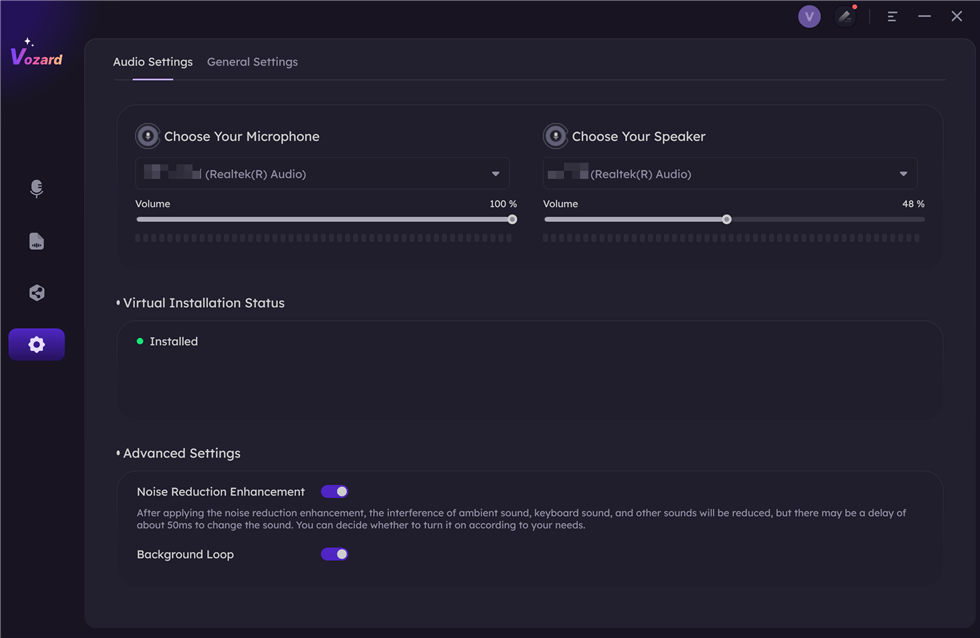
Set The Microphone and Speaker
Step 3. Once Vozard is ready, select the “ Real-time Voice Changer” feature. This enables you to begin changing your voice.
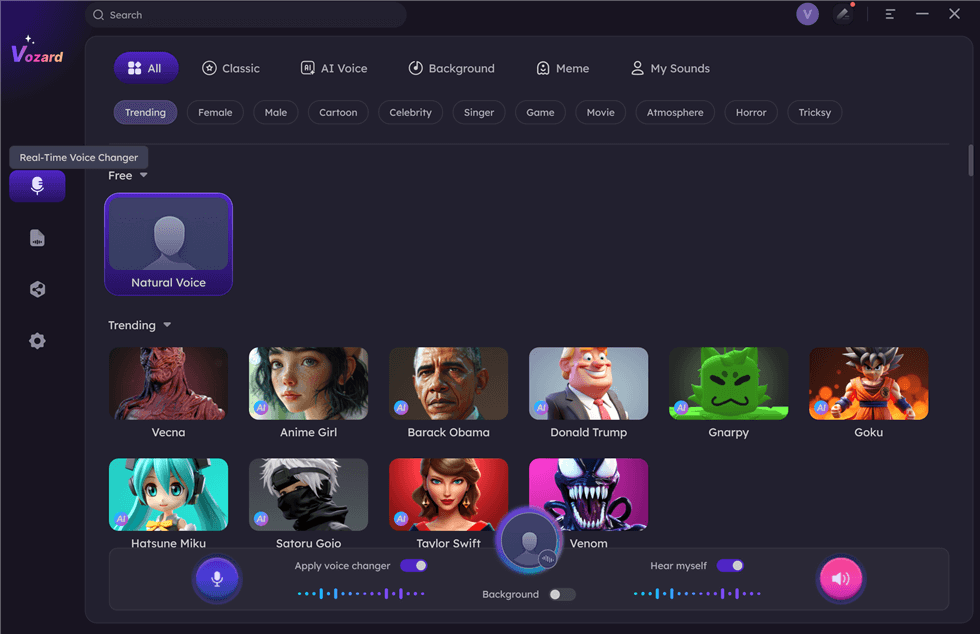
Select Real-Time Mode
Step 4. On the Real-time Mode screen, explore the icons in the voice change area. These allow you to:
- Enable or disable your “Microphone.”
- Check the current voice effect in use.
- Preview the background sounds.
- Hear your modified voice in real time.
- Toggle voice change and background effects.
- Share your voice on external platforms.
Step 5. Adjust the “Microphone,” “Speaker,” and “Background” volume levels by clicking on the “Voice Volume” option.
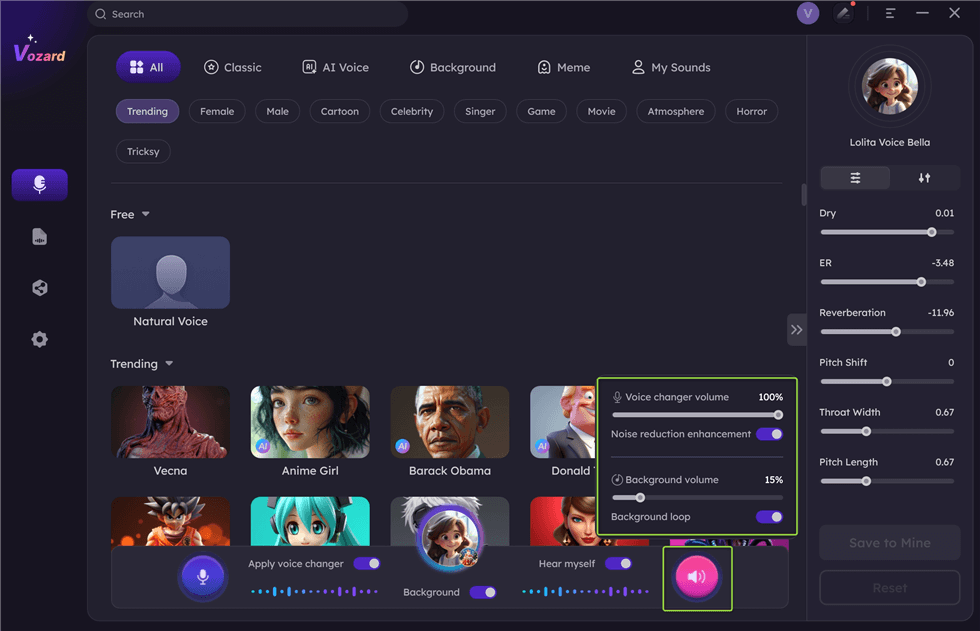
Adjust The Volume
Step 6. Find the raspy voice effect from the list of options at the bottom. Click “Download” to apply it and test the effect instantly.
Note: If the exact voice isn’t available, choose a similar effect and fine-tune the pitch for a closer match.
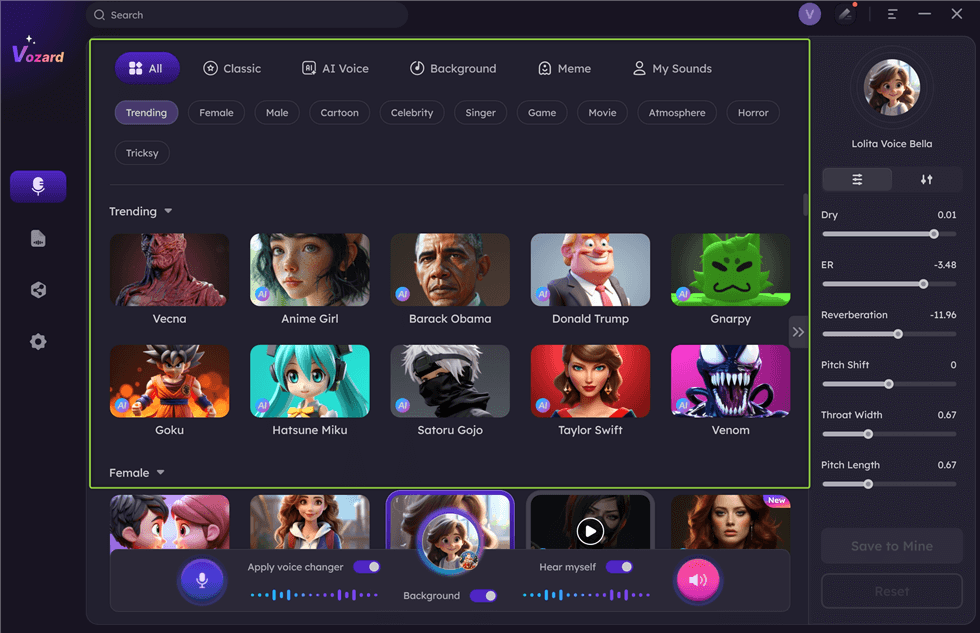
Download Effect
Step 7. When satisfied with your setup, hit the “Share” button to sync and share your transformed voice with other platforms.
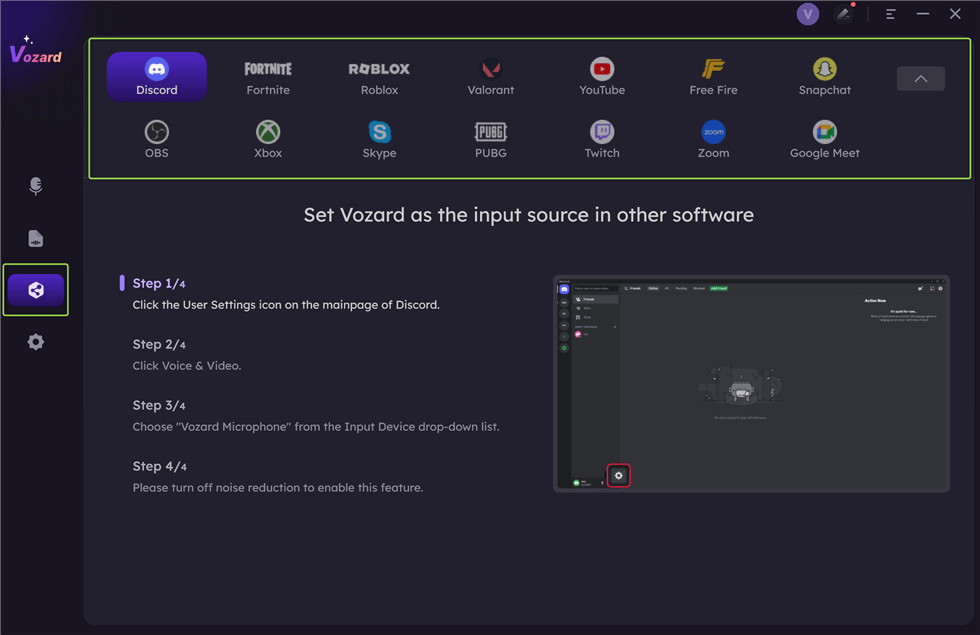
Share Your Voice
Frequently Asked Questions
How can I make my voice raspy safely without straining my vocal cords?
Several safe techniques for achieving a raspy voice include vocal fry and controlled whispering, which can give your voice a raspy texture without straining your vocal cords. However, to prevent vocal damage, avoid overusing these techniques. For a hassle-free and risk-free option, you can use a voice changer like Vozard, which allows you to modify your voice in real time and achieve a raspy tone without harming your vocal health.
Compared to other methods, how does Vozard help create a raspy voice?
Using advanced AI technology, Vozard offers a safe and easy way to achieve a raspy voice. Unlike techniques such as dehydration or vocal fry, which can cause vocal strain or damage over time, Vozard lets you transform your voice in real-time with no health risks.
Final Words
Ultimately, if you are after safety, fun, and effectiveness in creating a raspy voice, then Vozard is just what you need. Thanks to the advanced AI, real-time voice modulation, and a huge library of sound effects, you will easily get the raspy tone you want without risking your vocal health.
Whether creating content, gaming, or having fun in online chats, Vozard provides a versatile, user-friendly tool to help you transform your voice effortlessly. Say goodbye to vocal strain and let Vozard bring your creative voice ideas to life!
Product-related questions? Contact Our Support Team to Get Quick Solution >
