Top 7 Stephen Hawking Voice Generator
Discover the top 7 Stephen Hawking voice generator tools for creating robotic and text-to-speech voices. Simple, easy-to-use options for fun or learning!

Top 7 Stephen Hawking Voice Generator
- 180+ lifelike VST and AI voice effects.
- 3 flexible voice-changing methods.
- Compatible with 13 popular third-party platforms.
Many people struggle to find the perfect tool to replicate the iconic robotic voice of Stephen Hawking. A good voice generator helps create this unique sound with precision. These tools often include features like text-to-speech conversion, enabling you to create customized voiceovers. Some offer custom pitch control for fine-tuning the voice to match your preferences. Advanced tools also provide natural voice effects for a realistic output.
Want to create a catchy Stephen Hawking voice for your next project or a fun stream? No worries! This guide explores the Top 7 Stephen Hawking Voice Generator tools that offer these features, ensuring you can achieve the iconic voice effortlessly and accurately. Let’s begin to explore these in detail!
7 Best Stephen Hawking Voice Generator
Let’s explore the 7 best Stephen Hawking Voice Generators:
Vozard
Regarding the Best Stephen Hawking Voice Generator, Vozard stands out with its advanced features and seamless functionality. It offers 200+ lifelike sound effects, including iconic voices like SpongeBob, Joe Biden, and Darth Vader. With real-time voice changing and recording, you can instantly modify your voice or upload audio/video files for modulation with just one click.
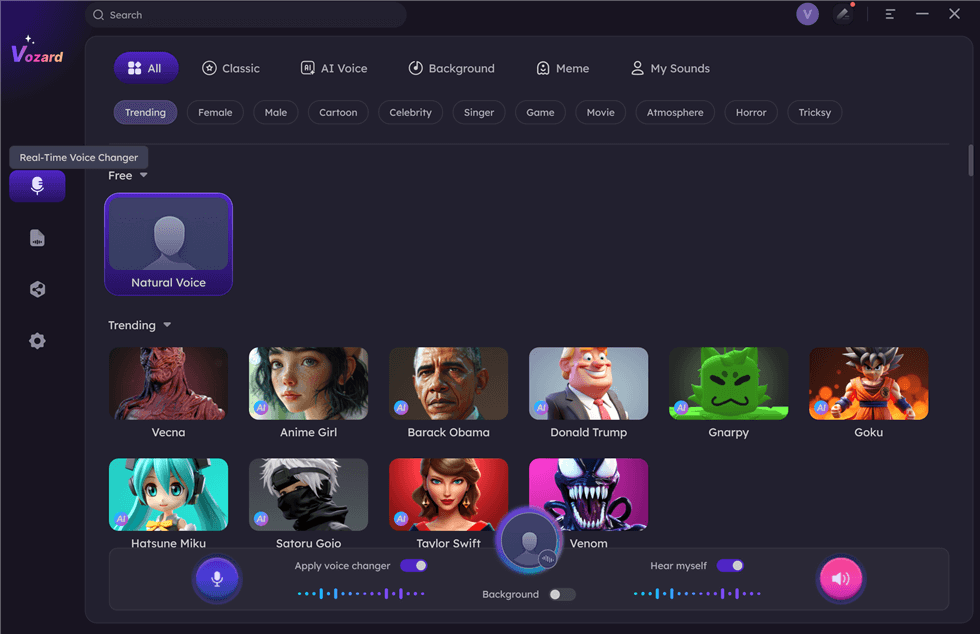
Stephen Hawking Voice Generator – Vozard
Vozard works seamlessly on platforms like Discord, Zoom, Fortnite, and Twitch, as well as streaming tools such as OBS, making it perfect for gaming, online chats, or live streaming. Enjoy unique background sound effects and the latest sound memes to spice up your content. Its multiple audio input options give you control to create fun and exciting sound effects. Whether gaming, live streaming, or pranking your friends, Vozard is 100% clean, secure, and compatible with Windows and Mac, ensuring endless possibilities for entertainment and creativity.
Free Download for all windows & 100% safe Free Download for all mac & 100% safe
Free Download100% Clean & Safe
Key Features:
- Provides unique character voices like Mickey Mouse and Minions for creative and fun voice effects.
- A 60-day money-back guarantee guarantees satisfaction and confidence in trying the tool.
- Includes diverse options for audio input, supporting real-time transformation, and pre-recorded file editing.
- Enhances gaming by disguising voices as different characters, adding surprise and excitement for teammates.
- Allows seamless integration with live streaming, helping capture viewers’ attention and boost audience engagement.
Pros:
- Offers real-time voice modulation
- Low latency for gaming, streaming, and chatting
- Includes a library of over 200 voices, including celebrities and fictional characters
- Compatible with platforms like Discord, Zoom, Twitch, and more
Cons:
- Requires stable internet connection
Pricing:
- Free
- 1-Month Subscription: $12.99
- 3-Month Subscription: $19.99
- 1-Year Subscription: $29.99
- One-Time Purchase: $49.99
LingoJam
LingoJam offers a versatile online platform beyond text-to-speech (TTS) services. It includes custom fonts, voice actors, and a dedicated Stephen Hawking voice generator. Thanks to its advanced formant synthesis technology, users can input text and listen to it in Hawking’s distinctive voice. It’s a comprehensive tool for creating unique audio experiences, but occasionally, it may produce slightly unnatural sounds.
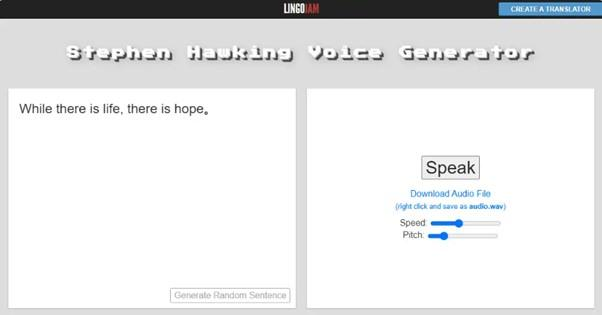
Stephen Hawking Voice Generator – LingoJam
Key Features
- Offers a Stephen Hawking voice generator for unique voice synthesis.
- Provides various text-to-speech options, including a Yoda voice and Shakespearean translator.
- Utilizes advanced formant synthesis technology for high-quality voice generation.
- Accessible online, making it easy to use across devices.
Pros
- Advanced voice synthesis technology
- Multiple unique voice options are available
- Easy-to-use online service
- Supports diverse text-to-speech features
Cons
- Occasionally produces unnatural sounds
- Limited to web-based usage
- Some options may feel less refined
Pricing: Free
VoxMaker
VoxMaker is a leading Stephen Hawking voice generator offering cutting-edge features for personalized AI voices. With options like AI cloning in 46+ languages, custom voice parameters, and multiple unique emotions, this tool delivers versatility and precision. Perfect for voice branding with 3200+ voice effects, creative projects, and language localization, it combines advanced AI with top-notch security and quick processing for realistic, high-quality results.
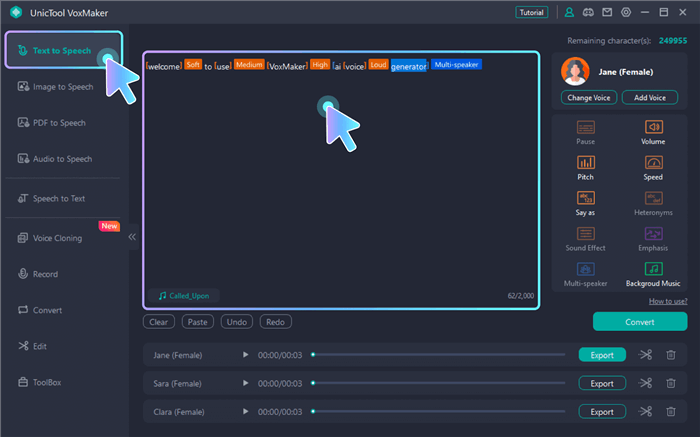
Stephen Hawking Voice Generator – VoxMaker
Key Features
- Clone voices in seconds with fast processing and seamless adjustments for unique voice creation.
- Export cloned voices as high-quality WAV files easily used in videos or other projects.
- Utilize unlimited cloning options to build a personalized voice library for versatile applications.
- Create engaging voices in multiple languages and accents, enhancing content localization efforts.
Pros
- High-quality output
- Fast processing speed
- Versatile cloning options
- Secure and private
Cons
- Limited free features
- Requires internet connection
- No offline editing options
Pricing:
- Free
- Monthly plan: $15.95/month
- Annual plan: $44.95/year
FakeYou
FakeYou is a dynamic platform known for its massive library of pre-trained 3500+ voices, including Stephen Hawking’s. The platform is powered by community-driven voice submissions, allowing for continuous growth. Additionally, FakeYou enables real-time voice generation and custom voice training, providing users with flexibility for personalized projects. Its free access and multi-language support make it an ideal choice for those experimenting with voiceovers or creating unique content.
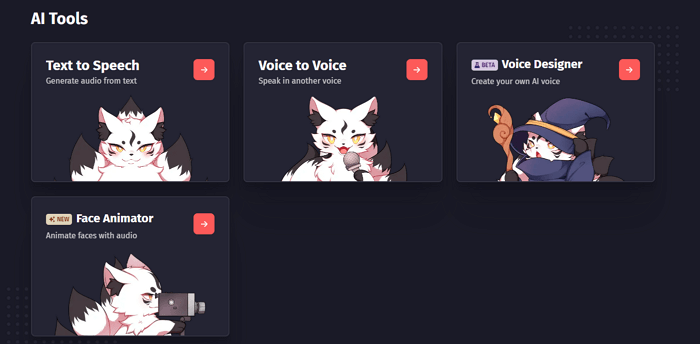
Stephen Hawking Voice Generator – FakeYou
Key Features
- Extensive library of pre-trained voices from celebrities, characters, and public figures.
- Community-driven platform allows users to share and upload custom voice submissions.
- Real-time voice generation for quick previews and iterations on creative projects.
- Custom voice training options for personal or branded voice creation.
- Free access to many features, with open community contributions.
Pros
- Large collection of pre-trained voices
- Real-time voice generation
- Free access for casual users
- Community-driven voice contributions
Cons
- Limited control for advanced users
- Sometimes, lower quality in custom voices
Pricing:
- Free
- Plus: $7/month
- Pro: $15/month
- Elite: $25/month
Vidnoz AI Voice Changer
Vidnoz AI Voice Changer is a versatile tool with 1400+ AI voices and a great option for the best Stephen Hawking voice generator. This tool allows users to create realistic AI voices, including Miley Cyrus and other celebrities, through text-to-speech conversion, audio recording, or file uploads. It is perfect for creating engaging voiceovers with support for 40+ languages, custom voice settings, and various AI voice models. It also offers text-to-speech lip sync, custom pitch and speed adjustments, and 2800+ video templates for seamless integration into professional video projects.
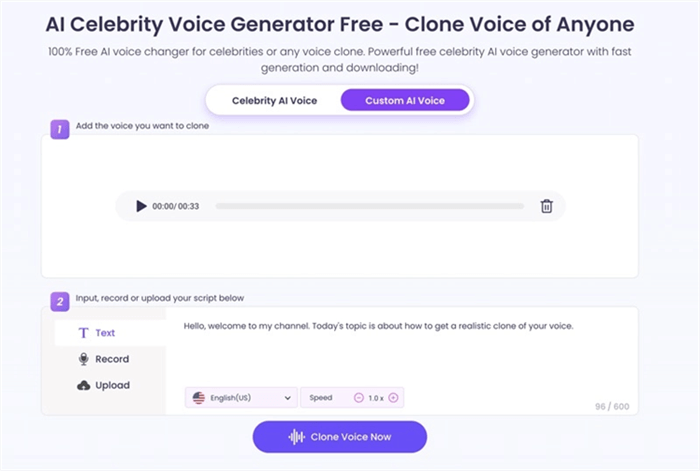
Stephen Hawking Voice Generator – Vidnoz AI Voice Changer
Key Features
- Upload audio files to generate AI voices with advanced settings and customization options.
- Supports more than 40 languages for voiceovers to meet diverse content needs worldwide.
- Includes text-to-speech technology that enables natural-sounding speech and expressive voiceovers.
- Provides realistic talking avatars and video templates to create engaging, professional videos.
Pros
- Supports multi-language voices
- Realistic text-to-speech sync
- Offers custom voice settings
- Large library of video templates
Cons
- Limited free usage
- Requires stable internet connection
- Lacks offline features
Pricing:
- Free
- Starter: $19.99/month
- Business: $56.99/month
Woord
Woord is a versatile text-to-speech (TTS) platform that enables users to convert text into natural-sounding speech using advanced AI technology. It offers over 100 realistic voice options across 34 languages, catering to diverse linguistic needs. The platform supports various use cases, including content creation, e-learning, and accessibility applications. Additionally, it offers an optical character recognition (OCR) system for deciphering scanned materials and supports multiple channels for disseminating TTS results. Woord also provides a Chrome plugin for seamless cross-platform interaction.

Stephen Hawking Voice Generator – Woord
Key Features:
- Choose from over 100 natural-sounding voices in 34 languages.
- Cater to a global audience with support for multiple languages and accents.
- Convert scanned documents into text using the built-in OCR system.
- Utilize the Chrome plugin for seamless integration across devices.
- Distribute TTS results through various channels to suit your needs.
Pros:
- Offers a wide range of realistic voice options.
- Easy to navigate and operate.
Cons:
- Some users report slow response times.
Pricing:
- Starter: $9.99 per month
- Basic: $24.99 per month
- Advance: $49.99 per month
- Pro: $99.99 per month
Soundboard
Soundboard is a user-friendly voice changer that meets all your audio modification needs. Whether you’re looking to transform your voice or create unique audio clips, this tool offers a variety of voice effects and sound clips. Its vast collection caters to various voice-changing scenarios, including custom soundboard creation. Compatible with Windows, macOS, and Linux, Soundboard.com allows seamless access to voice effects. If you’re searching for a Stephen Hawking voice generator or want to experiment with diverse audio styles, this tool has it all.
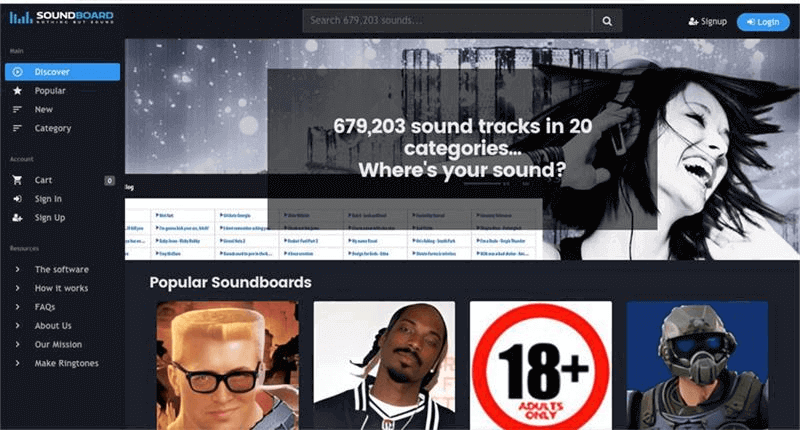
Stephen Hawking Voice Generator – Soundborad
Key Features
- Extensive library of pre-recorded voice effects and sound clips for endless customization.
- Simple user interface for easy navigation and quick access to sound options.
- Compatible with multiple operating systems, offering flexibility across devices.
- Create custom soundboards to personalize your audio experience.
Pros
- Wide variety of voice effects
- Easy-to-use interface
- Multi-platform support
- Customizable soundboards
Cons
- Limited voice effects
Pricing: Free
Comparison Table of Stephen Hawking Voice Generator
| Best For | Price | Compatibility | Key Features | Pros | Cons | |
| Vozard | Real-time voice changing and gaming | Free, Premium plan varies | Windows, Mac, Discord, Zoom, OBS | 180+ sound effects, real-time voice changing, integration with streaming platforms | 180+ sound effects, works on popular platforms, easy to use | Requires stable internet connection |
| LingoJam | Simple Stephen Hawking voice generator | Free | Web-based | Text-to-speech in Hawking’s voice, formant synthesis technology | Free to use, multiple unique voices, easy-to-use | Unnatural sounds, web-based only |
| VoxMaker | Personalized voice cloning, language localization | Free
Monthly plan: $15.95/month Annual plan: $44.95/year |
Windows, Mac, Web | AI cloning, 46+ languages, customizable voice parameters | High-quality output, fast processing, versatile cloning options | Limited free features, requires internet, no offline editing |
| Fake You | Real-time voice generation, community-driven | Free, $7/month (Plus), $15/month (Pro) | Web-based | Extensive library of pre-trained voices, real-time voice generation | Large voice collection, real-time generation, free for casual users | Less control for advanced users, quality issues with custom voices |
| Vidnoz AI Voice Changer | AI voice creation, video integration | Free, $19.99/month (Starter), $56.99/month (Business) | Windows, Mac, Web | Text-to-speech, voice model customization, video templates | Multi-language voices, realistic speech, large video library | Limited free usage, internet required, no offline features |
| Woord | Text-to-speech with realistic voices | Starter: $9.99 per month
Basic: $24.99 per month Advance: $49.99 per month Pro: $99.99 per month |
Web, Chrome plugin | 100+ voices, OCR support, multiple languages, cross-platform integration | Wide range of voices, easy navigation | Some users report slow response times |
| Soundboard | Custom voice effects and sound clips | Free | Windows, Mac, Linux | Pre-recorded voice effects, custom soundboard creation | Wide variety of effects, easy-to-use interface, multi-platform support | Premium features require a subscription, limited free access |
FAQs about Stephen Hawking Voice Generator
Which is the best Stephen Hawking Voice Generator?
One of the best tools for creators is Vozard. It provides various voice effects, including the Stephen Hawking voice, with real-time voice changing. It’s easy to use, works on platforms like Discord and Zoom, and ensures high-quality output, making it a great option.
Can I use a Stephen Hawking Voice Generator for gaming or streaming?
Many Stephen Hawking Voice Generators are compatible with gaming and streaming platforms. Tools like Vozard allow you to change your voice in real-time while playing games or streaming on Twitch and Discord. This can add fun and surprise to your content while engaging your audience.
Can I use a Stephen Hawking Voice Generator for free?
Yes, some tools offer free access to the Stephen Hawking Voice Generator. However, many have limited features in their free version. You should pay for a premium plan for more advanced features, such as better voice customization.
Final Words
To sum up, Stephen Hawking Voice Generators offer an easy way to change your voice and create fun, unique content. These tools use advanced technology to bring famous voices to life. Whether for gaming, streaming, or pranking, there’s a tool for everyone. If you’re looking for a simple and powerful voice changer, try Vozard. It’s easy to use, works on multiple platforms, and offers high-quality 200+ voice effects. Give Vozard a try to transform your voice instantly, and have fun with it!
Product-related questions? Contact Our Support Team to Get Quick Solution >
