Top 8 Valorant Voice Changers in 2026
This guide explores the top 8 Valorant Voice Changers of 2026, detailing their features and comparing them for informed decisions. Find your perfect voice changer and elevate your gaming experience!

Top 8 Valorant Voice Changers in 2026
- 200+ lifelike VST and AI voice effects.
- 3 flexible voice-changing methods.
- Compatible with 14 popular third-party platforms.
Finding the perfect Valorant voice changer can solve the problem of repetitive or boring in-game communication. These tools offer real-time voice modulation, making you sound unique during matches. Many voice changers include custom sound effects to enhance gameplay interaction. Their game compatibility ensures smooth use without lag. With features like adjustable pitch control and noise filtering, these tools make your voice clear and entertaining. This guide explores the Top 8 Valorant Voice Changers in 2026 to improve your gaming experience effortlessly. Let’s begin to explore these!
8 Best Voice Changers for Valorant
Here are the best eight voice changers for Valorant:
Vozard
Vozard is a powerful voice changer perfect for Valorant, offering a range of exciting features to transform your gaming and online experiences. With 200+ lifelike sound effects, you can mimic characters like SpongeBob or Joe Biden in real time. Its background sound effects and trending memes add fun to your chats and games.
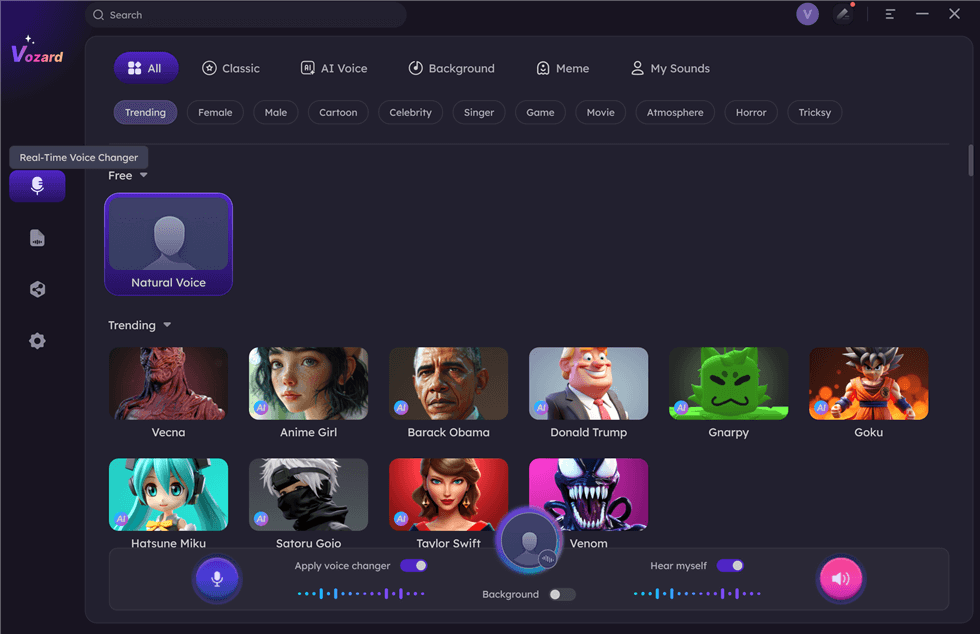
Select Real-Time Mode
Multiple audio input options allow you to transform your voice live or upload audio/video files for easy voice modulation. Compatible with platforms like Discord, Zoom, Twitch, and OBS, Vozard makes it simple to disguise your voice and prank teammates during games. With its advanced AI technology, the tool ensures realistic voice changes for gaming, chatting, or live streaming, enhancing your creativity and entertainment.
Free Download for all windows & 100% safe Free Download for all mac & 100% safe
Free Download100% Clean & Safe
Key Features:
- Supports real-time voice change with smooth performance for immersive Valorant gameplay and online chats.
- Includes a user-friendly interface for easy setup and quick voice transformation in minutes.
- Ensures compatibility with popular streaming tools and gaming platforms for seamless voice integration.
- Provides noise reduction for clear audio, even during high-energy gaming or live streaming sessions.
Pros:
- Over 200 sound effects.
- Works on Win and Mac.
- Real-time voice transformation.
- Easy to use interface.
Cons:
- Limited free features.
- Requires stable internet connection.
Pricing:
- Free
- 1-Month Subscription: $12.99
- 3-Month Subscription: $19.99
- 1-Year Subscription: $29.99
- One-Time Purchase: $49.99
Voicemod
Voicemod is a fantastic voice changer for Valorant, offering over 100 customizable voice filters. The tool offers pitch adjustment, distortion, and multiple vocal adjustment options to choose from. Moreover, you can add delay and reverb as you desire. Its keybinding feature allows quick switching between voice effects, which is perfect for intense gameplay. The tool ensures simple microphone integration, making it seamless for games like Valorant. Additionally, a free version provides significant access to features for budget-friendly users.
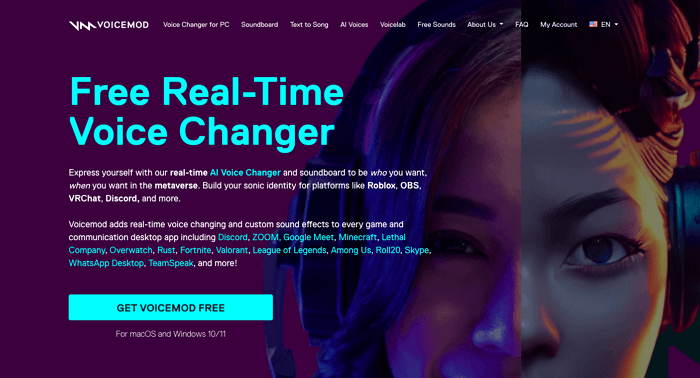
VoiceMod Product Page
Key Features
- Works smoothly with Valorant and integrates easily with other popular online games.
- Includes background effects for more immersive and creative gaming experiences.
- Offers soundboard customization to create unique audio mixes for better interaction.
- Allows direct voice recording and editing for personalized sound effects in real time.
- Updates regularly to improve performance and add new, exciting voice filters.
Pros
- Free version available.
- Over 100 voice filters.
- Easy-to-use interface.
- Compatible with Windows and Mac.
Cons
- Keymapping can confuse beginners.
- Requires time for setup.
Pricing:
- Annual subscription: $2.49 per month
- Onetime payment: $49.99
NCH Voxal Voice Changer
NCH Voxal Voice Changer is a trusted voice changer for Valorant, offering 40+ customizable voice filters for unique gameplay experiences. It runs efficiently and is light on system resources, making it ideal for older systems. The tool’s customized filter library ensures your favorite effects are always available. Perfect for streaming and gaming, it’s versatile and easy to use.
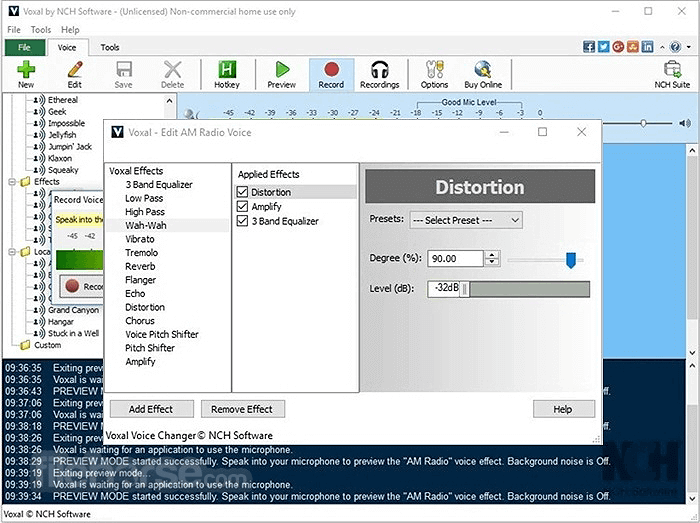
NCH Voxal Voice Changer
Key Features
- Works seamlessly with Windows, Mac, and Android for broad accessibility.
- Offers real-time voice modulation with smooth integration into Valorant and other games.
- It provides pre-made effects for instant use and requires minimal setup.
- Supports voice recording for post-editing and advanced customization.
- It features a simple interface that is suitable for both beginners and pros.
Pros
- Efficient system resources.
- Supports game and stream use.
- Adds filters to the library.
Cons
- The free version lacks features.
- Limited updates in recent years.
Pricing:
- Free
- Commercial: $39.95
- Home Use: $34.99
- Quarterly Plan: $3.33/month
Clownfish Voice Changer
Clownfish Voice Changer is a simple and free voice changer for Valorant that’s great for users who prefer an easy-to-use tool. It offers over 12 voice filters, including customizable options, and is designed for those who want straightforward voice modulation. You can also use it alongside macro keys or a stream deck for a smoother experience during gameplay.
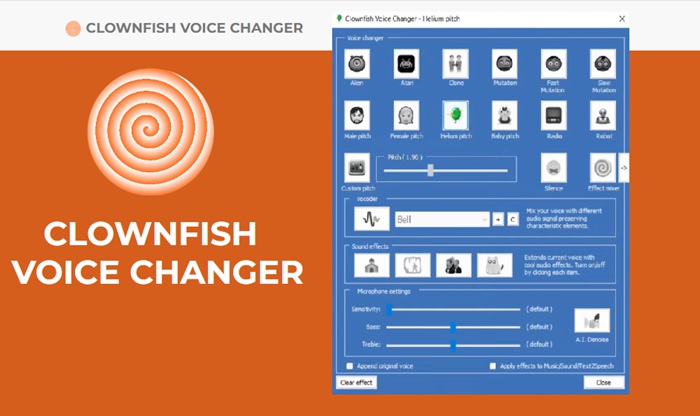
Clownfish Voice Changer
Key Features
- Real-time voice modification works perfectly for live gaming sessions in Valorant.
- Free and unlimited use, making it accessible for anyone looking for a budget-friendly option.
- Easy integration with keyboard macro keys and stream decks for better control.
- A simple interface ensures quick setup without the need for advanced technical skills.
Pros
- Free and unlimited use.
- Simple interface design.
- Customizable voice filters.
Cons
- Limited voice filter options.
- Lacks advanced features.
Pricing: Free
Vidnoz AI Voice Changer
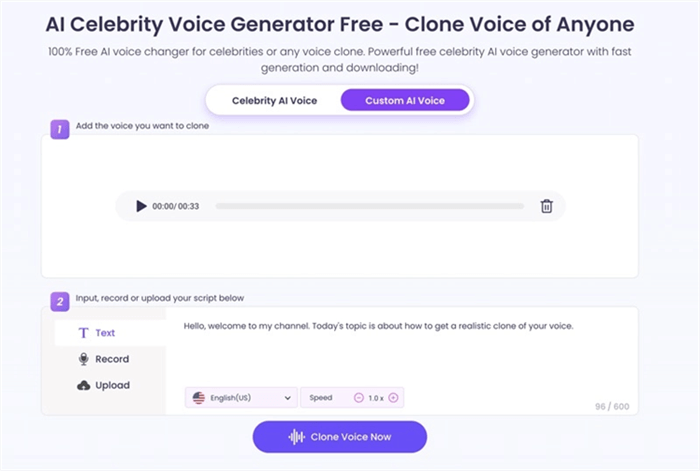
Vidnoz AI Voice Changer
Vidnoz AI Voice Changer is a versatile tool designed to elevate your Valorant gameplay with over 1380+ AI voices. Whether you want to transform your voice in real time or clone any voice for unique content, Vidnoz provides many options. You can easily convert text into speech or upload audio files, offering tone, pitch, and speed customization. With support for over 140+ languages, this tool enables you to create diverse, immersive voices that enhance your Valorant experience.
Key Features
- 1380+ AI voices or clone any voice for realistic gameplay in Valorant.
- Text-to-speech feature to instantly transform text into voice during gameplay.
- Supports 140+ languages for a global voiceover experience.
- Customizable tone, pitch, and speed for personalized voice effects.
Pros
- Vast collection of voices.
- Supports multiple languages.
- Highly customizable voice settings.
Cons
- Some advanced features are premium-only.
- The free version has limited voice options.
Pricing:
- Free
- Starter: $19.99/month
- Business: $56.99/month
MorphVOX
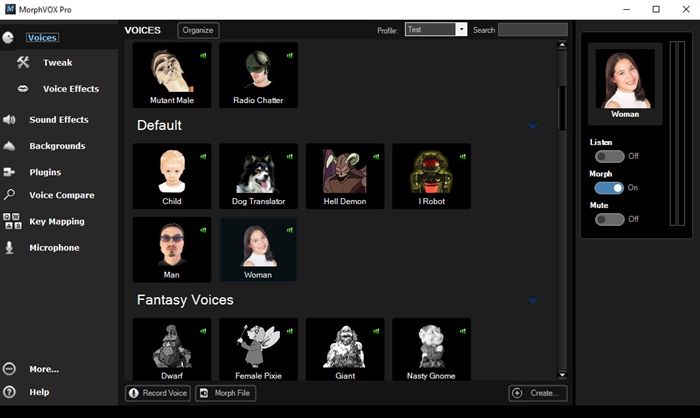
MorphVOX Pro Voice Changer
MorphVOX is a popular voice changer known for its ultra-realistic voice effects and customizable filters. Streamers and YouTubers use it to create pranks, memes, and voice-changing impacts during gameplay. Its categorized filters for male, female, fantasy, and character voices provide extensive options. It also works seamlessly on platforms like Discord and Zoom.
Key Features
- Offers both male and female voice filters for versatility in gaming and online interactions.
- Allows easy real-time voice modulation, ensuring smooth use during Valorant sessions.
- Customizes sound, voice, and background for personalized audio effects.
- Simple key binding to switch between filters instantly during gameplay.
- Includes a noise reduction feature for clearer voice output while gaming or streaming.
Pros
- Highly customizable filters.
- Easy key binding options.
- Realistic voice effects.
- Compatible with multiple platforms.
Cons
- A bit expensive.
- Needs better support.
Pricing:
- Free
- MorphVOX Pro: $15.99
VoiceMeeter
VoiceMeeter is an advanced digital audio mixer designed for users who want to control and customize their audio settings for Valorant and other applications. It allows you to send audio to two hardware devices and receive audio from multiple sources simultaneously. This feature is ideal for streamers, podcasters, or gamers needing complex audio setups for better gameplay experience and communication.
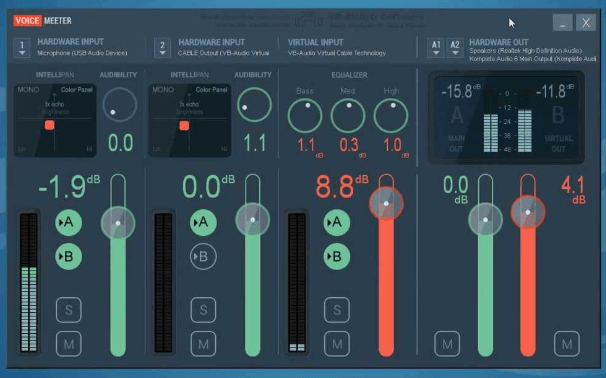
VoiceMeeter Interface
Key Features
- Routes audio to two separate hardware devices for enhanced sound control.
- Receives audio input from multiple applications at once, perfect for complex audio setups.
- Compatible with both Windows and Mac, providing flexibility across platforms.
- Available in three versions to suit different user needs and preferences.
- Simple interface for managing audio streams during Valorant sessions.
Pros
- Flexible audio routing options.
- Ideal for streamers and podcasters.
- Supports multiple applications.
Cons
- Advanced setup may be complex.
- The free version lacks some features.
Pricing: Free
Voice.ai
Voice.ai is a top-tier voice changer ideal for gamers and streamers using Valorant, Discord, or other communication platforms. Offering real-time voice cloning and editing, this tool supports various applications such as WhatsApp, Zoom and popular games like Fortnite and League of Legends. With 1000+ voices to choose from, it’s a powerful, flexible solution for voice customization.
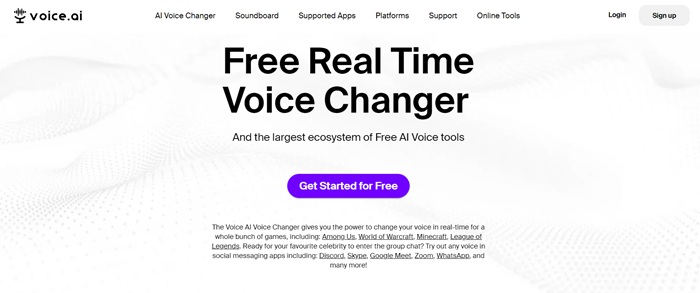
Home Page Interface of Voice.ai
Key Features
- Offers thousands of voices, including community-created ones, for diverse use.
- Real-time voice cloning and editing for smooth transitions in Valorant and other games.
- Works across multiple platforms like Discord, WhatsApp, and Zoom.
- Supports creating short audio clips for soundboards or messaging platforms.
Pros
- Real-time voice changes.
- Thousands of voices are available.
- Works across various platforms.
Cons
- Some past TOS concerns.
- Requires a strong internet connection.
Pricing: Free
Comparison Table of Valorant Voice Changer
| Best For | Price | Compatibility | Key Features | Pros | Cons | |
| Vozard | Real-time voice changing for pranks & games | Free, $12.99/month, $29.99/year, $49.99 one-time | Discord, Zoom, OBS, Twitch, Valorant | 180+ sound effects, noise reduction, customizable input | Over 180 sound effects, easy-to-use, real-time voice | Limited free features, requires stable connection |
| Voicemod | Dynamic voice effects for gamers and streamers | Free | Valorant, Discord, Zoom, Skype | 100+ voice filters, keybind feature, soundboard customization | Free version, 100+ filters, compatible with most platforms | Confusing keymapping, setup time required |
| NCH Voxal Voice Changer | Customizable voice filters for light systems | Free, $39.95 commercial, $34.99 home | Windows, Mac, Android | Pre-made effects, simple interface, real-time modulation | Low system resource use, easy setup, great for streaming | Free version lacks features, limited updates |
| Clownfish Voice Changer | Simple, free voice changer for casual use | Free | Windows, Skype, Discord | 12+ voice filters, keyboard macros, real-time voice change | Free and unlimited use, easy interface | Limited filters, lacks advanced features |
| Vidnoz AI Voice Changer | AI-based voice cloning & customization | Free, $19.99/month starter, $56.99/month business | Valorant, Discord, Zoom | 1380+ voices, text-to-speech, supports 40+ languages | Vast voice collection, highly customizable | Premium features limited, free version restricted |
| MorphVOX | Streamers & YouTubers needing realistic voice effects | Free, $15.99 for Pro version | Discord, Zoom, Valorant | Male, female, fantasy filters, real-time voice modulation | Customizable filters, key binding options | Expensive, needs better support |
| VoiceMeeter | Audio control for complex setups | Free | Windows, Mac | Routes audio to 2 hardware devices, multi-input support | Flexible routing, ideal for streamers | Advanced setup, lacks features in free version |
| Voice.ai | Real-time voice cloning for gaming and streaming | Free | Discord, Valorant, WhatsApp, Zoom | Thousands of voices, real-time editing, community-generated voices | Real-time changes, vast voice library, free trial | Past TOS concerns, strong internet needed |
FAQs about Valorant Voice Changer
Which is the best voice changer for Valorant?
Vozard is an excellent voice changer for Valorant. It offers over 180 sound effects, including real-time voice transformations. It’s easy to use and works well with platforms like Discord and Twitch, making it perfect for gameplay and streaming. Plus, its noise reduction ensures clear audio during high-energy gaming sessions.
Can I use a voice changer on all Valorant platforms?
Most voice changers work on Windows and Mac, the most common platforms for Valorant. However, some tools may not be available for consoles or mobile. Always check the compatibility of the voice changer with your device before using it in-game.
Are voice changers safe to use in Valorant?
Yes, most voice changers are safe to use in Valorant, but choosing one that is reliable and doesn’t interfere with the game is important. Avoid using tools that might cause your system to crash or negatively affect your gaming experience.
Final Words
In conclusion, using a voice changer in Valorant can add fun and creativity to your gaming experience. With many options available, choosing a reliable tool that works smoothly with your game is important. Vozard is an excellent choice, offering a wide range of voice effects and an easy setup. It’s perfect for real-time voice changes, making your gameplay more exciting. If you’re looking for an easy-to-use voice changer, try Vozard today and enjoy transforming your voice effortlessly in Valorant!
Product-related questions? Contact Our Support Team to Get Quick Solution >
