The Best Free Voice Changer for DnD – Vozard
Take your creativity to new heights with the best free voice changer for DND – Vozard. Learn how to use Vozard for DND with quick, simple guides.

The Best Free Voice Changer for DnD – Vozard
- 170+ lifelike VST and AI voice effects.
- 3 flexible voice-changing methods.
- Compatible with 13 popular third-party platforms.
Available for both Win & Mac
Dungeons and Dragons is a game that needs no introduction. It is one of the first role-playing games in history and comes with a lot of freedom.
Thanks to its high freedom features, you can do literally anything as long as the Dungeon Master agrees. However, if you want a fully immersive experience, we’ve got just the thing for you!
Voice changers for DnD will help you sound like anyone or anything you want! This article will show you the best free voice changer for DnD – Vozard and how to use it.
Table of ContentsHide
Vozard – Free and Easy Voice Changer for DnD
Vozard is an awesome voice changer that lets you sound like anyone you want, all thanks to its cool AI technology. Want to give your fantasy character a voice? Vozard has got you covered!
A simple interface and compatibility with Mac and Windows are also a part of Vozard.
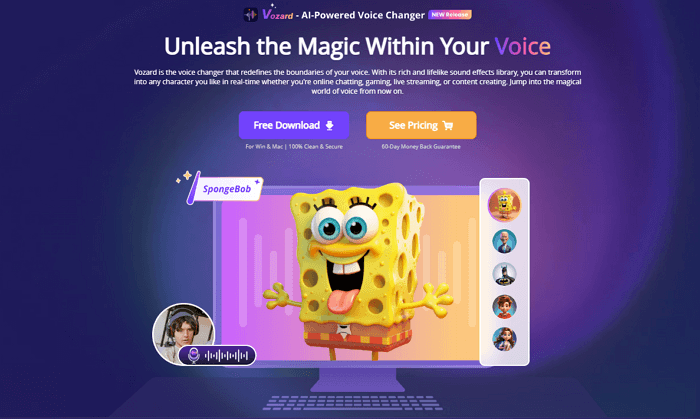
Vozard Product Page
Vozard has a variety of features to offer, but the free ones are listed below:
- Change your voice in real-time as you speak.
- 15 standard voice effects.
- Preview paid voices to decide the one you want.
- Three customizable voice effects.
- Add background sounds and effects to enhance your voice.
Now that you know the basics of Vozard, let’s see why it is the best voice changer for DnD Gamers and Live Streamers.
Best Voice Changer for DND Gamers and Live Streamers
Imagine being deep within a quest for Dungeons and Dragons, where your character’s life hangs at the balance. Suddenly, instead of hearing your voice, it changes to that of a dragon roaring or the wise tone of an old wizard. How? With Vozard!
With more than 170 real-time voice effects and pitch control on the go, unique character voices can be built instantly. Among others, there is an effect for every character or situation, ranging from futuristic cyborgs to classic fantasy archetypes.
Vozard isn’t just for fun, though – it’s also mega-useful for streamers, too. Its awesome AI-based voice effects take your streams up another notch. Make your audience engaged with immersive storytelling while acting out characters.
Plus, it works with all your favorite platforms, like Twitch, Discord, and more. So, whether you’re battling dragons in DND or entertaining viewers on a live stream, Vozard has got you covered!
Vozard will improve your gaming experience
How to Use Vozard to Change Your Voice?
Now, let’s take a look at how you can use Vozard as a voice changer for DND.
Step 1: Download and install Vozard on your computer.
Free Download for all windows & 100% safe Free Download for all mac & 100% safe
Free Download100% Clean & Safe
Step 2: Open Vozard on your computer and set the microphone and speaker settings.
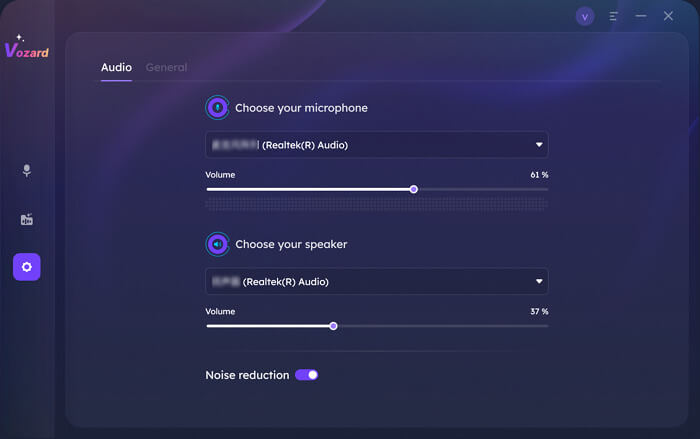
Vozard Settings Option
Step 3: On the left, there will be a panel showing two modes; click on “Real-time Mode.”
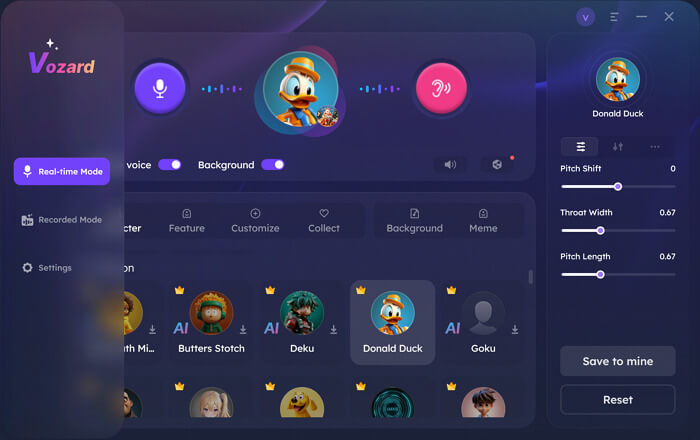
Go to Vozard Real-time Voice Change Mode
Step 4: Now, from the various tabs, choose the voice effect you want.
Step 5: After you have selected the effect, adjust the pitch and other settings in the right panel.
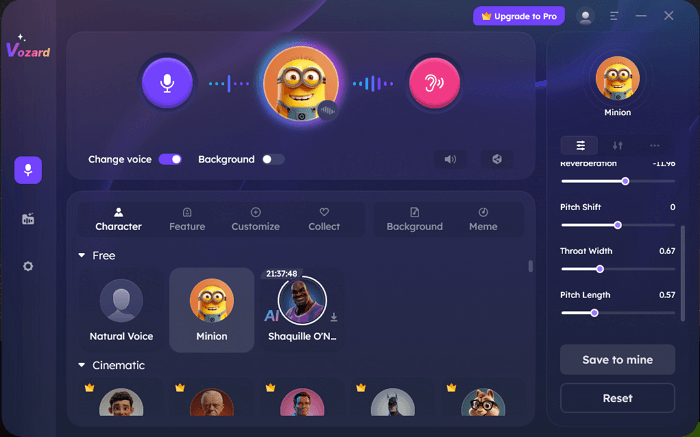
Pitch and Other Settings
Step 6: Click on the Mic to record your voice. Then click on the speaker to hear it. You can also activate both at the same time.
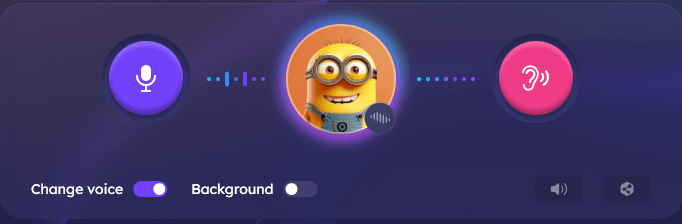
Voice Change Area Settings
Step 7: Once all is set, click on the share icon in the bottom right corner. Share your real-time voice on any platform.
And with that, you have a unique voice for your imaginary DND character!
How to Connect Vozard to Other Platforms?
One last thing we are going to do is see how you can connect Vozard to another platform. For example, how will you do that if you are playing Fortnite and want to use your real-time Vozard sound on Fortnite?
Well, to do that, you will have to set the input and output device to Vozard and select the voice-changing effect. The voice will change directly within the platform.
Here are steps to follow for Fortnite.
Step 1: Open Vozard and Fortnite side by side.
Step 2: Go to Fortnite’s Setting Menu.
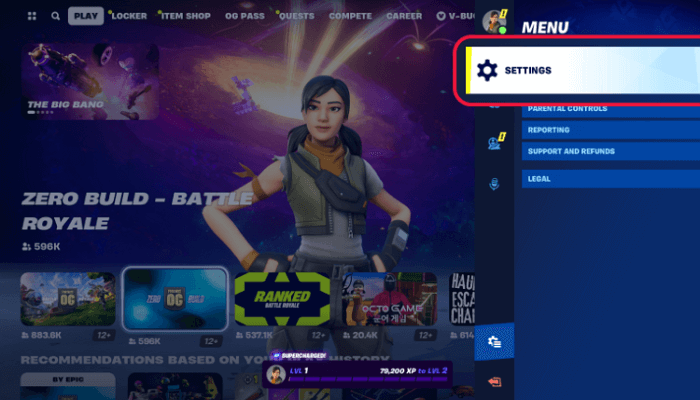
Click on Settings in Fortnite
Step 3: Click on the Speaker icon to change the voice chat settings.
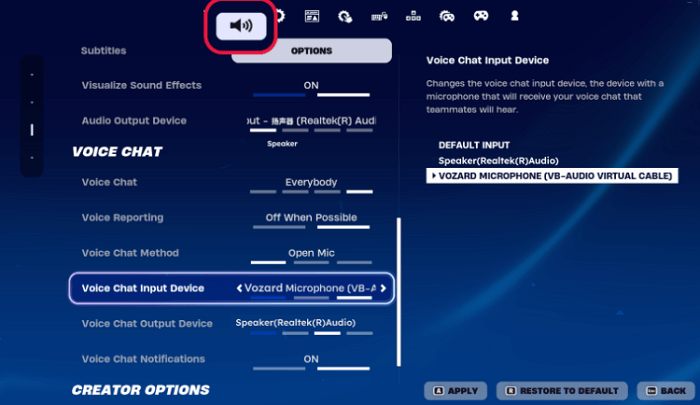
Click Speaker icon to open Fortnite voice chat
Step 4: Set “Vozard Microphone” as the voice chat input device.
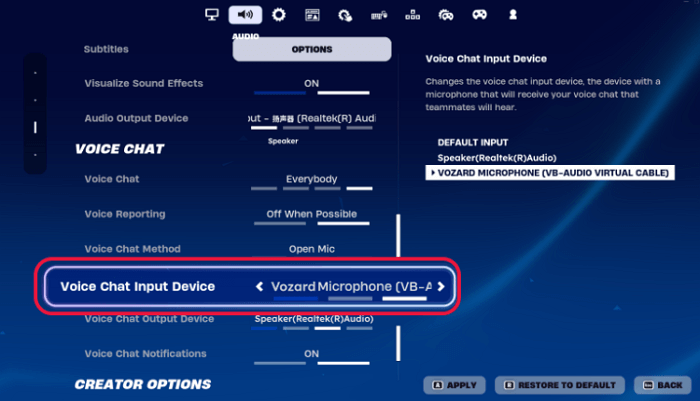
Set Vozard as the Input Device in Fortnite
Step 5: Click on “Apply” to save the settings.
You will now be able to hear your unique character voice from Vozard on Fortnite. Similarly, you can use the Vozard voices on various other platforms as well.
Final Words
DND is one of those games that relies upon the player’s imagination. You can make it as interesting and fun as you want by adding a voice changer into the mix.
Having a voice changer for DND is the best thing. You can create various unique character voices in real-time. For this purpose, Vozard is the one for you. With its 170+ sound effects and customizable audio options, you can do anything.
So, what are you still doing here? Download Vozard now!
Vozard -AI-Powered Voice Changer
Free download Vozard voice changer software to change your voice into anyone you want to enhance online chatting, gaming, live streaming, and content creation experiences.
Product-related questions? Contact Our Support Team to Get Quick Solution >
