VRChat Voice Changer: How to Change Your Voice and Enhance Your VR Experience
With VRChat’s voice changers, you can alter your voice in real-time, making virtual conversations more entertaining and engaging. They improve role-playing and make experiences more interesting by making you sound like many personalities. The best VRChat voice changer options for 2026 are presented in this guide. They are renowned for their realistic, rich sound effects and AI-powered real-time voice morphing. Read more!

VRChat Voice Changer: How to Change Your Voice and Enhance Your VR Experience
- 200+ lifelike VST and AI voice effects.
- 3 flexible voice-changing methods.
- Compatible with 14 popular third-party platforms.
What if your voice doesn’t fit your persona and your VRChat experience is boring? This is where a VRChat voice changer comes in, allowing you to change your voice in real time and enhance the immersion of discussions. Whether that’s playing tricks on friends, role-playing, or just making silly effects, such tools nurture creativity.
Many options stand out for their unique features. From AI-powered voice adjustments to customizable sound effects and seamless real-time performance, each offers something special. In this guide, we will explore the best VRChat voice changers in 2025. With these voice changers, you can sound like anyone—from a robot to a cartoon character. Let’s begin to explore these!
Table of ContentsHide
Why Use a Voice Changer in VRChat?
Voice is a big part of your virtual identity in VRChat. A voice changer makes it easy to match your character, create fun moments, or explore new roles. Some reasons to use a Voice Changer in VRChat:
- Match Your Avatar: Make your voice fit your character, whether it’s a robot, alien, or anime hero.
- Add Fun and Humor: Surprise friends with funny voices or unique sound effects during chats.
- Enhance Role-Playing: Dive into your character fully by changing your voice to suit their role.
- Maintain Privacy: Protect your real voice and identity using a different voice.
- Boost Creativity: Experiment with new tones and effects to make your VR experience more engaging.
Best 3 VRChat Voice Changers in 2026
Now, let’s have a detailed look at the best 3 VRChat voice changers in 2026:
MorphVOX
MorphVOX is a powerful voice changer that will enhance your VRChat experience. To make oneself sound like a robot, a fictional character, or someone of a different gender, you can alter the filters and apply incredibly lifelike voice effects. With its classified speech filters, adjustable sound settings, and smooth key binding for easy access, it’s ideal for engaging in role-playing. Its compatibility with Windows, Mac, and platforms like Discord and Zoom makes it versatile for VRChat users seeking creative and fun voice transformation.
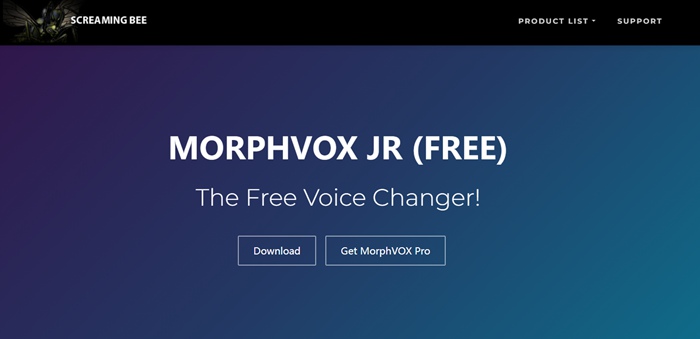
Main Page Interface of MorphVoc
Key Features
- Ultra-realistic voice effects with high-quality sound customization.
- Hotkey mapping for quick sound effect access during VRChat sessions.
- Categorized filters like male, female, and fantasy voices.
- Easy integration with other platforms, including Discord and Zoom.
Pros
- Highly tweakable effects.
- Wide variety of filters.
- Hotkey feature for ease.
- Great sound customization.
Cons
- The free version is limited.
- Slightly overpriced.
- It can be complex for beginners.
Pricing:
- Free
- MorphVOX Pro: $39.99
NCH Voxal Voice Changer
NCH Voxal Voice Changer is a trusted voice changer for VRChat with over 40+ customizable voice filters. It offers options like robotic, alien, or pitch-shifting effects, ensuring your VRChat avatar’s voice perfectly matches its persona. Lightweight and system-friendly, it runs smoothly during gaming or streaming. Its ability to create and save custom filters adds to its versatility.
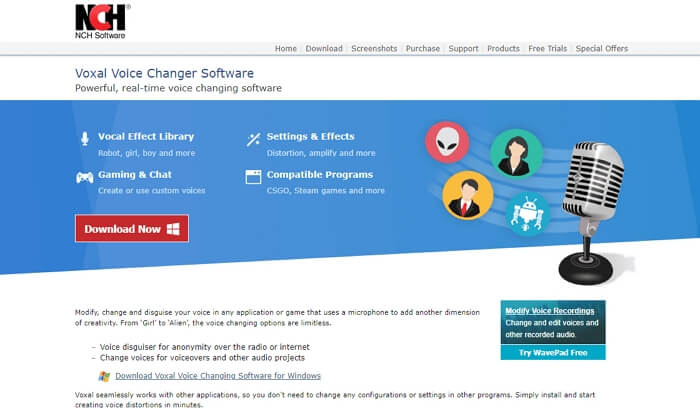
NCH Voxal Voice Changer
Key Features
- Real-time voice changing with minimal system impact.
- Ability to create custom filters and save them to the library.
- Offers over 40 preset voice filters for diverse customization.
Pros
- Wide variety of filters.
- Easy filter customization.
- Lightweight on resources.
- Smooth real-time performance.
Cons
- Limited free version.
- Lacks advanced updates.
Pricing:
- Free
- Commercial: $39.95
- Home Use: $34.99
- Quarterly Plan: $3.33/month
Clownfish Voice Changer
Clownfish Voice Changer is a free, real-time tool ideal for VRChat users who prefer simplicity. It offers over 12 customizable voice filters, such as robotic and pitch effects, to match your avatar. Its lightweight design supports macro keys and stream decks, making it perfect for seamless integration. The simple interface ensures ease of use for beginners.
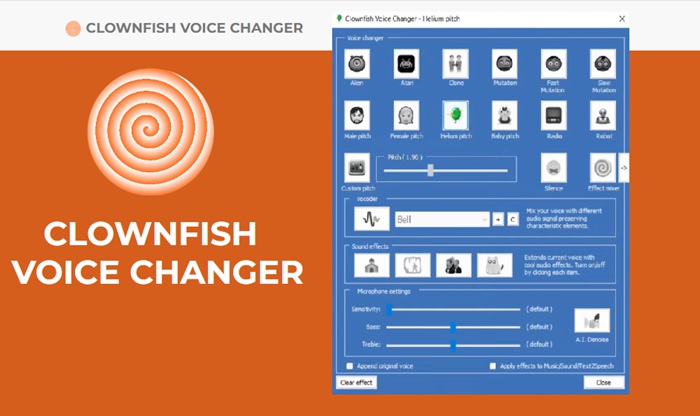
Clownfish Voice Changer
Key Features
- Free-to-use voice changer with real-time functionality.
- Supports macro keys and stream decks for quick access.
- Offers over 12 voice filters for varied customization.
- Lightweight design ensures smooth performance during VRChat.
Pros
- Free and unlimited use.
- Easy-to-use interface.
- Macro key compatibility.
- Lightweight and effective.
Cons
- Limited voice filter options.
- Not feature-rich.
Pricing: Free
Bonus Tip. How to Change Your Voice with AI In Real-time | Vozard
Vozard takes voice changing to the next level with 200+ lifelike sound effects, perfect for gaming, online chatting, and live streaming. Advanced AI technology allows you to transform into characters like SpongeBob, Joe Biden, or Darth Vader in real time. Explore background sound effects and popular sound memes for endless entertainment.
This tool supports multiple audio input methods, letting you switch voices instantly or upload files for voice modulation. Vozard works seamlessly with platforms like Discord, Zoom, and Twitch, making it ideal for pranking, gaming, or creating unique audio content. Whether you’re spicing up meetings, surprising teammates, or shining in live streams, Vozard is your go-to solution for voice customization.
Key Features:
- Offers real-time voice recording and modulation for personalized audio effects with just one click.
- Compatible with streaming tools like OBS, enhancing live streams with creative and unique voice effects.
- Includes audio/video file transformation, letting you edit and modulate pre-recorded content easily and quickly.
- Provides custom voice filters, allowing users to create unique effects tailored to specific needs.
- Low-latency performance ensures smooth and uninterrupted voice changes during live gaming or chatting.
Steps to Change Voice with Vozard
Let’s explore some easy steps to using Vozard:
Step 1. Free download and install Vozard on your computer. Open Vozard after installation. Go to “Settings” to set up your “Microphone” and “Speaker.”
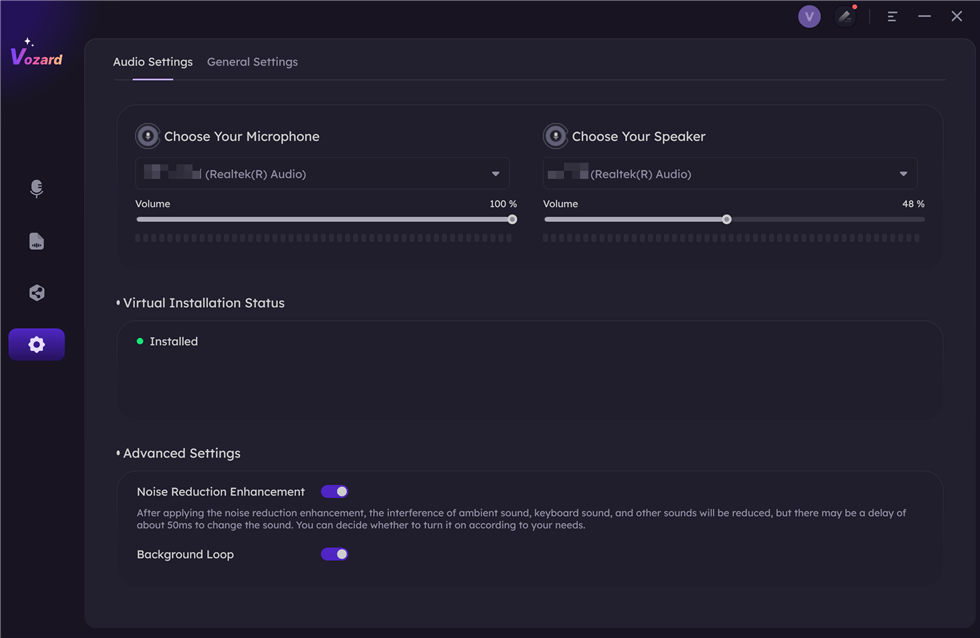
Set The Microphone and Speaker
Free Download for all windows & 100% safe Free Download for all mac & 100% safe
Free Download100% Clean & Safe
Step 2. Select the “Real-time Mode” option to start using the voice-changing features in Vozard.
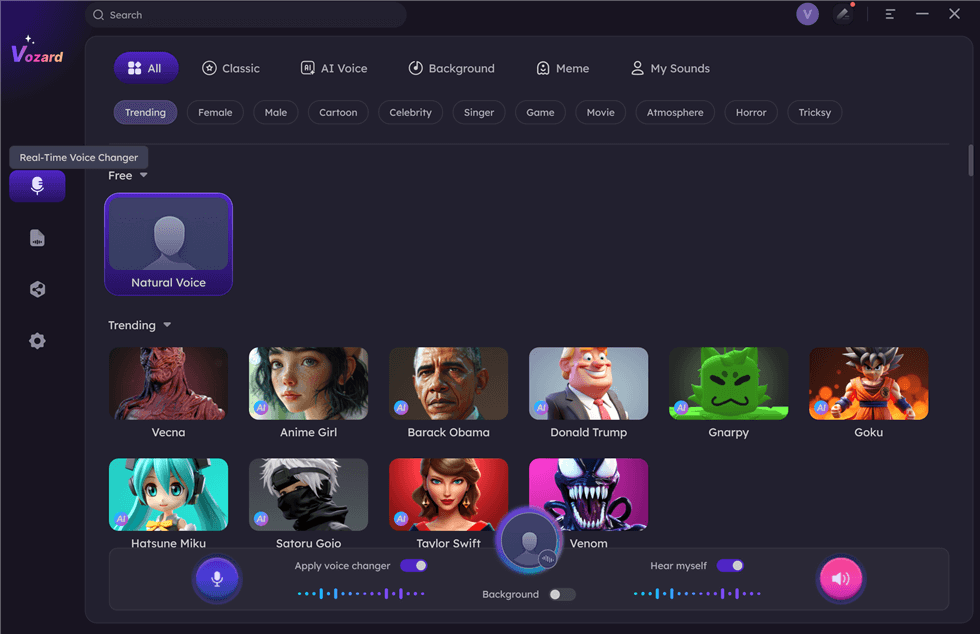
Select Real-Time Mode
Step 3. Use the “Voice Volume” button to adjust the volume of your microphone, speaker, and background.
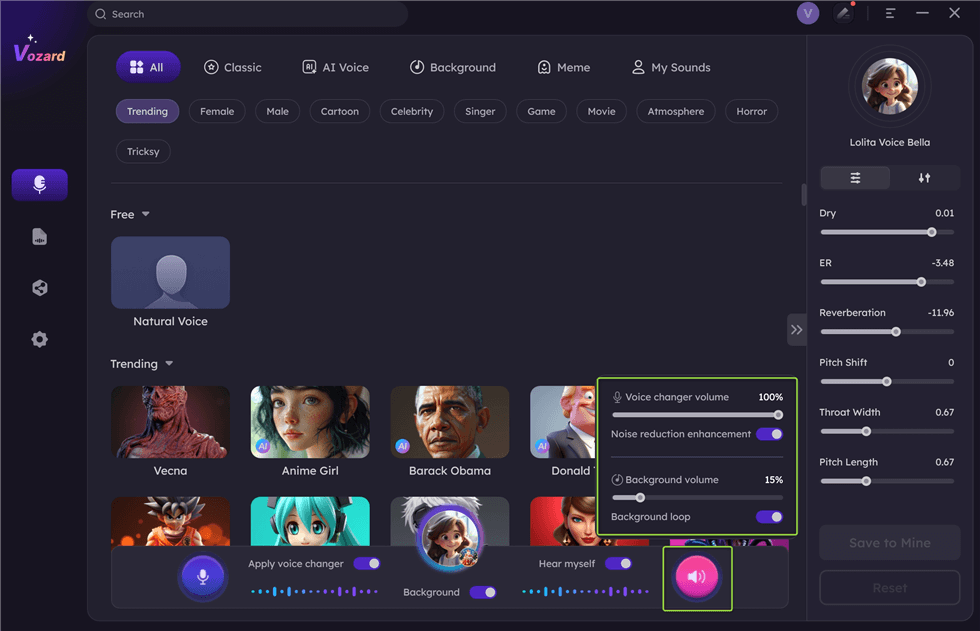
Adjust The Volume
Step 4. Pick the voice effect you want from the voice effects list. Click “Download” and test it.
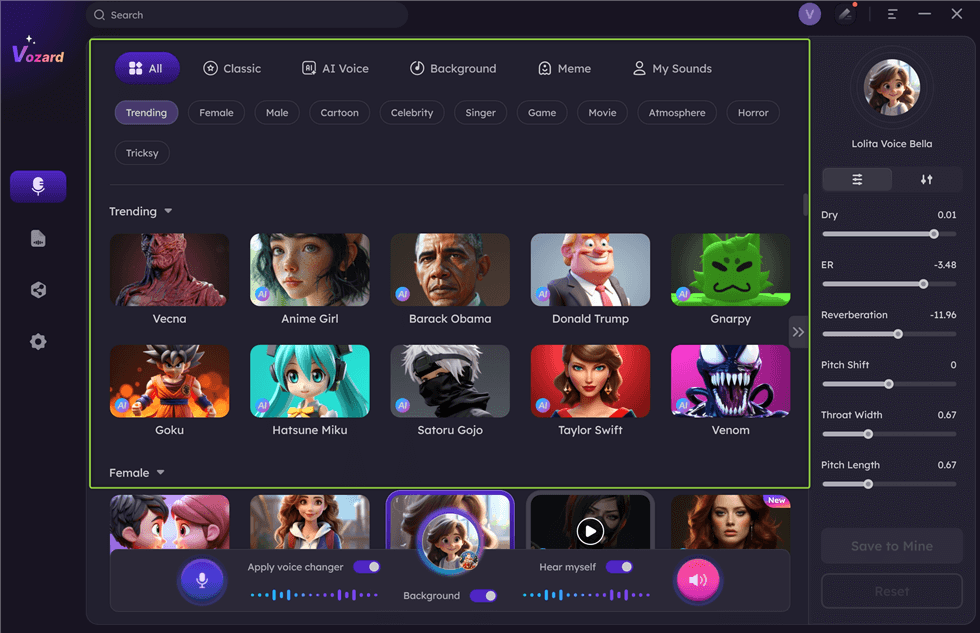
Download Effect
Note: If the exact effect isn’t available, choose the closest match and adjust the pitch for similarity.
Step 5. Click the “Share” button to sync and share your new voice on third-party platforms.
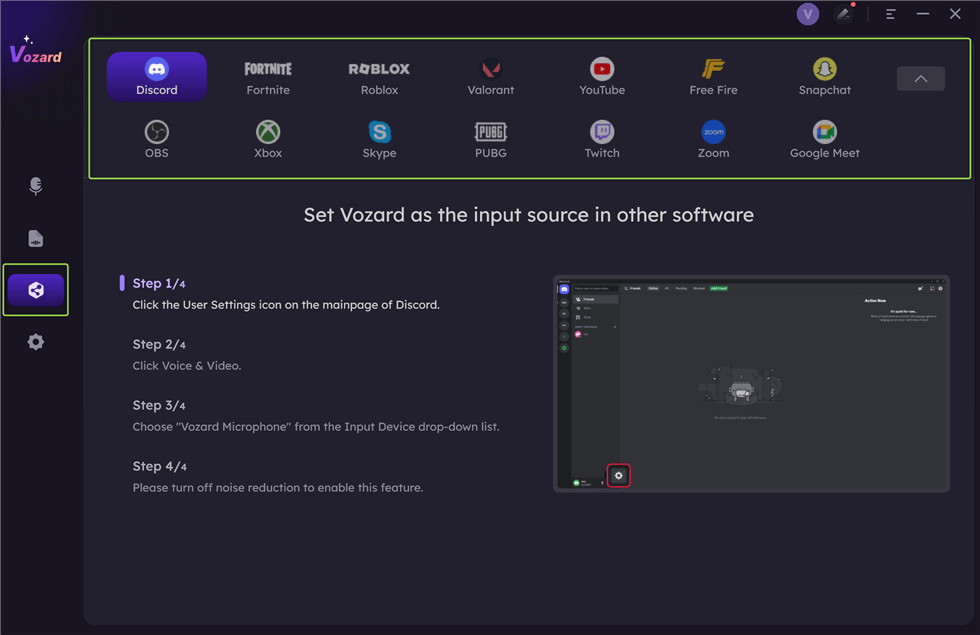
Share Your Voice
Pricing:
- Free version
- 1-Month Subscription: $12.99
- 3-Month Subscription: $19.99
- 1-Year Subscription: $29.99
- One-Time Purchase: $49.99
| Pros | Cons |
|
|
FAQs about VRChat Voice Changer
Are VRChat voice changers hard to set up?
Not at all. Most VRChat voice changers come with simple instructions. Download the software, connect it to your audio input, and choose a voice effect. Many tools also offer guides or tutorials to help users set them up quickly and easily.
Can I change my voice in real-time during VRChat sessions?
Yes, most VRChat voice changers allow real-time voice changing. You can alter your voice while talking to others in VRChat. With tools like Vozard, you can instantly switch between voices, adding more fun and creativity to your experience.
How realistic do VRChat voice changers sound?
The quality of voice changers varies. Some, like Vozard, offer incredibly realistic effects, mimicking characters like SpongeBob or Darth Vader. The more advanced tools provide high-quality, lifelike voices, while basic ones might sound more robotic or cartoonish. Furthermore, the better the tool, the more natural the voices.
Final Words
In conclusion, using a VRChat voice changer can make your virtual reality experience more exciting and enjoyable. Clownfish, NCH Voxal, and MorphVOX are fantastic options; each has unique features and customizable opportunities. Try Vozard for a fantastic voice-changing experience if you’re searching for something simple and enjoyable. Vozard, however, is distinctive if you’re searching for something one-of-a-kind and adaptable. More than 200 realistic sound effects are available, such as cartoon voices, famous people, and more. Try Vozard now to improve your VRChat experience with an intuitive, feature-rich voice changer!
Product-related questions? Contact Our Support Team to Get Quick Solution >
