iPhone 11 iOS 27 Support: Everything You Need to Know Before Updating
If you’re wondering whether iOS 27 supports the iPhone 11, the short answer is yes. Apple’s latest software update remains available for the iPhone 11 lineup, bringing performance improvements, enhanced security protections, a redesigned interface, and several new AI-powered features. However, some advanced Apple Intelligence capabilities require newer hardware and may not be available on older devices. In this guide, we’ll explain iPhone 11 compatibility, highlight the most important iOS 27 features, discuss feature limitations, and help you decide whether upgrading is worth it.
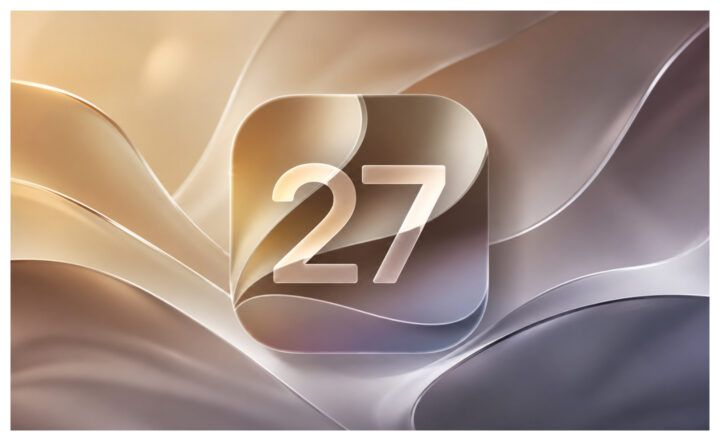
Apple officially unveiled iOS 27 at WWDC 2026, introducing a refreshed design, smarter Siri experiences, enhanced privacy protections, and improvements across core apps like Messages, Phone, and FaceTime.
For millions of users still using Apple’s popular 2019 flagship, one question immediately emerged: does iPhone 11 support iOS 27?
The answer is yes. Apple has officially confirmed that the iPhone 11, iPhone 11 Pro, and iPhone 11 Pro Max are compatible with iOS 27. However, compatibility is only part of the story. While iPhone 11 users can install the latest software update, some of iOS 27’s headline AI features require newer hardware.
Before updating, here’s everything you need to know about iPhone 11 iOS 27 support, performance, feature availability, and whether it’s still worth using the device in 2026.
Does iPhone 11 Support iOS 27?
Yes. Apple officially includes the following devices in the iOS 27 compatibility list:
- iPhone 11
- iPhone 11 Pro
- iPhone 11 Pro Max
This means iPhone 11 users can update to iOS 27 and continue receiving:
- Security updates
- App compatibility improvements
- Bug fixes
- New system features
- Future maintenance releases
For users searching “does iPhone 11 support iOS 27” or “will iOS 27 support iPhone 11”, the answer is now officially confirmed.
Perhaps even more impressive is the device’s longevity. Released in September 2019, the iPhone 11 has now received support through another major iOS generation, making it one of Apple’s longest-supported smartphones.
Why Apple Continued Supporting the iPhone 11
Many users expected Apple to end support for the iPhone 11 this year. Instead, the device survived another update cycle.
There are several reasons why Apple likely decided to keep the iPhone 11 on the supported devices list.
The A13 Bionic Still Delivers Solid Performance
Although Apple’s latest chips dramatically outperform the A13 Bionic in AI workloads, the processor remains capable of handling everyday tasks.
The iPhone 11 can still comfortably manage:
- Web browsing
- Social media apps
- Video streaming
- Mobile photography
- Navigation
- Productivity apps
- Casual gaming
For most users, performance remains more than adequate.
Millions of Users Still Own an iPhone 11
The iPhone 11 remains one of the best-selling iPhones ever released. Even in 2026, millions of people worldwide continue to use the device daily.
Dropping support would affect a significant portion of Apple’s active user base.
Apple’s Long-Term Software Support Strategy
Apple has increasingly emphasized device longevity and sustainability. Supporting older devices for longer periods helps reduce electronic waste while giving users more value from their purchases.
The continued support of iPhone 11 aligns with that strategy.
iOS 27 Supported Devices
Apple officially confirmed that iOS 27 supports iPhone 11 and newer models.
Complete iOS 27 Compatibility List
| Series | Supported Models |
| iPhone 17 Series | iPhone 17 Pro Max, iPhone 17 Pro, iPhone 17, iPhone 17e |
| iPhone Air | iPhone Air |
| iPhone 16 Series | iPhone 16 Pro Max, iPhone 16 Pro, iPhone 16 Plus, iPhone 16, iPhone 16e |
| iPhone 15 Series | iPhone 15 Pro Max, iPhone 15 Pro, iPhone 15 Plus, iPhone 15 |
| iPhone 14 Series | iPhone 14 Pro Max, iPhone 14 Pro, iPhone 14 Plus, iPhone 14 |
| iPhone 13 Series | iPhone 13 Pro Max, iPhone 13 Pro, iPhone 13, iPhone 13 mini |
| iPhone 12 Series | iPhone 12 Pro Max, iPhone 12 Pro, iPhone 12, iPhone 12 mini |
| iPhone 11 Series | iPhone 11 Pro Max, iPhone 11 Pro, iPhone 11 |
| iPhone SE | iPhone SE (2nd generation and later) |
Which iPhones Are Not Compatible with iOS 27?
The following models are no longer supported:
- iPhone XS
- iPhone XS Max
- iPhone XR
- iPhone X
- iPhone 8
- iPhone 8 Plus
- iPhone 7 series and earlier
As a result, the iPhone 11 is now among the oldest mainstream iPhones officially supported by iOS 27.
What New iOS 27 Features Are Available on iPhone 11?
While the most advanced Apple Intelligence experiences are reserved for newer iPhone models, iPhone 11 users can still benefit from many of the practical improvements introduced in iOS 27. The update focuses on performance, usability, accessibility, security, and selected AI-powered enhancements that improve everyday tasks without requiring the latest hardware.
Smarter Siri Powered by Apple Intelligence
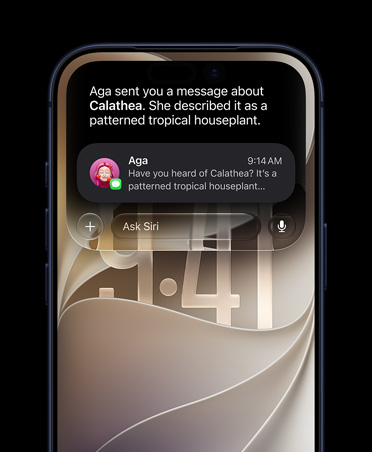
iOS 27 introduces a major Siri upgrade powered by Apple Intelligence, making Apple’s voice assistant more conversational, context-aware, and capable of handling tasks across apps.
New Siri features include:
- Natural back-and-forth conversations with better understanding of follow-up questions
- Personal context awareness, allowing Siri to find photos, emails, notes, and messages based on simple requests
- Cross-app actions, such as editing messages, creating reminders, organizing photos, or controlling apps with voice commands
- Expanded web knowledge for answering questions, generating ideas, and providing recommendations
- A dedicated Siri app that keeps conversation history synced across Apple devices
- Writing assistance that can draft, rewrite, and refine text directly within supported apps
These enhancements make Siri feel more like an AI assistant rather than a traditional voice command tool, helping users complete tasks faster with fewer steps.
AI-Powered Suggestions Across Apps
iOS 27 introduces intelligent suggestions throughout the system.
Based on the content of your conversations and activities, iPhone can automatically recommend actions such as:
- Creating calendar events from messages
- Adding reminders with one tap
- Finding related photos instantly
- Opening relevant documents or notes
These contextual suggestions help reduce manual steps and improve productivity.

Smarter Visual Experience with Liquid Glass
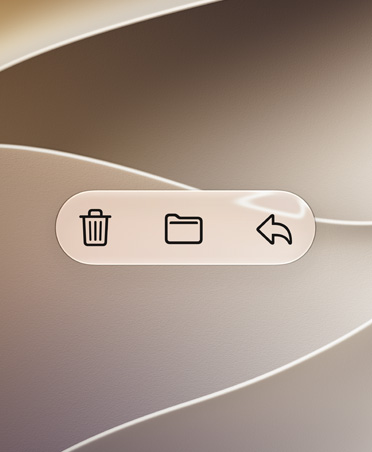
iOS 27 continues to refine Apple’s Liquid Glass design language, delivering a more polished interface across the system. On iPhone 11, users will notice improved text readability, stronger contrast, sharper app icons, and more consistent visual effects throughout iOS. Apple also adds new customization options, allowing users to personalize the appearance of the Liquid Glass interface.
Faster and More Responsive Performance
Apple has optimized core system functions to make older devices feel smoother and more efficient. Common tasks such as launching apps, browsing photos, transferring files through AirDrop, and navigating the operating system feel noticeably faster. For many iPhone 11 owners, these behind-the-scenes improvements may have a greater impact than any single new feature.
Accessibility Features Continue to Expand
Apple remains committed to accessibility with several meaningful upgrades in iOS 27. VoiceOver can provide richer image descriptions, live captions become more capable, video subtitles receive translation support, and Magnifier gains additional tools for users with low vision. These improvements help make iPhone more inclusive and easier to use for everyone.
Better Photo Sharing with iCloud Shared Albums
Shared Albums become more useful for families and groups. Users can share full-resolution photos, filter content more efficiently, and collaborate more easily across different platforms through iCloud.com, including Android and Windows devices.
Expanded Child Safety Features
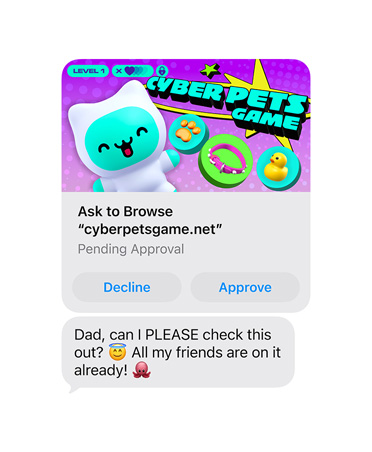
Families using Screen Time and parental controls gain several new tools.
New additions include:
| Feature | Description |
| Ask to Browse | Children must request approval before accessing new websites |
| Communication Safety | Detects and warns about explicit, violent, or graphic content |
| Time Allowances | Parents can set app category limits |
| Custom App Access | Parents choose exactly which apps children can use |
| Redesigned Controls | Easier parental control management |
Should You Update Your iPhone 11 to iOS 27?
For most iPhone 11 users, upgrading to iOS 27 is a worthwhile decision. While some advanced Apple Intelligence features remain exclusive to newer iPhone models, the update still brings meaningful improvements to performance, security, usability, and overall system stability.
Benefits of updating include:
- Better security protection against newly discovered vulnerabilities
- Continued compatibility with the latest apps and services
- New features across Siri, Safari, Mail, Photos, and other built-in apps
- Bug fixes that improve reliability and reduce system glitches
- Enhanced privacy controls and account protection tools
- Performance optimizations that make everyday tasks feel smoother
If your iPhone 11 is running well on its current version, iOS 27 should help extend its lifespan while ensuring access to Apple’s latest software improvements. Unless you depend on a business-critical app that has not yet been verified for compatibility, updating to iOS 27 is generally recommended for most users.
Should You Upgrade from iPhone 11 in 2026?
That depends on your needs.
Keep Your iPhone 11 If:
- It still feels fast enough
- Battery life remains acceptable
- You primarily use basic apps
- You don’t need advanced AI features
Consider Upgrading If:
- You want Apple Intelligence
- You use AI tools regularly
- You want better cameras
- You need longer future software support
- Your battery health is significantly degraded
For many people, the iPhone 11 remains a perfectly capable smartphone in 2026.
FAQs
Q1.Will iOS 27 support iPhone 11?
Yes. Apple officially supports the iPhone 11, iPhone 11 Pro, and iPhone 11 Pro Max with iOS 27.
Q2.Is iOS 27 worth installing on iPhone 11?
Yes. Most users will benefit from improved security, app compatibility, and system enhancements.
Q3.Will iOS 27 Slow Down iPhone 11?
Most users should not notice significant slowdowns during everyday use. However, devices with aging batteries or limited storage may experience performance issues after major software updates.
Q4.How Much Storage Does iOS 27 Require?
Apple recommends keeping several gigabytes of free storage available before installing iOS 27. The exact download size varies depending on your current iOS version and device model.
Q5.Can I Downgrade from iOS 27 If I Don’t Like It?
In most cases, Apple only allows downgrades for a limited period after release. Once older iOS versions are no longer signed, downgrading becomes impossible through official methods.
You May Also Like: Can You Downgrade to Unsigned iOS? A Practical 2026 Guide>
Q6.Does iOS 27 Improve Battery Life on iPhone 11?
Battery life depends on device condition and usage habits. Some users may notice improvements after optimization finishes, while others with older batteries may see little change.
Q7.How Long Will Apple Support iPhone 11?
Although Apple does not publish a fixed support timeline, the iPhone 11 has already received several years of major iOS updates and will likely continue receiving security updates even after major OS support ends.
Conclusion
If you’re searching for information about iPhone 11 iOS 27 support, the answer is simple: the iPhone 11 officially supports iOS 27.
The more important takeaway is that compatibility does not equal full functionality. While iPhone 11 users receive the latest operating system, security updates, and most core features, some of Apple’s newest AI-powered experiences remain exclusive to newer devices.
For the majority of users, however, updating to iOS 27 is still a smart choice. The iPhone 11 remains one of the longest-supported smartphones on the market, and Apple’s decision to keep it on the compatibility list demonstrates just how much life the device still has left.



Wanda Norris is a junior author in iMobie specializing in iOS tips and solutions. She keeps a close eye on every iOS update to provide practical, easy-to-understand guides that help users solve problems and master their Apple devices.
Product-related questions? Contact Our Support Team to Get Quick Solution >
