How to Transfer Music from iPod to Computer
Congratulations, you find the best answer to transfer music from iPod to computer.
- PodTrans Pro™ is the easiest solution to transfer iPod music to Computer or iTunes library.
- Works with USB 3.0 and Lightning interface: transfer 7000 iPod music to computer in 20 mins.
- Supports to Rebuild your iTunes library or Merge to current iTunes, 100% worry-free guarantee.


There might be many methods available to retrieve your music from your iPod to computer using various software, but now, the methods shown here don't require any of skills from you.
Don't believe it? We prepared a 1 minute video guide for you.
Let's Start to Bring Your iPod Music Back to Computer
- Open PodTrans Pro, if you still did't get it, you may Free Download Here.
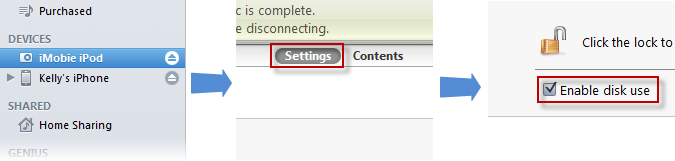
- Plug in your iPod with USB connector cable. And make sure your iPod have been Enabled Disk Use.
- Click iWizard button and choose PC Folder as shown on above video.
- You may also choose iTunes Library to export playlist and/or ratings onto iTunes simultaneously.
- Before starting, make sure you have enough disk space to save your music.
- Start the transferring, and wait for a while to see anything back to your computer.


Still have a problem? Let us know your story, and get a professional advice! Submit Your Question
Want more? Yes, PodTrans Pro™ will extremely ease your life:
- iTunes-to-iPod Transfer: Always keeps you far away from the iTunes' boring full sync, and never be afraid of losing the precious music after iTunes sync.
- iPod-to-iPod Transfer: Directly migrates music, movies, TV Shows, iTunes U, Podcasts and Audiobooks from one iPod to another.
- Converts Music and Video on the Fly: Auto detects iPod incompatible Video/Audio files and spontaneously converts them to iPod friendly format.
- Keeps Meta Data Intact: When transferring the music, you can keep ratings, artworks, tags, play counts and all media info intact.
- Don't stop here, Download PodTrans Pro now to explore more.

Recommended by: Steven Joe
- Recommended:

- Total Downloads:517,093
- Download Size:12.78 MB
- Windows:XP/Vista/7/8
32bit & 64bit
I was so concerned that i would lose the music on my iPod of CD's I no longer own or that are scratched. Thanks for getting my music back from iPod to iTunes safely! That's why I like PodTrans Pro so much.
- Steven Joe

Precise & direct iPod to iTunes instructions that any dummy (ME) can understand. The self-explained interface casts many other software into the shade.
- Fangprintz, cnet.com
Since my iPod lives longer than any of my computers, am always trying to find someone that will help me get my music from iPod back to the new iTunes. Thanks god I got PodTrans PRO! It saved my life.
- weisenthal729, cnet.com

Before finding PodTrans Pro, I had spent countless hours trying to download music from my Ipod Nano onto my newly installed iTunes. This app is the BEST! and SO easy to use! A must have!
- Cindi Siegel, facebook.com