How to Play Stumble Guys on PC & Mac [4 Ways]
Stumble Guys is a fun multiplayer game loved worldwide. Playing it on a PC or Mac gives better controls and a larger screen. In this guide, learn 4 simple ways for how to play Stumble Guys on PC: using Steam, AnyMiro, or emulators like BlueStacks and MemuPlay.

How to Play Stumble Guys on PC & Mac [4 Ways]
Try AnyMiro to mirror Android & iPhone to PC for free via USB and WiFi.
- Fast response time within 10 ms and 60fps frame rate.
- A stunning visual experience with no color difference.
- Lag-free screen mirroring and 4k resolution.
There are several ways to play Stumble Guys on a Mac or PC, and it’s simple. The game may be streamed and played on your PC using Android emulators such as BlueStacks or MemuPlay. Using screen mirroring apps like AnyMiro to mirror your phone’s screen is an additional choice. This makes playing Stumble Guys with more fluid controls on a larger screen. Regardless of your approach, you can experience the excitement of multiplayer obstacle racing on your Mac or PC. In this guide, we’ll look at four methods for how to play Stumble Guys on PC in this guide so you can get started right away.
Table of ContentsHide
How to Play Stumble Guys PC on Steam
Stumble Guys may be played on your PC using Steam, which offers enhanced visuals, smooth controls, and a simple multiplayer setup for a more pleasurable gaming experience. Moreover, it’s easy to download and set up directly from the platform. Whether you’re racing through obstacle courses or competing with friends, the PC version provides an upgraded gameplay experience compared to mobile devices. While it works best with a capable computer, even mid-range systems can deliver a solid performance.
Advantages
- Easy Access: The official PC version is available directly on Steam, a trusted platform.
- Enhanced Experience: Offers smoother controls and larger screen gameplay than mobile devices.
- Official Updates: Automatically receive the latest updates and features from the developers.
- Multiplayer Support: Seamless online play with friends or random players.
Disadvantages
- High System Requirements: Needs Windows 10 or higher, a decent graphics card, a 64-bit processor, and 4GB RAM, which can limit accessibility for users with basic setups.
- Storage Use: Although the game is lightweight, Steam installation may require additional disk space.
- Device Limitation: Not available for Mac users without using additional workarounds.
Now, let’s explore the simple steps to use Steam for this purpose:
Step 1. Go to the official Steam website using your browser.
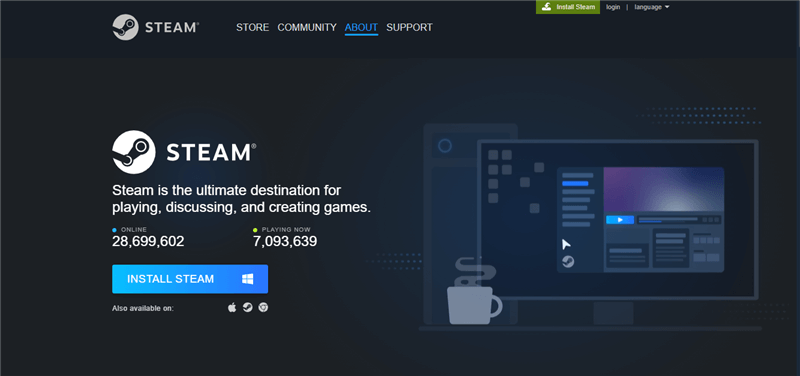
Step 2. Click on “Install Steam” in the page’s upper-right corner.
Step 3. Click the “Install Steam” button on the About page to download the installer file.
Click Install Steam
Step 4. Open the downloaded file and follow the setup instructions to install the Steam app.
Step 5. Launch the Steam app after installation, login, or create a new account if needed.
Step 6. Search for “Stumble Guys” in the Steam Store, download it, and start playing the game!
How to Play Stumble Guys on PC without Steam/Emulator
AnyMiro is an amazing tool for playing Stumble Guys without Steam or an emulator on your PC. It lets you mirror your phone screen directly to your computer, offering a smooth and fun gaming experience. With its stable connection, you can enjoy up to 10 hours of gameplay without lag. High-resolution mirroring ensures the visuals look as clear and vibrant as your phone screen, supporting up to 4K. The precise audiovisual sync makes it perfect for live streaming with real-time game sound. You can stream effortlessly to platforms like Twitch and YouTube using OBS Studio.
For added convenience, AnyMiro allows you to capture screenshots and record gameplay, preserving your best moments. It also supports live annotation, ideal for interactive sessions. Whether for games, teaching, or streaming, AnyMiro delivers a seamless and professional experience!
Free Download for all windows & 100% safe Free Download for all mac & 100% safe
Free Download100% Clean & Safe
Key Features:
- You can easily play games on your PC by mirroring your phone’s screen onto it with AnyMiro.
- It guarantees a steady connection to play games without interruption or lag.
- The app supports up to 4K resolution, so every detail of the game seems clear and sharp.
- You may stream straight to well-known websites like Twitch or YouTube without additional software.
- AnyMiro lets you easily capture screenshots or record gameplay to keep memorable moments.
Here are some basic steps to use AnyMiro to play Stumble Guys on PC:
From iPhone to PC & Mac
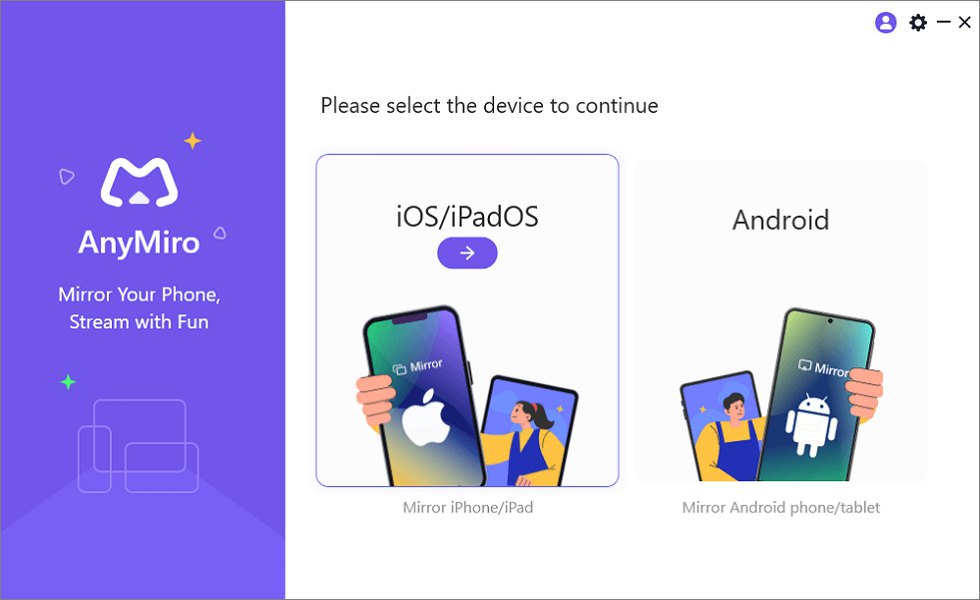
Step 1. Free download AnyMiro on your computer and select “iOS/iPadOS.”
Mirror iPhone to Computer
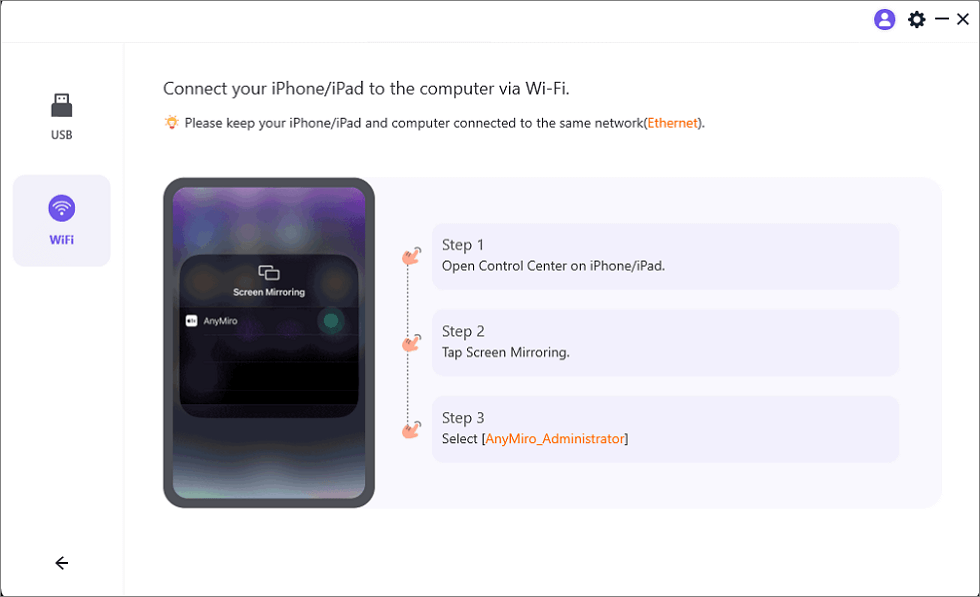
Step 2. Select “Wi-Fi connection.”
Mirror iOS to Computer via WiFi
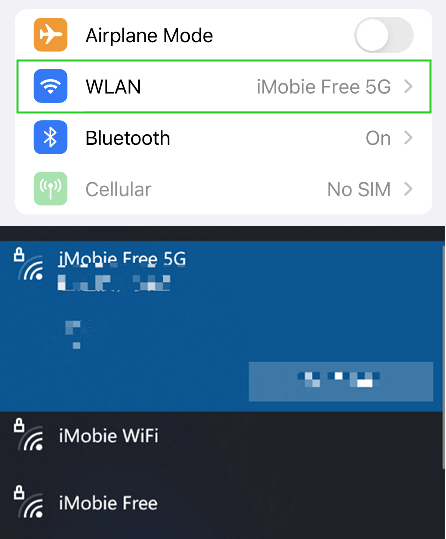
Step 3. Check that both devices have the same Wi-Fi network.
Connect to the Same WiFi
Step 4. On your iPhone or iPad, open Control Center, tap “Screen Mirroring,” and select “AnyMiro_Computer Name.”
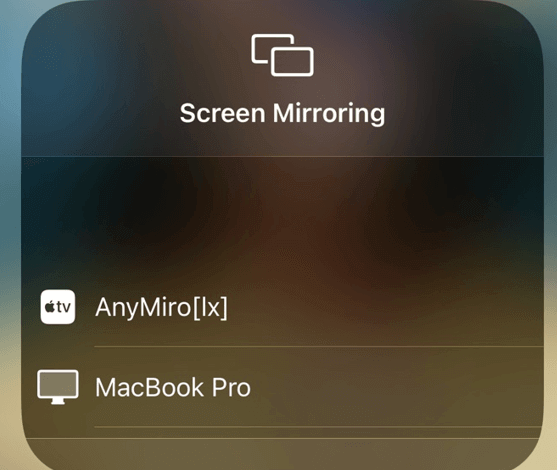
Select Your Computer from the List
Step 5. Your device will be detected, and screen mirroring will begin.
From Android to PC & Mac
Step 1. Free download and install AnyMiro on your computer and open it.
Free Download for all windows & 100% safe Free Download for all mac & 100% safe
Free Download100% Clean & Safe
Step 2. Choose “Android” from the main menu.
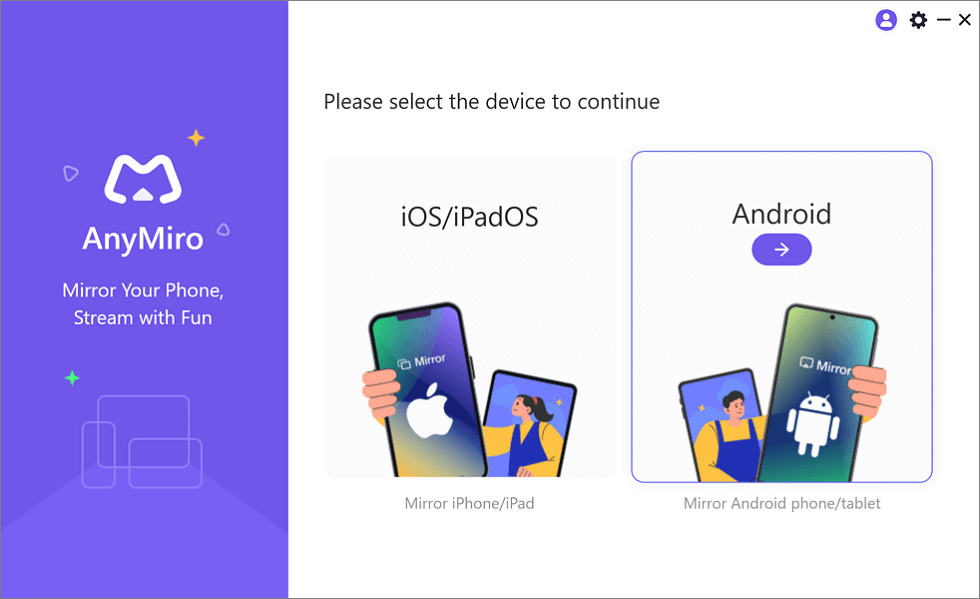
Mirror Android to Computer
Step 3. Click the “Wi-Fi” icon to begin the wireless connection.
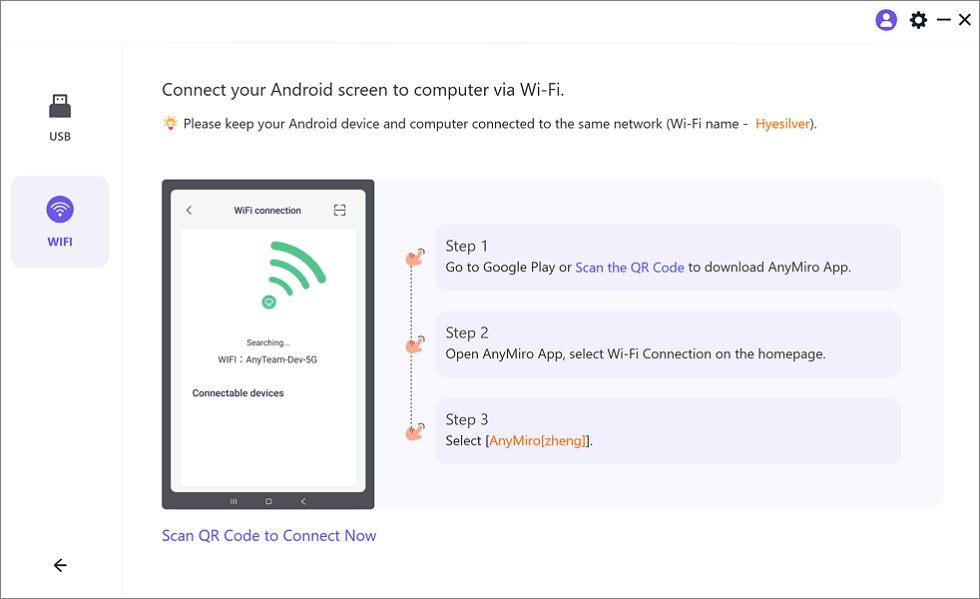
Mirror Android to Computer via WiFi
Step 4. Download the AnyMiro app from Google Play or scan the QR code on your Android phone.
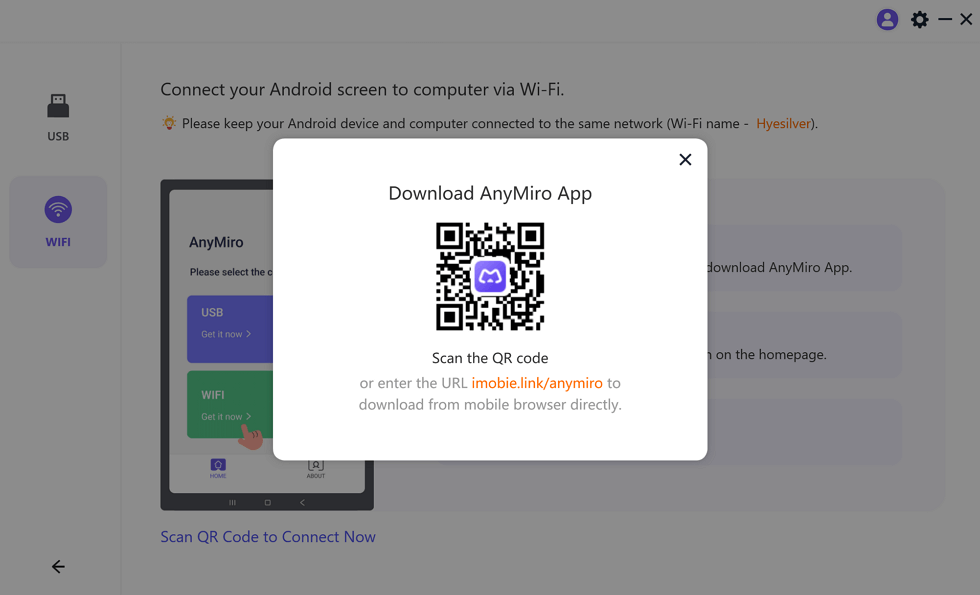
Download AnyMiro App on Your Phone
Step 5. Open the app on your phone and select “Wi-Fi Connection.”
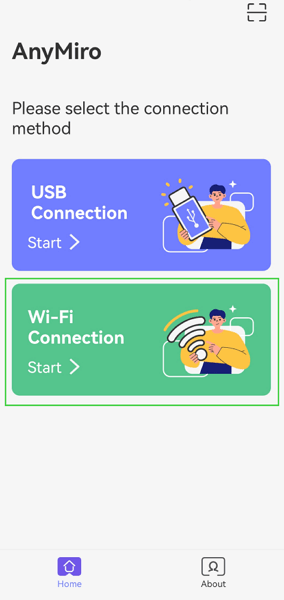
Select the Connection Method
Step 6. Pick your computer’s name from the list to start screen mirroring.
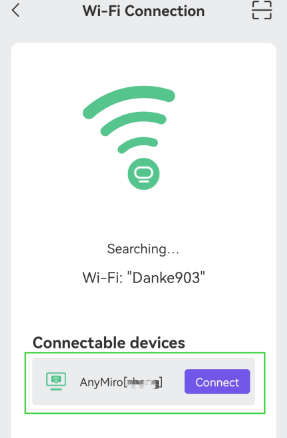
Select Your PC to Access Android from PC
How to Play Stumble Guys on PC with Emulator
Check out the methods of using an emulator to play Stumble Guys on PC:
BlueStacks
One of the most popular Android emulators to run on the PC is BlueStacks. It has powerful engines that support the best gaming performance and is compatible with keyboards/mouse. You can customize the control for Stumble Guys and get games to download and play directly from Google Play. Multitasking capability, where multiple apps can run simultaneously, increases efficiency and productivity. This is ideal for fast-paced games since it can support HD visuals and enhanced speed. To use BlueStacks:
Step 1. Download and install BlueStacks on your PC. After that, open it.
Step 2. Go to the Google Play Store app within BlueStacks and sign in with your Google account.
Step 3. Use the search bar to find Stumble Guys and click the install button.
Step 4. After installation, you can launch Stumble Guys and play it on your PC using the emulator.
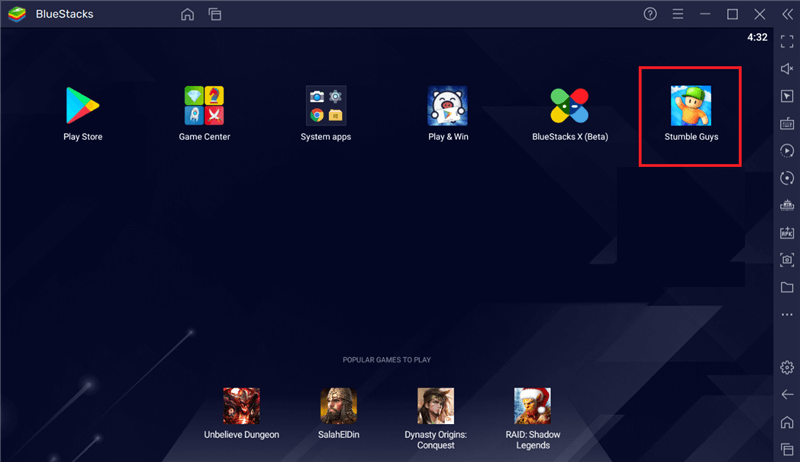
Stumble Guys on BlueStacks
MemuPlay
MEmuPlay is another excellent emulator that focuses on speed and performance. It provides key mapping to improve your control configuration for enhanced gameplay and supports multiple instances, enabling you to play many games simultaneously. Stumble Guys runs seamlessly on your PC, even on less powerful PCs, thanks to MEmuPlay’s high-definition graphics and quick processing. It is a fantastic option for players with less powerful hardware because of its lightweight design. For this method:
Step 1. Download and install MemuPlay from the official website.
Step 2. Open MemuPlay and go to the Play Store. Search for Stumble Guys in the Play Store.

Search Stumble Guys
Step 3. Click “Install” to download the game.
Step 4. Once the game is installed, you can launch and start playing Stumble Guys on MemuPlay.

Stumble Guys on MemuPlay
FAQs on How to play Stumble Guys on PC
How do I control Stumble Guys on PC?
You can use the keyboard to control Stumble Guys on your PC. Most emulators automatically map controls to the keyboard, or you can customize them in the emulator settings to suit your preferences. You can also use a controller if supported.
Is AnyMiro useful for playing Stumble Guys on PC?
AnyMiro isn’t typically used for playing Stumble Guys, but it can be helpful if you want to mirror your mobile device to a PC. You can stream the game from your phone wirelessly to your PC screen for a larger display experience.
Does playing Stumble Guys on PC provide a better experience?
The bigger screen and accurate keyboard/gamepad controls make playing Stumble Guys on a PC better. Compared to using a mobile device, the game’s graphics are crisper, and the gameplay is smoother.
Final Words
Use a BlueStacks or MemuPlay Android emulator on your PC to play Stumble Guys. You can download and play the game on your computer using these emulators that offer superior controls and visuals than cell phones. For screen mirroring from the phone to the laptop, AnyMiro is a great choice. It makes simple screen mirroring of your phone on your computer to play a mobile game on a PC. AnyMiro ensures a perfect, latency-free gaming experience for your live stream or gameplay.

 AnyMiro – Real-Time Screen Mirroring Tool
- More than 10 hours of stable screen mirroring connection.
- Up to 4K resolution providing a stunning visual experience.
- Integrates with live streaming tools such as OBS and Streamlabs.
- Auto-sync video and background audio with timestamp adjustments.
Free Download
100% Clean & Safe
Free Download
100% Clean & Safe
Free Download 100% Clean & Safe
Product-related questions? Contact Our Support Team to Get Quick Solution >
