How to Stream HBO Max on Discord in 2026
The following guide demonstrates step-by-step instructions for how to stream HBO Max on Discord. It explains HBO Max sharing rules and screen sharing methods while outlining necessary preparations before start time. Introduction

How to Stream HBO Max on Discord in 2026
Try AnyMiro to mirror iPhone and Android to PC for free via USB & WiFi.
- Fast response time within 10 ms and 60fps frame rate.
- A stunning visual experience with no color difference.
- Lag-free screen mirroring and 4k resolution.
You desire to watch HBO Max shows with friends, though they are in distant places. Your efforts to stream your computer screen on Discord result in subpar performance, along with video blackouts. This can be very annoying. The challenge of screen sharing occurs frequently to numerous users who remain uncertain about resolving it. This guide will show you how to stream HBO Max on Discord smoothly. You don’t need to be a tech expert. Just follow the simple steps and enjoy streaming with your friends anytime.
Table of ContentsHide
Everything You Must Know about Stream HBO Max on Discord
Several key points need attention before sharing HBO Max content through Discord. You can use the screen share function to stream HBO Max but follow specific rules. The best streaming approach follows platform rules and keeps away from legal complications.
Can You Stream HBO Max on Discord?
The built-in screen share feature lets users stream HBO Max content through Discord. You can display your screen contents to friends by sharing your voice channel’s screen. An active HBO Max subscription will allow you to access the content. You only need to launch your browser and HBO Max or open the app to begin screen sharing through your platform.
Disclaimer Before Streaming HBO Max – Important
Unauthorized users can potentially violate copyright laws by streaming HBO Max on Discord. Using HBO Max requires you to abide by all rules and guidelines of the service. Watching with friends remains enjoyable, but you must respect copyright rules by using authorized platforms to share media content with your friends.
How to Stream HBO Max on Discord
Now, let’s have a detailed look at the step-by-step guide to streaming HBO Max on Discord:
Step 1. Turn Off “Hardware Acceleration” in Browser
- Open your web browser (like Chrome). Click the “⁝” three dots at the top-right. Go to “Settings,” then click “System” on the left.
- Turn off the switch for “Use hardware acceleration when available.” This helps fix black screen problems while streaming.
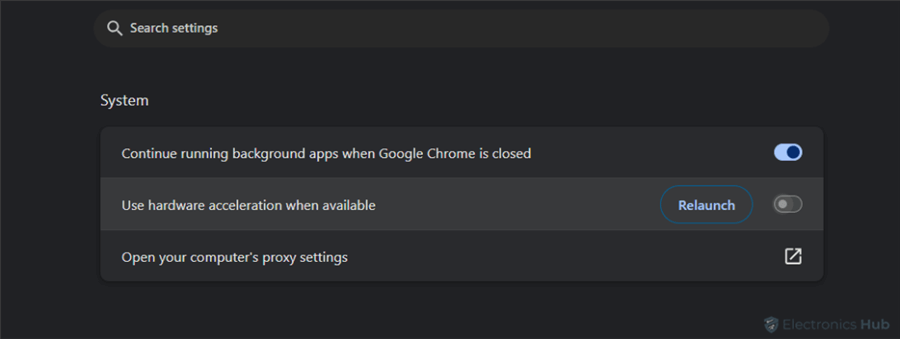
Turn Off Use Hardware Acceleration When Available
Step 2. Change Settings in Discord
- Open the Discord app. Click the “Settings” (gear icon) at the bottom left. Go to “Voice & Video” under “App Settings.”
- Scroll to “Advanced” and turn off “Hardware Acceleration”.
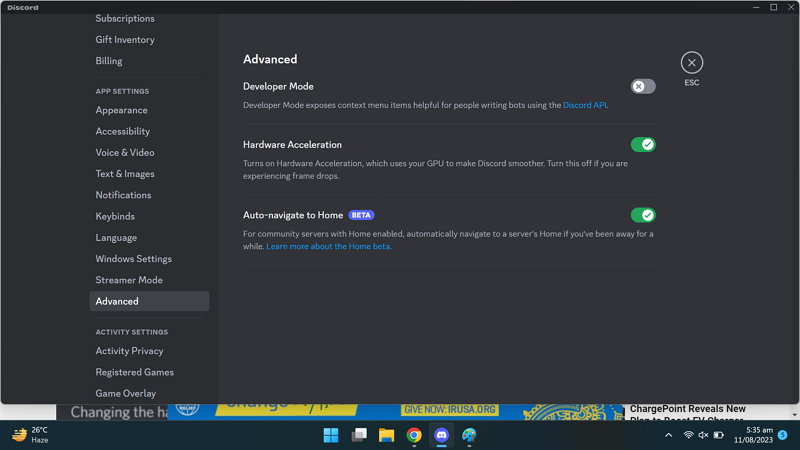
Turn Hardware Acceleration Off
- Then, go to “Registered Games” from the left menu.
- Click “Add it” and select your browser, like “Google Chrome”.
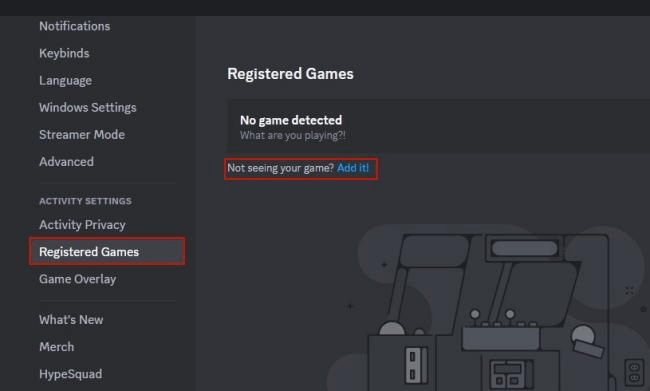
Select Add It
Step 3. Go to the HBO Max website and log in. Choose a movie or show you want to watch. Keep it open and paused in the browser you added to Discord.
Step 4. Share Screen on a Voice Channel
Open Discord and join a server with a voice channel. Enter the voice channel and click the “Share Your Screen” icon at the bottom.
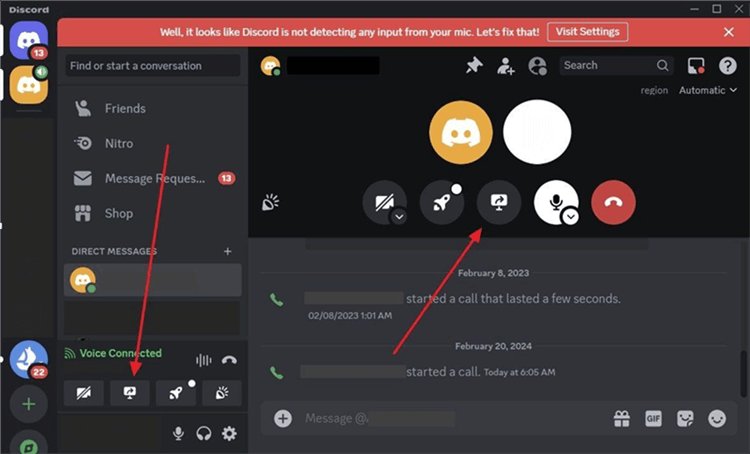
Click Share Your Screen
Select your browser (like Chrome) in the screen share window. If necessary, change quality settings, then click “Go Live.”
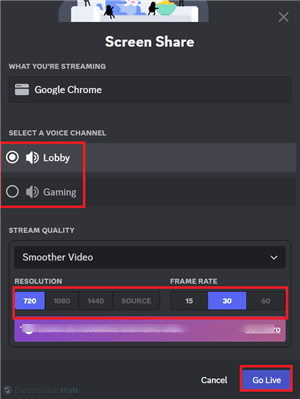
Choose Go Live
Bonus Tip. How to Stream a Mobile Phone’s Game to Discord
If you want to stream your mobile games to Discord easily, AnyMiro is a great tool. It helps you mirror your phone screen to your PC with smooth and clear visuals. iPhone and Android users can experience 4K quality streaming without delays when using AnyMiro. The stable connection allows ten hours of streaming, which works great for gamers. This solution synchronizes direct video and audio, ensuring optimal sound and image quality.
You can instantly save your top game moments during gameplay through straightforward recording and screen capture. Users can display their screen content directly on OBS Studio and similar streaming applications, including Twitch and YouTube. While streaming, you should activate the interactive live drawing tool to draw annotations for viewer engagement.
Free Download for all windows & 100% safe Free Download for all mac & 100% safe
Free Download100% Clean & Safe
Key Features:
- Stream your mobile games for up to 10 hours without interruptions or quality drop.
- You can mirror your phone to a PC with a stable connection for long-game streaming.
- Enjoy sharp, clear screen mirroring with real 4K resolution and no lag.
- Audio and video stay in sync, making your stream smooth and fun to watch.
- Use it with OBS or Twitch to share your game screen immediately.
- Capture and save your gameplay moments with one click while streaming live.
Here are the simple steps to use AnyMiro for this purpose:
From iPhone to PC & Mac
Step 1. Free download and launch AnyMiro on your computer. Use a USB cable to plug your iPhone or iPad into the computer.
Step 2. On AnyMiro, click on the “iOS/iPadOS” option.
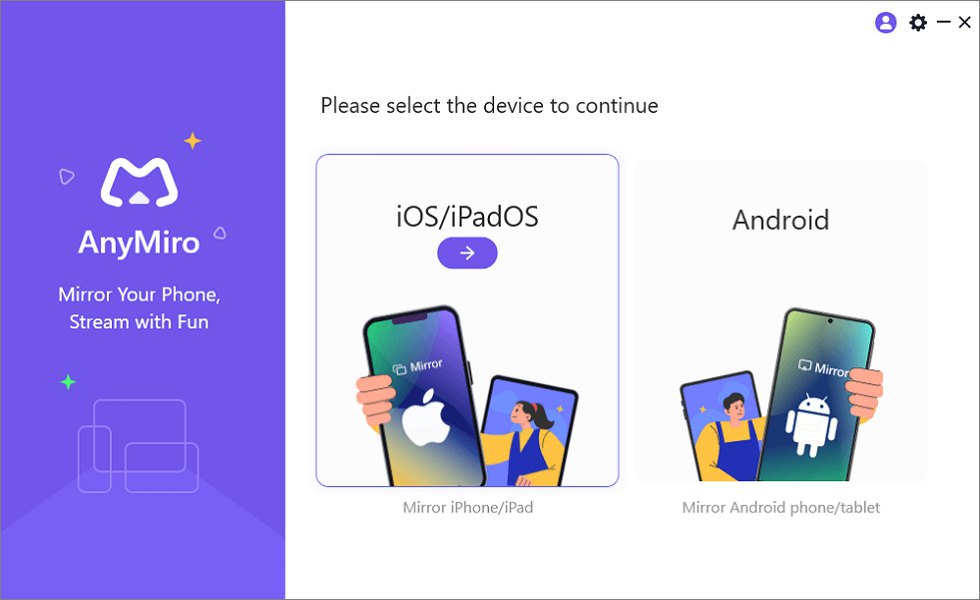
Mirror iPhone to Computer
Step 3. Next, click on “USB connection” to begin.
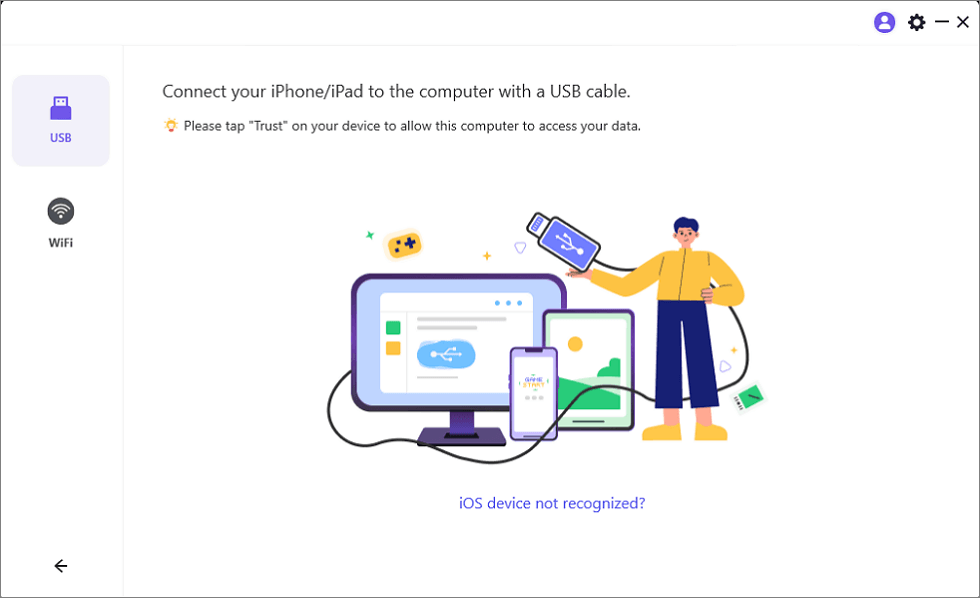
Connect Your iPhone/iPad with a USB Cable
Step 4. A message will appear on your iPhone or iPad. Tap “Trust” to confirm the connection.
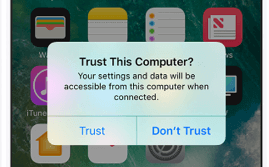
Trust Your Computer on iPhone
Step 5. If prompted, enter your passcode. Your iPhone screen will start showing on your PC/Mac.
From Android to PC & Mac
Step 1. Open AnyMiro on your PC/Mac and select “Android.”
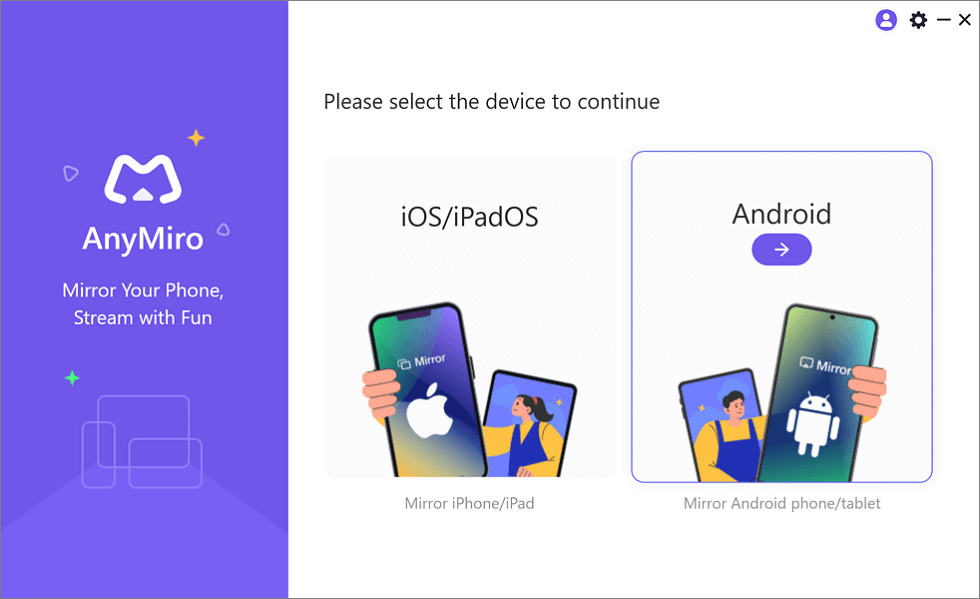
Mirror Android to Computer
Step 2. Click “Wi-Fi” to use wireless mode.
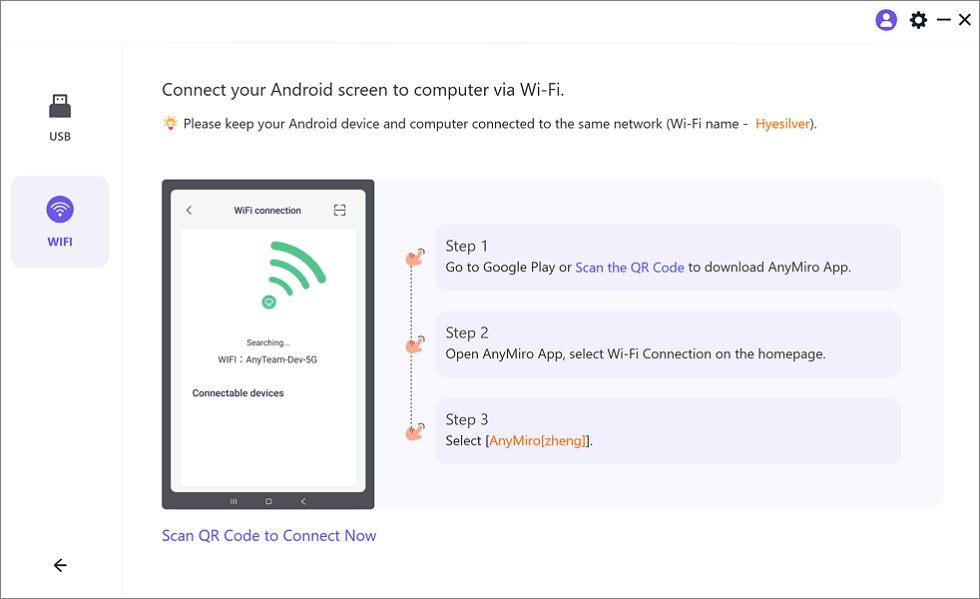
Mirror Android to Computer via WiFi
Step 3. Install the AnyMiro app from Google Play or scan the QR code on your screen.
Step 4. Launch the app and tap on “Wi-Fi Connection.”
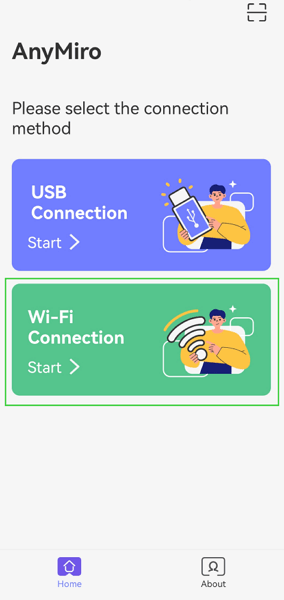
Select the Connection Method
Step 5. Choose your PC name from the list. Your phone screen will now be mirrored.
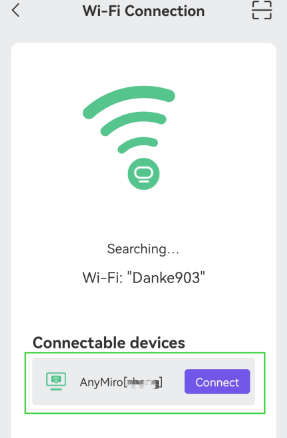
Select Your PC to Access Android from PC
FAQs on Stream HBO Max on Discord
Why is HBO Max showing a black screen on Discord?
A black screen usually happens due to DRM protection. To fix it, turn off hardware acceleration in your browser or try using a screen mirroring tool like AnyMiro.
Can I stream HBO Max from my phone on Discord?
Yes, but it’s easier from a PC. You can use AnyMiro to stream HBO Max smoothly from your mobile to Discord to mirror your phone screen.
What browser works best to stream HBO Max on Discord?
Google Chrome and Microsoft Edge work well. Just turn off hardware acceleration to avoid black screen issues during screen sharing.
Final Words
Discord users can enjoy watching HBO Max content in live streaming sessions with their friends. Understanding streaming setups for movies or live content improves your overall viewing experience in Discord. To achieve the best video experience, pick your browser carefully and turn off hardware acceleration while adjusting your audio settings. Users who use phones can achieve streaming success through screen mirroring options. For smooth and high-quality mirroring, try AnyMiro. It provides stable screen sharing and clear 4K video and lets you easily mirror your Android and iPhone to your computer. Great for streaming, games, or anything you love to watch together!
AnyMiro – Real-Time Screen Mirroring Tool
Free download AnyMiro to enjoy a fast, stable, and smooth screen mirroring experience. You can mirror for better game playing, video watching, or live streaming mobile phone content.
Product-related questions? Contact Our Support Team to Get Quick Solution >
