If your iPhone will not start, update, or restore normally, you may be told to try Recovery Mode or DFU Mode. The two are related, but they are not the same thing.
Recovery Mode is the standard computer-assisted recovery environment. DFU Mode works at an earlier stage of the iPhone startup process, which is why it is often described as a “deeper” recovery mode.
But deeper does not automatically mean better. DFU does not guarantee a successful repair. It does not bypass Apple’s security protections, and simply entering DFU does not erase the phone.
For most users, the useful questions are simpler: Which mode should I try first? Will it erase my data? And what should I do if the mode or repair does not work?
Recovery Mode vs DFU Mode at a Glance
| Recovery Mode | DFU Mode | |
|---|---|---|
| Main purpose | The normal computer-assisted recovery environment | A lower-level state used for restoration and some deeper repair workflows |
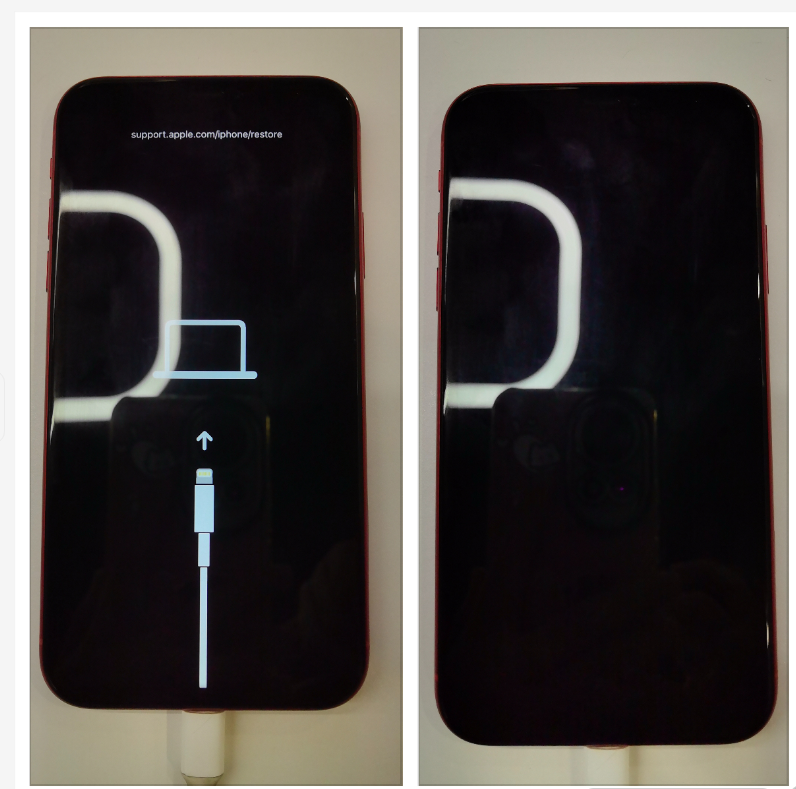
| What you see on the iPhone | A Connect to Computer recovery screen | The screen normally remains black |
| Where it starts | Later in the startup process | Earlier in the startup process |
| Common next action | Update or Restore | Restore or a repair process that requires DFU |
| Does entering the mode itself erase data? | No | No |
| Can the following Restore erase data? | Yes | Yes |
| Does it bypass the iPhone passcode? | No | No |
| Does it allow any unsigned iOS version? | No | No |
Which One Should You Try First?
For most iPhone software problems, Recovery Mode should be the first choice.
Recovery Mode is the standard computer-assisted path when an iPhone cannot start or update normally. Depending on the problem, the computer may offer an Update before a full Restore. That matters because an Update may reinstall iOS while keeping your personal data.
DFU Mode is more relevant when the normal Recovery Mode path is not enough and the restoration process needs to start from an earlier point in the iPhone startup process.
That does not mean every failed Recovery Mode attempt should immediately be followed by DFU. A failed update or restore can also be caused by a USB connection, the computer, the network, a firmware problem, or a hardware fault.
A simple rule is:
Start with Recovery Mode unless there is a specific reason to use DFU.
Will Recovery Mode or DFU Mode Erase Your Data?
Entering either mode does not automatically erase the iPhone.
What matters is the action performed after the device enters that state.
| Action | What it does | What happens to local data? |
|---|---|---|
| Enter Recovery Mode | Places the iPhone in the normal recovery environment | Does not itself erase data |
| Update from Recovery Mode | Reinstalls system software while trying to keep the current device state | Intended to preserve personal data |
| Restore from Recovery Mode | Reinstalls iOS and returns the device to a fresh system state | Erases local data |
| Enter DFU Mode | Places the iPhone in a lower-level recovery state | Does not itself erase data |
| Restore from DFU Mode | Restores the device from that lower-level state | Erases local data |
This is why statements such as “Recovery Mode deletes everything” or “DFU wipes the iPhone as soon as you enter it” are misleading.
The mode and the action are two different things. Entering the mode changes the state of the iPhone. A Restore is what erases it.
For the official distinction between updating and restoring an iPhone, see Apple’s iPhone recovery instructions.
Why DFU Mode Is Not Simply a “Stronger” Recovery Mode
It is easy to think of Recovery Mode and DFU Mode as two repair levels: Recovery is the normal option, and DFU is the stronger option.
That is only partly true.
DFU starts earlier in the iPhone startup process, so it can be useful when restoration needs to begin below the normal Recovery Mode environment. But entering a lower-level state does not automatically make the repair more successful.
It also does not remove the iPhone’s normal security rules.
DFU Mode does not:
- guarantee that the iPhone can be repaired;
- fix damaged hardware;
- unlock passcode-protected personal data;
- allow any unsigned iOS version to be installed;
- or make firmware checks disappear.
A better way to think about DFU is: it gives the recovery process a different starting point, not unlimited access to the iPhone.
A Better Way to Understand the Recovery Process
Recovery problems are easier to understand if four different stages are kept separate:
Entry Procedure → System State → Repair Action → Outcome
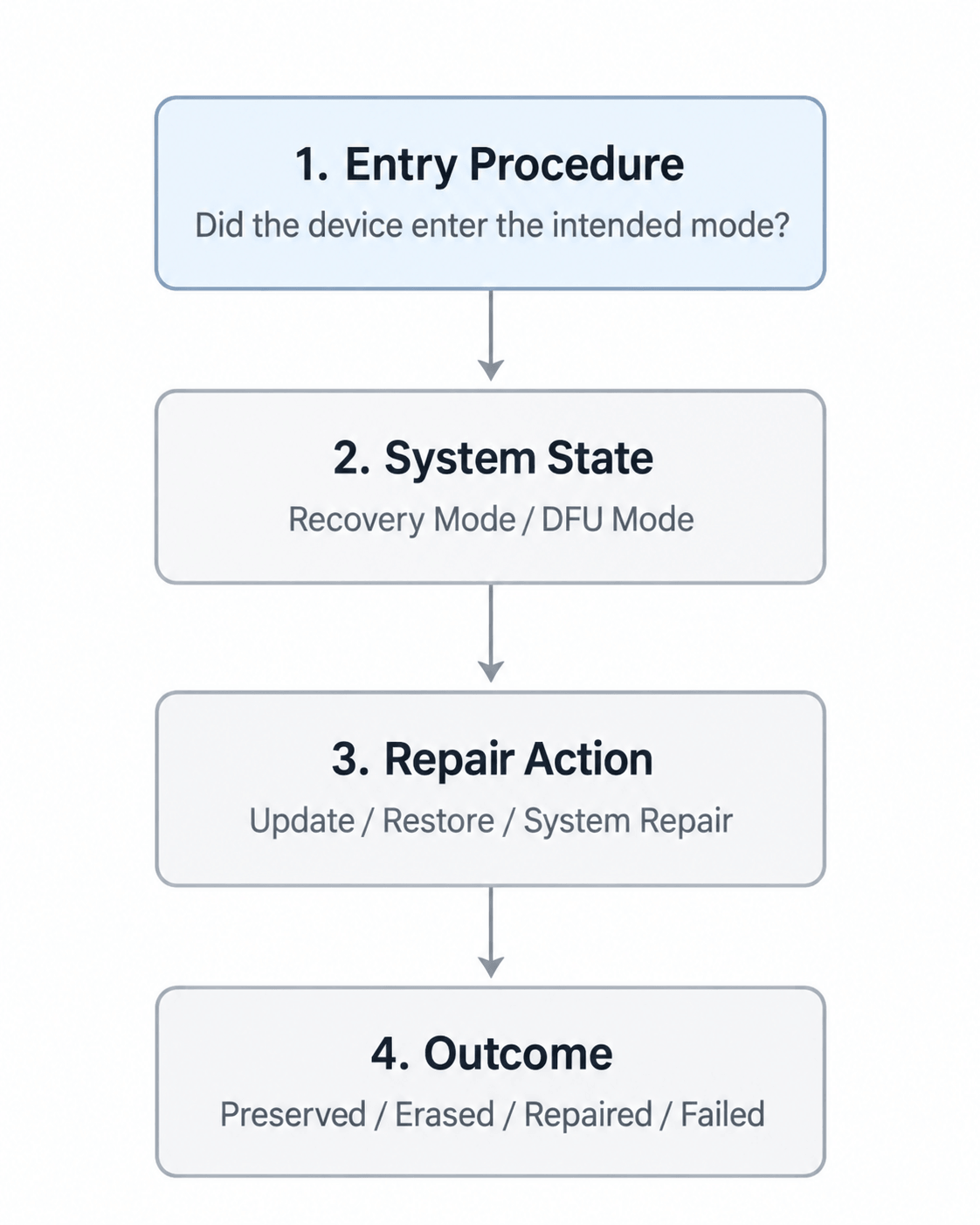
For example, an iPhone may successfully enter Recovery Mode but fail later while system software is being downloaded or installed. In that case, Recovery Mode itself worked; the later operation failed.
The opposite can also happen with DFU. If the button sequence or timing is wrong, the iPhone may never enter DFU Mode at all. That is an entry problem, not a failed DFU repair.
This distinction matters because the next step depends on where the process actually failed.
Why Recovery Mode and DFU Mode Work Differently
When an iPhone starts, several parts of the system load in sequence before iOS is fully running.
Recovery Mode becomes available later in that startup process. DFU Mode begins earlier, before the normal Recovery Mode interface has loaded. That is the main technical reason DFU is considered a lower-level recovery state.
You do not need to understand every part of the secure boot process to use either mode. The important point is that earlier in the startup process does not mean outside the iPhone’s security system.
The device still verifies trusted system software and continues to protect encrypted user data. For the technical background on where Recovery Mode and DFU fit into the startup process, see Apple Platform Security: Boot process for iPad and iPhone devices.
What We Learned from Real Device Testing
Our internal device testing showed a practical difference that is easy to miss in technical explanations: Recovery Mode was generally easier to enter consistently than DFU Mode.
We tested guided Recovery and DFU entry across multiple generations of iPhone, iPad, and iPod touch, with additional validation on both macOS and Windows. Recovery Mode entry was generally straightforward to reproduce. DFU was more sensitive to the exact device family, button sequence, and timing.
The iPad testing made this especially clear. Recovery Mode entry succeeded across the tested Home-button and non-Home-button models. In an earlier version of our DFU guidance, however, several tested iPads without a Home button repeatedly failed to reach DFU because the transition after the display turned black was not described precisely enough.
After the instructions were corrected, later validation produced successful results on those device families. The device itself had not changed; the entry procedure had.
That leads to a useful troubleshooting lesson:
If an iPhone or iPad does not enter DFU Mode, do not immediately assume that DFU is unsupported or that the device has a serious problem.
The button sequence and timing may simply need to be checked again. On newer devices without a Home button, even a small difference in when buttons are pressed or released can change which state the device enters.
Our system-repair regression testing also showed the opposite side of the same issue. A device could enter Recovery Mode successfully and still encounter a problem later during a firmware or repair operation.
In other words:
Entering the mode successfully does not guarantee the repair will succeed, and failing to enter the mode does not mean a repair has already failed.
These observations come from internal QA tests performed during product development and validation. They reflect the devices, system versions, computer environments, software builds, and procedures tested at the time. They are not current repair-success benchmarks and were not tests of passcode bypass or data-recovery capability.
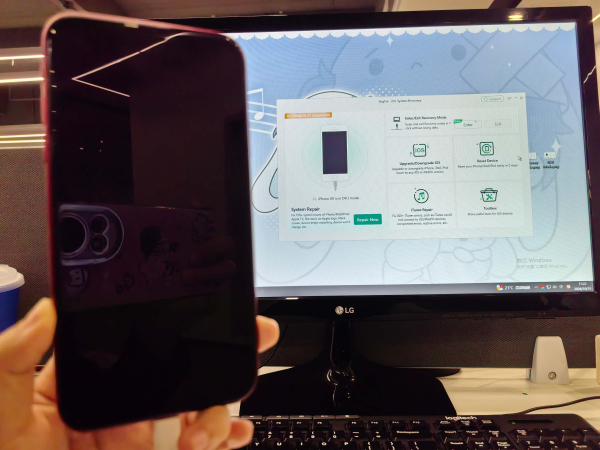
Example of how we verified a black-screen device had actually entered DFU Mode during testing.
Where AnyFix Fits in the Process
We develop AnyFix at iMobie, and some of the observations above come from our own QA work on its recovery and system-repair workflows.
AnyFix separates getting the device into the right recovery state from repairing the system.
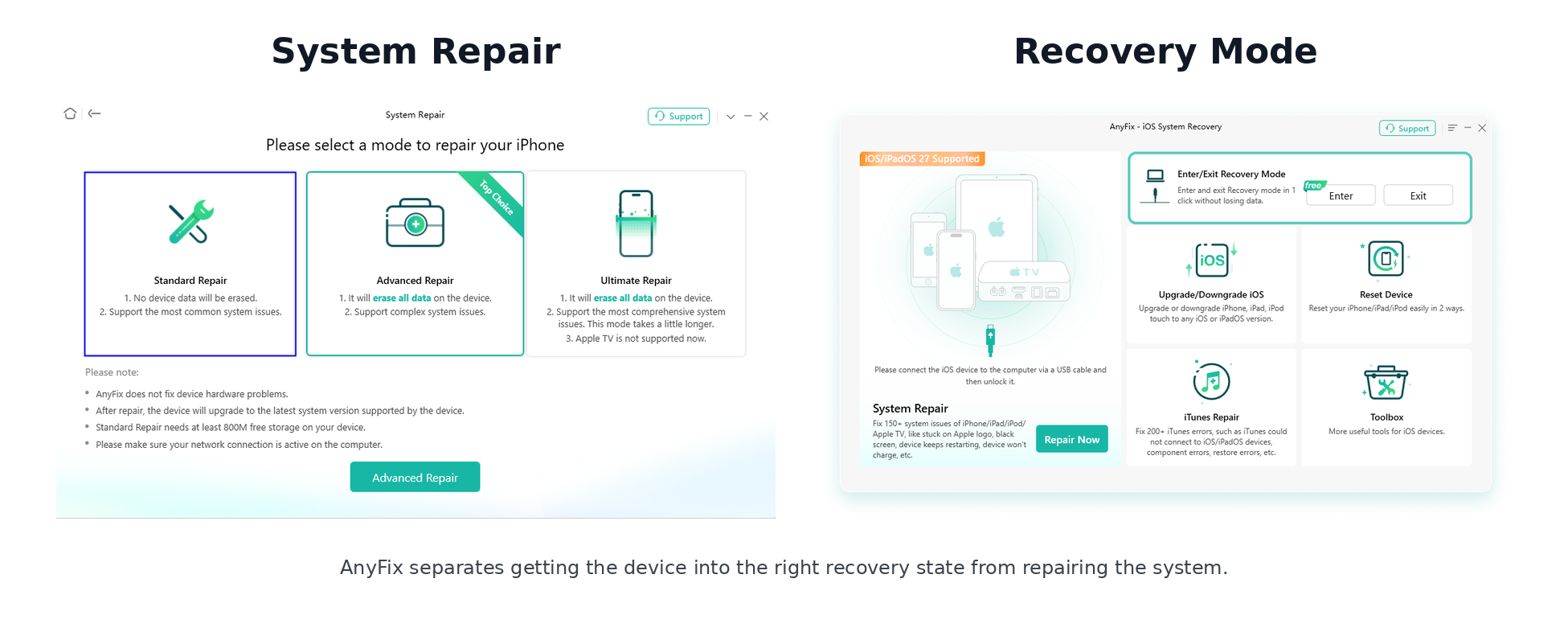
For example, the current software includes a dedicated Enter/Exit Recovery Mode function. It can attempt to place a connected iPhone, iPad, or iPod touch into Recovery Mode and can also exit Recovery Mode. If automatic entry does not work, the software provides manual instructions instead of treating that as proof that the device cannot be recovered.
The software also distinguishes Recovery Mode from DFU Mode. A device already in DFU Mode is treated differently from one in normal Recovery Mode, and some deeper repair workflows require DFU before they can continue.
AnyFix also separates repair options according to their data impact. The current interface describes Standard Repair as a repair mode designed not to erase device data, while Advanced Repair and Ultimate Repair warn that device data will be erased.
It also states that hardware problems are outside what the software can repair.
So AnyFix does not make DFU Mode “stronger” and does not bypass Apple’s security protections. Its role is to help manage the recovery and repair process within the states and system rules the device supports.
Can DFU Mode Install Any iOS Version?
No.
DFU works earlier in the startup process, but that does not remove the software authorization rules that apply when iOS is installed or restored.
iOS updates and restores use software signing and authorization checks. When an older iOS version is no longer authorized for a particular device, simply putting the iPhone into DFU Mode does not remove that restriction.
So DFU Mode does not automatically let you install:
- any IPSW file you choose;
- an unsigned version of iOS;
- or any older iOS version that is no longer authorized for the device.
This remains true whether the restore is performed through Apple software or through a third-party system-repair utility.
For the underlying authorization mechanism, see Apple Platform Security: Secure software updates.
Can DFU Mode Access Data on a Locked iPhone?
No. DFU Mode changes how the iPhone can be restored; it does not unlock encrypted personal data.
An iPhone can be in Recovery Mode or DFU Mode while its passcode-protected photos, messages, notes, and other personal files remain inaccessible.
Additional protections apply to encryption keys during alternative boot states so that Recovery Mode and DFU Mode do not become another route around the device passcode.
This creates an important distinction:
System recovery and data access are not the same thing.
An iPhone may be restorable even when the original passcode-protected local data cannot be read or preserved.
For the underlying security mechanism, see Apple Platform Security: Protecting keys in alternate boot modes.
What If Recovery Mode or DFU Still Does Not Work?
If the iPhone cannot enter the intended mode or a later repair fails, first identify which stage is causing the problem.
If the device cannot enter Recovery Mode or DFU Mode, check the device-specific button sequence, timing, cable, USB connection, and whether the computer can detect the iPhone.
If the mode is entered successfully but the Update, Restore, or repair fails later, the problem may instead involve the computer, network connection, firmware download, software authorization, or the device itself.
If the issue is caused by damaged hardware, changing between Recovery Mode and DFU Mode will not fix the underlying fault.
This is why repeatedly trying a “deeper” mode is not always the right response. The better approach is to identify where the recovery process is failing.
The Key Point: A Recovery Mode Is Not the Recovery Result
Recovery Mode and DFU Mode give the recovery process different starting points, but neither mode determines the final result by itself.
The simplest way to understand the process is:
Entry Procedure → System State → Repair Action → Outcome
When something goes wrong, ask:
- Did the device actually enter the intended mode?
- Which recovery state is available?
- What action is being performed from that state?
- And what will that action do to the system and local data?
Those questions are much more useful for deciding what to try next than simply asking whether DFU Mode is “stronger” than Recovery Mode.


 AnyFix