Understanding the Disney Plus Download Limit: Rules, Expirations, and Offline Alternatives
Disney+ downloads are limited to 10 mobile devices, require online check-ins, and expire after playback starts. Official downloads are not available on Mac or PC. For flexible offline viewing, Keeprix helps save accessible Disney+ videos as local MP4/MKV files for personal use.
The official Disney Plus download limit restricts offline viewing to a maximum of 10 supported mobile devices. Additionally, downloaded videos require the device to connect to the internet at least once every 30 days, and once you start playing a downloaded title, it expires in 48 hours. Currently, official downloads are not available on Mac or Windows desktop computers. Understanding these exact numbers is critical before preparing your offline media to watch Disney Plus offline during a long trip or commute.
Deep Dive: Disney Plus Offline Viewing Rules Explained
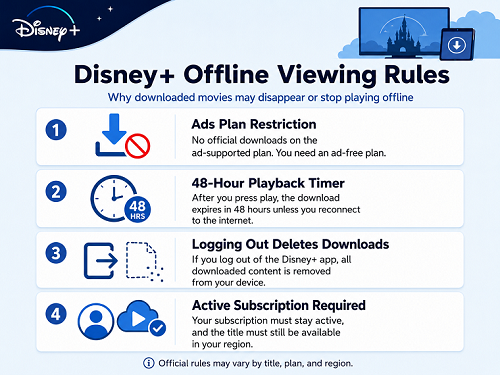
To understand exactly why your downloaded Disney Plus movies might disappear or fail to play offline, it is important to review how the platform’s rules affect your device. Here is a checklist of the official offline viewing rules:
- The Standard with Ads plan restriction: Official offline downloading is completely if you are subscribed to the ad-supported tier. You must have an ad-free plan.
- The 48-hour playback timer: Once you tap ‘play’ on a downloaded movie or episode, a hidden countdown begins. You have exactly 48 hours to finish watching before the download expires and requires an internet connection to renew.
- The immediate logout trap: If you log out of the Disney+ app for any reason, all downloaded content is instantly and permanently deleted from your device.
- Active subscription requirement: You must maintain an active Disney+ account, and the specific title must still be available on the streaming platform in your region for the download to remain valid.
Why App-Only Limits Can Ruin Your Travel Plans
These official limits might seem reasonable at home, but they frequently create frustrating friction when you are actually traveling and relying on offline media. Consider how these app-only rules impact real-world situations:
- Scenario 1: The Long Flight Return. You download a few movies for a round-trip vacation. You watch half of a movie on the flight there, fall asleep, and try to finish it on your return flight three days later. Because of the 48-hour playback timer, the movie has already expired and will not play without an internet connection.
- Scenario 2: Laptop Viewing. You want to watch a new release on the larger screen of your Mac or Windows laptop while commuting. You quickly realize there is no official download feature for desktop computers, leaving you stuck watching on a small phone screen.
- Scenario 3: Unreliable Hotel Wi-Fi. You download a full season of a show for an extended trip, but the remote hotel Wi-Fi blocks streaming services. Because your tablet cannot complete its required 30-day online ‘check-in,’ your entire offline library suddenly becomes locked.
When you need reliable offline entertainment, these app-locked expirations highlight the need for a more flexible, file-based desktop workflow.
How to Save Disney Plus Videos as Local Files on Mac and PC
If you are restricted by the 48-hour expiration timer or the lack of official PC and Mac support, Keeprix Video Downloader offers a desktop alternative. Keeprix helps you turn videos you can already access into flexible local files, giving you a “File to Freedom” workflow for personal offline viewing.
Advantages of Keeprix:
- Save videos you can already access for personal offline viewing.
- Watch video offline on Windows or Mac.
- Reduce reliance on app-only downloads that may expire.
- Organize MP4/MKV files in local folders.
- Keep available subtitles and audio tracks when supported.
By saving your accessible Disney+ movies and shows as MP4 or MKV files, you can build a personal offline library that does not expire mid-flight.
Here is how to prepare your watchlist:
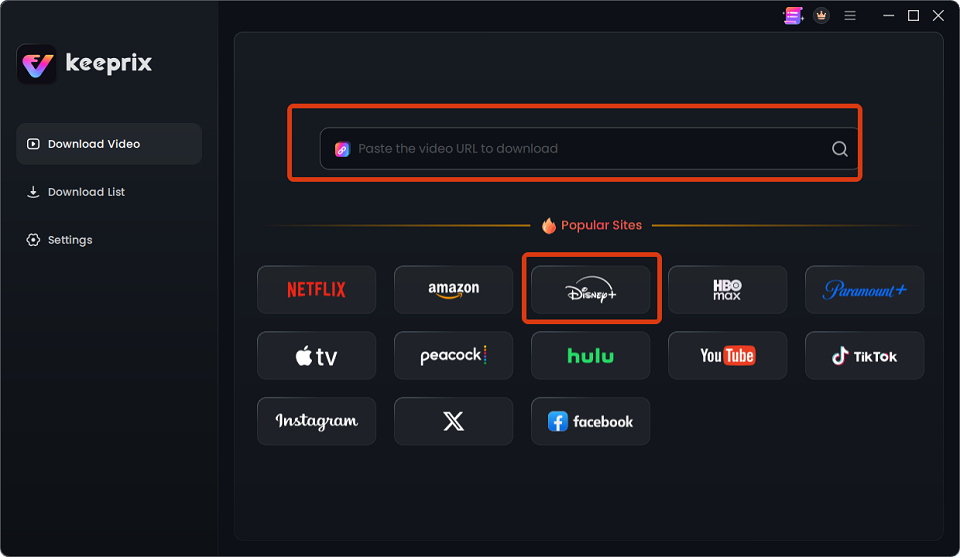
Step 1: Open Keeprix on your Windows or Mac computer and select Disney. You can also paste the link of the video you want to download into the search box.
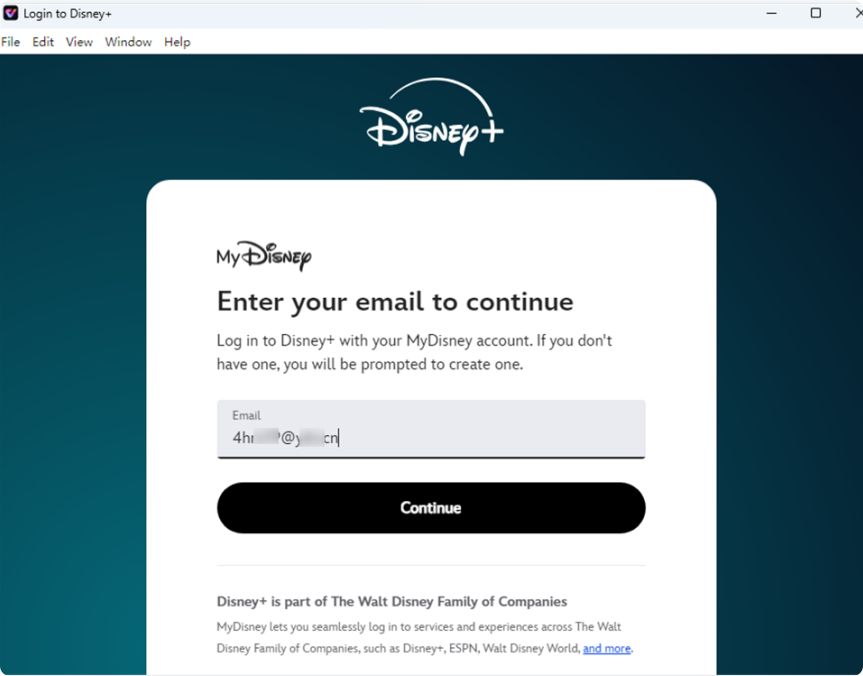
Step 2: Use the built-in browser to log into your active Disney+ account (you still need a valid subscription and access to the title you want to save).
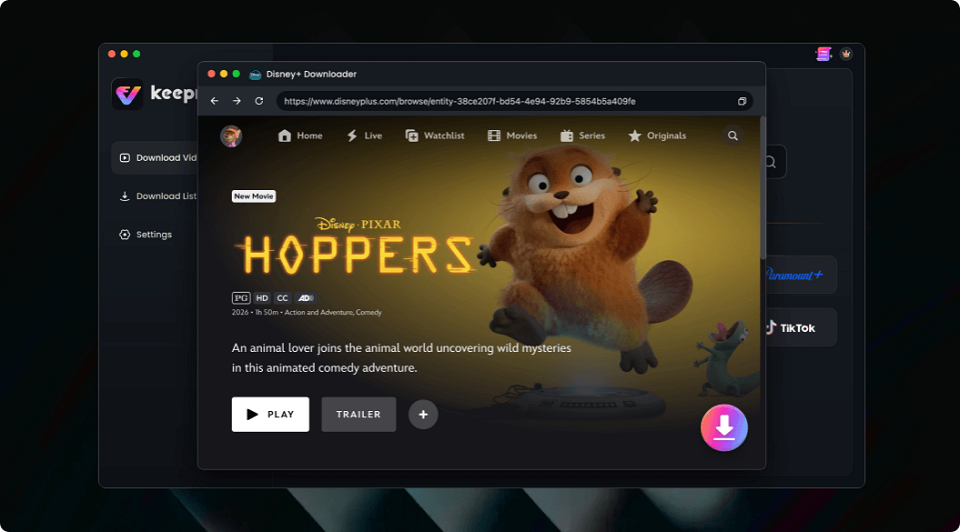
Step 3: Select the video. Keeprix supports up to 4K resolution, but only when that source quality is actually available for the title.
Step 4: Choose MP4 or MKV as your output format so the file plays easily on your preferred media player or cross-device setup.
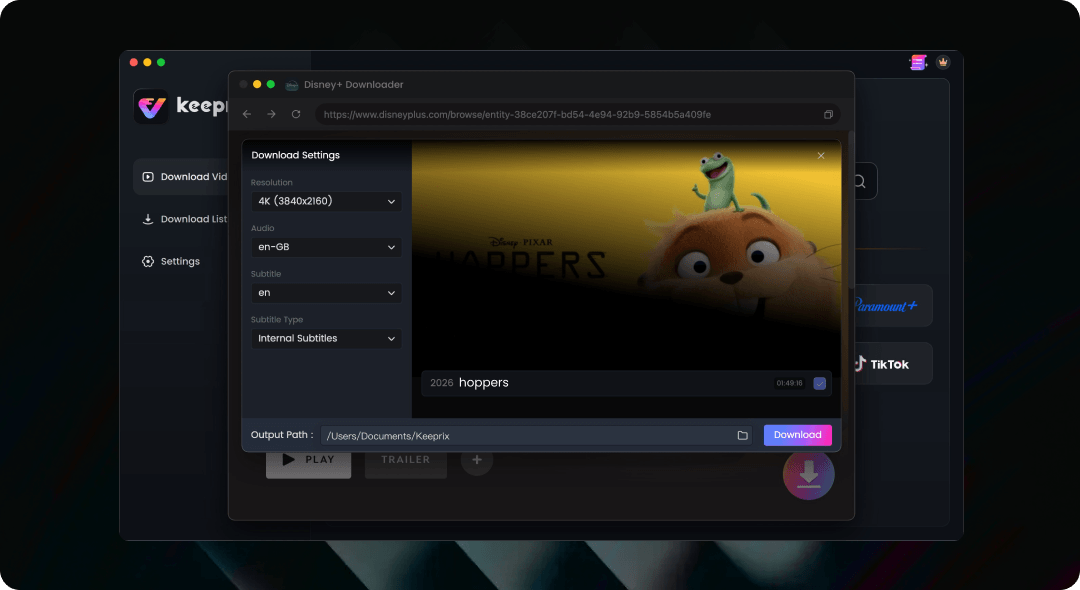
Step 5: Start the download to save the file locally without the trial download quota limits.
Instead of relying on an app-locked system, this local-file workflow gives you the freedom to store, organize, and watch your media on the screens you actually use.
Comparison: Official App Downloads vs. Keeprix Desktop Workflow
To see exactly how a local-file workflow compares to the official mobile app, here is a transparent breakdown of your offline viewing options:
| Feature | Official Disney+ App | Keeprix |
| Supported Devices | Max 10 mobile devices/tablets (No Mac/PC) | Windows and Mac computers |
| Expiration Rules | 30 days (unopened) / 48 hours (after playback) | Local files do not have platform expiration timers |
| File Format | Hidden, app-locked cached files | Standard MP4 or MKV files |
| Playback Flexibility | Restricted to the Disney+ mobile app | Play anywhere across compatible media players and devices |
While the official app is perfectly fine for casual mobile viewing on a daily commute, preparing for extensive travel or watching on a laptop requires the flexibility of standard MP4 and MKV files.
Frequently Asked Questions
1.How many devices can you download Disney Plus movies on?
You can officially download Disney Plus content on up to 10 supported mobile devices or tablets at the same time.
2.Can I download Disney Plus on Mac?
Officially, no. The Disney+ platform does not support offline downloads for Mac or Windows computers. To watch offline on a laptop, you need a desktop tool like Keeprix to save accessible videos as standard MP4 or MKV files.
3.Does Keeprix require an account to save Disney+ videos?
Yes. Keeprix is primarily used to help users save their available Disney+ content from their accounts to their computers. You still need a valid Disney+ subscription and should only use the downloaded content for personal offline viewing.
4.Does the Disney Plus ad plan allow downloads?
No. The Disney+ Standard with Ads plan does not support official offline downloads. You must upgrade to an ad-free tier to download Disney Plus movies on mobile devices.
Final Thoughts: Get Your Watchlist Ready Before You Travel
Understanding the 10-device limit and strict 48-hour expiration rules is the best way to prevent your offline movies from disappearing mid-trip. For mobile users on short commutes, carefully managing the official app works perfectly well. However, if you are planning a long flight, heading into an area with poor internet, or simply wanting to watch on a Mac or PC, app-only restrictions can quickly disrupt your viewing plans. For PC and Mac users wanting a flexible alternative, Keeprix provides a reliable way to save your accessible videos as MP4 or MKV files without worrying about platform expiration timers. Get your offline watchlist ready before you leave to ensure uninterrupted viewing wherever your travels take you.



Joy Taylor is a seasoned technical writer with over a decade of experience in mobile technology. At iMobie, she specializes in producing in-depth content on iOS data recovery, iPhone unlocking solutions, and iOS troubleshooting.
Product-related questions? Contact Our Support Team to Get Quick Solution >
