How to Download Max Shows & Movies to Watch Offline
You can download HBO Max shows and movies with the official app on Android, iOS, or an Amazon Fire tablet. However, downloads from the official app come with certain restrictions. Then you can use a specific Max downloader to save videos without limits. Check this article and learn how to get HBO Max video download in 2 methods.
Many people love watching their favorite shows and movies on different online platforms such as Max, but not everyone can stay online all the time. That’s why you search for ways to download HBO Max videos and watch them offline. To download shows and movies from Max, you can use the built-in download feature directly. The download function is available for limited devices only. Computer and TV users cannot save content directly from Max.
But no worries, some third-party tools like Keeprix Max Downloader, allow you to get HBO Max video downloads on a computer. This guide will explain how to download Max videos with the official app or using a video downloader, as well as share their benefits and restrictions to help you choose easily.
HBO Max Video Download Requirements
Users can download Max videos on supported mobile devices, including iOS and Android devices, or choose the Amazon Fire tablets. With its download feature, users can save titles on supported devices, but they need the latest Max app and enough storage space. The device also has to meet the basic system requirements so downloads and playback work smoothly.
The ability to download depends on the subscription plan you opt for. Users with Ad-Free or Ultimate Ad-Free plans can download shows or movies to watch offline, while the Ads plan does not offer this option. The Ad-Free plan allows up to 30 downloads across devices, while the Ultimate Ad-Free plan offers up to 100. Downloaded titles remain available for a limited period or expire sooner due to content licensing rules.
| Subscription Plan | Video Download | Price |
| Basic with Ads | Not Supported | $9.99/month or $99.99/year |
| Standard | 30 Titles | $16.99/month or $169.99/year |
| Premium | 100 Titles | $20.99/month or $209.99/year |
How to Download Max Shows/Movies in App
Now that the requirements are clear, it’s time to see how the HBO Max video download works in the app. This section will guide users through the official steps to save shows and movies for offline viewing:
Step 1: Log in To Your HBO Account
Start by installing the HBO app from the Play Store or App Store to provide your credentials in the respective fields and press the Sign in button. If you do not have an account, opt for the Sign up button and create your new account.
Step 2: Select your Desired Show/Movie
Initiate the process by logging in to the account, selecting the desired movie or show, and opting for the Download button.
Step 3: Navigate to the Save Titles
The downloading process will take some time, depending on your internet connection. Once completed, navigate to the home page and opt for the Account icon button to find your saved titles.
Step 4: Access the Downloaded Items
From your accounts page, navigate to the Downloads section and opt for your saved videos. After this, users can watch these videos without needing an internet connection.
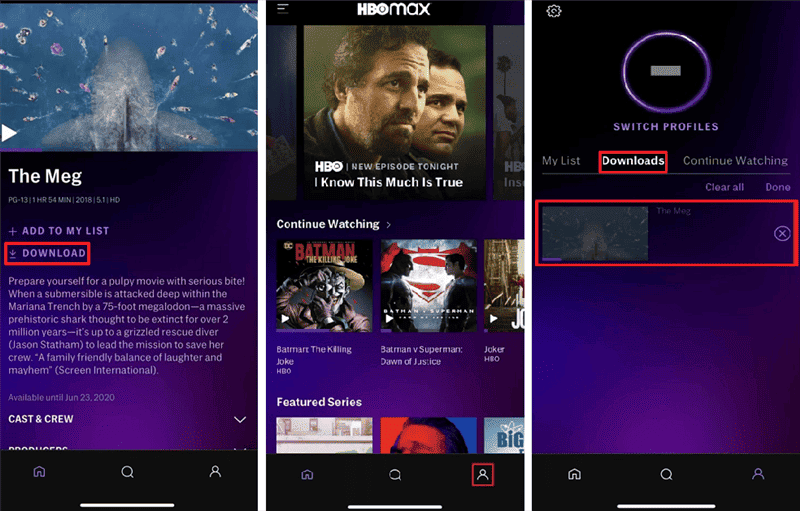
Download Max Videos in App
That’s all it takes to download shows and movies directly within the Max app. By following these steps, users can enjoy their favorite titles offline at any time, making it easier to watch on the go without worrying about internet access.
How to Download Max Shows/Movies on Computer
Unlike the mobile app, HBO Max does not allow users to download shows or movies directly to a computer, which can be limiting for those who prefer watching on a larger screen or saving content for offline access. This is where Keeprix becomes a reliable HBO Max video downloader for PC and Mac, allowing you to bypass Max download limits and save titles in high quality.
With Keeprix Downloader, you can download HBO Max videos regardless of your subscription plan. It supports downloading shows or movies from Max with a basic ad-supported plan to the premium one. Below are the steps to use Keeprix for downloading Max shows and movies on your PC and Mac.
Step 1: Download and install the Keeprix Downloader
Go to the Keeprix official website and download Keeprix Downloader. Then install it on your Windows or Mac computer. Once done, access the tool and opt for the Max from the home screen.
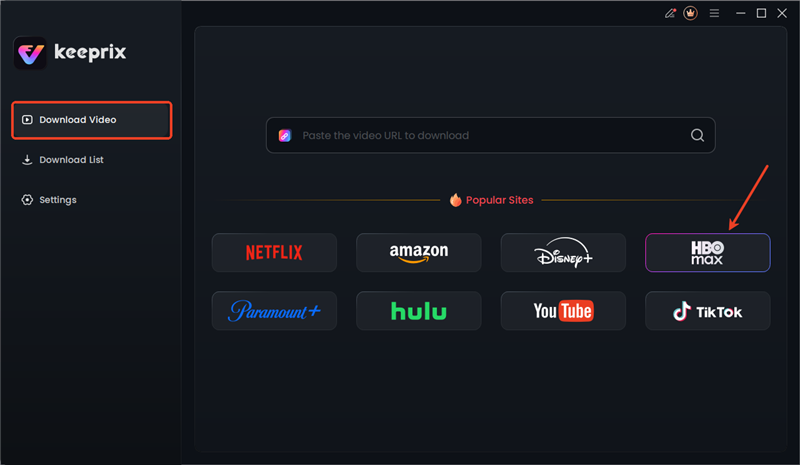
Choose Max in Keeprix
Step 2: Log in To the HBO Account
After that, a new screen will open where you have to provide the credentials for your Max account and select the Sign in button.
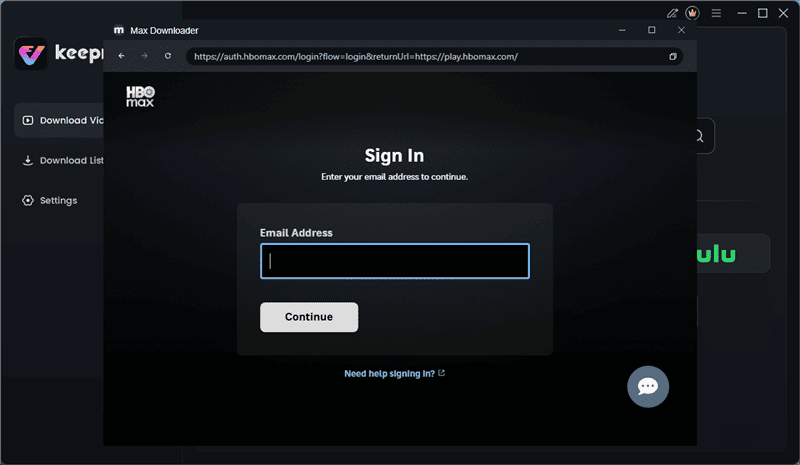
Sign In to Max in Keeprix
Step 3: Select Your Desired TV or Movie
Moving on, choose your desired show or movie, and a new screen will pop up. On that screen, select the Download button to start the process of downloading.

Download Max Videos in Keeprix
Step 4: Navigate to the Downloaded Files
Go back to the Keeprix home page and click on the Download List button located on the right side. Here, you can pause or cancel the files that have been added to the queue.

Access Max Downloads in Keeprix
With Keeprix, saving Max content on your computer becomes simple and hassle-free. Once your downloads are complete, you can build your own offline library and enjoy uninterrupted viewing whenever you like.
Downloads from Keeprix are allowed for personal use only. Don’t transfer the saved shows or movies to others.
FAQs About HBO Max Video Download
1. Can I download movies from HBO Max on my laptop?
No, HBO Max does not allow users to download movies on laptops because the feature is limited to only mobile devices. Its supported devices include iPhones and Android phones. Moreover, this restriction is due to licensing rules and the lack of app support for computers.
2. Why is there no download option on HBO Max?
The button may be missing due to multiple reasons, one of which can be if the selected movie or show is not available for offline viewing. It can also disappear when a user has a plan that does not allow downloads. Subscription type and content licensing directly decide whether the option appears in the app.
3. What shows and movies can be downloaded on Max?
Multiple titles from the app users can be saved if they display the download icon next to them. Users can face the problem as some content may still be unavailable due to regional or licensing restrictions. Apart from this, users should always check the icon before attempting to save any title offline.
Conclusion
In short, HBO Max video download lets users save selected shows and movies for offline access on supported devices. This feature works with eligible subscription plans, offering more control over when and where to watch. Users can keep entertainment ready without relying on internet access or speed. Opt for HBO Max now to enjoy uninterrupted access to movies and series anytime and anywhere.



Joy Taylor is a seasoned technical writer with over a decade of experience in mobile technology. At iMobie, she specializes in producing in-depth content on iOS data recovery, iPhone unlocking solutions, and iOS troubleshooting.
Product-related questions? Contact Our Support Team to Get Quick Solution >
