How Long Do Amazon Prime Downloads Last & How to Extend
Find out how long do Amazon Prime downloads last and why they expire. Learn how to check viewing time. This guide also reveals two easy ways to keep Netflix videos longer. You can redownload titles or use Keeprix Video Downloader to save Amazon Prime Videos in MP4 format without any download limits.
Ever wondered how long Amazon Prime downloads last once they’re saved? You’re not alone. Many people open the app ready to watch, only to find their show or movie has expired. It’s annoying, especially if you travel often or have a weak internet connection. The good news is you don’t have to stick to those limits. This blog explains the time limits for Amazon Prime downloads and shares simple ways to extend them. By the end, you’ll know exactly how to make your favorite shows and movies stay on your device and ready to watch.
How Long Do Amazon Prime Downloads Last Before Expiring?
Download times on Amazon Prime Video vary depending on your membership status and the content you are downloading.
For Videos Included with Prime Membership
They are similar to rented videos. After downloading them, you have 30 days to start watching. Once you hit play, you will have 48 hours before the video expires. Moreover, if your Amazon Prime membership lapses, any content will disappear, regardless of whether it’s expired, unless you re-subscribe.
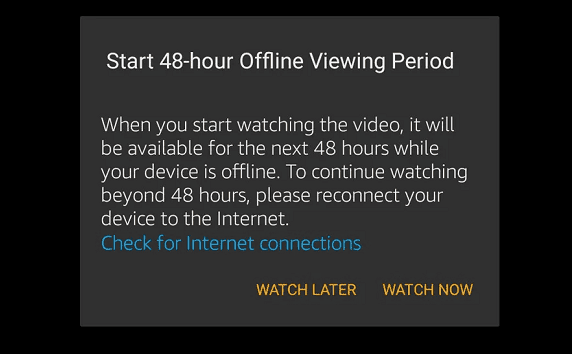
Prime Video Downloads Viewing Period
For Rented Videos
If you have rented Amazon Prime videos, you can download them within 30 days of payment. Once you have started downloading the videos, you have 48 hours to play them back. Remember to finish watching videos before the expiration date. Otherwise, your downloaded videos will be deleted from your Amazon Prime account when the 30-day period ends.
Tips: How to download Amazon Prime rented videos
For Purchased Videos
If you have purchased Amazon Prime videos, don’t worry about expiration. There are no time limits for purchased Amazon Prime videos; you can download them at any time for offline viewing. However, according to your agreed-upon terms and conditions, Amazon Prime can delete the downloaded videos under specific circumstances. Although this is rare, being mindful of the facts would be beneficial.
How to Check the Offline Viewing Period for Amazon Prime Downloads
You can easily check the remaining viewing period by going to the download page. Below are the steps
Step 1: First, open Amazon Prime Video and head to the “Downloads” or “Offline” section.
Step 2: Here you can find your downloaded videos. Now, tap on the three-dot icon.
Step 3: Check the remaining viewing period for your downloaded video.
How to Extend the Offline Viewing Period
Want to keep your favorite Prime Video shows longer? You’re not stuck with the default limits. A few simple tricks can help you extend the duration of your downloads. Below are two easy methods you can try right now.
Method 1. Re-download the Content
Redownloading the content will help you extend the offline viewing period. Here is how you can re-download the content on Amazon Prime Video.
Step 1: Firstly, open the Prime Video application on your device.
Step 2: Go to the “Downloads” section from the bottom menu. Find the movie or show you want to re-download.
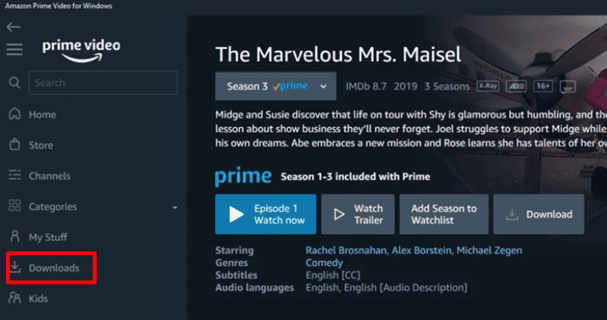
Access Downloads in Prime Video App
Step 3: If it’s not found, search for the title using the search bar. Finally, click the Download button next to the title.
Step 4: Choose video quality if prompted, then wait for it to finish.
Method 2. Download Prime Video to MP4
Another way to prolong your offline viewing time is to download Prime Video to MP4 format. This eliminates the built-in expiry restrictions and allows you to retain your shows or movies as long as you wish. Keeprix Downloader makes this easy. It is an easy-to-install Windows and Mac app that downloads Amazon Prime in MP4 file format. The tool maintains the original quality, audio tracks, and subtitles.
You can pick the resolution you want, batch download episodes, and keep them on your device without worrying about your membership status. By using Keeprix Downloader, you’re not tied to the 30-day or 48-hour rules. Your videos stay with you and are always ready to watch.
Standout Features of Keeprix Downloader:
- Download streaming videos in MP4/MKV format without DRM protection or expiration dates.
- Offers fast video downloading speed without lag and latency.
- Download streaming videos from Netflix, Amazon Prime, Disney Plus, Hulu, and Max (HBO Max).
- Allows you to download streaming videos without restrictions (time limit or geographical restrictions).
- Download up to 4K videos from social media platforms like YouTube and Instagram.
Steps to Download Amazon Prime Videos Using Keeprix Downloader:
Step 1: First, go to the Keeprix official website and install Keeprix Video Downloader on your Windows or Mac.
Step 2: Launch the software, select Amazon from the main screen. You can also paste the Amazon Prime Video link to access your favorite content directly.
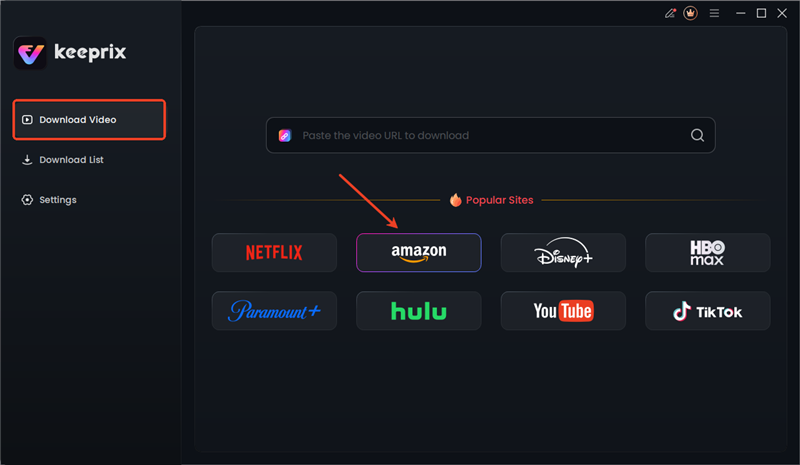
Choose Amazon in Keeprix
Step 3: It will prompt you to log in to your Prime Video account. Simply enter your account information and log in.

Sign in to Amazon Prime Account in Keeprix
Step 5: After logging on, find the desired show and download it. Alternatively, you can access it directly by pasting the Amazon Prime Video link. Next, click the download icon.
Step 6: Complete Resolution, audio, and Subtitle type and output path settings. Now, you can choose to download, and this starts the process of downloading.
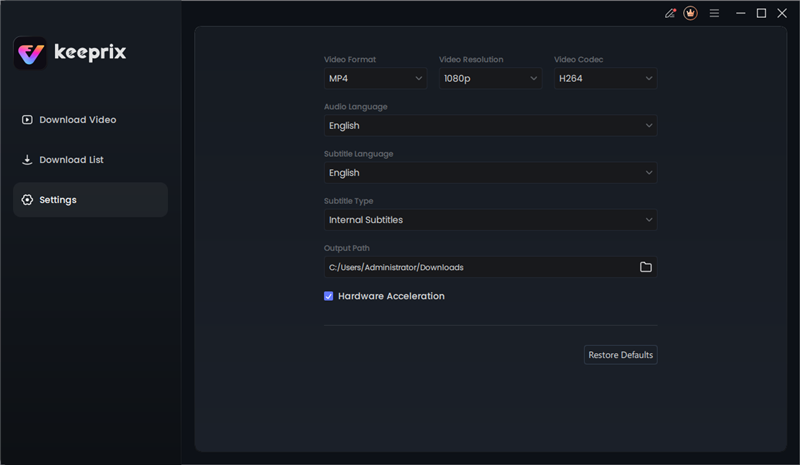
Keeprix Download Settings
Step 7: Keeprix Downloader will begin downloading your video from Amazon Prime. There are also options to cancel, pause, or redownload. Once the video is downloaded, you will see it under the Completed tab.
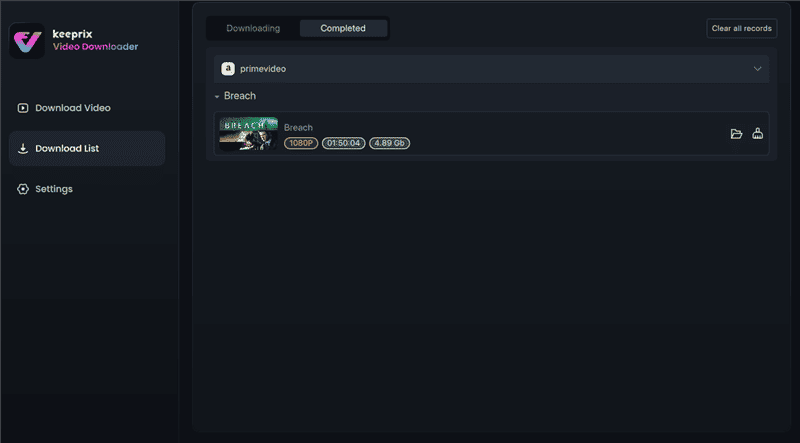
Access Prime Downloads in Keeprix
Conclusion
Understanding how long Amazon Prime downloads last allows you to have better control of offline viewing. The majority of titles follow the 30-day rule and the 48-hour rule. But you can extend access by re-downloading or saving MP4 files with Keeprix Video Downloader. For uninterrupted viewing, use Keeprix Downloader. Keep your favorite shows and movies without expiration concerns.



Joy Taylor is a seasoned technical writer with over a decade of experience in mobile technology. At iMobie, she specializes in producing in-depth content on iOS data recovery, iPhone unlocking solutions, and iOS troubleshooting.
Product-related questions? Contact Our Support Team to Get Quick Solution >
