Why Netflix Downloaded Title Says Expired & How Long It Lasts
Netflix downloads don’t last forever. Most titles stay for 30 days, but once played, they can expire in 48 hours to 7 days. They may also disappear if removed from Netflix. In this blog, you’ll learn why downloads expire and the best ways to keep watching offline.
Ever noticed your favorite Netflix downloads suddenly expire? It can be frustrating when you’re offline and ready to watch. Many users ask, how long do Netflix downloads last and why do they disappear so quickly. The truth is, Netflix sets limits on how long a title stays available. But don’t worry!
There are some smart ways to handle this issue. In this blog, we’ll explore how long Netflix downloads last, why they expire, and what you can do to keep watching offline without interruptions.
“I lost track and have a number of movies to watch that expire 12/31/24. If I download them I know they will be removed on the expiration date. If I download them and put that device in airplane mode (take it offline) do you think I would still be able to watch them knowing they would be deleted the next time the device is online? I figured someone must have tried this by now. Thanks.” – A user asked on Reddit.
How Long Do Netflix Downloads Last?
Due to Netflix download limits, for ad-free Netflix subscribers, the downloads are set to last between 48 hours and 7 days. Unwatched Netflix downloads remain available for 30 days. However, once you click the start button, they will expire in 48 hours to a maximum of 7 days.
When the download expiration limit is less than 7 days, Netflix will show how much time the download has left beside the title on the download page of the app. Also, you can lose the downloads in case the movie or the show is removed from Netflix, or it becomes unavailable due to expired copyright.
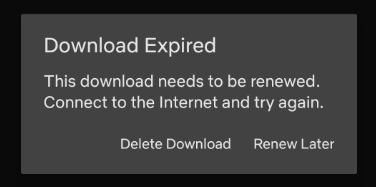
Netflix Download Expired
Why Does Netflix Set Expiration Dates for Downloads?
Netflix downloads expire mainly due to licensing agreements, piracy prevention, DRM content protection, and to encourage continuous subscriber engagement. You can check the details in the following part.
1. Licensing Agreements:
Netflix licenses content for a specific duration. As the license expires, the downloads will become unavailable. Netflix rents the movies from the creators for a specific period. After the term ends, you won’t see the title in your downloads.
2. Content Protection (DRM):
The Digital Rights Management makes sure that the downloads cannot be shared or copied indefinitely. Netflix DRM policy also states that the platform has to remove the downloads after a specific time. Therefore, you stop seeing the video after some time.
3. Piracy Prevention:
Netflix download expiration minimizes piracy. If there is no expiration, the video may stay there for an indefinite time, which may increase the risk of unauthorized distribution.
4. Subscription Retention:
The regular expiration encourages subscribers to subscribe again and boost engagement.
What To Do If Netflix Downloads Expire?
There are 3 methods to help you extend Netflix downloads or keep the content offline without expiration, including downloading Netflix videos to MP4, re-downloading the titles, or upgrading your subscription plan. Check the instructions and enjoy better offline watching from Netflix.
Method 1. Download Netflix to MP4 and Keep Forever
The best way to avoid expiration is to save Netflix videos in MP4 format. Netflix does not offer this feature, but Keeprix Netflix Downloader makes it possible. With it, you can download movies and shows as MP4 files in 1080p. MP4 downloaded files work on any device, be it a computer, phone, tablet, or TV.
Once saved, the videos stay with you forever. No expiry dates. No sudden deletions. You can watch them offline whenever and wherever you like. Keeprix Video Downloader also supports subtitles, multiple languages, and smooth playback. It’s a simple solution to keep your Netflix library permanent.
Key Features of Keeprix Downloader:
- Download Netflix content in up to 1080p quality with no limits.
- Save Netflix movies/shows on a Windows or Mac computer without the Netflix app.
- Keep downloads forever, even after Netflix’s 30-day expiry.
- Download the videos with audio and subtitles as you want.
- Fully compatible with Windows & Mac, and also supports Amazon Prime, Disney+, Hulu, and Max (HBO Max).
Steps to Download Netflix Videos using Keeprix Downloader:
Step 1. Download and install Keeprix Downloader from the Keeprix official website. Launch it and select Download Video from the left. Then, choose Netflix or paste the video link in the search box.
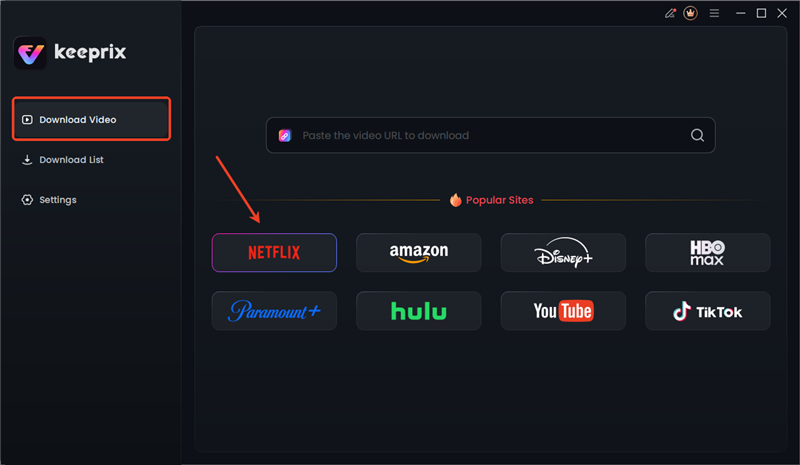
Choose Netflix in Keeprix
Step 2. Keeprix Video Downloader guides you to the built-in streaming feature on Netflix. Enter your Netflix details here to log in.
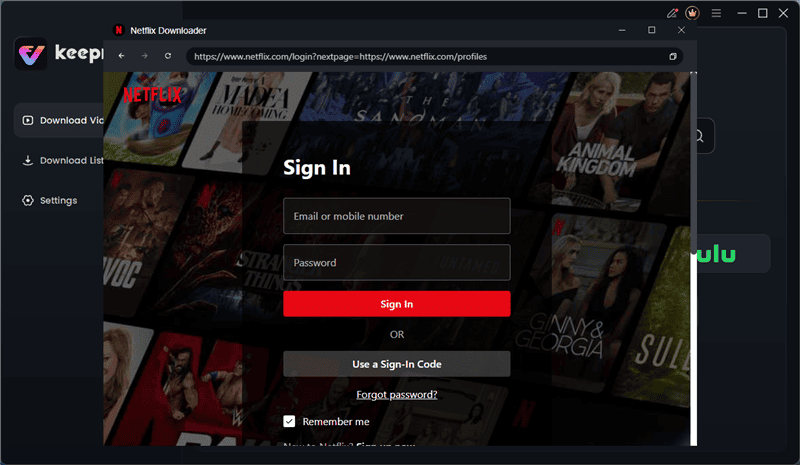
Log in to Netflix in Keeprix
Step 3. Begin by searching for your favourite Netflix shows or films to download. If you do have a Netflix link, then just enter it into the search box to get a quick shortcut.
Step 4. Choose your favorite Netflix video from the search results. This will open the playback page. From here, click the Download icon.
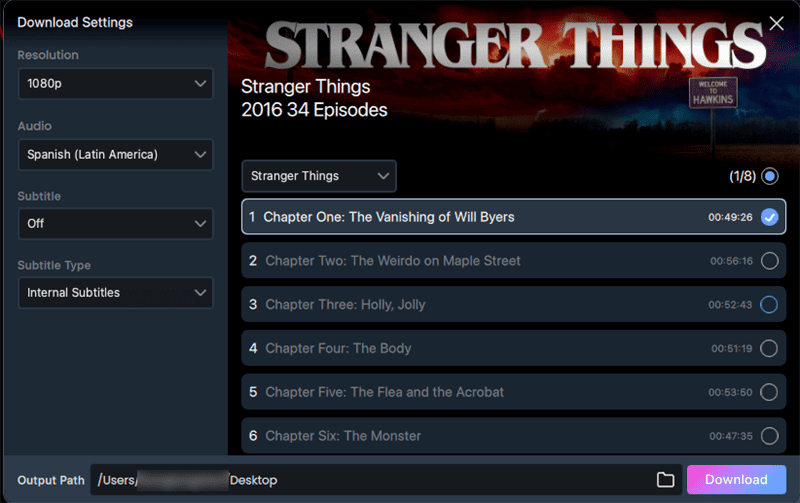
Download Netflix Video in Keeprix
Step 5. Select your favorite video resolution, audio language, and type of subtitle (internal or external) of the video. Next, select your File Save Location and download.
Step 6. Your download will start. You can track it in the Download List menu on the left.
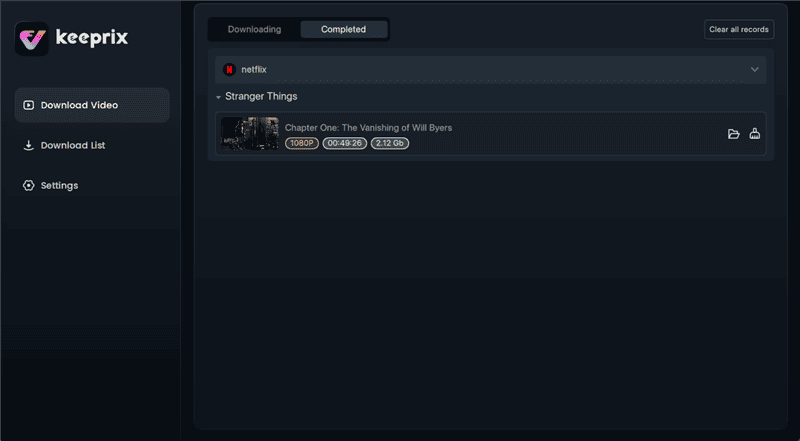
Netflix Downloads in Keeprix
The downloads from Keeprix are MP4 or MKV format, which allows you to keep them forever. You can watch the content offline on any player or transfer the videos to your mobile or tablet. Please note that you can’t share the offline content with others or use it commercially. Keeprix Downloader is for personal use only.
Method 2. Re-download the Titles
When your Netflix download expires, it won’t play. But you can re-download it in case the title is available. In older Netflix applications, there was a re-download button that appeared next to expired videos. You just tapped it to refresh the file.
In new apps, that button is gone. If the title has left Netflix, you cannot download it again. To re-download a working title:
Step 1: Open the Netflix app. Use the search bar to find the movie or show.
Step 2: Tap the download icon and wait for the video to save again. Now you can watch it offline once more.
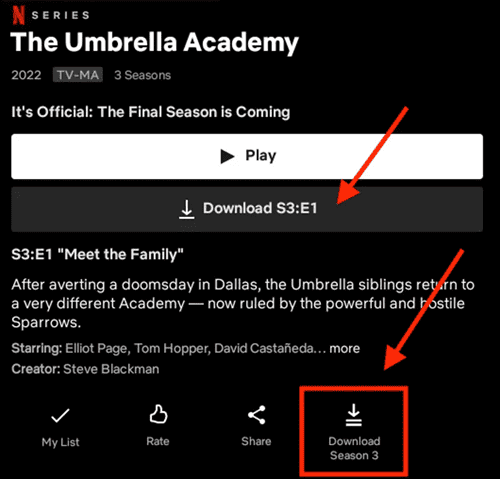
Download Netflix Videos in App
Method 3. Upgrade Your Subscription Plan
Sometimes, your Netflix downloads expire due to the invalid status of your subscription plan. In this case, you can upgrade your Netflix plan to resolve download problems. The more advanced plans entitle you to work with more devices and experience faster downloads. The premium plans further provide you with the flexibility of viewing offline.
Here is how you can upgrade or change your plan on Netflix:
Step 1: To begin with, visit Netflix on the app or the site. Go to Your Account settings.
Step 2: Scroll down to Plan Details and select Change Plan.
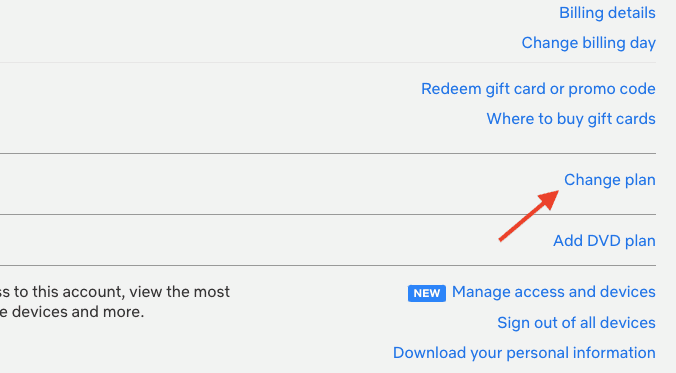
Upgrade Netflix Subscription Plan
Step 3: Select your plan – Basic, Standard, or Premium. Click Save and confirm it.
Once updated, your new plan takes effect right away. This means more devices, more downloads, and fewer restrictions. It’s a simple way to keep watching without interruptions.
FAQs About Netflix Download Limits
1. How to make Netflix downloads permanent?
Netflix downloads always expire. The only way to keep them forever is to save them in MP4 format. You can use Keeprix Video Downloader for this. It lets you download Netflix videos as MP4 files and keep them on any device without limits.
2. When you download a movie on Netflix, does it stay forever?
No. Netflix downloads expire after some time. Some downloads last between 48 hours and 7 days. You’ll need to re-download to watch again.
3. Can I download Netflix videos without expiring?
Not within the Netflix app. All downloads expire sooner or later. To avoid this, you need a third-party tool like KeeprixVideo Downloader to save videos permanently.
Conclusion
Now you know how long Netflix downloads last and why Netflix sets the expiration time for downloaded content. Most titles stay for 30 days if unwatched. But once you press play, they can expire within 48 hours to 7 days. If that feels too limited, you can re-download titles, upgrade your plan, or use Keeprix Downloader to keep them forever. Enjoy offline viewing from Netflix without stress now.



Joy Taylor is a seasoned technical writer with over a decade of experience in mobile technology. At iMobie, she specializes in producing in-depth content on iOS data recovery, iPhone unlocking solutions, and iOS troubleshooting.
Product-related questions? Contact Our Support Team to Get Quick Solution >
