How to Download Netflix Videos for Offline Viewing on Mobile, Windows & Mac
To download Netflix videos for offline viewing, you need the Netflix app on a supported device and an active Netflix subscription. Not all content is available for download due to licensing. If you’re preparing for a flight, commute, or area with poor Wi-Fi, this guide covers both the official app method and a desktop-based alternative for saving accessible videos as local files.
Netflix allows offline downloads for many movies and shows, but only through the Netflix app on supported devices. That means you may be able to download on a phone, tablet, Fire device, or Chromebook, while Mac, TV, browser, USB, and normal MP4 export are not supported by the official app. In this guide, we’ll explain where Netflix downloads work, what limits you may meet, and when a tool like Keeprix Video Downloader can help you create a personal offline library on Windows or Mac.
General Rules to Download Netflix Videos
To protect licensing agreements with studios and content providers, Netflix restricts how its movies and shows can be downloaded and stored. These restrictions are directly tied to digital rights management and regional distribution policies. With that in mind, let’s look at the specific download limits you may encounter when using the Netflix app:
- Supported Devices: Netflix downloads are available in the Netflix app on supported iPhone, iPad, Android, Fire devices, and Chromebooks that can use the Netflix app. Downloads are not available through a normal web browser.
- Active Account: To learn how to download Netflix videos, an active Netflix subscription and account are required. If you cancel or pause your account, all downloads will be deleted.
- Content Availability: Not all movies or shows can be downloaded due to licensing restrictions. Titles from other networks or studios may be blocked, even if they are streamable.
- Plan Limits: Netflix ad-supported plans allow 15 total downloads per device per calendar month. Ad-free plans may allow more active downloads, but the number of download devices depends on your plan.
- Title Limits: Some titles can be downloaded only a limited number of times per year. So, Netflix will warn if you reach the limit.
- Expiration: Downloads expire after a set time, often 48 hours after you begin watching. To watch again, you must reconnect online or re-download the title.
- Stay Signed In: You must remain signed into your Netflix account to access downloads. Kids’ profiles may block higher-rated downloads.
- Device Binding: Downloads are tied to the device used. You can only play a downloaded movie or episode on the same device that downloaded the content.
Method 1. How to Download Netflix Videos on Android and iPhone
Netflix’s mobile app offers offline downloads of TV episodes on iPhone and Android. You can also enable the Download Next Episode feature in settings to grab the following episode while you watch. These mobile features help you keep new content ready for offline viewing. Remember, plan limits like 100 downloads per device, and expiration rules still apply.
Take guidance from these steps to learn how to download Netflix videos:
Step 1. Open the Netflix app and sign in. Tap My Netflix or Downloads.
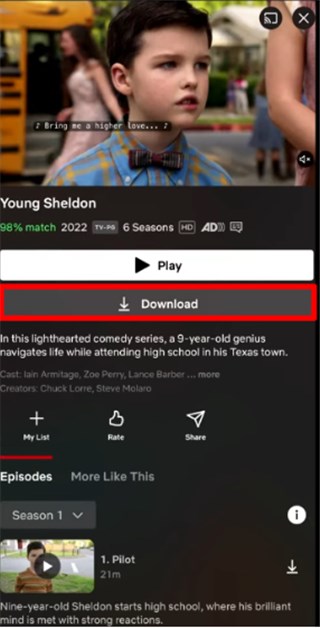
Tap on Download Bbutton
Step 2. Alternatively, tap the Download icon in front of each episode. You can also turn on the Smart Download feature for optimized downloading.
Step 3. Wait for the download to complete and access the My Netflix tab. Now, access the Downloads folder to see all the episodes you have saved.
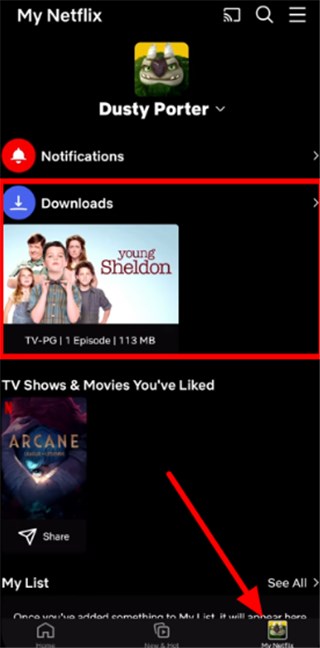
Access Download Folder
Method 2. How to Download Netflix Videos on an iPad
The Netflix app on iPad works just like on iPhone, allowing offline viewing in the device’s Downloads section. Smart Downloads and other features work the same as on mobile. With a larger screen and storage, iPad users can pick higher video quality if desired in Settings.
Follow these steps to download your favorite title:
Step 1. After launching the Netflix app, open the title you want to save for offline viewing and hit the Download button under the title.
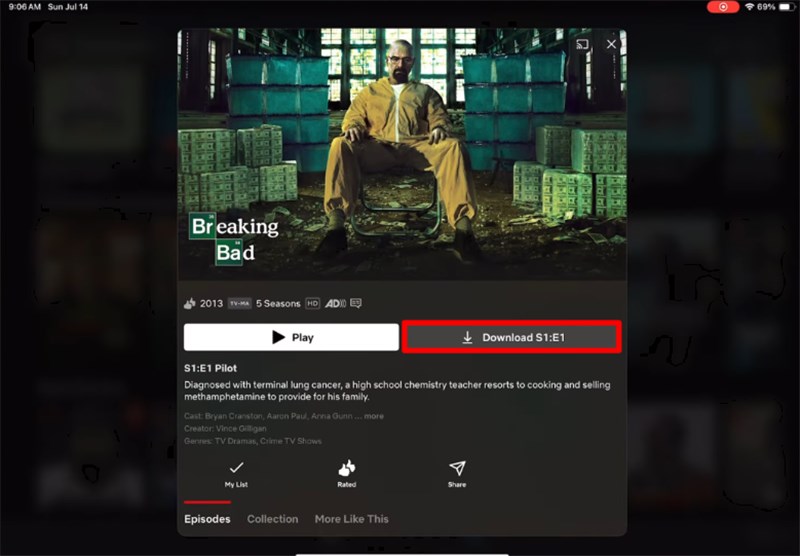
Press Download Button on iPad
Step 2. Now, go to the My Netflix tab and watch the recently saved videos under the Downloads section.
Netflix Official Downloads vs. Keeprix Offline Saving
Netflix allows offline downloads through its official app on supported devices, but those downloads stay inside the Netflix app and come with device, title, plan, and expiration limits. If you want to save accessible Netflix videos as local files on Windows or Mac for personal offline viewing, Keeprix offers a more flexible option.
| User Need | Netflix Official App | Keeprix Offline Saving |
| Download for offline viewing | Available for selected titles on supported devices. | Save accessible Netflix videos on Windows or Mac for personal offline viewing. |
| Watch on Mac | Not supported through the official Netflix app. | Save videos locally on Mac with Keeprix. |
| Watch on Windows PC | Browser downloads are not supported; app support may vary. | Save videos locally on Windows as MP4/MKV files. |
| Export as MP4/MKV | Not supported. Downloads stay inside the Netflix app. | Save videos as local MP4/MKV files for easier playback and organization. |
| Transfer to USB or external drive | Not supported as normal video files. | Save and organize local files on your computer or external drive. |
| Keep subtitles and audio tracks | Depends on the Netflix app and the selected title. | Save available subtitles and audio tracks when supported. |
| Download expiration | Downloads may expire and require renewal inside the app. | Local files are easier to manage for a personal offline library. |
| Best for | Short-term offline viewing inside the Netflix app. | Personal offline library and more flexible local playback. |
Note: Keeprix is intended for personal offline viewing only. Only save videos you can legally access, and do not redistribute, upload, sell, or share downloaded content.
Method 3. Save Netflix Videos as MP4/MKV for Personal Offline Viewing with Keeprix
If the official Netflix app does not meet your offline viewing needs, Keeprix Video Downloader offers a more flexible option for videos you can already access. It lets you save Netflix movies and episodes as local MP4 or MKV files on Windows or Mac, so you can organize them in a personal media library and play them with common media players.
Keeprix is useful when you want to prepare videos before a trip, keep episodes in one folder, manage subtitles and audio tracks, or watch offline without relying only on app-based downloads. It is intended for personal offline viewing only. Do not redistribute, upload, sell, or share downloaded content.
Key Features of Keeprix Video Downloader:
- Save Netflix movies and episodes you can access as local MP4/MKV files.
- Download selected videos on Windows or Mac for personal offline viewing.
- Keep subtitles and audio tracks when available.
- Batch save multiple episodes to prepare an offline watchlist faster.
- Organize downloaded videos in local folders, external drives, or a personal media library.
- Play saved files with common media players for easier offline access.
Steps to Download Netflix Videos with Keeprix Video Downloader:
Step 1. Download and launch Keeprix Video Downloader on your computer. Tap Netflix within the Download Videos tab to begin saving videos.
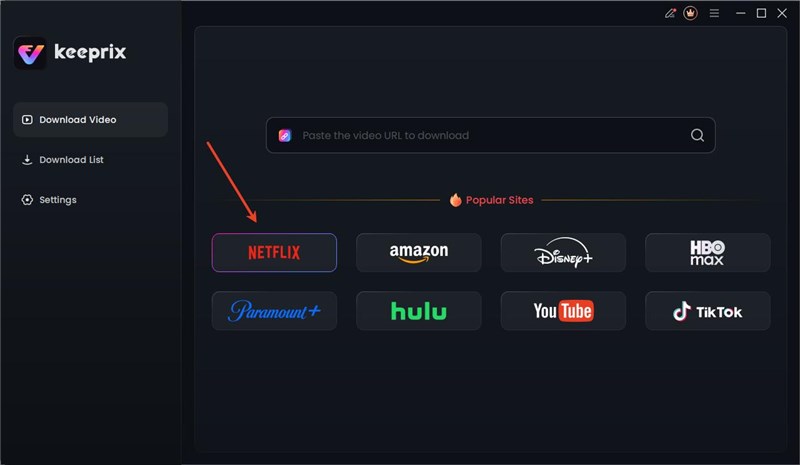
Choose Netflix Platform
Step 2. Log in with your Netflix account. Search for the show or movie you want to download from Keeprix.
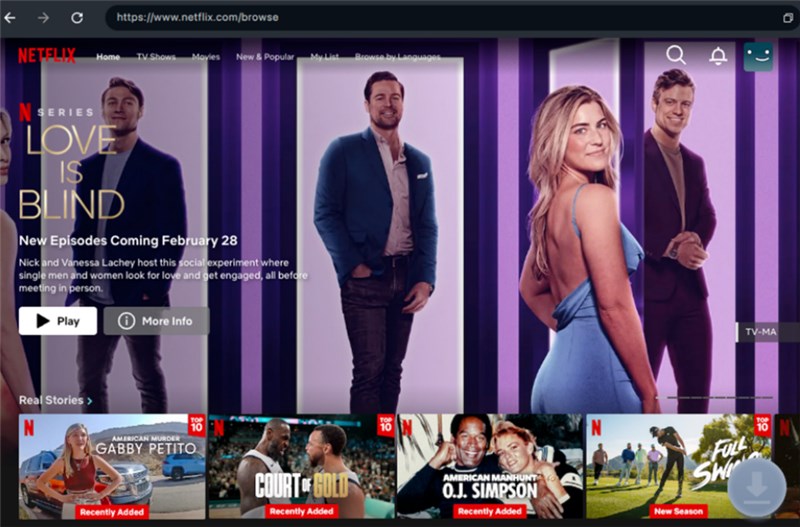
Tap Download Icon
Step 3. Choose download settings, including quality and subtitles. Tap the Download button.
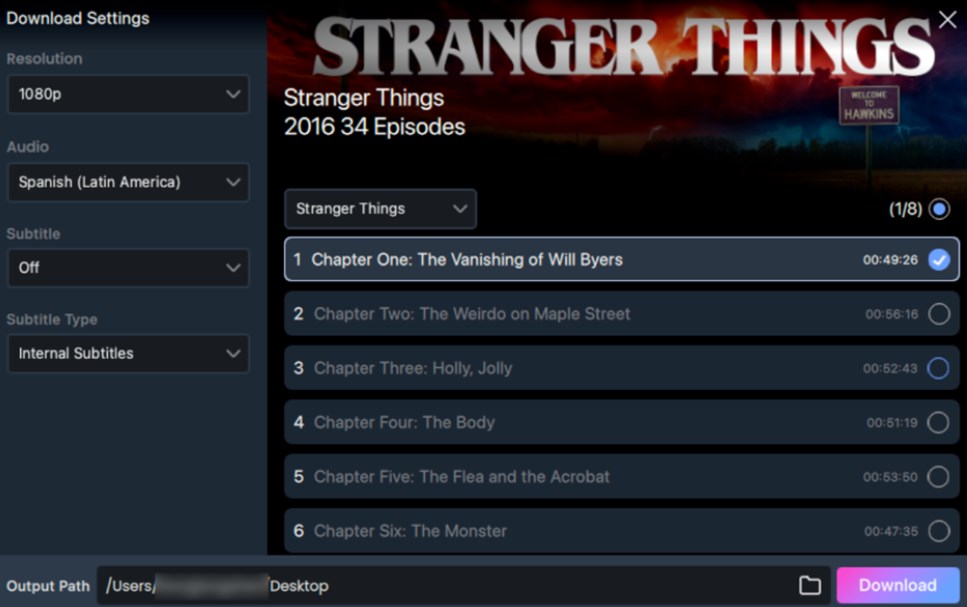
Adjust Download Settings
Step 4. After the download is complete, you can find the saved MP4/MKV file on your computer and add it to your personal offline library.
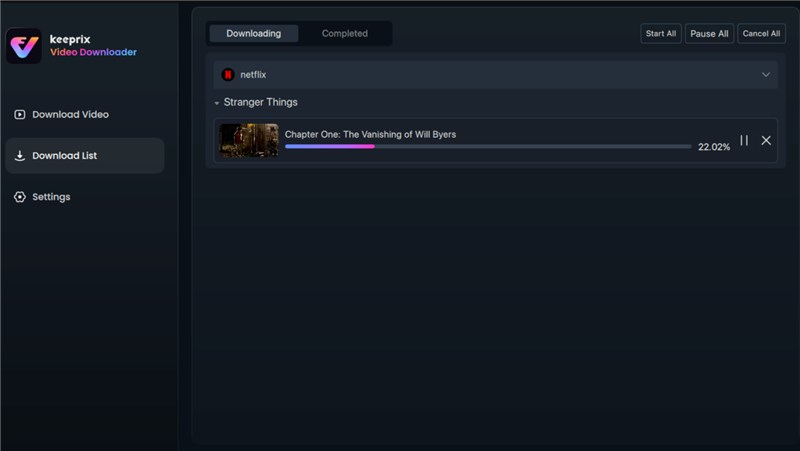
FAQs about How to Download Netflix Videos
Q1. Why isn’t a Netflix movie or TV show available for download?
Most times, shows or movies owned by other studios or with restricted rights won’t be downloadable. This platform will simply exclude content based on cost or regional deals.
Q2. Can you download Netflix movies on your Mac?
No, Netflix does not support offline downloads on the macOS platform. On a MacBook, you can only stream movies in a browser.
Q3. Is there a way to save Netflix videos on a smart TV?
Netflix’s smart TV apps do not allow offline downloads. To download Netflix videos and watch offline on TV, download Netflix videos on a phone or tablet first and then play them on the TV via casting or HDMI connection.
Q4. Can I download Netflix on Windows?
The Netflix app for Windows 10/11 supports offline downloads. Open the app from the Microsoft Store, sign in, and look for the download icon on eligible titles.
Q5. How many Netflix downloads can I have?
On ad-free plans, up to 100 downloads per device. Ad-supported plans allow 15 downloads per device per month. Some titles also have their own per-year download limits.
Q6. Can You Download Netflix Videos on Mac?
No, Netflix does not provide official offline downloads on Mac through a browser. You can stream Netflix on Mac, but the official app-based download feature is not available the same way it is on mobile devices. If you want to save Netflix videos on a Mac for personal offline viewing, you need a separate desktop downloader such as Keeprix.
Q7. Can I transfer Netflix downloads to USB?
Official Netflix downloads cannot be moved like normal video files. If you need to organize videos on a USB drive or external hard drive, save accessible titles as local MP4/MKV files with a file-based downloader.
Conclusion
If you only need to watch offline on a phone, tablet, Fire device, or Chromebook, the Netflix app is the simplest option. If you want to save accessible Netflix videos as MP4/MKV files on Windows or Mac for personal offline viewing, Keeprix Video Downloader offers a more flexible way to build and organize your offline video library. Always use downloaded content for personal viewing only and do not share, upload, sell, or redistribute it.



Joy Taylor is a seasoned technical writer with over a decade of experience in mobile technology. At iMobie, she specializes in producing in-depth content on iOS data recovery, iPhone unlocking solutions, and iOS troubleshooting.
Product-related questions? Contact Our Support Team to Get Quick Solution >
