Can You Remove Ads on Disney Plus? How to Guide
This guide explores effective methods to remove ads on Disney Plus for an uninterrupted streaming experience. Learn how to enjoy Disney Plus movies without ads by upgrading your subscription, using ad-blockers, and watching videos offline.
Disney Plus, as one of the most popular streaming platforms, has been offering a vast library of beloved classics, blockbuster movies, and exclusive original content. Users of all ages can find their desired videos on it. However, with the introduction of ad-supported subscription tiers, many users are wondering how to eliminate ads on Disney Plus and enjoy their favorite content uninterrupted.
This article will provide a comprehensive guide on how to remove ads on Disney Plus, exploring various methods to enhance your viewing experience. Whether you’re a new subscriber or a long-time fan, you’ll find valuable insights and step-by-step instructions to help you enjoy Disney Plus videos ad-free.
Does Disney Plus Have Ads?
Yes, Disney Plus has ads on its Basic with Ads plan. To offer more flexible pricing and attract a wider audience, Disney introduced ad-supported subscription plans in the US in 2022, and then expanded them to all supported regions in 2023. This allows users to access the extensive Disney Plus library at a lower monthly cost, with the trade-off of occasional commercial interruptions. While the ad-free experience was the original standard for the platform, the introduction of ads has become a common practice in the streaming industry to provide more affordable options for consumers.
The ad experience on Disney Plus is designed to be as seamless as possible, with ad breaks typically occurring before and during content playback. However, for those who prefer an uninterrupted viewing experience, the presence of ads can be a significant drawback. This has led many users to seek out ways to remove or bypass these commercial breaks.
Can You Remove or Skip Ads on Disney Plus?
The possibility of removing ads on Disney Plus largely depends on the method you choose. While it’s not possible to skip ads directly in the streaming content, there are ways to eliminate them. It’s important to understand the limitations and potential restrictions associated with each method.
The most straightforward way to remove ads is by subscribing to an ad-free plan. However, even with a premium subscription, some promotional content for Disney’s own shows and movies may still be shown. Additionally, live TV and certain special events will include commercial breaks, regardless of your subscription plan. For those who opt for other methods like an ad-blocker or Disney Plus downloader, the effectiveness and user experience can vary. Ad-blockers, for instance, may not always be reliable and could potentially compromise your online security.
How to Get Rid of Ads on Disney Plus
There are several effective methods to get rid of ads on Disney Plus. Below, we’ll explore each one in detail, providing step-by-step instructions to help you choose the best option for your needs.
Method 1. Upgrade the Subscription Plan
The most official and straightforward way to remove ads on Disney Plus is to upgrade your subscription to an ad-free plan. This ensures a seamless viewing experience without the need for any third-party software or tools.
Step-by-Step Guide to Upgrading Your Disney Plus Subscription:
Step 1. Log in to your Disney Plus account
Open your web browser and navigate to the Disney Plus website. Enter your login credentials to access your account.
Step 2. Go to your account settings
Click on your profile icon in the top-right corner of the screen and select “Account” from the drop-down menu.
Step 3. Manage your subscription
In the “Subscription” section, you will see your current plan. Click on the option to “Change your plan” or “Manage your subscription.”
Step 4. Select an ad-free plan
You will be presented with a list of available subscription plans. Choose the Disney+ Premium plan or a bundle that includes ad-free Disney+.
Step 5. Confirm your new plan
Review the details of your new plan and confirm the changes. Your subscription will be upgraded, and you can start enjoying ad-free streaming immediately.
Upgrading the subscription plan will increase your monthly bill. The premium plan price will increase to $18.99/month and $189.99/year on October 21st, 2025.
Method 2. Use Ad-blocker in Browser Streaming
For those who watch Disney Plus on a web browser, an ad-blocker extension can be a potential solution to reduce or eliminate ads. Ad-blockers are designed to identify and block ad-serving domains, preventing them from loading and displaying on your screen.
However, it’s important to note that the effectiveness of ad-blockers can be inconsistent. Streaming services like Disney Plus are constantly updating their platforms to counteract ad-blocking technologies. Additionally, some ad-blockers may not be able to block all types of ads, and some may even pose security risks.
Popular Ad-Blocker Extensions:
- AdGuard: A comprehensive ad-blocking solution that offers a range of features, including tracking protection and parental controls.
- AdBlock Plus: One of the most popular ad-blockers, with a large user base and a wide range of filter lists.
Steps to Block Ads on Disney Plus:
Step 1. Install an ad-blocker extension in Chrome. Take the AdGuard adblocker as an example.

AdGuard Adblocker
Step 2. Enable the extension in your browser.
Step 3. Start streaming Disney Plus videos with your browser. The adblocker is supposed to remove the ads from your videos.
Method 3. Download Disney Plus for Offline Watching
Another effective way to remove ads on Disney Plus is to download your favorite movies and shows for offline viewing. When you download content from Disney Plus, the downloaded files are ad-free, allowing you to watch them at your convenience without any interruptions. However, the official download feature is only available with ad-free plans due to Disney Plus download limits.
For those with ad-supported plans, a third-party tool like Keeprix Downloader can be a great alternative. It allows you to download Disney Plus videos to your computer, and the downloaded files are typically in a standard format like MP4 or MKV, which can be played on any device.
Why Choose Keeprix Downloader:
- Ad-free downloads: Keeprix Downloader removes all ads from the downloaded videos, ensuring an uninterrupted viewing experience.
- High-quality downloads: You can download videos in up to 1080p resolution, with high-quality audio.
- DRM removal: The downloader removes DRM protection from the downloaded files, so you can keep them forever and watch them on any device.
- User-friendly interface: It is easy to use, with a simple and intuitive interface.
- Windows & Mac Support: Available for use on Windows and Mac computers.
Steps to Download Disney Plus Videos with Keeprix Downloader:
Step 1. Download and install Keeprix Downloader from the Keeprix official website.
Step 2. Launch the software and choose Disney+ on the main screen.
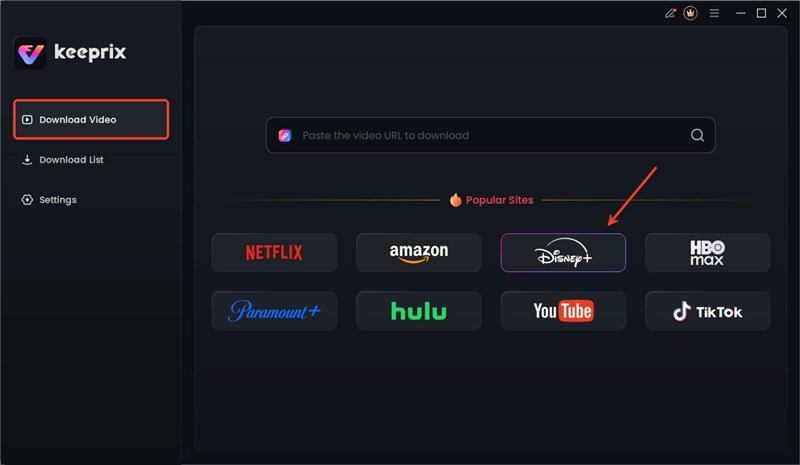
Choose Disney Plus Platform
Step 3. Log in to your Disney+ account so that you can access the movies and shows.

Log in to Disney Plus in Keeprix
Step 4. Choose your desired videos and download them directly in Keeprix Downloader.

Disney Plus Downloads in Keeprix
After downloading, you can find the content in your local folder. Then you can watch it offline on any player without limits.
FAQs About Removing Ads on Disney Plus
1. How much does it cost to get rid of ads on Disney Plus?
As of September 2025, the Disney+ Premium plan, which is ad-free, costs $15.99 per month or $159.99 per year in the US. But the price will increase to $18.99 and $189.99 from October 21st, 2025. Various bundle options include ad-free Disney+, Hulu, and ESPN+. Prices may vary by region and are subject to change.
2. Are ads on Disney Plus skippable?
No, ads on Disney Plus are not skippable. If you are watching a video with the ad-supported plan, you have to watch the full ad break before your content resumes.
3. How long do ads last on Disney Plus?
Ad breaks on Disney Plus can vary in length, but they are typically between 15 and 60 seconds long. The total ad time per hour of content is generally around 4 minutes.
Conclusion
In conclusion, there are several effective ways to get rid of ads on Disney Plus and enjoy an uninterrupted streaming experience. The most straightforward method is to upgrade to a premium, ad-free subscription plan. For those who prefer a more budget-friendly option, ad-blockers can be a potential solution, although their effectiveness may vary. Alternatively, video downloaders like Keeprix Downloader offer a reliable way to download and watch Disney Plus content without any ads. By choosing the method that best suits your needs, you can enjoy all the magic of Disney Plus without any commercial interruptions. Go ahead and explore these options to create your perfect ad-free viewing experience on Disney Plus.



Joy Taylor is a seasoned technical writer with over a decade of experience in mobile technology. At iMobie, she specializes in producing in-depth content on iOS data recovery, iPhone unlocking solutions, and iOS troubleshooting.
Product-related questions? Contact Our Support Team to Get Quick Solution >
