Keeprix Downloader: Best Way to Save Streaming Videos 2026
This article introduces what Keeprix Downloader is, how much it cost for full download version, and how to download streaming videos with this software. You can also get a discount before upgrade.
Key Takeaways: You can get Keeprix Downloader 20% OFF with the coupon iMoKeeprix (for any plan). Download Keeprix now and save your favorite movies/shows from Netflix, Amazon Prime, Disney+, etc.
Introduction
Streaming platforms offer great fun for users to enjoy movies and shows. However, it’s not always accessible when there is no network connection, even if you have downloaded the content with an official streaming video app. That’s why Keeprix Downloader become so popular today. It provides a simple way to save videos for offline playback without the usual streaming limitations. This 2026 guide breaks down what Keeprix is, pricing/trial details, safety considerations, and a clear workflow for downloading streaming videos with a discount.
What Is Keeprix Downloader?
Keeprix Downloader is an all-in-one desktop video download tool that saves videos to common formats like MP4 or MKV. It supports a large number of websites and major streaming services. The latest version 1.3.4 claims to support 1000+ platforms, plus batch downloads and multilingual subtitles.
In review ecosystems, Keeprix is praised more like a save-to-file tool, meaning the output is a playable local file you can keep in your own library. Promotional/editorial pages also emphasize offline use cases like travel and weak internet, and they frequently mention high resolution.
Highlights of Keeprix Downloader (According to common user reviews):
- Multiple Platforms Supported: Keeprix supports downloading content from various streaming platforms, including Netflix, Amazon Prime, Disney+, and more.
- Format flexibility: MP4/MKV are repeatedly referenced across official + third-party listings.
- Batch/queue downloads: often framed as “download a whole season” or multiple items at once.
- Subtitles/audio tracks: official pages and reviews mention multilingual subtitles and selectable audio/subtitle tracks.
Note: As Keeprix bypasses DRM during the download process, it is a personal-use tool only, and only saves content you have rights/permission to download.
Is Keeprix Free?
No, Keeprix Downloader is not a free tool, but it offers free trials that let you download videos before paying. To get a Keeprix free trial, you can register for the software directly. The trial version lets you download 2 complete videos, not just clips.
How much does it cost to subscribe to Keeprix?
The cost varies from a monthly plan to a lifetime one. Here is the detailed information:
- $49.99/month
- $99.99/year
- $159.99/lifetime
Big Discount: Now you can use the coupon iMoKeeprix to unlock a 20% OFF for each Keeprix plan. Limited offer, don’t miss out!
Is Keeprix Safe to Use?
Yes, Keeprix Downloader is widely regarded as safe and clean to use. There is no malware or virus in the installation package. You can easily download and use it on Windows and Mac computers. Additionally, Keeprix Downloader is listed on some known download sites, such as Softpedia, MajorGeeks, Cnet, etc. There is no worry about the software security.
How to Download Streaming Videos with Keeprix Downloader?
Here’s how to download videos from streaming platforms in Keeprix Downloader.
Step 1. Download and install Keeprix on your computer. Register an account and get the free trial. Or activate your account with your license code.
Step 2. Choose the video platform. If the platform is not listed on the Keeprix homepage, you can just paste the video link in the search box.
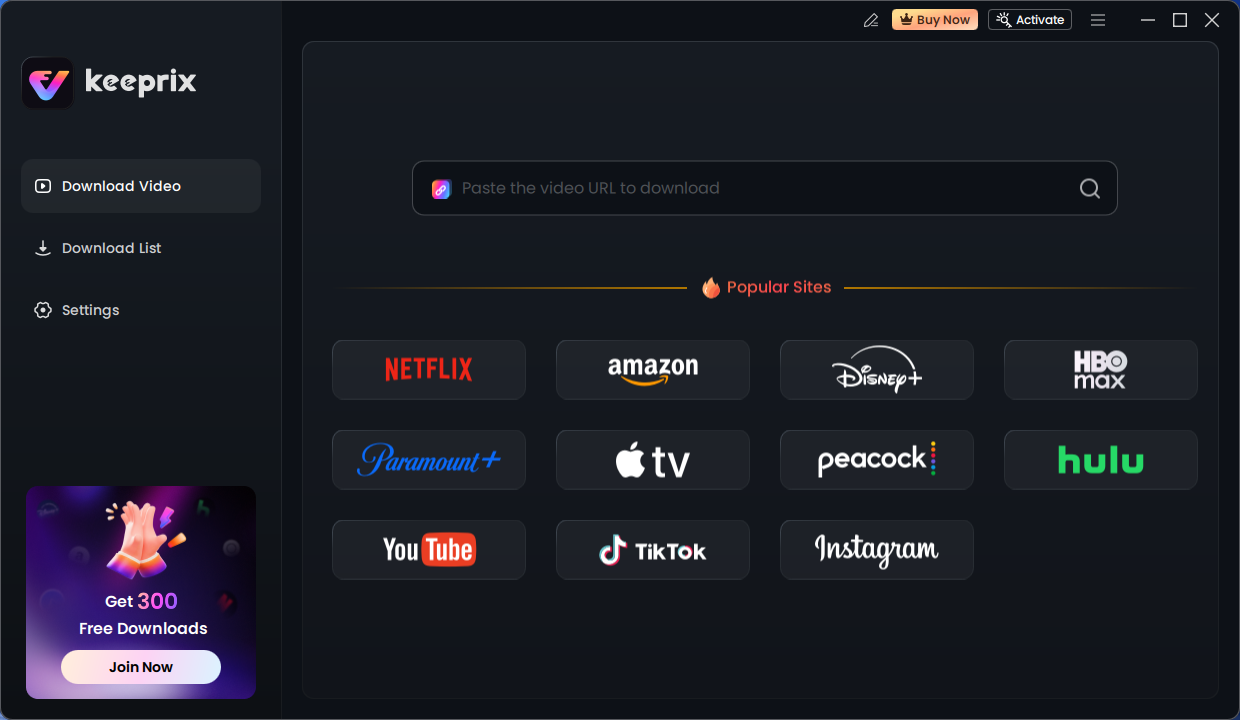
Step 3. Keeprix Downloader will initiate the video profile. When it is loaded, you can just click the download button and save your movies or shows.
FAQs About Keeprix Downloader
1) Does Keeprix work on MacBooks?
Yes, Keeprix Downloader is available for Windows & Mac, and deal listings commonly mention macOS 11 or later.
2) Can you download a whole series with Keeprix?
Keeprix supports batch downloads, which allows you to add entire seasons or series to the download list.
3) Does Keeprix have a free trial?
Yes, Keeprix provides a free trial that allows you to download 2 complete videos without paying for a license.
4) Can you download 4K videos with Keeprix?
Yes, you can download 4K videos from social media platforms (such as YouTube and TikTok) with Keeprix Downloader when the source offers it.
5) Can you download subtitles with Keeprix?
Yes, you can download subtitles in supported languages with Keeprix Downloader. The subtitles can be downloaded internally or externally.
Final Words
This Keeprix Downloader review shows why the tool is positioned as a 2026-friendly way to save streaming videos for offline playback: multi-site support, MP4/MKV output, batch downloads, and subtitle handling are repeatedly highlighted across top results. If you decide to try it, start with the free trial and use it only for content you’re allowed to download.
To save more on Keeprix, you can use the coupon iMoKeeprix to save more on purchasing. Ready to test the workflow? Download Keeprix and enjoy restriction-free offline watching on major streaming platforms.



Joy Taylor is a seasoned technical writer with over a decade of experience in mobile technology. At iMobie, she specializes in producing in-depth content on iOS data recovery, iPhone unlocking solutions, and iOS troubleshooting.
Product-related questions? Contact Our Support Team to Get Quick Solution >
