3 Ways to Watch Amazon Prime Videos Offline on Mobile/Tablets/Computer
Download Amazon Prime Video titles to watch shows and movies without internet. For this, use the official Prime Video app on mobile and computer for offline viewing. To help you watch videos offline without an app, Keeprix Downloader proves to be the best alternate tool, offering unrestricted downloads.
Movie lovers like to watch their favorite movies and TV shows offline while traveling. To fulfill their needs, Amazon Prime Video offline access lets them download eligible titles using the official app on different platforms. This allows you to save movies and shows for later watching on your device.
However, these built-in downloads come with Amazon Prime download limits, which restrict the maximum download number and title expiration. In addition, content saved from the official Amazon Prime program can only be played back inside the app in an encrypted format. Don’t worry, this article will introduce how to download Amazon Prime videos with or without the app. Keep reading and learn the step-by-step tutorials.
1. Not all videos are available for watching offline due to the license agreement.
2. Downloaded content will expire after a set period (30 days before first playback, then 48 hours once started).
3. The maximum download number depends on your subscription plan, from 15 to 25 titles.
How to Watch Amazon Prime Videos Offline on Mobile/Fire Tablet
With the official Amazon Prime app on Android, iOS, or Fire Tablets, you can download eligible movies and shows for offline viewing. As long as you have a valid Prime Video subscription, you can use the app to download movies or shows from Amazon Prime directly.
Follow these steps on your smartphone to save Amazon Prime videos offline:
Step 1. Start by opening the app on your mobile and logging in to your Amazon account. Now, find the TV show you want to save and tap its Download button.
Step 2. Alternatively, access the episode list of your favorite TV series and hit the Download icon next to each episode.
Step 3. Finally, access the Downloads tab to find and play all the saved episodes.
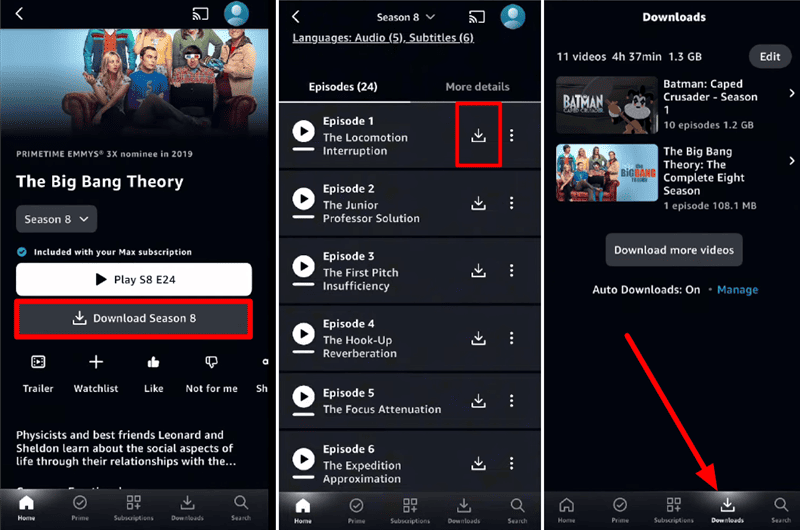
Download Prime Videos on Mobile
Remember to watch Amazon Prime downloads offline before they expire, or you will need to re-download the titles.
How to Watch Amazon Prime Videos Offline on Desktop
You can also download your favorite titles on a Windows or Mac computer using Amazon’s Prime Video app. Keep in mind that the same limits apply to desktop applications like mobile ones. Go through the following steps to download and watch Amazon Prime videos offline on Windows or Mac.
Step 1. Launch the Amazon Prime app on your computer and then sign in with your account. Next, simply browse for the title you want to save for offline viewing. Now, click the Download icon below the title details to save the video.
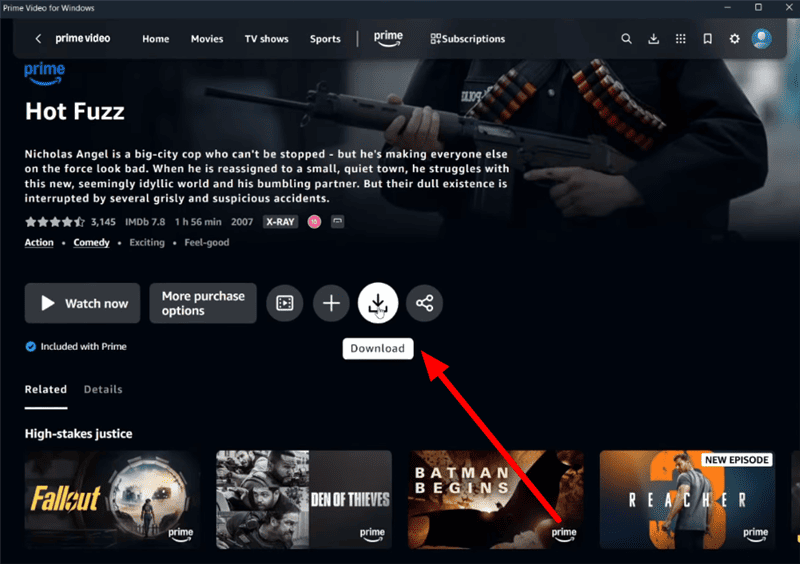
Download Prime Videos on Computer
Step 2. Within Download Options, adjust the video quality and audio settings. Finally, tap the Start Downloading button to save your favorite title.
Step 3. After downloading, find your video within the Downloads section of the app.
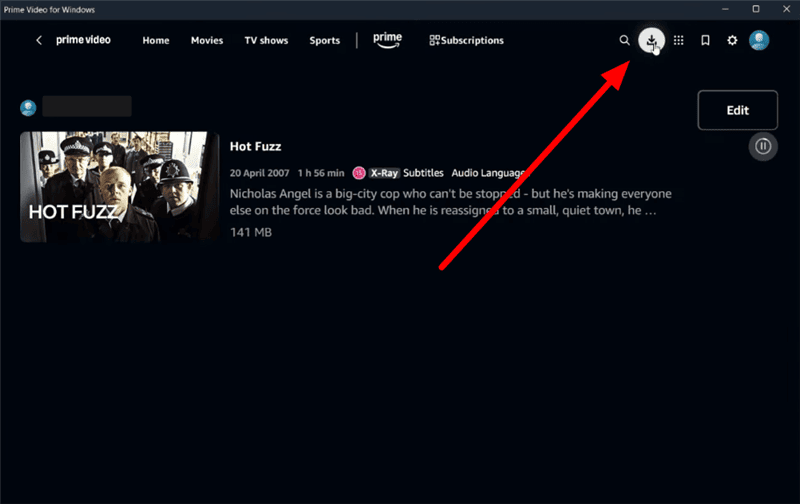
Access Prime Downloads on Computer
For Windows users, only Windows 10 and 11 can be used to download Prime Video titles for offline viewing.
How to Watch Amazon Prime Videos Offline Without the App
As Amazon Prime Video offline watching is limited inside the app, you may wonder if it’s possible to get the downloads without the app. Yes, using a third-party video downloader can help remove Prime video download restrictions, thus you can save the content to MP4 or MKV format. Keeprix All-in-one is such a powerful tool you can try. It can download videos from multiple streaming platforms, including Amazon Prime, Netflix, Hulu, and more. You can check the main features of Keeprix below:
Keeprix Downloader Main Features:
- High-quality Downloads: Save videos in up to 1080p (streaming platforms) or 4K (social platforms) with rich detail.
- Fast Download Speed: Offer hardware-accelerated downloads to help users save videos much faster.
- Free Trial: You can download 2 complete videos from the supported platforms to test the features and performance.
- Audio & Subtitles Download: Download audios and subtitles inside the videos or separately as you want.
Steps to watch Amazon Prime videos offline with Keeprix Downloader:
Step 1. Download & Install Keeprix All-in-one
Go to the Keeprix official website, then download and install the downloader on your Windows/Mac computer.
Step 2. Log in to Prime Video
Launch Keeprix Downloader on your computer, and select Amazon from the homepage. Log in to your Amazon Prime account.
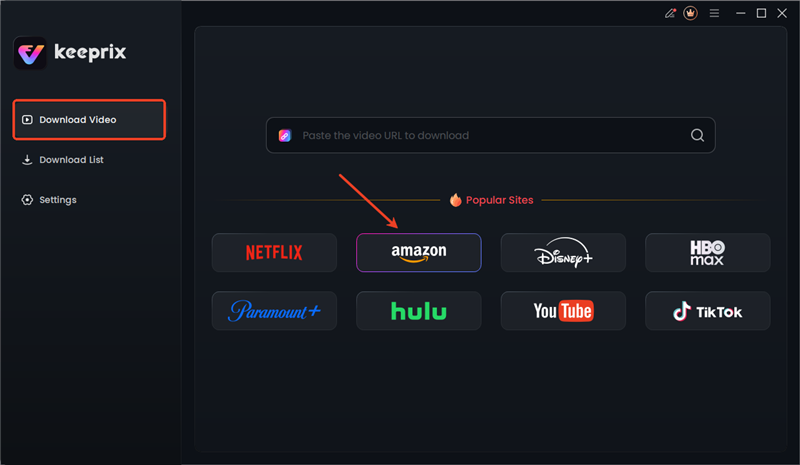
Choose Amazon in Keeprix
Step 3. Find the Movies or Shows You Want to Download
After logging in, you can paste the video link directly in Keeprix or search for the video name in the built-in browser.
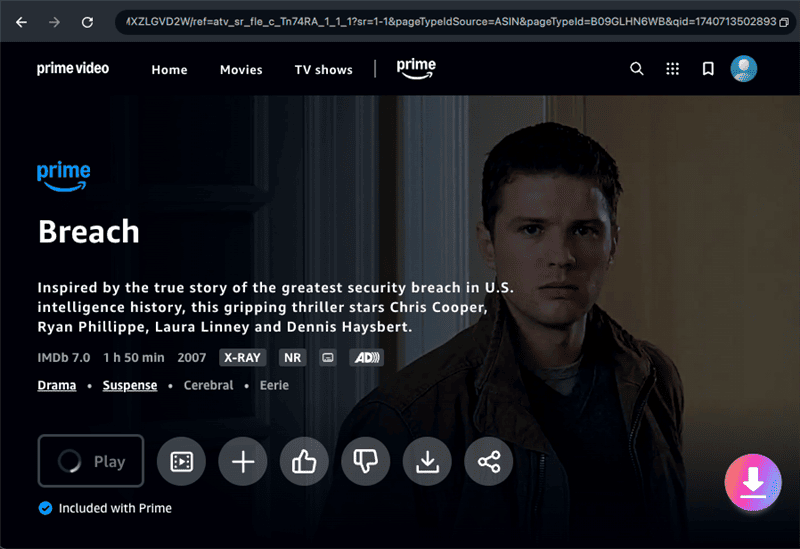
Download Prime Videos in Keeprix
Step 4. Download Amazon Prime Videos with Keeprix
On the video profile page, click the pink download icon to save it to your computer. You can set the download format, video resolution, subtitle, etc, before downloading.
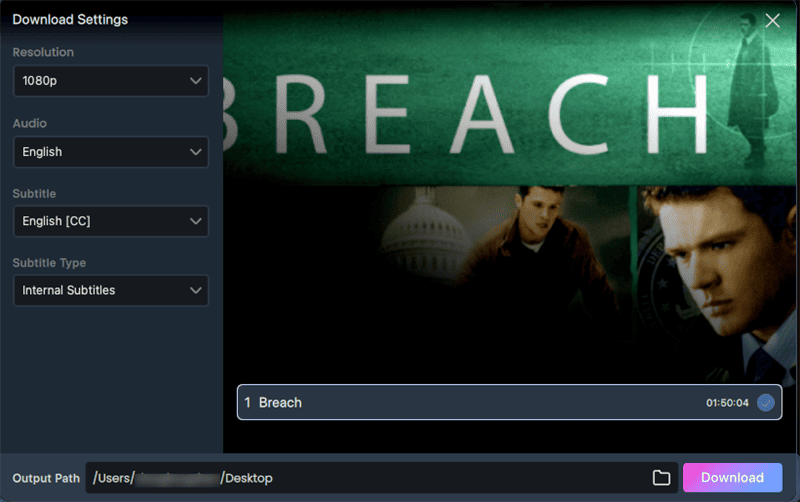
Video Settings Before Downloading
Step 5. Access Amazon Prime Downloads Without App
You can check the download process in real time. Once finished, the content will be DRM-free and you can watch it offline on any media player.

Access Prime Downloads in Keeprix
The downloaded content from Keeprix Downloader cannot be used commercially or transferred to others. You should download videos for personal use only.
FAQs About Amazon Prime Video Offline Watching
1. Can you watch Amazon Prime offline on a plane?
Yes, after downloading titles via the Prime Video app, you can watch them in airplane mode. The videos are saved on your device for up to 30 days before expiration. So, you can play them within the Downloads tab without an internet connection.
2. Can I watch Amazon Prime on my phone without the internet?
Yes, download the desired movies or shows in advance using the Prime Video mobile app. The content is then available offline in the app’s Downloads section as long as your subscription plan is valid. You can watch it without the internet, subject to Amazon’s expiration rules.
3. How many devices can I watch Amazon Prime videos offline?
Amazon allows offline downloads on up to 4 devices. Moreover, each downloaded title can’t be played on more than 2 devices at the same time. If you reach this limit, you must delete downloads on one device before adding another. Keeprix Downloader imposes no such device limit, so you can transfer the files anywhere.
Conclusion
In summary, Amazon’s official offline feature lets you save videos on phones, Fire tablets, or computers. However, it is hampered by download limits, expirations, and device restrictions. Keeprix Prime Video Downloader lifts all these restrictions, as it converts Prime videos to MP4, preserving subtitles and metadata without expiration. With Keeprix Downloader, you can create your entire Prime library and play it on any device without restrictions. Don’t hesitate to download Keeprix Downloader today and enjoy unlimited Amazon Prime Video offline.



Joy Taylor is a seasoned technical writer with over a decade of experience in mobile technology. At iMobie, she specializes in producing in-depth content on iOS data recovery, iPhone unlocking solutions, and iOS troubleshooting.
Product-related questions? Contact Our Support Team to Get Quick Solution >
