Can You Watch Disney Plus Offline? – How to Guide
Disney+ has an offline video streaming option that is only available on mobile phones and tablets through the Disney+ official application, if you have subscribed to the Ad-free Plan. If you want more freedom to download videos at a lower price, you can use a third-party software such as Keeprix Downloader.
Disney Plus has a huge media library with a lot of movies. People often want to watch these shows offline by downloading them. However, the platform has some restrictions on saving its content for offline watching.
In this guide, we’ll answer the question “Can you watch Disney Plus offline?” We’ll also guide you in detail on how you can watch Disney Plus content offline, with details of their plans. Plus, you will also learn about a third-party tool that will allow you to download Disney+ movies and watch them even without any internet connection. Let’s get into it.
Can You Watch Disney Plus Offline?
Yes, you can watch Disney Plus offline. With the app on iOS, Android, and Amazon Fire tablets, you can easily download movies, episodes, or full seasons from Disney Plus to enjoy without the internet. However, there are a few download limitations:
- Users can only access the download button in the Disney Plus app. Downloads don’t work on smart TVs, game consoles, or desktop browsers.
- Your subscription is another essential thing. Ad-free plans (Standard and Premium) provide offline watching functionality. The ad-supported plan does not give a download option.
- Every 30 days, the downloads will expire, and they can only re-download to watch offline.
- You may also face regional content availability restrictions.
Now, let’s get into the details and learn the method to watch Disney Plus offline.
How to Watch Disney Plus Offline
To watch Disney Plus offline, you need to have an ad-free Disney Plus subscription to enable the built-in download feature. The basic plan with ads doesn’t allow downloading any movies or shows. Offline downloads are available on iPhone, iPad, Android phones/tablets, and Amazon Fire Tablets. Knowing the requirements of downloading videos from Disney Plus, let’s check the instructions below.
Steps to Download Disney Plus Videos on Mobile Devices:
Step 1. Open the Disney Plus app on your phone or tablet and log in. The downloading option is not available on browsers.
Step 2. Search for the movie or show you want to download.
Step 3. You can download the entire season by clicking the small “Download Arrow.” Alternatively, scroll down and you will see a little “Download Arrow” along with each episode of a show. Download each episode separately.
Step 4. Go to the “Downloads” tab in the app to watch your saved content offline.
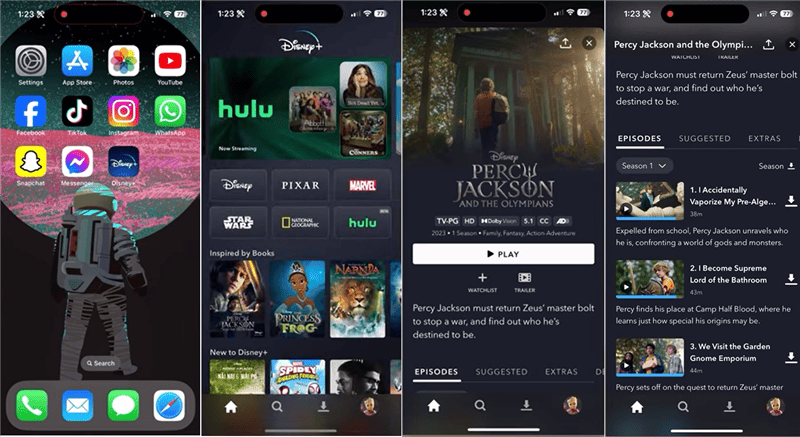
Download Disney+ Videos on Mobile
- You can adjust the video download quality (high, medium, standard) in the app settings. Adjust these settings according to your storage and quality requirements.
- You should connect to the internet and visit the Disney + App every 30 days to renew licenses and keep downloads valid.
That’s how you can download Disney Plus videos on supported devices with the ad-free plan. If you are subscribed to the basic plan and want to upgrade to the premium one for video downloads, just follow the steps:
Steps to Switch to Disney+ Premium (No Ads):
Step 1. Open the Disney Plus mobile application or go to the Disney Plus website. Log in with your Disney account credentials.
Step 2. Go to the top right section and click your profile picture icon. Then select “Account.”
Step 3. In your account details, locate the plan and click on “Subscriptions.”
Step 4. In case a third party like Apple, Google, or Amazon manages your Disney Plus account, you can change the plan from the service provider. If you’re being charged directly through Disney+, click “Change” next to your subscription name.
Step 5. Choose the Premium plan, and click “Continue.” Verify your billing details and click “Agree & Subscribe” to complete the change.
Once you have subscribed to the ad-free plan, you can download videos on Disney Plus.
Can You watch Disney Plus Offline on Computers?
Disney + does not officially support downloads on desktop or laptop computers. You can only watch movies or shows on a computer browser. However, some third-party downloaders or DRM-free recorders can be used to watch Disney Plus offline on a computer. These tools allow you to bypass Disney Plus download limits, or record streaming content without a black screen, thus making it possible to watch videos offline.
So, if you don’t want to upgrade your subscription plan or want to view videos on computers or smart screens, you can use Keeprix Disney Plus downloader. Let’s get into the details.
How to Watch Disney Plus Offline Without Limits
As one of the most reliable video download tools, Keeprix Downloader simplifies the download process and saves content from Disney Plus in easy steps. It’s available for Windows and Mac users to get offline videos from multiple platforms, including Disney Plus, Netflix, Amazon Prime, and more. More importantly, the downloaded content won’t expire so you can keep it forever. Simply check the advantages of using Keeprix Downloader here.
Key Features of Keeprix Downloader:
- Download Disney Plus videos with any plan, including the basic one with ads.
- Bypass Disney Plus download limits and save videos without app.
- Remove DRM from the downloaded videos to avoid expiring in 30 days.
- Save videos in MP4/MKV format so that you can watch them offline on any media player.
Steps to download Disney Plus movies on computers with Keeprix Downloader:
Step 1. Download and install Keeprix Downloader on your Windows or Mac computer.
Step 2. Launch Keeprix Downloader and click on the “Disney+” button from the main screen.
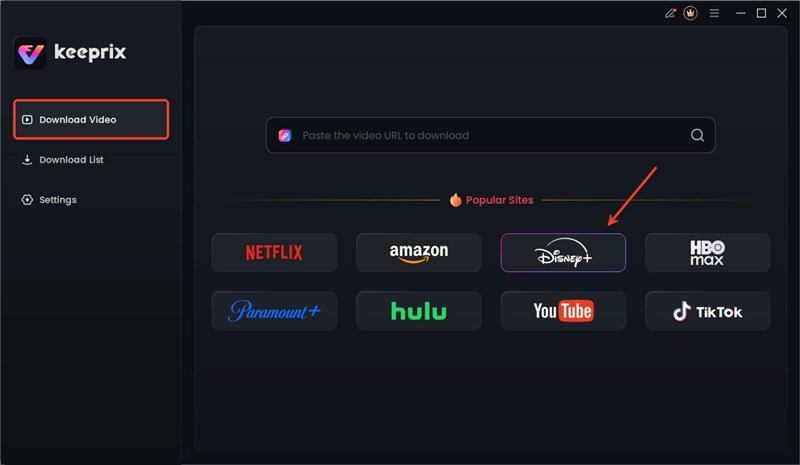
Choose Disney Plus Platform
Step 3. The Disney+ login page will open. Log in using your credentials.
Step 4. Search for your video or enter its URL in the built-in browser. Once our video is open, click the “Download button.”
Step 5. You can adjust configuration options before downloading the video. Choose the Video Resolution, Audio Track, and Subtitles. Select the outpath and click the “Download button.”
Step 6. Keeprix will download the video, and you will find it in the “Downloads List” section.
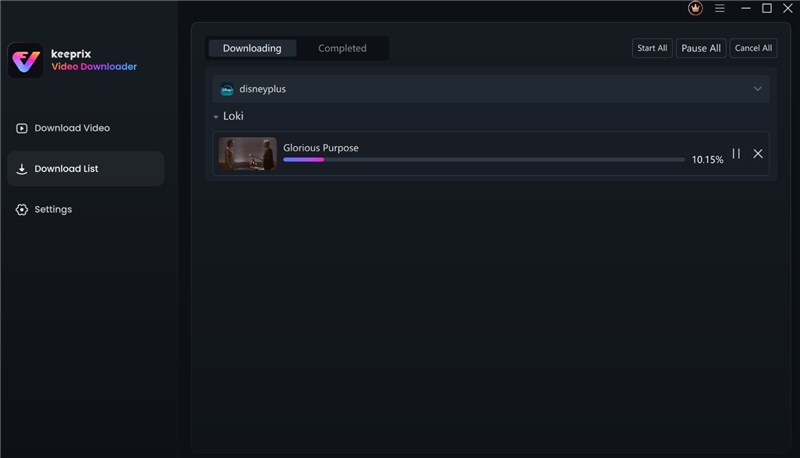
Download Movies on Disney Plus
After downloading, you can access the downloads in your local folder, which you have set as the output path before downloading. The videos can be watched on any player, such as VLC, Windows Media Player, or Mac player.
Frequently Asked Questions
1. What movies can I watch offline on Disney Plus?
You can only watch those movies offline that you have downloaded using an active internet connection. Mind that you can only watch these movies offline on your mobile phone.
2. Can I watch Disney Plus offline with any subscription plan?
No, you can’t watch Disney Plus offline with any subscription plan. The built-in download feature is only available for the Standard Plan (ad-free) or the Premium Plan.
3. Are there ads when I watch Disney Plus offline?
No. Videos downloaded using Keeprix Downloader play advert-free, even if your Disney Plus subscription would otherwise contain adverts. The videos are stored locally for uninterrupted, seamless offline playback.
Conclusion
The question “Can you watch Disney Plus offline?” has a clear answer now. Yes! We have discussed two popular methods used for viewing Disney Plus videos offline. You can either use Disney’s official method for downloading videos with device and other limitations, or you can use Keeprix Downloader for unlimited offline videos. Choose a method according to your preferences and enjoy your favourite shows and movies anytime, anywhere.



Joy Taylor is a seasoned technical writer with over a decade of experience in mobile technology. At iMobie, she specializes in producing in-depth content on iOS data recovery, iPhone unlocking solutions, and iOS troubleshooting.
Product-related questions? Contact Our Support Team to Get Quick Solution >
