MTK FRP Tool Review: MediaTek FRP Bypass, Download & Alternative
MTK FRP Tool is useful only when the phone, chipset, drivers, device mode, and tool build all match. Before downloading an unofficial MTK utility, check whether your device is truly MediaTek-based, where the file comes from, and why detection or FRP operations may fail.
Searching for an MTK FRP Tool download usually means you have reached the Google verification screen after a factory reset and want a Windows utility for a MediaTek-powered Android device. Before downloading anything, however, confirm two things: your phone actually uses a MediaTek chipset and you can identify a trustworthy source for the exact tool build you intend to run.
“MTK FRP Tool” is often used as a broad search term for Windows utilities that communicate with MediaTek devices through USB drivers, preloader/BROM-style connection modes, or other chipset-specific servicing paths. That does not mean every file using the name comes from the same developer, supports the same phones, or is safe to install.
This review focuses on the decision points that matter: what an MTK FRP utility is designed to do, how to screen a download before opening it, what device conditions it requires, why detection commonly fails, and how it compares with a guided FRP workflow such as DroidKit.
Important: Use FRP and device-servicing tools only on a phone or tablet you own or are authorized to service. If you can recover the Google account previously synced with the device, account recovery is the more direct route. Do not enter Google or manufacturer account credentials into unknown utilities or download pages.
Quick Answer: Is MTK FRP Tool Worth Using?
An MTK FRP utility can be worth evaluating when all of the following are true:
- Your Android phone or tablet actually uses a MediaTek chipset.
- You have a Windows PC and a reliable data-capable USB cable.
- You understand which MediaTek USB driver and device mode the specific utility requires.
- You can verify where the tool file came from.
- The tool documentation explicitly matches your chipset, model, or servicing scenario.
It is a poor choice when you are only guessing that the phone is MTK-based, Windows never detects the device, the download comes from an unknown mirror, or the utility claims universal Android compatibility without explaining supported chipsets or builds.
| Your Situation | Best Next Step |
| You have a confirmed MediaTek device and understand MTK servicing tools | Evaluate the specific MTK utility and its documented requirements |
| You do not know the chipset | Confirm the model/chipset before downloading anything |
| The download source is unclear | Do not run the file until its origin can be verified |
| Windows cannot detect the phone | Troubleshoot driver, cable, port, device mode, and chipset first |
| You want to compare FRP software rather than one MTK utility | Use the FRP bypass tool comparison |
What Is MTK FRP Tool?
MTK means MediaTek, a chipset platform used in many Android phones and tablets. Tools described as MTK FRP utilities are Windows-based service programs intended to communicate with compatible MediaTek hardware and perform particular device-maintenance or FRP-related operations.
Users may search for the same general intent with phrases such as:
- MTK FRP Tool
- MediaTek FRP bypass tool
- MTK FRP unlock tool
- MTK bypass tool
- MediaTek FRP removal tool
- MTK FRP Tool free download
- MTK FRP Tool latest version
The important limitation is that “MTK FRP Tool” should not be treated as a universal product specification. Different utilities and builds can require different MediaTek chipsets, drivers, device modes, Android versions, or security conditions.
What an MTK FRP Utility May Require
- A supported MediaTek chipset.
- A Windows computer.
- A stable USB data connection.
- The MediaTek USB driver expected by that tool.
- The correct phone-side connection or boot mode.
- A tool build that actually supports the device or chipset.
For another current review of a broader MTK service utility, see the MediaTek Universal Tool guide. It is useful for understanding why chipset, Android build, drivers, boot mode, and security patch should be checked separately instead of assuming that “MediaTek” alone guarantees compatibility.
How to Know Whether Your Phone Is MediaTek
This is the most important check to make before using an MTK-specific FRP utility. A tool designed around MediaTek communication will not become compatible just because the Android phone is stuck at the same Google verification screen.
Start with the exact device model rather than the brand name alone. One manufacturer may sell phones using MediaTek, Qualcomm, Exynos, or other platforms, and even nearby model names can use different hardware.
| Check | Why It Matters |
| Exact model number | Helps distinguish devices that look similar but use different hardware |
| Chipset specification from a reliable device source | Confirms whether the device is actually MediaTek-based |
| Windows device detection | Shows whether the expected MediaTek connection is appearing at all |
| Tool documentation | Confirms whether the utility claims support for the relevant chipset or model |
| Android/security build | Can affect whether an older service workflow still applies |
Do not infer chipset from the FRP screen. A MediaTek phone and a Qualcomm phone can both display the same Google Verify your account page. The lock screen tells you the problem type, not which chipset-specific servicing tool to use.
Before You Download MTK FRP Tool: What to Check
Download safety is one of the main reasons to review MTK FRP utilities rather than simply posting a ZIP link. No verified official publisher/download location for one universal product called “MTK FRP Tool” is established in this guide, so a filename alone is not enough to prove that a download is legitimate or current.
| Download Check | Lower-Risk Signal | Warning Sign |
| Publisher | The developer or project can be identified | No developer information at all |
| Version | The source explains what the build is and what changed | “Latest version” appears with no version history |
| Compatibility | Supported chipset/device requirements are stated | Claims to unlock every Android model |
| Archive | The download structure and installation process are explained | Unknown password-protected archive with no explanation |
| Security | The file can be independently scanned before execution | The site tells you to ignore every security warning |
| Credentials | The tool does not ask for unrelated account passwords | Requests Google, Samsung, Xiaomi, or other credentials without a clear reason |
MTK FRP Download Red Flags
- “100% supports every MediaTek phone” with no supported-device information.
- A version number that changes between the page title, filename, and archive contents.
- Multiple forced redirects before the download starts.
- A password-protected ZIP where the source of the archive is unclear.
- Instructions telling you to disable security software as the first troubleshooting step.
- An executable whose publisher or project cannot be identified.
- A tool that asks you to sign in with your Google account inside the utility.
If the only way to continue is to ignore several unexplained security warnings, stop and verify the file before running it.
What Does MTK FRP Tool Require?
The exact workflow differs between MTK utilities, versions, and phone models, so this page should not pretend that one nine-step sequence applies to every file using the MTK FRP Tool name. Instead, verify the required checkpoints in order.
| Checkpoint | What You Need to Confirm |
| 1. Chipset | The device is MediaTek-based |
| 2. Tool build | The utility documents support for the relevant chipset or device |
| 3. Windows driver | The driver expected by the utility installs correctly |
| 4. USB connection | The PC sees the device in the mode required by the tool |
| 5. Device mode | The phone reaches the exact preloader/BROM/service mode required by that utility |
| 6. FRP function | The program actually presents an applicable FRP operation for the detected device |
A Safer Way to Approach the Workflow
Step 1. Record the exact phone model and confirm that its chipset is MediaTek.
Step 2. Identify the exact MTK utility and build you intend to use. Do not rely on the filename alone.
Step 3. Read that build’s documented driver and device-mode requirements before connecting the phone.
Step 4. Install only the driver that is actually required for the tool/device workflow.
Step 5. Connect the powered-off or restarted device using the connection sequence documented for that specific model or utility.
Step 6. Check whether Windows and the tool detect the MediaTek device correctly before selecting any FRP-related action.
Step 7. If the tool displays a supported FRP function for the detected device, review any erase or reset warning before proceeding.
Step 8. If detection never succeeds or the expected device information is wrong, stop instead of repeatedly running an operation against an unidentified target.
Why the revised steps stop at compatibility checks: MTK utilities do not all expose identical buttons or device modes. Giving one universal “click Erase FRP” sequence would imply compatibility that has not been established for a specific tool build and phone.
MTK FRP Tool Pros and Cons
The value of an MTK-specific utility depends heavily on who is using it. A technician familiar with MediaTek drivers and connection modes has a different risk profile from someone who only wants to regain access to one personal phone.
| Pros | Cons |
| Targets MediaTek-specific servicing scenarios | Does not apply to non-MediaTek hardware |
| Some utilities are available without a paid consumer license | No single verified download source applies to every tool using the MTK FRP name |
| Can be useful to experienced users who understand MTK connections | Drivers and device modes can make setup difficult for beginners |
| May provide FRP-related operations for supported devices | Compatibility can change with chipset, firmware, Android version, and security patch |
| Useful diagnostic value when the chipset and connection are known | Wrong or unverified files create malware, detection, boot, and data-loss risk |
Who Is MTK FRP Tool Best For?
It is a better fit for someone who already knows the exact MediaTek chipset, understands Windows device drivers, can distinguish normal Android/ADB detection from MediaTek service-mode detection, and can evaluate whether the downloaded tool build is trustworthy.
It is a weaker fit for a beginner who does not know the chipset, cannot identify the source of the executable, or needs a clear consumer workflow rather than a chipset-servicing utility.
What If MTK FRP Tool Is Not Working?
“MTK FRP Tool not working” is too broad to diagnose by itself. The useful question is where the workflow stops.
| Problem | Likely Check | What to Do |
| Nothing happens when the phone is connected | USB cable, port, driver, or device mode | Confirm the connection requirements before reopening the tool |
| Windows sees an unknown device | Driver setup | Identify the hardware entry and install only the correct required driver |
| Tool keeps waiting for device | Wrong connection mode or unsupported chipset | Re-check the model/chipset and the tool’s device-mode instructions |
| The detected device information looks wrong | Tool/device mismatch | Stop before running an erase or FRP action |
| The FRP option is unavailable | Unsupported build, model, or security state | Do not assume another random MTK build is automatically compatible |
| Windows security flags the executable | Unsigned, altered, or potentially unsafe file | Verify the source and scan the file instead of automatically bypassing the warning |
| The phone is Qualcomm/Exynos rather than MediaTek | Wrong tool family | Use a solution designed for that chipset/device instead |
For broader failure diagnosis, the FRP bypass not working guide covers outdated methods, connection failures, security-patch changes, and other reasons an FRP workflow may stop.
MTK Device Not Detected: Check in This Order
- Confirm the chipset. Do not troubleshoot MediaTek drivers for a Qualcomm or Exynos phone.
- Confirm the cable. A charging-only cable can power a phone without carrying usable data.
- Change the USB port. Rule out a physical port or hub issue.
- Check Windows Device Manager. See whether the phone appears briefly when connected in the required state.
- Verify the driver. Match it to the connection method expected by the utility.
- Verify the device mode. A normal powered-on Android connection is not the same as an MTK servicing connection.
- Verify the tool build. Detection failure may simply mean that build does not support the phone.
MTK FRP Tool Alternative: When DroidKit Fits Better
DroidKit is not a drop-in replacement for every MediaTek servicing function. Its relevance here is narrower: it can make more sense when your actual goal is Google FRP removal on a supported Android device, rather than chipset-level servicing, driver experimentation, or other MTK maintenance tasks.
Consider the DroidKit route when:
- You only need an FRP workflow rather than broader MediaTek servicing functions.
- You want the software to present the next device-side step instead of manually choosing MTK commands.
- You have a Windows PC or Mac.
- The current DroidKit FRP workflow explicitly supports your brand/device scenario.
- You would rather avoid downloading several unrelated MTK executables to solve a detection problem.
Before choosing it, check the current supported brands and workflow on the official DroidKit FRP Bypass page. Do not assume support only because the phone has a MediaTek processor.
Free Download * 100% Clean & Safe
How to Check the DroidKit FRP Workflow
Step 1. Open DroidKit on your Windows PC or Mac and select FRP Bypass.

Choose FRP Bypass
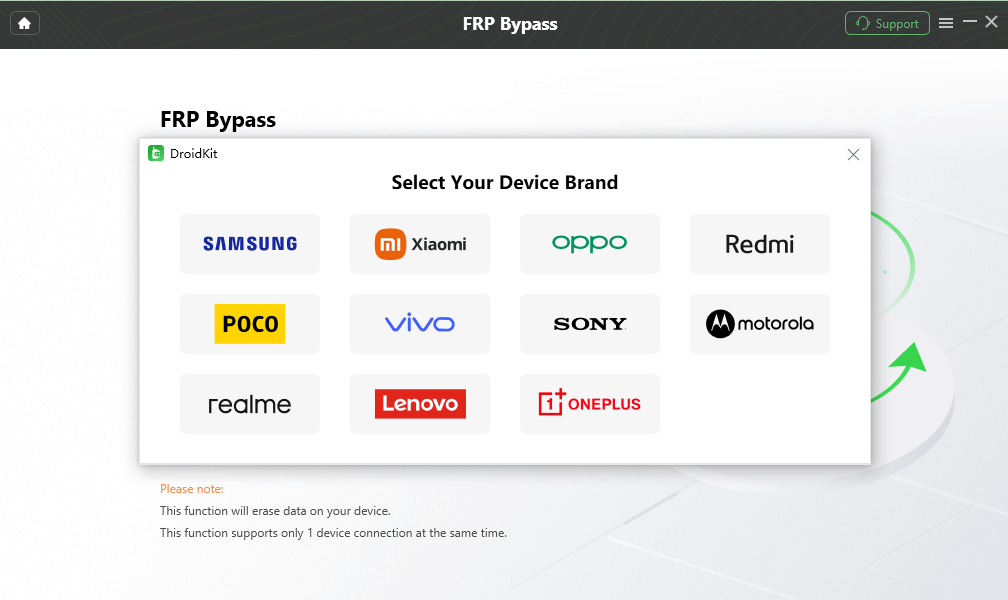
Step 2. Connect the Android device with a data-capable USB cable and follow the initial detection prompts.
Choose the Correct Device Brand
Step 3. Select only a brand/device workflow that corresponds to the phone you connected.
Step 4. Follow the on-screen instructions generated for that supported workflow rather than applying MediaTek-specific steps from another tool.
Step 5. Continue only while the instructions shown by DroidKit match the screen and device state you actually have.

FRP Workflow Complete
MTK FRP Tool vs DroidKit: Which One Should You Choose?
These tools should be compared by use case, not by declaring one universally better.
| Item | MTK FRP Utility | DroidKit |
| Primary angle | MediaTek-specific servicing / FRP workflows | Consumer-oriented FRP workflow for supported devices |
| Chipset focus | MediaTek | Not selected by chipset alone |
| Computer | Typically Windows | Windows or Mac |
| Driver/device-mode knowledge | Often important | More of the process is presented through guided instructions |
| Download situation | Varies by the specific third-party MTK utility | Official vendor download is available |
| Best suited to | Users comfortable with MTK drivers, device modes, and technical servicing tools | Users whose supported FRP scenario matches the software’s guided workflow |
| Wrong-device risk | High if chipset/model compatibility is guessed | Still requires supported brand/device confirmation |
Choose MTK FRP Tool When
- You have confirmed MediaTek hardware.
- You know which specific MTK utility/build you are using.
- You can verify the download source.
- You understand the required Windows driver and connection mode.
- The tool documents support for your target device or chipset.
Choose a Guided FRP Tool When
- Your objective is FRP removal rather than general chipset servicing.
- You prefer a vendor-supported download and guided interface.
- You do not want to troubleshoot several different MTK tool builds.
- Your phone appears in the current supported FRP workflow.
FAQs About MTK FRP Tool
What is MTK FRP Tool?
MTK FRP Tool is a general search term used for Windows utilities that perform FRP-related servicing on some MediaTek-powered Android devices. Compatibility depends on the specific utility, chipset, drivers, phone model, firmware, and security state.
Is MTK FRP Tool free?
Some MTK service utilities are distributed free of charge, but “free” does not tell you whether a particular download is official, current, compatible, or safe. Verify the developer, file source, version, and device requirements before running it.
Where can I download MTK FRP Tool?
This review does not provide an unverified third-party executable as an “official” MTK FRP Tool download. Because multiple utilities can appear under similar MTK FRP names, first identify the exact developer and tool build you intend to use, then verify the original source before downloading it.
Does MTK FRP Tool work on all MediaTek phones?
No. Sharing a MediaTek chipset family does not guarantee compatibility. The exact SoC, phone model, firmware, Android version, security patch, USB driver, device mode, and tool build can all affect whether the utility recognizes the device or exposes an applicable FRP function.
Why is MTK FRP Tool not detecting my phone?
Start with the chipset rather than reinstalling software repeatedly. Common causes include a non-MediaTek device, incorrect USB driver, charging-only cable, unsuitable USB port, wrong connection mode, or a tool build that does not support the device.
Do I need to disable antivirus to use MTK FRP Tool?
Do not disable security software automatically just because a download page tells you to. First verify the publisher and file source and scan the executable. If a file cannot be reasonably verified, treating the warning as a download-risk signal is safer than simply suppressing it.
Does MTK FRP Tool work on Android 13, 14, or 15?
Android version alone is not enough to answer that. Compatibility can depend on the specific phone, MediaTek chipset, firmware, security update, tool build, and the device mode the utility requires. Check the tool’s documented support instead of relying only on a “latest Android” claim.
What if my phone uses Qualcomm instead of MediaTek?
An MTK-specific utility is the wrong tool family. Use guidance intended for the actual chipset or device. MediaTek and Qualcomm servicing methods should not be treated as interchangeable just because both devices display Google FRP verification.
What is the best MTK FRP Tool alternative?
There is no universal best alternative. If you want another technical MediaTek utility, compare MTK-specific tools and their chipset requirements. If your only objective is FRP removal and your device is supported, a guided consumer workflow such as DroidKit may be easier to evaluate.
Conclusion
The most important part of an MTK FRP Tool review is not supplying another download button. It is establishing whether the phone is actually MediaTek-based, whether the executable comes from a source you can verify, whether the required driver and device mode match the tool, and where the workflow fails when detection does not work.
If you are comfortable with MTK servicing utilities and can verify those conditions, an MTK-specific tool may fit your use case. If the download source is unclear, the phone is not detected, or your actual goal is simply FRP removal on a supported device, stop cycling through random MTK executables and evaluate a guided FRP option instead.
More Related Articles



Joy Taylor is a seasoned technical writer with over a decade of experience in mobile technology. At iMobie, she specializes in producing in-depth content on iOS data recovery, iPhone unlocking solutions, and iOS troubleshooting.
Product-related questions? Contact Our Support Team to Get Quick Solution >
