R Studio Review 2026: The Ultimate Guide for Data Scientists
This RStudio review offers a clear, hands-on evaluation of its features, performance, and usability to help you decide if it’s the right IDE for your data science and R programming needs in 2026.
Choosing the right Integrated Development Environment (IDE) can feel like a major commitment, especially when you’re facing a wall of code and a looming deadline. You’ve heard RStudio is the standard for the R language, but you’re also aware of the common hurdles: a potentially steep learning curve, performance lags with large datasets, and an interface that can seem overwhelming at first. This isn’t just about finding a code editor; it’s about finding a tool that enhances your productivity without adding to your frustration.

This in-depth r studio review is designed to cut through that uncertainty. We’ll provide a clear, objective analysis based on rigorous testing. This is more than just a list of features; it’s a practical guide to determine if this popular rstudio data science software review aligns with your specific needs in 2026.
Is RStudio Worth It in 2026?
After extensive use, our verdict is clear: RStudio remains the premier IDE for anyone whose work is centered on the R programming language. Its primary strength is the cohesive, all-in-one environment that merges a script editor, console, debugging tools, and visualization panes into a single, efficient workspace. This integration dramatically streamlines the data analysis workflow.
However, it’s not without its drawbacks. New users will likely face a notable learning curve, and the software can show performance issues when handling very large datasets on machines with limited memory. For dedicated R users, though, the long-term benefits of mastering RStudio far outweigh the initial learning investment. The payoff in productivity, organization, and reproducibility is substantial once you overcome the initial hurdles.
Here is a summary of our findings:
RStudio Pros:
- Unified and Intuitive Workspace: All essential tools—editor, console, environment viewer, plots—are logically arranged in one window, minimizing context switching.
- Superior Visualization Tools: Seamless integration with packages like `ggplot2` allows you to generate, inspect, resize, and export plots directly within the IDE.
- Robust Debugging and Diagnostics: An interactive debugger helps you step through code line by line, while live diagnostics flag potential errors as you type.
- Excellent Project Management: RStudio Projects keep all your files, data, scripts, and history organized in a self-contained directory, promoting reproducible research.
- Rich Ecosystem Integration: Built-in support for tools like R Markdown (for reporting) and Shiny (for web apps) makes it a comprehensive platform for the entire data science lifecycle.
RStudio Cons:
- Steep Initial Learning Curve: The sheer number of panes, options, and features can be overwhelming for those completely new to programming or IDEs.
- Memory Intensive: The IDE can become slow, unresponsive, or even crash when working with very large datasets or complex, memory-heavy operations.
- Primarily R-Focused: It lacks the native, seamless integration with other languages like Python that you’d find in multi-language IDEs.
A Hands-On RStudio Features Review
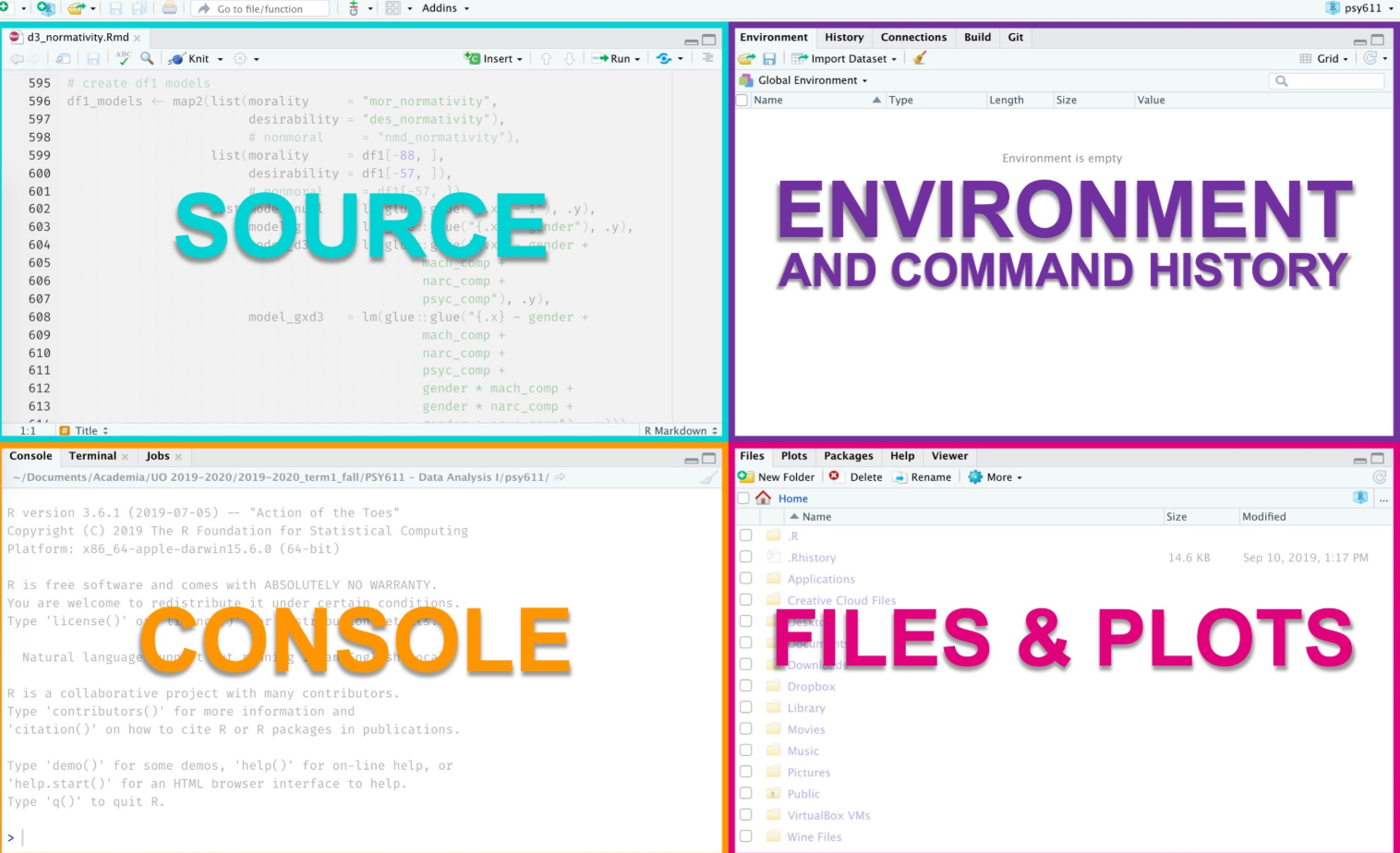
To understand RStudio’s value, we need to look at its core components. The default four-pane layout is the centerpiece of its design, making it an exceptional rstudio data analysis tool. While it might look complex, each pane has a clear purpose.
1. The Script Editor (Source Pane)
Located in the top-left, this is where you’ll write and save your R scripts (`.R` files). It’s more than a simple text editor; it provides essential features that accelerate development:
- Syntax Highlighting: Makes code readable by color-coding functions, comments, and variables.
- Code Completion: Suggests function names and arguments as you type, reducing typos and the need to memorize syntax.
- Code Folding: Allows you to collapse chunks of code (like functions or loops) to focus on the section you’re working on.
- Live Diagnostics: Underlines potential errors in your code before you even run it.
2. The R Console
Below the script editor is the console, the interactive engine of R. You can execute lines of code directly from the editor (using `Ctrl+Enter` on Windows/Linux or `Cmd+Enter` on macOS) and see the output here immediately. This interactive workflow is perfect for testing ideas, inspecting objects, and performing quick calculations.
3. The Environment & History Pane
The top-right pane gives you a live overview of your workspace.
- Environment: Lists all the objects (data frames, variables, functions) currently loaded into R’s memory. You can click on data frames to view them in a spreadsheet-like format. This is incredibly useful for debugging.
- History: Keeps a log of every command you’ve executed, which you can easily recall and reuse.
4. The Files, Plots, Packages & Help Pane
This multi-purpose pane in the bottom-right is a hub for output and resources.
- Files: A simple file browser for your project directory.
- Plots: When you create a visualization, it appears here automatically. You can zoom, export, and cycle through previous plots without leaving the IDE. This tight feedback loop is a key advantage for exploratory data analysis.
- Packages: Manage your installed R packages—install new ones, update existing ones, and load them into your session.
- Help: Access R’s official documentation. A common frustration is that this documentation can be cryptic. The key is knowing how to use it: type `?function_name` in the console to pull up the specific help file. If that’s too narrow, `??search_term` will search all documentation for a keyword. For more user-friendly guides, look for a package’s “vignettes,” which are often excellent tutorials.
RStudio vs. VS Code vs. Jupyter: A Head-to-Head Comparison
While RStudio is the specialist, general-purpose tools are increasingly popular. This r studio vs alternatives review evaluates how it stacks up against VS Code (with the R extension) and Jupyter Notebooks for data science tasks.
| Feature / Criterion | RStudio | Visual Studio Code (with R Extension) | Jupyter Notebooks |
| Primary Focus | Specialized R Development | General Purpose, Multi-Language | Literate Programming & Reporting |
| R Integration | Excellent: Deep, native integration. All tools are built for R from the ground up. | Good: Highly functional with extensions, but feels less cohesive than RStudio. | Fair: Good for simple R code in cells, but not ideal for complex script development or package building. |
| Data Visualization | Excellent: Integrated plot pane allows for rapid iteration, resizing, and exporting. | Good: Plots typically open in a separate window or viewer pane, which is less fluid. | Good: Inline plotting is excellent for reports, but less ideal for iterative analysis. |
| Debugging | Excellent: Native, interactive debugger with breakpoints and environment inspection. | Good: Solid debugging capabilities provided by the R extension. | Limited: Debugging is cell-by-cell and generally less sophisticated. |
| Beginner Friendliness | Fair: Can be overwhelming initially but is structured logically for the R workflow. | Fair: Less initial clutter, but requires setup and configuration of extensions. | Excellent: The notebook interface is very intuitive for beginners. |
| Multi-Language Support | Poor: Primarily designed for R, with limited support for other languages. | Excellent: Seamlessly supports Python, JavaScript, SQL, and hundreds of other languages. | Excellent: Supports multiple “kernels,” allowing for notebooks in R, Python, Julia, etc. |
Bottom Line
- Choose RStudio if: Your work is 80% or more in R. You are developing R packages, building Shiny apps, or doing heavy statistical analysis.
- Choose VS Code if: You are a polyglot developer who frequently switches between R, Python, SQL, and other tools. You prefer a single, highly customizable editor for everything.
- Choose Jupyter if: Your primary goal is to create shareable reports, tutorials, or presentations that weave narrative text with code and its output.
Beyond Solo Work: RStudio for Teams and Reproducibility
A critical part of modern data science is collaboration, and this is where RStudio’s project-based approach shines. It moves beyond just writing scripts to creating self-contained, shareable, and reproducible analyses.
The foundation is RStudio Projects. When you create a project, RStudio creates a dedicated directory with a `.Rproj` file. This keeps all your scripts, data, and outputs together and sets the working directory automatically. This simple step eliminates a huge source of “it works on my machine” errors when sharing code.
For true collaboration, RStudio offers excellent built-in Git and version control integration. From the IDE, you can connect a project to a GitHub repository, then stage, commit, push, and pull changes without ever touching the command line. This is essential for tracking changes, resolving conflicts, and working in parallel with colleagues.
Finally, to ensure collaborators can run your code exactly as you did, you need to manage package versions. The `renv` package is the standard solution. It creates a project-specific library of packages, recording the exact versions used. When a collaborator opens the project, `renv` can automatically install the correct package versions, guaranteeing a consistent and reproducible environment for everyone.
Read More: How to Recover Permanently Deleted Files from Google Drive>
Frequently Asked Questions About RStudio
Here are direct answers to the most common questions about RStudio.
Is RStudio a good IDE for data science?
Yes, RStudio is an excellent IDE for data science, particularly for work centered on the R language. Its integrated tools for coding, plotting, debugging, and reporting make it one of the most efficient solutions for statistical analysis and data visualization.
What are the pros and cons of using RStudio?
The main pros are its unified interface, powerful visualization and debugging tools, and strong project management features that aid collaboration. The primary cons are its potentially steep learning curve for complete beginners and performance issues when handling very large datasets with inefficient code.
How easy is RStudio to learn for beginners?
For users with some programming experience, RStudio is relatively straightforward. For absolute beginners, the interface can be intimidating. The key is to start by focusing only on the script editor and console. As you gain confidence, you can gradually explore other features and use community resources like Stack Overflow and the Posit Community forum.
How does RStudio compare to Python IDEs like VSCode or Jupyter?
RStudio is highly specialized for R, offering the most seamless experience for R development. VSCode is a more flexible, general-purpose editor that supports many languages well, including R via extensions. Jupyter is best for creating reports and notebooks that mix code with narrative text but is less ideal for pure script development.
Is RStudio free to use for students?
Yes, RStudio Desktop is open-source and completely free for everyone, including students, academic researchers, and commercial users. The free version is fully functional and sufficient for the vast majority of data science work.
You may also like: Top 6 Android Data Recovery Software Review>
Final Thoughts
Navigating the world of data science tools can be daunting, and the initial complexity of RStudio can feel like a significant barrier. However, the frustration of a cluttered workflow or the inefficiency of juggling multiple windows for coding, plotting, and package management is a far greater obstacle in the long run. RStudio directly solves this by providing a unified, R-centric command center.
While it demands an initial investment in learning, the payoff in productivity and organization is substantial. Don’t let the initial intimidation stop you. Your next step is simple and risk-free: download the free version of RStudio Desktop and start with a small, manageable project. Load a simple dataset, create one plot, and experience the integrated workflow for yourself. You’ll quickly see how this powerful tool can help you regain control over your analysis and turn complex data challenges into clear, actionable insights.



Joy Taylor is a seasoned technical writer with over a decade of experience in mobile technology. At iMobie, she specializes in producing in-depth content on iOS data recovery, iPhone unlocking solutions, and iOS troubleshooting.
Product-related questions? Contact Our Support Team to Get Quick Solution >
