[Full Guide] Amazon Prime Video Download on Mac
To download Amazon Prime Video content on a Mac, you can use the official Prime Video app or online tools like Keepvid. But these methods come with restrictions such as expiry dates and limited device support. For a more flexible way, Keeprix Video Downloader can help you save Prime videos on Mac without limitations, making it easier to watch anytime and on any player.
Offline viewing is a major benefit of streaming, and Amazon Prime Video supports it on mobile and Windows devices. However, Mac users are not given this option, which causes inconvenience for those who want to save videos locally. Luckily, this article provides a complete guide to Amazon Prime Video download on Mac, along with everything you need to know about available options and workarounds. By the end, you’ll be able to watch Amazon Prime videos offline on your Mac with ease.
Can I Download Movies from Amazon Prime to My Mac?
Yes, you can download Amazon Prime Video movies and TV shows on a Mac using the official Prime Video for macOS app, available in the Mac App Store. The app works much like the iOS version, letting you store titles for offline viewing. However, Amazon sets several restrictions:
- Device Limits: If titles are downloaded, the files can only be saved on 4 devices (usually two streams at a time).
- Viewing Window: Normally, you have the right to watch the downloaded video for 30 days, and within 48 hours after you have started playback, the time to finish the video is up.
- Title Availability: Downloading of the prime titles may not be available due to licensing restrictions.
- Rental Rules: Generally, rented videos can only be downloaded onto a single device with a 30-day window to start and 48 hours to finish once playback has begun.
Amazon Prime Video Download on Mac [No Restrictions]
Even though Amazon’s official app permits downloading, it still has certain limitations. For Mac users who are looking for a more accommodating way, Keeprix Amazon Prime Video Downloader is the answer to download and watch Prime videos offline. This tool allows you to get 1080P movies and TV shows in their original quality and keep them for a lifetime without any restrictions imposed by Amazon. It enables you to save the content in MP4 or MKV format and provides options for multiple audio tracks and subtitles so that you can easily watch the content offline on any device.
Features of Keeprix Amazon Prime Video Downloader:
- Convert Prime videos into MP4 or MKV formats to play them on any device.
- Downloaded videos will be with you forever without an expiration date.
- Play the downloaded titles offline without any interruptions.
- Access and download content without geographic limitations to watch later.
How to download Amazon Prime Video on Mac using Keeprix Video Downloader:
Step 1. Download Keeprix Video Downloader and install it on your computer. Launch it and select the Amazon platform.
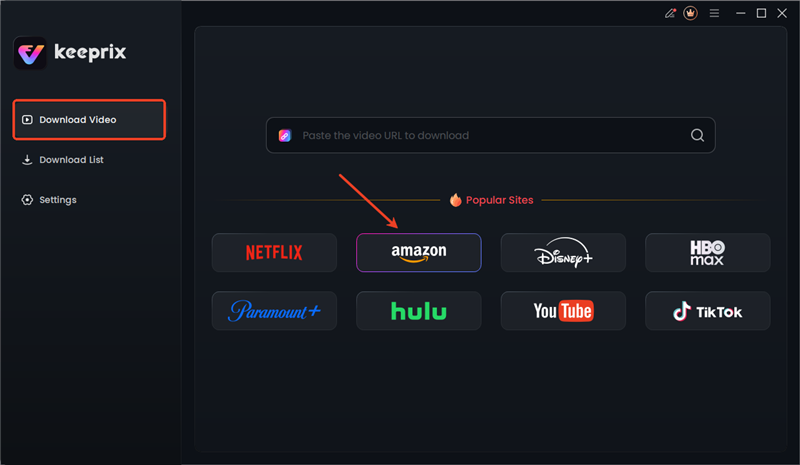
Choose Amazon in Keeprix
Step 2. Sign in to your Amazon Prime account by entering your credentials.

Sign in to Amazon Prime Account
Step 3. Find a video you want to download, and tap the download button. After the download is completed, the video will be stored in the local file on your computer.
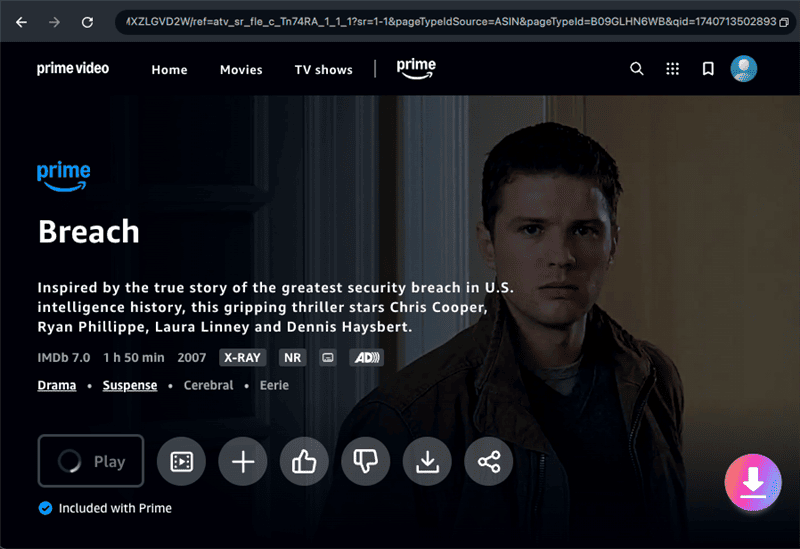
Download Prime Videos
Download Amazon Prime Video for Mac Officially
The official way to download Amazon Prime Video on a Mac is through the Prime Video app for macOS, available in the Mac App Store. This app allows you to save selected movies and TV shows for offline viewing directly on your Mac. But it comes with many Amazon Prime download limitations. For example, downloads remain locked inside the app, vary by title and region, and expire after 30 days or 48 hours once playback begins. Follow the steps below:
Step 1. Open the Mac App Store, search for Amazon Prime Video, download and install the app.
Step 2. Launch the app and sign in with your Amazon account.
Step 3. Browse or search for the title you want, then click Download if the option is available.

Download Amazon Prime Videos on Mac
Step 4. Check your saved videos in the Downloads section of the app.
Amazon Prime Video Download on Mac via Online Tool
Another option is to use an online downloader like Keepvid, which works directly in your browser without installation or setup. You just copy the video URL from Prime Video, paste it into the tool, and click GO. However, Keepvid often come with restrictions such as unstable performance, slower speeds, or potential privacy and security risks compared to desktop software. Here are the steps to download Amazon Prime Video on Mac using Keepvid:
Step 1. Open your browser and open Amazon Prime Video. Select the movie or episode you are interested in and copy the link from the address bar.
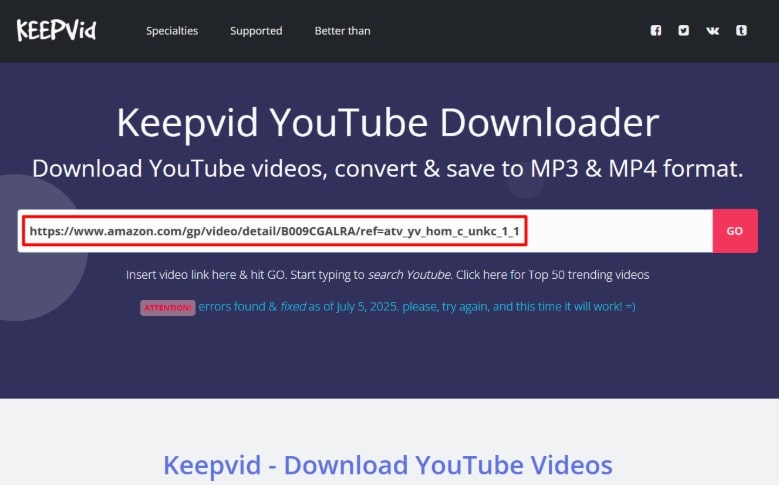
Paste URL of Prime Video in Keepvid
Step 2. Go to the Keepvid site, paste the URL you copied into the search box, and click GO to obtain the download options.
Step 3. Pick the format and resolution that you like, then right-click the Download button and pick Save Link As to save the file on your Mac.
FAQs about Amazon Prime Video download on Mac
Q1. Can you get Prime Video on a MacBook Air?
Yes. You can download the Amazon Prime Video app from the Mac App Store on your MacBook Air. Once installed, you can stream directly or save selected titles for offline viewing.
Q2. How do you download Amazon Prime movies to a MacBook?
There are two main options: use the official Prime Video app for Mac, or rely on third-party tools such as Keeprix Downloader or online services like Keepvid to bypass official download limits.
Q3. Can I watch downloaded Amazon Prime movies on an airplane with a Mac?
Yes. Movies saved through the Prime Video app or a downloader can be played offline, so you can enjoy them on your Mac without an internet connection.
Conclusion
In this article, we introduced three ways to download Amazon Prime Video on Mac: the official Prime Video app, an online tool like Keepvid, and the professional Keeprix Video Downloader. While the first two methods work, they come with restrictions on quality, availability, or expiry. For an unlimited solution, Keeprix Video Downloader lets you save Prime videos in MP4/MKV formats without Amazon Prime Download restrictions. Download Keeprix today and build your own unrestricted offline Amazon Prime Video library.



Joy Taylor is a seasoned technical writer with over a decade of experience in mobile technology. At iMobie, she specializes in producing in-depth content on iOS data recovery, iPhone unlocking solutions, and iOS troubleshooting.
Product-related questions? Contact Our Support Team to Get Quick Solution >
