Amazon Prime Video DRM Removal: Limits & 3 Offline Options
Amazon Prime Video uses DRM to protect movies and shows, which is why official downloads can only be played inside the Prime Video app and may expire after a certain period. This guide explains what Amazon Prime Video DRM means and what options you have for personal offline viewing, including the official Prime Video app, screen recording, and Keeprix Video Downloader.
Amazon Prime Video offers a large library of movies, shows, and originals, but its offline downloads are protected by DRM, or Digital Rights Management. This means downloaded titles are usually tied to the Prime Video app, your Amazon account, and supported devices. If you want to understand why Prime downloads expire, why they cannot be exported as normal video files, and what offline viewing options are available, this guide breaks down the key limits and compares 3 common methods.
What Is Amazon Prime Video DRM?
Amazon Prime Video DRM (Digital Rights Management) is a set of security measures that aim at stopping unauthorized or illegal copying, sharing, or redistribution of the protected digital titles. When you download a movie or TV show from Prime Video, the file is stored in an encrypted format rather than as a standard video. It is tied to your Amazon account and the Prime Video app through license keys, which means you cannot freely transfer, export, or play the file on other devices or players.
Can You Remove DRM from Amazon Prime Video?
Yes, it is possible to remove the DRM from Amazon Prime Video, but it isn’t a simple task. Prime downloads are DRM-protected, so decrypting them requires specialized tools and technical steps. These tools are converters that change encrypted Prime Video files into regular video formats (e.g., MP4) that can be saved, played, or transferred to other devices. The next part is about three common ways for Amazon Prime Video DRM removal.
Amazon Prime Video DRM Limits You Should Know
Amazon Prime Video allows offline downloads through its app on supported devices, but downloads are not the same as normal video files. Before choosing any offline viewing method, keep these official limits in mind:
- Downloaded titles are usually playable only inside the Prime Video app.
- Many downloaded videos must be started within 30 days and finished within 48 hours after playback begins.
- Not every movie or show is available for download because of licensing rules.
- Download availability, device support, and title limits may vary by country, account type, title, and subscription status.
- If your Prime membership, rental period, add-on subscription, or regional access changes, some downloads may become unavailable.
If the official Prime Video app already meets your needs, it is the simplest option. If you need a more flexible file-based workflow for personal offline viewing, the methods below show what each option can and cannot do.
Method 1. Save Prime Videos for Personal Offline Viewing with Keeprix
For users who want a more flexible offline viewing experience, Keeprix Prime Video Downloader can help save Prime Video titles you can already access as local MP4 or MKV files. Instead of keeping downloads locked inside the Prime Video app, Keeprix lets you organize videos on a Windows or Mac computer for personal viewing, travel, study, or media library management.
It is a better fit if you want to watch videos in a common media player, prepare a watchlist before a trip, save episodes in batches, or avoid relying only on temporary app downloads.
Major features of the Keeprix Video Downloader:
- Save Prime Video titles you can access for personal offline viewing.
- Export videos in MP4 or MKV for easier playback and organization.
- Keep video and audio quality up to 1080p, depending on the source title.
- Batch save multiple episodes or movies to prepare an offline watchlist faster.
- Manage downloaded videos on Windows or Mac as part of a personal media library.
Steps to remove Amazon Prime DRM with Keeprix Downloader:
Step 1: Download Keeprix Video Downloader & Select the Amazon Prime Platform
Download and install Keeprix Downloader on your computer, then launch it and choose Amazon under the Download Video option.
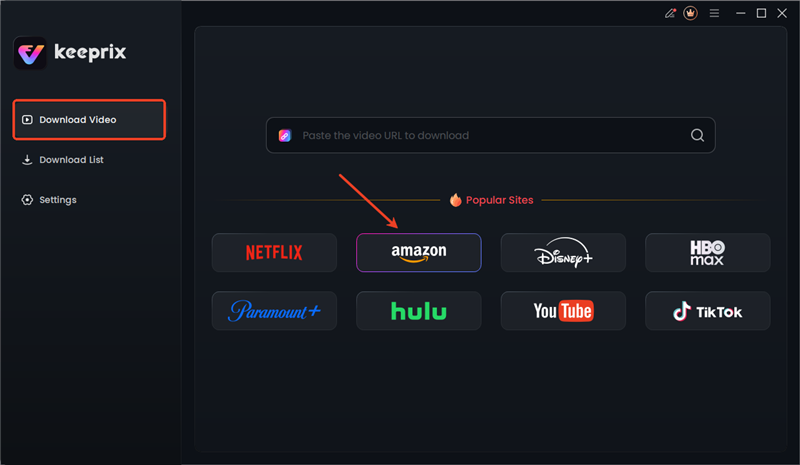
Choose Amazon Platform
Step 2: Log in to Your Amazon Account
The Prime Video built-in browser homepage will be opened. The login to your Amazon account will appear as a pop-up—just follow the given steps to log in.

Sign in to Amazon Prime Account
Step 3: Download Amazon Prime Video
Once you confirm the download settings, click the Download button. The video will be added to the download queue and saved as a local file for personal offline viewing.
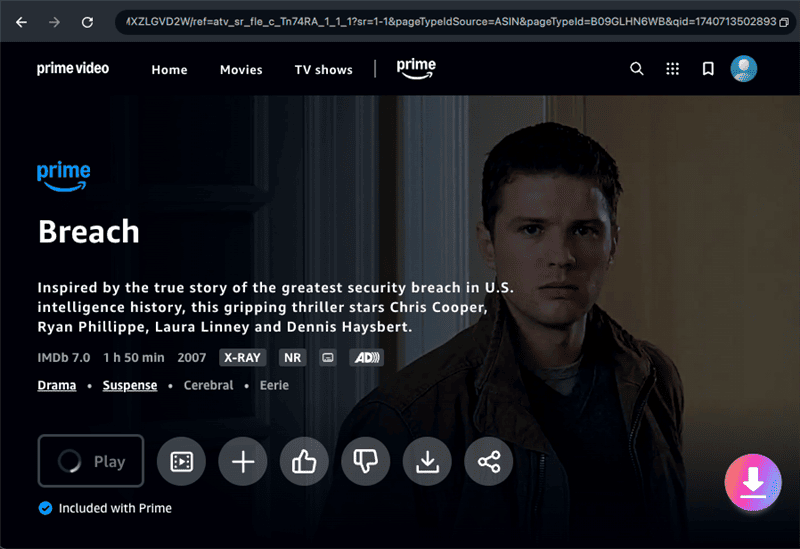
Download Prime Videos
Limited Offer: Get Keeprix Video Downloader 20% OFF and save Prime Video titles you can access for personal offline viewing.
Amazon Prime Video Official Downloads vs. Keeprix Offline Saving
Amazon Prime Video does allow offline downloads for selected titles, but those downloads are usually limited to the Prime Video app, supported devices, and certain viewing periods. If you want more flexible offline viewing on a computer, USB drive, media player, or personal video library, Keeprix offers another option for videos you can already access legally.
| User Need | Amazon Prime Video Official App | Keeprix Personal Offline Saving |
| Watch offline | Yes, on supported app/device | Save as MP4/MKV on computer |
| Transfer to USB | Not supported directly | Supported after download |
| Watch on any player | No | Yes |
| Keep after expiration | No, official downloads expire | Yes, for personal local library |
| Batch save episodes | Limited | Supported |
While each method works in certain cases, they also come with trade-offs such as limited quality, slow recording, or the need for paid subscriptions. If you want a hassle-free way to save Amazon Prime videos, Keeprix Amazon Downloader is a good choice to bypass Amazon Prime DRM. It offers 1080p quality, MP4/MKV formats, and the download files will never expire.
Method 2. Remove Amazon Prime DRM via Screen Recorder
Another option is to record Prime Video playback with a screen recorder such as OBS Studio. This does not export the original Prime Video download file. Instead, it captures the video as it plays on your screen and saves a new recording for offline viewing. The downside is that recording happens in real time, quality may drop, and large files can take up significant storage.
Step 1. Get OBS Studio from the official site and then set it up on your pc. After that, close it and restart it in your system.
Step 2. Within the OBS interface, click the + icon located under the Sources panel and select either Display Capture or Window Capture.
Step 3. In the web or app version of Amazon Prime Video, open and log in to your account; then start playing the video that you want to record.
Step 4. To start recording, the user must set the Resolution, Frame rate, and output Format (MP4 or MKV) in OBS as well as include Audio.
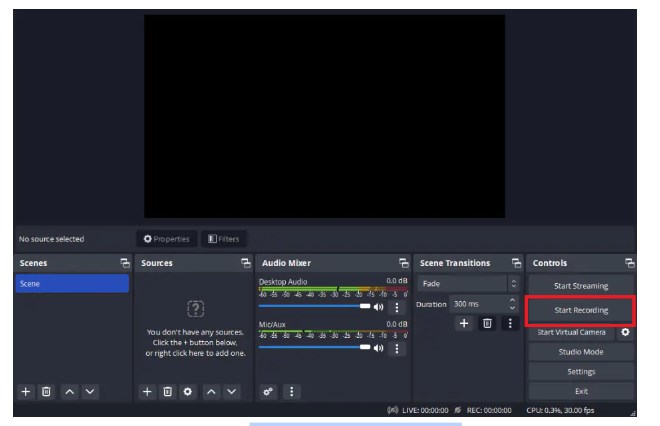
Start Recording with OBS Studio
Step 5. Pressing the Start Recording button in OBS allows the video to be played and recorded in full without any interruptions.
Step 6. When the video is over, press the Stop Recording button in the same place. The computer will automatically save the file in the location set under Output Settings.
Method 3. Amazon Prime Video DRM Removal by Screen-Sharing Tool
Zoom can also work as a basic screen-recording workaround. You can start a meeting, share your screen, play the Prime Video title, and record the session. However, this method is slow, compressed, and less stable than a dedicated downloader. It is better treated as a backup option rather than the main solution.
Step 1. Get Zoom installed on your PC, then log in to your account. Make sure that you are the host, and start a new meeting.
Step 2. Navigate to enable the Share screening feature and click on the option that corresponds to the Amazon Prime Video window.
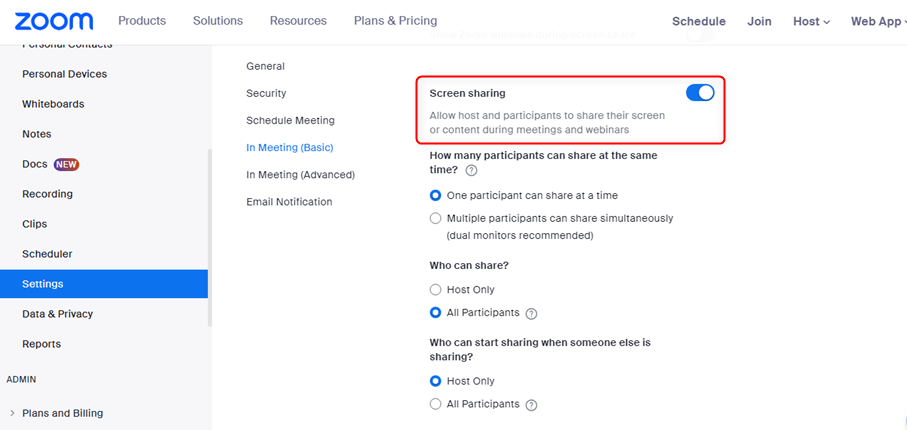
Turn On Screen Sharing
Step 3. Turn on Zoom’s recording feature before playing the video. Go to Amazon Prime Video, sign in, and play the video you want to record.
Step 4. After the recording has stopped, the Zoom output folder will pop up, where you can save the file to your desired location.
You might also like: Prime Video Download Limit: How to Fix ‘Limit Reached’ Errors in 2026
Comparison of Amazon Prime Video DRM Removal Tools
Below, we compare the 3 methods of removing DRM from Amazon Prime Video to help you choose one that suits you best.
| Method | Pros | Cons |
| Keeprix Video Downloader |
|
|
| OBS Studio |
|
|
| Zoom |
|
|
Each method has trade-offs. Screen recording and screen-sharing tools are free or easy to access, but they are slow, may reduce quality, and require you to record the entire video in real time. Keeprix is more suitable for users who want a cleaner way to save Prime Video titles they can access as MP4 or MKV files for personal offline viewing on Windows or Mac.
You might also like: Disney Plus Download Limit: Official Rules and Solutions for 2026
FAQs about Amazon Prime Video DRM Removal
Q1. Is Amazon Prime Video DRM removal legal?
DRM removal laws and platform rules vary by region, use case, and content type. In general, copying, sharing, redistributing, selling, or uploading Prime Video content can violate copyright law and Amazon’s terms. If you use any offline viewing tool, only save videos you can legally access and keep them for personal use.
Q2. How to remove Amazon DRM?
You can use DRM removal software, record with OBS, or use screen-sharing apps, though all methods may conflict with Amazon’s policies.
Q3. How to get rid of DRM from videos without paying?
Free tools like OBS can record videos but with time and quality limits. For faster, high-quality results, Keeprix Video Downloader is the best option.
Q4. Why do Amazon Prime Video downloads expire?
Prime Video downloads are controlled by licensing rules and DRM. Many downloads must be started within 30 days and finished within 48 hours after playback begins. Some titles may also become unavailable if your subscription, rental period, or region changes.
Q5. Why can’t I download some Prime Video titles?
Not every Prime Video title is available for download. Availability may depend on licensing, region, device compatibility, subscription type, and whether the title is rented, purchased, or included with Prime.
Conclusion
If you only need short-term offline viewing on a supported device, the official Prime Video app is the safest and simplest choice. If you want a more flexible personal offline library on Windows or Mac, Keeprix Video Downloader offers a smoother way to save Prime Video titles you can already access as MP4 or MKV files. For best results, use it only for personal viewing and never redistribute, upload, sell, or share downloaded content.



Joy Taylor is a seasoned technical writer with over a decade of experience in mobile technology. At iMobie, she specializes in producing in-depth content on iOS data recovery, iPhone unlocking solutions, and iOS troubleshooting.
Product-related questions? Contact Our Support Team to Get Quick Solution >
