How to Rip Movie from Amazon Prime in 3 Ways
To download Amazon Prime Video content, you can use screen recorders like OBS Studio and dedicated tools such as Audials Movie. They allow you to capture and playback, but often come with quality or performance trade-offs. For a more straightforward approach, Keeprix Video Downloader saves Prime content in MP4 format for flexible offline viewing.
Ripping Amazon Prime videos is the process of saving movies and shows from Prime as permanent files on your device, allowing you to watch Prime videos offline, without expiration dates, or device limits. Many users turn to ripping when the official download feature proves too restrictive. In this updated 2025 guide, we’ll cover everything from the basics of Amazon Prime Video rip, and then walk you through three proven solutions so you can make an informed choice.
What Is Amazon Prime Video Rip?
Amazon Prime Video rip is a method of duplicating or capturing video and TV series from Amazon Prime to keep them as permanent storage on your device. Unlike the built-in download feature, which is limited to offline access within the Prime Video application, ripping creates a new video file that can be accessed at any time, even if you are no longer subscribed or if the title is removed from the library. In a nutshell, it allows users to circumvent streaming limitations and thus have more control over their content.
Can I Rip Videos from Amazon Prime?
Technically, yes, but it’s not simple. Amazon’s official downloads are temporary and DRM-protected, playable only in the Prime Video app. To create a permanent, portable file, you’d need to bypass DRM, which is complex and not easily done. There are also risks. Bypassing DRM may violate Amazon’s Terms of Service and, in some regions, copyright law. If you explore third-party tools or screen recorders, use them cautiously, only for personal offline viewing, and never for sharing.
Way 1. Amazon Prime Video Rip via Keeprix Video Downloader
To rip Amazon Prime Video, Keeprix Video Downloader offers a powerful alternative to the restrictive official app. It can help you bypass Prime Video’s download limitations. This tool supports saving movies and TV shows as permanent MP4 or MKV files that never expire. It supports high-quality downloads up to 1080p or even 4K, keeps multiple audio tracks and subtitles, and places no limits on the number of titles or devices. This means you can build your own offline Amazon Prime video library and watch freely anytime, anywhere, without worrying about expirations or restrictions.
Main Features of Keeprix Video Downloader:
- Unlimited downloads without Prime Video’s 15–25 title cap.
- 1080p Full HD quality for crystal-clear viewing.
- Ad-free playback for uninterrupted enjoyment.
- Save Amazon Prime videos in MP4 or MKV for universal compatibility.
- Access and download content globally without region limits.
Steps for Amazon Prime Video Rip with Keeprix Video Downloader:
Step 1. Download and launch Keeprix on your computer. Choose the Amazon platform from the homepage.
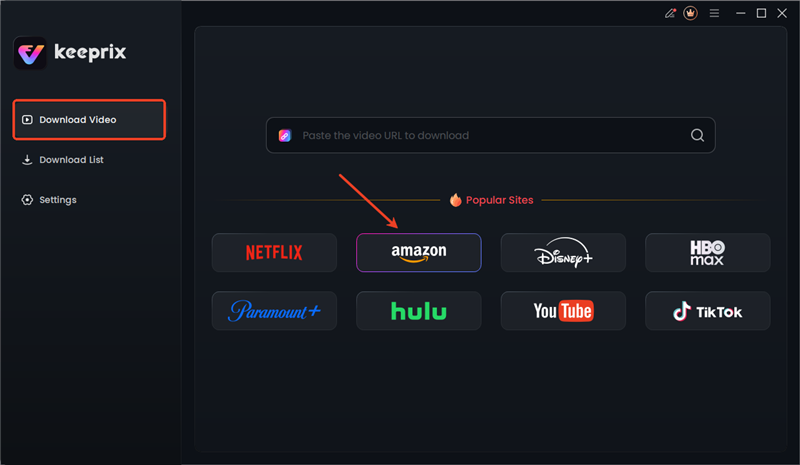
Choose Amazon in Keeprix
Step 2. Sign in to your Amazon Prime account to access the video content. Your login information remains secure and is used only to retrieve video details.

Sign in to Amazon Prime Account
Step 3. Find the specific movie you want to download. Click the “Download” button to start the process. Once the download is complete, the video will be saved on your device and ready for offline playback permanently.
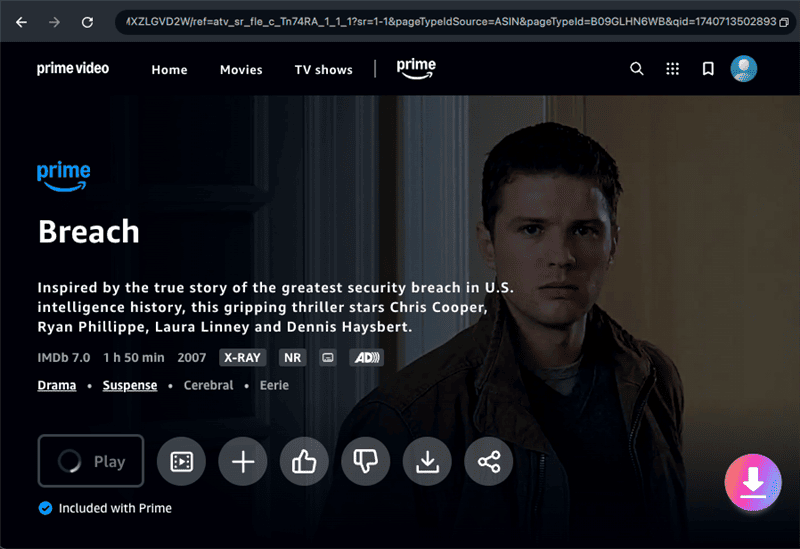
Download Prime Videos in Keeprix
Way 2. Rip Amazon Prime Videos via OBS Studio
Another method to rip Amazon Prime is OBS Studio. It lets you capture whatever is playing on your screen, including Amazon Prime videos, and save them as MP4 or MKV files. However, screen recording has clear drawbacks: the recording happens in real time, quality may be affected by system performance, and you need to keep the video playing without interruption.
How to rip Amazon Prime videos with OBS Studio:
Step 1. Download and install OBS Studio on your computer.
Step 2. Open OBS and select the + icon under the Sources panel. To record your full screen, use Display Capture. If you only want to record the Prime Video player window, then Window Capture is the right choice.
Step 3. Go to your Prime Video account in a browser, play the video you want to rip, then click Start Recording in OBS.
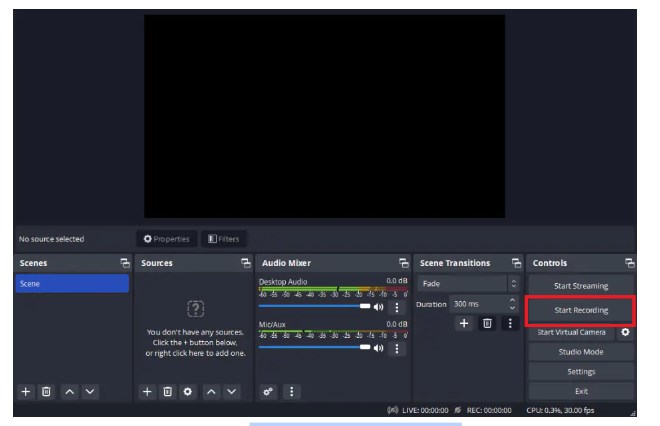
Start Recording with OBS Studio
Step 4. When you are done, click Stop Recording, and your video will be saved to the folder you selected on your computer.
Way 3. Amazon Prime Video Rip with Audials Movie
Audials Movie is a professional, all-in-one recording tool that many users choose to capture Amazon Prime videos. Compared with free screen recorders, it offers a more streamlined experience: the interface is beginner-friendly, and it comes with built-in presets tailored for popular streaming platforms like Amazon Prime, making setup much easier. However, like OBS Studio, recording still takes place in real time, and system performance, internet stability, and background tasks can affect the final quality.
How to rip Amazon Prime videos with Audials Movie:
Step 1. Get the Audials Movie from the Audials’ official website, set it up on your computer, and then open the program.
Step 2. Access the Video Streaming tab and find Amazon Prime Video in the list of compatible platforms. Thus, the program can utilize the correct parameters for recording.

Rip Amazon Prime Videos with Audials Movie
Step 3. Sign in using your Amazon Prime details.
Step 4. Search for the videos you want to download, hit play, and press the record button in Audials. When finished, the captured file will be saved in your chosen format.
FAQs about Amazon Prime Video Rip
Q1. How do I rip off Amazon Prime?
Ripping Amazon Prime videos can be done by using a specially designed tool like Keeprix Video Downloader or Audials Movie, or simply by recording with a free software solution such as OBS Studio.
Q2. Can I rip Amazon Prime Video for free?
Yes, free screen recording software like OBS Studio can be used to grab Prime Video content without any charge. Only a few words about quality, as professional tools like Keeprix offer better quality, faster downloads, and more features.
Q3. How to convert Amazon Prime videos to MP4?
Amazon doesn’t support MP4 conversion, and its downloads only stay encrypted in the app. For MP4 files without expiry, you can use Keeprix Prime Video Downloader.
Q4. How to screen record Amazon Prime Video without a black screen?
To screen record Amazon Prime Video without a black screen, choose Display Capture in OBS Studio and disable browser hardware acceleration to record the video normally.
Conclusion
To sum up, this guide goes through three working solutions for Amazon Prime Video rip, including Keeprix Video Downloader, OBS Studio, and Audials Movie. Since both OBS Studio and Audials Movie rely on real-time recording, they can be time-consuming and less efficient. For a faster, more reliable solution, Keeprix Video Downloader is the better choice. It offers quick Amazon Prime video downloads, permanent MP4/MKV files, and unlimited offline access. Download Keeprix today and start building your own Prime Video library without limits.



Joy Taylor is a seasoned technical writer with over a decade of experience in mobile technology. At iMobie, she specializes in producing in-depth content on iOS data recovery, iPhone unlocking solutions, and iOS troubleshooting.
Product-related questions? Contact Our Support Team to Get Quick Solution >
