How to Bypass Hulu Download Limits for Offline Watching
Discover Hulu’s frustrating download limits, including restrictions on devices, content, quantity, and expiration. This guide explains each limitation in detail and reveals how you can bypass them using a Hulu downloader to save any Hulu video offline without expiration.
For a long time, Hulu has been hotly discussed in the streaming world, offering a selection of current-season TV shows, classic series, original productions, and blockbuster movies. For subscribers on the go, Hulu’s offline download feature is a lifesaver, allowing you to watch your favorite content on flights, during commutes, or anywhere without a reliable internet connection.
However, the built-in download feature comes with several restrictions, which can hinder the offline viewing experience. This article will provide a comprehensive breakdown of every Hulu download limit, from device and content restrictions to expiration dates, and offer a powerful solution to download from Hulu without limits.
Limit 1. Downloads Are Available on Mobile Only
One of the most significant and often surprising limitations of Hulu’s offline viewing feature is the device restriction. Officially, you can only download content on specific mobile devices.
Supported Devices for Hulu Downloads:
- iOS iPhones and iPads
- Android mobile phones and tablets
- Amazon Fire tablets
This means you cannot download Hulu shows or movies directly to your laptop or desktop computer. You also can’t download content to smart TVs, streaming sticks like Roku or Chromecast, or gaming consoles like PlayStation or Xbox. Moreover, the downloaded content can only be watched offline within the Hulu app. You can’t use other players to open the downloads and watch.
This restriction is a major inconvenience for users who prefer watching on a larger screen or want to save videos to a computer with more storage space. If you’re planning a long trip and want to watch on your laptop, you’re officially out of luck. This limitation is primarily due to Hulu DRM protection and licensing agreements, which are easier for Hulu to control and enforce within the closed ecosystems of mobile apps. The app can securely store the downloaded files and manage the expiration timers, ensuring compliance with its content partners’ rules.
Limit 2. Only Premium Plans Support Downloading
The ability to download content is not a standard feature for all Hulu subscribers. It is reserved for those on premium, ad-free tiers. If you are subscribed to the basic, ad-supported plan, you will not have access to the download functionality.
Hulu Plans with Download Support:
- Hulu (No Ads): This is the primary plan that offers the download feature.
- Hulu (No Ads) + Live TV: Subscribers to this premium bundle can also download content from the Hulu streaming library.
If you have the standard Hulu (With Ads) plan, the download icon will simply not appear next to eligible titles. This is a common strategy in the streaming industry to upsell users to higher-priced tiers. While the ad-supported plan offers a more affordable entry point to Hulu’s library, it locks away premium features like offline viewing. Therefore, the first hurdle to even considering downloads is ensuring you’re paying for one of the more expensive ad-free subscriptions.
Limit 3. Not All Videos Can Be Downloaded
Even if you have the right plan and a supported mobile device, you’ll discover that not every movie and TV show on Hulu is available for download. The download icon only appears next to certain titles. This limitation can be frustrating if you have a specific show to download. It is entirely based on the licensing agreements Hulu has with the studios and production companies that own the content. Some distributors do not permit their content to be downloaded for offline viewing.
Furthermore, content may become unavailable for download at any time. As licensing deals change and content cycles on and off the platform, the list of downloadable titles is constantly changing.
Limit 4. Maximum Download Number
Hulu imposes a strict cap on the total number of titles you can have downloaded at any one time. Across all your registered devices, you are limited to a maximum of 25 downloads per account, which can be limited for a family or shared account.
Once you reach the 25-title cap, Hulu will prevent you from downloading anything else. To download a new title, you must first delete an existing one. This forces users to constantly manage their downloaded content.

Too Many Downloads on Hulu
Limit 5. Downloaded Content Will Expire
Besides the above 4 kinds of restrictions on Hulu downloads, the last one is that your downloaded videos have a built-in expiration date. Hulu’s downloads are not permanent but temporary digital rentals. The expiration rules work in two ways:
- 30-Day Viewing Window: Once you download a title, you have up to 30 days to begin watching it. If you don’t start playback within those 30 days, the download will automatically expire, and you’ll need to redownload it from Hulu.
- 48-Hour Playback Window: Once you press play on a downloaded video, you have just 48 hours to finish watching it. After 48 hours, the download expires, even if you only watched a few minutes.

Hulu Download Expired
This ticking clock adds a layer of pressure to offline viewing and undermines the very convenience it’s meant to provide. You can’t simply download a library of your favorite movies to watch whenever you want over the next few months. You must carefully plan your downloads around when you intend to watch them, which makes the feature far less flexible than users would hope.
How to Bypass Hulu Download Limit
As there are various restrictions, you may ask: Can I bypass Hulu download limits and save videos easily? Yes, using a third-party video downloader can help achieve this aim. Keeprix Downloader is a highly recommended tool specifically designed to bypass the download limits of Hulu and other major streaming services. It allows you to download movies or TV shows from Hulu directly to your Windows or Mac computer, effectively removing all the restrictions discussed above.
The benefits of using Keeprix Downloader:
- Download as many videos as you want from Hulu.
- Allow downloading with any subscription plan, including the Basic with ads one and Hulu free trial.
- Save videos in MP4/MKV format without expiration.
- Support downloading on Windows/Mac and watch offline on any device.
Step-by-Step guide to bypass Hulu download limits:
Step 1. Go to the Keeprix official website. Download and install Keeprix Downloader on your computer.
Step 2. Open Keeprix Downloader. Select Hulu from the supported platforms. It will open an integrated web browser.
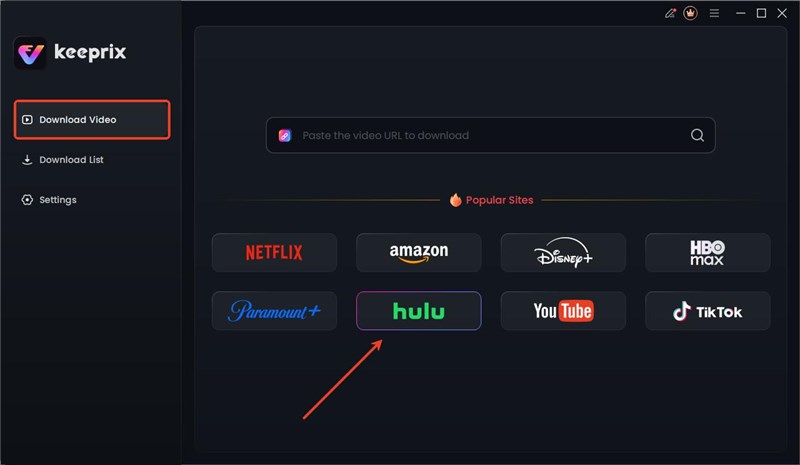
Choose Hulu in Keeprix Downloader
Step 3. Log in to your Hulu account so that you can access its movies and shows.

Log in to Hulu Account
Step 4. Browse or search for the movie or TV series you want to save. Once you have chosen a video, Keeprix will analyze it and present you with download options.
Step 5. Confirm your download settings, then click the download button to start.
Step 6. Once the download is complete, you can go to the Download List section and find your offline content. The downloads can be watched on any media player without the Hulu app.

Hulu Downloads in Keeprix
Although Keeprix supports downloading Hulu content without limits, you can’t download movies or shows for commercial use or transfer the downloads to others.
FAQs About Hulu Download Limit
1. Why is Hulu not letting me download?
There are several reasons why you might be unable to download on Hulu, such as you have subscribed to the basic with ads plan, you are not downloading on a supported device, the content is unavailable for download, you have reached the download limit, etc.
2. Why does Hulu delete my downloads?
Hulu automatically deletes your downloads due to its expiration policy. A download will be deleted if:
- It has been 30 days since you downloaded the title and you haven’t started watching it.
- It has been 48 hours since you first started playing the video.
- The movie or show’s license has expired, and it is no longer available to stream on Hulu.
3. What does “download on too many devices” mean on Hulu?
The “download on too many devices” error message appears when you try to download a title on a sixth device. Hulu’s policy allows you to have downloaded content stored on a maximum of five individual supported mobile devices at any one time.
Conclusion
Like many streaming platforms, Hulu sets download restrictions for users. From the supported download devices to the expiration policy on downloaded content, users can feel upset about any part. By understanding these limitations and using a powerful tool like Keeprix Downloader, you can break free from these restrictions. Take control of your viewing experience and build a permanent, limit-free library of your favorite Hulu content to watch anytime, anywhere, on any device you want.



Joy Taylor is a seasoned technical writer with over a decade of experience in mobile technology. At iMobie, she specializes in producing in-depth content on iOS data recovery, iPhone unlocking solutions, and iOS troubleshooting.
Product-related questions? Contact Our Support Team to Get Quick Solution >
