How to Download from Hulu on All Devices [2 Ways]
Hulu’s official downloads work on iPhone, iPad, Android devices, and Fire tablets, but not on desktop browsers, Mac, Windows PC, smart TVs, or game consoles. If you want to save Hulu videos on a computer for personal offline viewing, Keeprix offers a PC/Mac option that saves accessible Hulu videos as local MP4/MKV files.
Hulu lets eligible subscribers download selected shows and movies for offline viewing, but the official download feature has clear limits. You need a supported mobile device, an eligible Hulu plan, and a title that includes the Download icon. Official Hulu downloads also stay inside the Hulu app and may expire after a limited time.
In this guide, you’ll learn how to download Hulu videos in two ways: using the official Hulu app on supported mobile devices, and using Keeprix on Windows or Mac when you want a more flexible personal offline saving option.
Things You Should Know Before Downloading from Hulu
Before downloading Hulu shows or movies, keep these rules in mind:
1. You need an eligible Hulu plan. Hulu’s official download feature is available only with eligible ad-free plans, such as Hulu (No Ads) and Hulu (No Ads) + Live TV.
2. Not every title can be downloaded. Only movies and episodes with the Download icon are available for offline viewing.
3. Official Hulu downloads work only on supported mobile devices. You can download on supported iPhone, iPad, Android devices, and Fire tablets, but not on desktop browsers, smart TVs, or game consoles.
4. Official downloads stay inside the Hulu app. You cannot export them as normal MP4 files or move them to a USB drive.
5. Hulu downloads expire. Unwatched downloads are usually available for a limited time, and once playback starts, the viewing window becomes shorter.
6. Downloads may be removed if you log out, reinstall the app, or if the title leaves Hulu’s library.
Can You Download from Hulu? Here’s the Quick Answer
Yes, Hulu allows offline downloads, but only under certain conditions. Use this table to quickly check what works and what does not.
| Question | Official Hulu App | PC/Mac Offline Saving |
| Can you download Hulu shows? | Yes, but only selected titles with the Download icon. | Yes, you can save accessible Hulu videos as local files |
| Can you download Hulu on iPhone or Android? | Yes, on supported iPhone, iPad, Android devices, and Fire tablets. | Not needed unless you want local files on a computer. |
| Can you download Hulu on PC or Mac? | No, official downloads are not supported on desktop browsers. | Yes, Keeprix works on Windows and Mac. |
| Can you export Hulu downloads as MP4? | No, official downloads stay inside the Hulu app. | Yes, Keeprix can save videos as MP4/MKV files. |
| Do Hulu downloads expire? | Yes, official downloads are time-limited and may need renewal. | Local files are easier to manage for a personal offline library. |
Download Hulu content on Android/iPhone/Fire Tablet [Official App]
If you have an Android, iPhone, or Fire Tablet, you can easily download shows with the Hulu app. This is the simplest way to watch shows offline. The mobile app lets you download shows fast. This is great for people who travel a lot. It is also perfect for when you have bad internet. You can get your favorite shows with just a few taps. However, downloads on the Hulu app come with restrictions. They expire after a limited time and are only compatible with specific devices.
Here is how to download from Hulu on Android/iPhone/Fire Tablet:
Step 1. Open the official Hulu app on your mobile device or tablet.
Step 2. Look for the “Search” icon, usually at the bottom of the screen.
Step 3. Then, click “Downloadable” to view the content that you can download and watch offline.
Step 4. Open the show/movie you want to download and click the download icon. You can download each episode like this.

Download Hulu content
Step 5. Once the downloading is completed, it will be shown in “Downloads.”
Save Hulu Videos on Windows or Mac for Personal Offline Viewing
If you want to watch Hulu offline on a Windows PC or Mac, Hulu’s official app may not be enough because official downloads are limited to supported mobile devices and remain inside the Hulu app. Keeprix Video Downloader offers a desktop option for personal offline viewing. It helps you save Hulu shows and movies you can already access as local MP4/MKV files, so you can organize them on your computer, prepare a travel watchlist, or play them with common media players.
Keeprix is intended for personal offline viewing only. You should only save videos you can legally access and should not upload, sell, share, or redistribute downloaded content.
Main Features of Keeprix Video Downloader:
– Save Hulu videos you can access as local MP4/MKV files for personal offline viewing.
– Download selected shows, movies, or episodes on Windows and Mac.
– Save available subtitles and audio tracks when supported.
– Batch save multiple episodes to prepare an offline watchlist faster.
– Organize saved videos in local folders, external drives, or a personal media library.
Steps to Download Hulu Videos Using Keeprix Video Downloader:
Step 1: Download and Install Keeprix Video Downloader
Download and launch Keeprix Video Downloader. Select the “Hulu” platform. Or, you can directly paste the video link into the URL box.
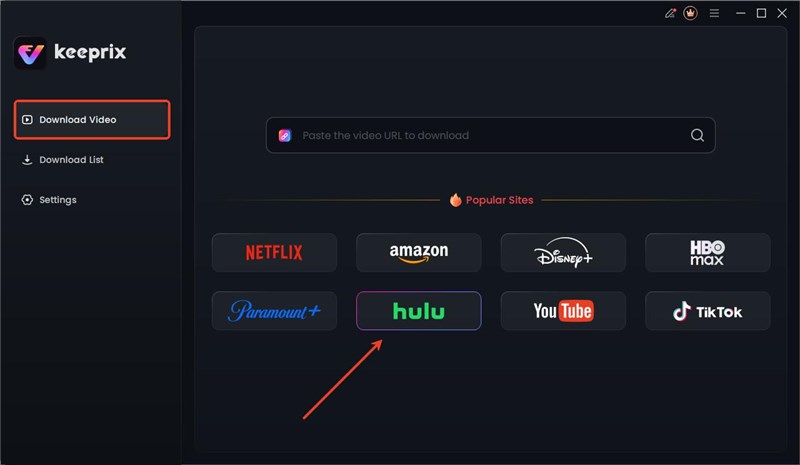
Choose Hulu in Keeprix Video Downloader
Step 2: Sign in to Your Hulu Account
Keeprix Video Downloader will take you to the Hulu built-in browser page. Click “SIGN UP FOR HULU ONLY” and log in with your Hulu credentials.
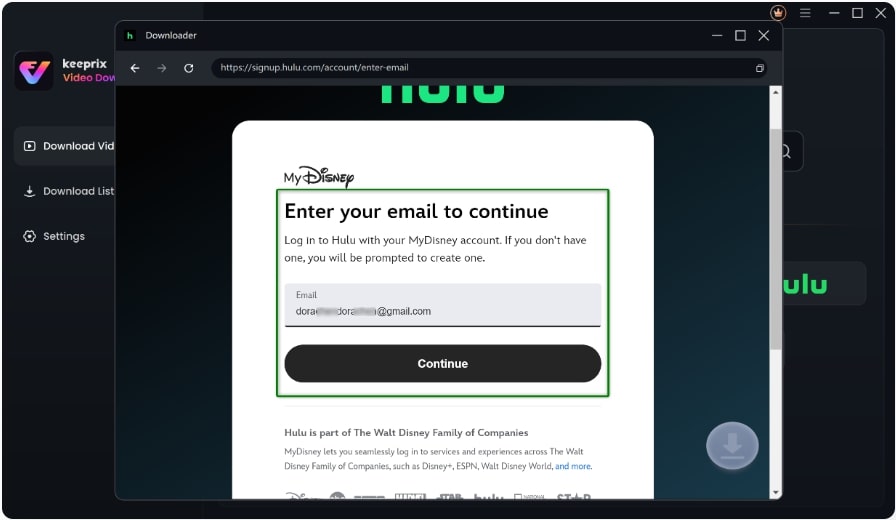
Log in to Hulu Account
Step 3: Download Hulu Content
Search for the show you want to download. Open it and click the “Download” icon showing in the bottom right corner. After it is completed, you can enjoy Hulu shows offline without restrictions.

Download Hulu Video
Download Hulu content on Android/iPhone/Fire Tablet [Official App]
If you have an Android, iPhone, or Fire Tablet, you can easily download shows with the Hulu app. This is the simplest way to watch shows offline. The mobile app lets you download shows fast. This is great for people who travel a lot. It is also perfect for when you have bad internet. You can get your favorite shows with just a few taps. However, downloads on the Hulu app come with restrictions. They expire after a limited time and are only compatible with specific devices.
Here is how to download from Hulu on Android/iPhone/Fire Tablet:
Step 1. Open the official Hulu app on your mobile device or tablet.
Step 2. Look for the “Search” icon, usually at the bottom of the screen.
Step 3. Then, click “Downloadable” to view the content that you can download and watch offline.
Step 4. Open the show/movie you want to download and click the download icon. You can download each episode like this.
Download Hulu content
Step 5. Once the downloading is completed, it will be shown in “Downloads.”
| Comparison | Hulu Official App | Keeprix Desktop |
| Devices | Android, iPhone, iPad, Fire Tablet | Windows 10/11, macOS 11+ |
| Required Plan | Hulu (No Ads) or Hulu + Live TV | Works with any plan |
| Quality | Up to 720p | Up to 720p, depends on source |
| File Format | App-protected, in-app only | MP4 / MKV |
| Expiry | 30 days / 48 hrs after playback | No app-enforced expiry |
| Desktop Download | Not supported | Windows & Mac native app |
| Subtitles | App-controlled | Preserved when available |
| USB / External Drive | Not supported | Copy to USB or external storage |
| Best For | Quick mobile viewing | Desktop library, travel, cross-device |
Why Can’t I Download Some Hulu Shows?
If you cannot download a Hulu show or movie, it does not always mean the app is broken. The most common reasons include:
– The title does not have a Download icon.
– Your Hulu plan does not support downloads.
– You are using an unsupported device, such as a computer, smart TV, or game console.
– Your device storage is full.
– Your Hulu app is outdated.
– The download has expired.
– The title has left Hulu’s streaming library.
– You signed out of Hulu or reinstalled the app, which may remove downloaded titles from that device.
If the Download icon is missing, try another title in the Downloadable section. If downloads fail or disappear, check our guide on fixing Hulu downloads not working.
FAQs about How to Download from Hulu
Q1. Can you download from Hulu to watch offline?
Yes, you sure can! You just need the right plan. This feature works with the Hulu (No Ads) plan and the Hulu + Live TV plan. You can do it on your phone or tablet.
Q2. Why can’t I download an episode on Hulu?
Hulu episodes may not download because not all titles are eligible, downloads aren’t available on the ad-supported plan, your device storage is full, or the Hulu app needs an update.
Q3. Can you download Hulu Movies on a laptop/PC?
Unfortunately, you cannot use the official app for this. Hulu’s app does not let you download on a computer. But there are other tools like Keeprix Video Downloader that can help.
Q4. Can you download Hulu shows on Mac?
Not with Hulu’s official app or desktop browser. Official Hulu downloads are designed for supported mobile devices and Fire tablets. If you want to save Hulu videos on Mac for personal offline viewing, you can use Keeprix.
Q5. Can I transfer Hulu downloads to USB?
No. Official Hulu downloads cannot be exported or transferred as normal video files. They remain inside the Hulu app on the device where they were downloaded.
Conclusion
Wrapping it up! This article explores how to download from Hulu. The download option in the Hulu app is built right into it. But it has some limitations. For a more flexible way, Keeprix Video Downloader supports downloading and watching Hulu shows on TV, computer, and other devices. You can then watch your shows on any device you want without expiration. Don’t wait, download Keeprix today and start enjoying Hulu offline!



Joy Taylor is a seasoned technical writer with over a decade of experience in mobile technology. At iMobie, she specializes in producing in-depth content on iOS data recovery, iPhone unlocking solutions, and iOS troubleshooting.
Product-related questions? Contact Our Support Team to Get Quick Solution >
