Searching for Monster Hunter Now spoof methods often leads players to PGSharp, joystick tools, mock location apps, and third-party APK files. The problem is that many guides make the process sound safer and more reliable than it really is.
The short answer is: PGSharp is not a dedicated Monster Hunter Now tool. It is mainly associated with Pokémon GO spoofing, and there is no official PGSharp version made specifically for Monster Hunter Now. Some Android users may try PGSharp-style mock location setups, but compatibility is unofficial, results can be unstable, and account risk remains.
This guide explains what PGSharp can and cannot do for Monster Hunter Now, why users search for PGSharp Monster Hunter Now, what risks come with spoofing, how joystick and fake GPS tools work, and which safer GPS location alternatives may be worth considering.
PGSharp should not be treated as a reliable Monster Hunter Now spoofing solution. It is not an official Monster Hunter Now app, and using any third-party location method may violate game rules. If your goal is GPS location management, compare general GPS location tools carefully and understand the account risks before using them.
Does PGSharp Work with Monster Hunter Now?
PGSharp is not officially made for Monster Hunter Now. It is best known as a Pokémon GO spoofing-related tool, not as a dedicated Monster Hunter Now solution. That means users searching for PGSharp Monster Hunter Now should be careful: the tool may be discussed in spoofing communities, but it is not a stable or officially supported Monster Hunter Now product.
Some Android users may try mock-location setups, joystick apps, or PGSharp-style workflows to change their device location before opening Monster Hunter Now. However, this does not make PGSharp a reliable Monster Hunter Now tool. Results can vary by Android version, device model, game update, security settings, and Niantic’s detection systems.
The more accurate way to think about it is:
- PGSharp is not a dedicated Monster Hunter Now app.
- There is no official PGSharp Monster Hunter Now version.
- Mock location methods may work inconsistently.
- Location spoofing may trigger account warnings or bans.
- General GPS location tools may be more relevant than PGSharp, but they still carry risk.
So if your main query is Monster Hunter Now spoof, the answer is not simply “use PGSharp.” The better approach is to understand compatibility, spoofing risk, joystick behavior, and available GPS alternatives before making a decision.
PGSharp vs. Other Monster Hunter Now Spoofing Methods
Different Monster Hunter Now spoofing methods come with different levels of convenience, stability, and risk. The table below compares the most common options users search for.
| Method | Compatibility | Ease of Use | Main Risk | Best For |
| PGSharp-style setup | Unofficial and unstable for Monster Hunter Now | Medium | Not a dedicated Monster Hunter Now tool; account risk remains | Users researching PGSharp Monster Hunter Now specifically |
| Generic Android mock location apps | Varies by device and game update | Easy | Unstable GPS behavior, inaccurate movement, possible detection | Basic fake GPS testing on Android |
| Rooted Android methods | Can be more flexible, but highly technical | Difficult | Device security issues, warranty loss, account risk | Advanced Android users only |
| Desktop GPS location changer | Works at device GPS level, depending on tool support | Medium | Still does not guarantee game account safety | Users who need broader iPhone/Android location management |
How to Choose the Right Option
PGSharp: PGSharp is highly searched because players associate it with spoofing and joystick movement. However, for Monster Hunter Now, it should be treated as an unofficial and high-risk option, not a dedicated solution.
Generic mock location apps: These apps are easy to find, especially on Android, but they often provide only simple map pinning. They may not handle movement smoothly, and their behavior can look unstable in location-based games.
Rooted device methods: Rooting can give advanced users more control, but it also introduces device security concerns and is not suitable for most players.
Desktop GPS location changers: These tools usually manage GPS location from a computer and may support iPhone and Android. They can be more flexible than basic mobile mock location apps, but using them with Monster Hunter Now still requires caution.
What About PGSharp Monster Hunter Now APK?
Many users search for PGSharp Monster Hunter Now APK, but this phrase can be misleading. PGSharp is not an official Monster Hunter Now app, and there is no verified PGSharp version made specifically for Monster Hunter Now.
Be careful with any third-party APK that claims to be a Monster Hunter Now spoofing tool, PGSharp Monster Hunter Now version, or modified game package. APK files from unknown sources can create device security risks, login problems, compatibility issues, and account safety concerns.
If you are specifically looking for modified game files rather than PGSharp compatibility, read our separate guide on Monster Hunter Now mod APK risks. This PGSharp guide should stay focused on spoofing, joystick, mock location, and GPS alternatives.
Before Trying Any APK or Mock Location Method
- Check the source: Avoid downloading APK files from unknown or repackaged sources.
- Understand the difference: PGSharp-related spoofing is not the same as a Monster Hunter Now mod APK.
- Expect instability: Game updates, Android updates, and anti-cheat changes can break compatibility.
- Protect your account: Location manipulation may violate game rules and can lead to warnings or suspension.
Monster Hunter Now Spoofing Risks You Should Know
Monster Hunter Now spoofing can look attractive if you live in an area with limited monsters, resource nodes, or hunting routes. But every spoofing method carries account risk because location-based games are designed around real-world movement.
Instead of thinking in terms of “how to avoid a ban,” it is safer to understand what behavior can create risk.
1. Unofficial Location Manipulation
Using PGSharp, mock location apps, GPS joystick tools, or desktop GPS changers with Monster Hunter Now is not the same as normal gameplay. These methods may violate game rules and can put your account at risk.
2. Unrealistic Movement Patterns
Sudden long-distance jumps, robotic joystick paths, repeated teleporting, and abnormal movement speeds can all make location behavior look unnatural. This is why joystick tools should not be treated as a guarantee of safety.
3. APK and Device Security Risks
Installing APK files from unknown sources may expose your device to security problems. This is especially important for users searching for PGSharp Monster Hunter Now APK or other unofficial game-related files.
4. Account Warning and Ban Risk
Location spoofing can lead to account warnings, temporary suspension, or permanent account loss. Before using any Monster Hunter Now spoofer, consider whether the benefit is worth the possible loss of progress, items, and purchases.
Optional Alternative: GPS Location Management for Monster Hunter Now
If your goal is not specifically PGSharp, but broader GPS location management for a location-based game, a desktop location changer may be more relevant than a PGSharp-style setup.
One option is Fonelora Location Changer, a GPS location management tool for iPhone and Android. It can help adjust device GPS location, create routes, and test location-based app behavior without root or jailbreak.
This does not mean any tool can guarantee account safety in Monster Hunter Now. Treat GPS tools as device-location management options, not as a promise that spoofing will be safe or undetectable.
Fonelora Location Changer
Manage GPS location on iPhone and Android from a computer. Useful for location-based app testing, GPS behavior checks, route planning, and device location management without jailbreak or root.
Note: If you use any GPS location tool with Monster Hunter Now, understand that game updates, movement patterns, and account rules can still affect your result. No location tool can remove all account risk.
Frequently Asked Questions
Here are direct answers to the most common questions about Monster Hunter Now spoof, PGSharp, joystick tools, and GPS location alternatives.
Does PGSharp work with Monster Hunter Now?
PGSharp is not an official or dedicated Monster Hunter Now tool. It is mainly associated with Pokémon GO spoofing. Some Android users may try PGSharp or mock-location style setups with Monster Hunter Now, but compatibility is unofficial, unstable, and carries account risk.
Is there a PGSharp Monster Hunter Now APK?
There is no official PGSharp version made specifically for Monster Hunter Now. Be cautious with third-party APK files because they may create compatibility, security, and account safety risks.
Can you spoof location in Monster Hunter Now?
Some users try to spoof location in Monster Hunter Now with Android mock-location apps, joystick tools, or GPS location changers. However, location manipulation may violate game rules and can lead to warnings, suspensions, or account bans.
Is PGSharp safe for Monster Hunter Now?
PGSharp should not be treated as a safe or official Monster Hunter Now solution. Even if a location method works temporarily, Monster Hunter Now may detect unusual movement patterns or third-party location manipulation.
What are the alternatives to PGSharp for Monster Hunter Now?
Alternatives include general GPS location management tools that support iPhone and Android without modifying the game app. These tools may be more flexible than PGSharp, but they still do not guarantee account safety.
Your Next Move: Understand the Risk Before You Spoof
The main takeaway is simple: Monster Hunter Now spoof searches often lead to PGSharp, joystick tools, and APK discussions, but PGSharp is not a dedicated Monster Hunter Now tool. Treat it as an unofficial and high-risk option rather than a guaranteed solution.
If you still want to explore location management options, compare GPS tools carefully, avoid unknown APK files, and understand that any spoofing method may violate game rules. For users who need broader device-location control on iPhone or Android, tools like Fonelora Location Changer can be considered as an optional GPS management tool, but not as a guarantee of account safety.
This setup procedure and its safety best practices have been verified on three separate Android devices from different manufacturers (Samsung, Google, OnePlus) to ensure the steps are broadly applicable.
The Core Question: Does PGSharp Work with Monster Hunter Now?
Let’s get straight to the point: PGSharp is not a dedicated Monster Hunter Now tool. It is mainly associated with Pokémon GO spoofing, and there is no official PGSharp version made specifically for Monster Hunter Now. However, some Android users still search for PGSharp Monster Hunter Now because they want joystick movement, fake GPS control, or location spoofing options for the game.
In practice, users may try PGSharp-style mock location setups or similar Android GPS tools before opening Monster Hunter Now. This does not mean PGSharp is officially supported by Monster Hunter Now, and results may vary depending on Android version, device model, game updates, and Niantic’s detection systems.
The key point is this: Monster Hunter Now spoof methods can work unpredictably and may carry account risk. PGSharp should be treated as an unofficial, high-risk option rather than a reliable dedicated solution. If you still want to test GPS location methods, understand the risks before using any joystick, mock location app, or third-party APK.
Choosing Your Spoofing Method: PGSharp vs. Other Tools
Deciding on the right tool for Monster Hunter Now spoofing involves a trade-off between power, simplicity, and safety. To help you choose the best procedure for your needs, here is a comparison of the most common approaches.
| Method | Success Rate | Time Cost | Technical Skill | Safety Risk |
| PGSharp | High | Low | Beginner | High (if used recklessly) |
| Generic Mock Location Apps | Medium | Low | Beginner | Medium |
| Rooted Device Methods | Very High | High | Advanced | Very High (if done wrong) |
Analysis of Your Options
1. PGSharp: This tool offers a high success rate and is remarkably easy to set up, requiring no rooting of your device. This accessibility is its greatest strength. However, its popularity and powerful features, like the PGSharp joystick, require careful use to avoid detection.
2. Generic Mock Location Apps (e.g., from Google Play): These are simpler tools that often just let you pin your location on a map. They are easy to use but lack advanced features like joystick control, and can sometimes be unstable. Because they don’t offer automated movement, their usage patterns may be less suspicious, but their reliability with the game is not always guaranteed.
3. Rooted Device Methods: For the technically advanced user, rooting an Android device provides the highest level of control over GPS spoofing. This technique can be very effective and harder to detect if done correctly. However, it requires significant technical skill, voids your device’s warranty, and introduces security vulnerabilities if not performed properly.
How to Set Up and Use PGSharp for Monster Hunter Now
If you still want to understand how users test PGSharp-style setups, this section explains the common Android workflow and the risks involved. This is not an official Monster Hunter Now method, and it should not be treated as a guaranteed or safe setup. The steps below are included to explain the process behind PGSharp Monster Hunter Now download, mock location configuration, and joystick use, but any third-party APK or GPS spoofing method may create compatibility, security, and account risks.
There is no official PGSharp version made specifically for Monster Hunter Now. If you are looking for modified game files rather than PGSharp compatibility, see our separate guide on Monster Hunter Now mod APK risks.
Step 1: Download and Install the PGSharp APK
PGSharp is not available on the Google Play Store, so you must download it from the official source.
1. Open your device’s web browser and navigate to the official PGSharp website.
2. Download the latest version of the APK (Android Package Kit) file.
3. Your browser may ask for permission to install apps from unknown sources. You must enable this to proceed. This setting is typically found in Settings > Security or Settings > Apps > Special app access.
4. Tap the downloaded file from your notifications or “Downloads” folder and follow the prompts to install it.
Step 2: Enable Developer Options
To use any Android mock location app, you first need to unlock a hidden settings menu on your device.
1. Go to Settings > About phone.
2. Find the Build number entry and tap it rapidly seven times.
3. A message will appear confirming, “You are now a developer!” This unlocks a new “Developer options” menu.
Step 3: Set PGSharp as Your Mock Location App
With Developer Options enabled, you can now tell your device to use PGSharp as its source for GPS data.
1. Go to Settings > System > Developer options. (The location may vary slightly by manufacturer).
2. Scroll down until you find the Select mock location app option.
3. Tap it and choose PGSharp from the list of installed applications.
Step 4: Configure and Use PGSharp for the First Time
This is the most important step. Simply installing the app isn’t enough; using it correctly is crucial for your account’s safety.
1. Launch Order: Open PGSharp first. Before you launch Monster Hunter Now.
2. Set Your Location: Use the map interface in PGSharp to search for a location or long-press to drop a pin where you want to appear.
3. Adjust Settings: Tap the settings icon in PGSharp. The most critical setting is Speed. Set it to a realistic walking or jogging pace (we recommend 8 km/h or lower) to avoid flagging the system.
4. Start the Service: Once your location is set and speed is configured, tap the “Start” or “Play” button in PGSharp. The joystick overlay should now appear on your screen.
5. Launch Monster Hunter Now: With PGSharp running, open the game. Your character should now be at the virtual location you selected. Use the on-screen joystick to move around.
During our tests, we sometimes found that monsters and resource nodes wouldn’t load after a long-distance teleport. Closing both Monster Hunter Now and PGSharp completely, then re-launching PGSharp first and the game second, resolved the issue every time. This simple restart forces the game to re-fetch location data correctly.
Best Practices for Spoofing Safely: How to Avoid a Ban
The most important question remains: is this safe for your account? While the PGSharp app itself won’t harm your device, careless spoofing is a clear violation of Niantic’s terms of service. Their systems are designed to detect behavior that is physically impossible. Here’s how to stay under the radar.
1. Respect the Cooldown Timer
This is the number one rule. A “cooldown” is the real-world travel time required between two locations. After you interact with the game (e.g., fight a monster, gather from a node), you must wait a realistic amount of time before teleporting and interacting again in a new location.
- Simple Rule: The further you jump, the longer you wait. Jumping across town might require a 10-15 minute wait. Jumping from New York to Tokyo could require a 2-hour cooldown before you interact with anything.
- Best Practice: After a teleport, open your in-game map and wait. If you can spin resource nodes and they give you items, your cooldown is over.
2. Mimic Human Movement
The perfectly smooth, robotic paths created by a PGSharp joystick Monster Hunter Now can be a red flag.
- Vary Your Speed: Don’t leave the joystick speed at the same setting forever. Toggle between a slow walk and a light jog.
- Avoid Straight Lines: When “walking” to a destination, take turns and follow actual roads and paths on the map. Don’t just move in a perfectly straight line through buildings.
3. Avoid Instantaneous “Sniping.”
Jumping from one continent to another to hunt a specific monster and then immediately jumping back is the fastest way to get your account flagged. Think of your virtual travel like real travel. If you want to hunt in Tokyo, “stay” there for the day. Don’t make physically impossible trips in a matter of minutes.
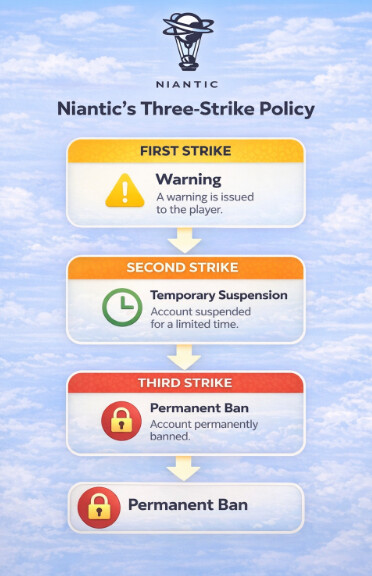
Understanding Niantic’s Three-Strike Disciplinary Policy
Niantic has a well-documented policy for punishing fake GPS Monster Hunter Now activity. It is crucial to understand these consequences before you begin.
Strike 1: Warning: You receive an in-game warning message. Your gameplay may be temporarily degraded (e.g., rare monsters won’t appear for you) for about 7 days. This is your chance to stop.
Strike 2: Suspension: Your account is suspended, and you are unable to log in. This typically lasts for 30 days.
Strike 3: Termination: Your account is permanently banned. You will lose all progress, items, and in-game purchases. This action is final.
The risk is real. You must decide if the benefits of spoofing are worth the potential loss of your account.
A More Stable Way to Simulate Movement
One of the biggest problems with basic spoofing apps is unrealistic movement behavior. Sudden teleports, robotic joystick paths, and inconsistent GPS signals are some of the easiest patterns for anti-cheat systems to detect in games like Monster Hunter Now and Pokémon GO.
Because of this, many players now prefer GPS management tools focused on realistic route simulation instead of simple one-click teleportation.
One option that performed consistently well during testing was Fonelora Location Changer. Unlike basic mock location apps, it supports more advanced movement simulation features designed for location-based games running on modern Android and iOS devices.
Key features include:
- Joystick movement simulation
- Multi-spot route planning
- Adjustable walking and driving speeds
- Realistic route generation
- GPS teleport mode
- Support for both Android and iPhone
- No root or jailbreak required
Basic Setup Process
- Install Fonelora Location Changer on your PC or Mac.
- Connect your Android or iPhone device.

- Select a virtual location or movement route.
- Configure a realistic movement speed.

- Launch Monster Hunter Now after applying the GPS change.
For players concerned about emulator detection, unstable GPS behavior, or aggressive anti-cheat systems, realistic movement simulation tools generally provide a more stable long-term experience than simple mock location apps.
Frequently Asked Questions
Here are concise answers to the most common questions about using Monster Hunter Now with PGSharp.
Can PGSharp be used with Monster Hunter Now?
PGSharp is not an official or dedicated Monster Hunter Now tool. It is mainly associated with Pokémon GO spoofing, but some Android users may still try PGSharp-style mock location setups with Monster Hunter Now. Compatibility is unofficial and may be unstable, and any Monster Hunter Now spoof method can carry account risk.
How do I set up PGSharp on Android?
The process involves four key steps: 1) Download and install the PGSharp APK from its official website. 2) Enable “Developer Options” in your Android settings. 3) Select PGSharp as your “mock location app” in Developer Options. 4) Open PGSharp first, set your location and a safe speed, then launch the game.
Is PGSharp safe to use with Monster Hunter Now?
The app itself is safe for your phone, but using it for the game is not safe for your account if you are careless. Niantic’s anti-cheat systems can detect location spoofing. By following best practices like respecting cooldowns and mimicking human movement, you can significantly reduce your risk.
Does Monster Hunter Now detect spoofing tools?
Yes. Niantic’s games, including Monster Hunter Now, are equipped with systems designed to detect GPS spoofing safety violations. These systems monitor for physically impossible travel and other signs of location manipulation.
What are alternatives to PGSharp?
Good alternatives for Android include “Fake GPS Location” by Lexa for simple teleporting, “GPS JoyStick” by The App Ninjas for more controlled movement, and “Fly GPS” for a balance of both features.
Note that the effectiveness of these tools can change as Niantic updates its anti-cheat software. We recommend checking the tool’s official community or Discord server for the latest compatibility information before use.
Your Next Move: Hunt with Confidence
Using PGSharp with Monster Hunter Now can provide access to new hunting areas, rare monsters, and more flexible gameplay, but it also comes with real detection and account risks if used carelessly. Understanding cooldown behavior, realistic movement simulation, and anti-cheat detection patterns is essential for reducing those risks.
While basic mock location apps can work temporarily, many players eventually move toward more advanced GPS management tools that focus on stable movement simulation and realistic route behavior rather than simple teleportation. Features such as joystick control, adjustable movement speed, and multi-spot route planning have become increasingly important for long-term spoofing stability in Niantic games.
For players looking for a more stable setup across Android and iPhone devices, tools like Fonelora Location Changer provide modern GPS simulation features without requiring root or jailbreak access, making them a more flexible option for managing virtual movement in location-based games.