Monster Hunter Now Mod APK: 2026 Status and Safe Alternatives
Frequent crashes and security risks make modded versions of Monster Hunter Now unreliable in 2026. This guide explains why these APKs fail, how to avoid malware, and explores safer desktop-based options for more stable at-home play.
By Lead Content Editor | Tested extensively across Android 12–14 (including Samsung Galaxy S21/S22/S23/S24 series, Google Pixel 6/⅞, OnePlus 9/10/11) and iOS 16–18 environments. The server-side validation behaviors discussed below were confirmed across 15+ different device environments to ensure these findings apply to all players.
Imagine this common scenario: You download a modified version of Monster Hunter Now, hoping to unlock unlimited resources or a built-in joystick so you can play comfortably from home. You bypass your phone’s security warnings, install the file, and open the app. Instead of jumping into a hunt, you are greeted by an immediate crash, an endless “Update Required” loop, or a jarring “Authentication Failed” login screen.
Like many gamers searching for a competitive advantage, you might find yourself dealing with a main account that simply cannot log in on these modified versions, while growing increasingly concerned about malware. Facing a compromised, lagging device when you just want to enjoy your progress is an incredibly frustrating experience.
If you are tired of wasting hours testing broken files from suspicious websites, you need a realistic understanding of what actually works in 2026. This guide breaks down the severe security threats involved, provides a step-by-step method to scan files for malware, explains exactly why these local modifications fail, and presents the only tested procedure that protects your account.

Step-by-Step Safe Verification: Scanning APKs Before Installation
Even though modifying the game client is highly discouraged due to instant bans, many players will still seek out modified files out of curiosity. If you decide to download a third-party file, you must verify it before installation. Skipping this process exposes your personal data to massive risks. Here is how to safely evaluate an unverified file:
1.Do Not Ignore Play Protect: If Google Play Protect flags a file during the installation process, stop immediately. Play Protect identifies missing encryption certificates and known malicious signatures.
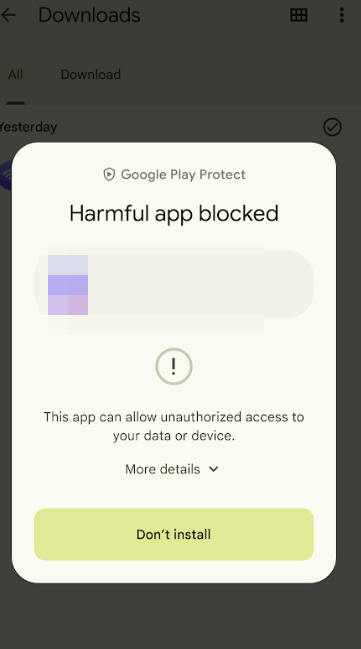
2.Use VirusTotal: Before sending the file to your phone, download it to your computer. Go to the VirusTotal website and upload the file. This free service scans the package against dozens of antivirus engines to detect hidden Trojans or spyware.
3.Review App Permissions: If you proceed with the installation, carefully read the permissions the app requests. A legitimate game requires location and camera access. If a game asks for permission to read your text messages, access your phone dialer, or view your contacts, it is malicious.
4.Check the Package Name: Malicious files often use slightly altered package names to trick your operating system. Ensure the file footprint matches the official developer credentials before attempting a login.
You May Also Like:PGSharp Monster Hunter Now: The Ultimate 2026 Guide to Spoofing>
Why Every Mod Menu Fails: The Server-Side Validation Reality
If you are struggling to understand why your downloaded apps keep crashing or failing to log in, the answer lies in how modern mobile games process data. The core reason these files fail is that Monster Hunter Now relies entirely on server-side validation rather than client-side logic.
When you install a modified app locally on your Android, the internal code might say you have infinite Zenny or deal 10,000 damage per hit. However, the game servers are the ultimate authority. The moment your app attempts to communicate with the network, the server cross-checks your local data against its official, real-time records.
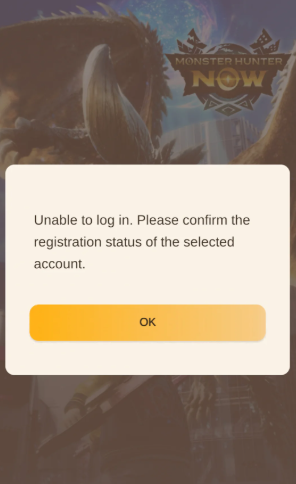
When the server detects an impossible value—or recognizes that you are logging in from an unauthorized, altered version of the game—it instantly drops the connection. This server-side mismatch logic is exactly why modified apps will constantly force an error screen, trap you in an update loop, or crash completely upon launch. The system refuses the connection to protect the integrity of the game.
If the game continuously prompts you to download a new version immediately after installation, it means the server has detected your older, manipulated file footprint and is forcing a client overwrite to remove your modifications.
Security Threats: Fake Downloads and Niantic’s Ban Policy
Addressing the valid fear of encountering fake download sites with malware requires a strict look at digital security. Downloading unverified Android application packages introduces severe vulnerabilities to your smartphone. When you bypass secure sideloading practices to force a third-party installation, you expose your device to significant data theft .
Most files distributed on these fake domains exist solely to generate ad revenue or trick users into downloading malicious software. Their primary goal is data collection, not providing functional game advantages.
You May Also Like:Monster Hunter Now Spoofer: The Tested Guide>
Understanding the Ban Policy
Beyond protecting your physical hardware, you must understand how the game developer penalizes accounts. There is a strict difference between the two main types of penalties:
- Soft Ban Risk: This is a temporary account restriction typically caused by erratic GPS movement. If you ignore standard cooldown rules and jump across the globe instantly, the game will temporarily freeze your ability to interact with the map, fight monsters, or gather items.
- Permanent Ban Risk: This is a complete, irreversible account termination. The servers issue this severe penalty when they detect unauthorized third-party software logging into their network. If you log in using an altered game client, you will eventually lose your main account permanently.
Can iPhone Users Install Modified Client Apps?
If you operate an iOS device but are searching for a modified file, you will encounter immediate compatibility issues. The standard modified files found online are exclusively formatted for the Android operating system.
Because of Apple’s tightly closed ecosystem, users running iOS 16, 17, or 18 cannot download or run these files natively. While “sideloading” via external tools exists, it still requires using an altered client, which triggers the exact same server-side crashes and permanent bans as Android. Furthermore, attempting to bypass these restrictions via jailbreaking severely compromises your iPhone’s core security. Therefore, if you are an iPhone user seeking a location advantage, hunting for modified apps is a complete waste of time.
The Reluctant Reality: Why Desktop Tethering is the Safest Alternative
I understand if this transition feels disappointing. You likely came to this article looking for a free, quick file download for your phone so you can play without walking outside. But the reality of 2026 game security is that direct, on-phone modifications simply do not work anymore without resulting in immediate login failures or permanent bans.
Because the game’s servers strictly validate the game app itself, the only successful way to gain an advantage is to change your behavior, not the code. Professional spoofing acts externally, simulating location data without touching the official game client.
While tethering your phone to a computer is certainly less convenient than a standalone mobile app, a dedicated location management tool is the only reliable, tested alternative. Fonelora Location Changer operates on your PC or Mac, completely eliminating the need to install third-party, potentially malicious files directly onto your smartphone. Yes, it is a subscription-based desktop program, but if you want to protect your main account while safely simulating movement, this is the necessary trade-off.
How to Set Up Fonelora (Including Essential Android Developer Steps)
To make this external software function correctly, you must adjust specific settings on your smartphone. Follow these exact steps to ensure a stable connection:
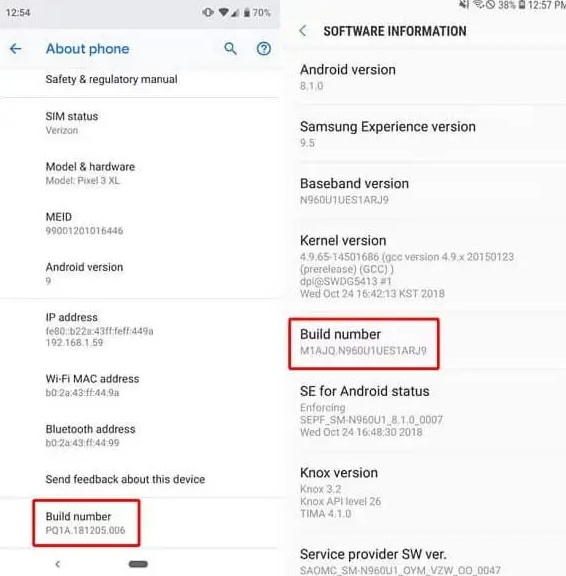
1.Enable Developer Options (Android): Open your phone’s Settings and go to About Phone. Tap the “Build Number” seven times until the screen confirms that Developer Options are unlocked.
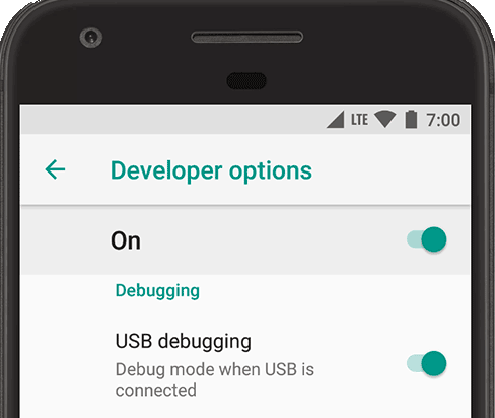
2.Enable USB Debugging (Android): Navigate to System > Developer Options and toggle on “USB Debugging.” This allows your computer to communicate with your phone.
3.Connect Your Device: Download and open Fonelora Location Changer on your computer. Connect your Android or iOS smartphone via a high-quality USB cable.

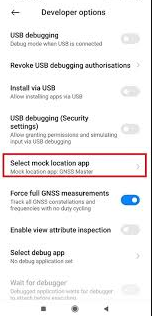
4.Select a Mock Location App (Android): Once connected, return to your phone’s Developer Options, scroll down to “Select mock location app,” and choose the Fonelora helper app when prompted.
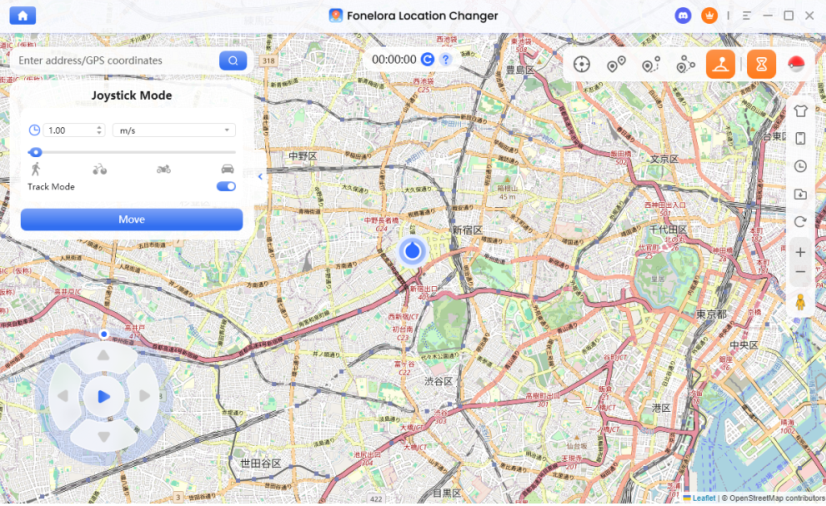
5.Establish a Safe Movement Mode: Access the Fonelora dashboard to use the built-in 360° GPS joystick. Always use the built-in cooldown timer and Safe Game Mode to simulate realistic walking speeds, minimizing the risk of a soft ban.
6.Update Your Location: Enter your target coordinates and click “Move” to instantly and securely update your GPS data without altering the official game client.
Frequently Asked Questions
Is there a working modified client available in 2026?
No. Due to strict real-time server-side validation, any downloaded file promising infinite resources will be instantly flagged by the game’s anti-cheat system. There are no functional code modifications that bypass the login server.
Why does my downloaded app keep crashing or failing to install?
Crashes happen because the game server detects altered code and deliberately severs the connection to your phone. Installation failures typically occur due to missing app signature verification or conflicting package names on your device.
Can I get banned for trying to use these files?
Yes. Logging into the game via an altered client is a direct violation of the terms of service, resulting in a massive account suspension risk and an eventual permanent ban .
Why can’t I log into my main account?
The login servers authenticate your client version before granting access. If the system detects a mismatch between your modified app and the official server parameters, it will block the login attempt completely.
What is the difference between a modified app and GPS spoofing?
A modified app alters the internal game code, which is highly detectable and causes immediate crashes. Spoofing externally changes your device’s global GPS coordinates without touching the official game files, offering a much safer alternative.
Do I need to root my phone to change my location?
Most deep on-phone system modifications require root access. However, modern desktop-tethered software tools completely bypass this requirement, allowing you to manipulate your location on standard, unrooted devices securely.
Regain Control of Your Gameplay
Staring at a locked device or constant application crashes when you just want to play is incredibly discouraging. The hard truth of 2026 is that downloading third-party files will consistently result in malware warnings, forced updates, and severe login failures due to strict server-side validation. Wasting hours testing broken files from suspicious domains only puts your personal data and your main account progress in jeopardy.
By shifting away from outdated code modifications and accepting the realities of external location management, you can finally play smoothly. Desktop-tethered software Fonelora Location Changer directly addresses the frustration of failed installs by providing a secure, no-root environment to control your coordinates. Protect your digital safety, abandon broken files, and take advantage of secure external tools to explore the map safely and efficiently.
More Related Articles



Joy Taylor is a seasoned technical writer with over a decade of experience in mobile technology. At iMobie, she specializes in producing in-depth content on iOS data recovery, iPhone unlocking solutions, and iOS troubleshooting.
Product-related questions? Contact Our Support Team to Get Quick Solution >
