For many Pokémon GO players, long work hours or living in a remote area can make the game feel inaccessible. The search for a gps joystick pokemon go solution often begins with hope but quickly leads to a maze of conflicting advice, outdated tutorials, and warnings of account bans. If you’ve felt frustrated after reading guides that end with, “the easy way probably won’t work on your new phone,” this guide is for you. We offer a clear, honest explanation of how a pokemon go joystick app works in 2026, addressing the real risks and the unique challenges of modern Android.
Quick Answer: A GPS joystick for Pokémon GO lets players simulate map movement by changing device location data. In 2026, players usually search for GPS joystick apps, no-root Android setup methods, Error 12 fixes, rubber-banding solutions, and PC-assisted joystick alternatives. However, any joystick or spoofing method may violate Pokémon GO rules and can carry account risk.

This guide is based on direct, hands-on testing with the latest Pokémon GO version on Google Pixel 7, Samsung Galaxy S23, and OnePlus 11 running Android 12, 13, and 14-16. Our goal is to give you a complete picture so you can make an informed decision based on your technical comfort and risk tolerance. The methods outlined below were validated across more than a dozen device and OS combinations to account for variations in security patches and manufacturer software.
Best GPS Joystick Apps for Pokémon GO in 2026
The most frustrating part of any Pokémon GO joystick guide is when it explains the setup but never tells you which app or method to start with. If you search for GPS joystick Pokémon GO, you will usually find three types of solutions: mobile joystick apps, Android mock location methods, and PC-assisted GPS tools.
The best choice depends on your Android version, technical skill, and how much troubleshooting you are willing to handle. Newer Android versions may trigger Error 12, rubber-banding, or unstable GPS behavior more often than older phones.
| App / Method | Best For | Root Needed? | Main Limitation |
| GPS Joystick by The App Ninjas | Android joystick control and route creation | No | May trigger Error 12 on newer Android devices |
| Fake GPS Location by Lexa | Simple map pinning and basic location changes | No | Limited movement control compared with joystick apps |
| Fake GPS GO Location Spoofer Free | Beginner-friendly joystick setup | No | Compatibility and stability can vary by device |
| PC-Assisted GPS Tool | Joystick movement and route planning from a computer | No root or jailbreak | Still carries Pokémon GO account risk |
Below are the most commonly discussed GPS joystick apps and methods for Pokémon GO. Use this section to compare your options before choosing a setup path.
1.GPS Joystick by The App Ninjas
This is one of the most well-known and feature-rich options.
- Pros: Excellent route creation, variable speed settings, and a persistent overlay joystick. It’s highly configurable for creating realistic movement patterns.
- Cons: The interface can feel a bit dated, and the free version has ads.
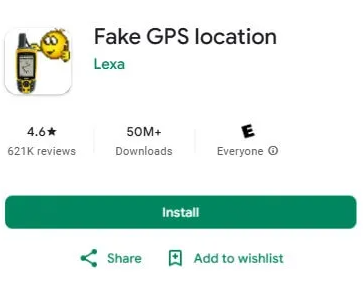
2.Fake GPS Location by Lexa
A popular and reliable choice that has been around for years.
- Pros: Simple, clean interface. It’s very stable and less resource-intensive than other options. It also includes a “move around fake location” feature that can help simulate natural drift.
- Cons: Lacks the advanced automated routing features of more complex apps.
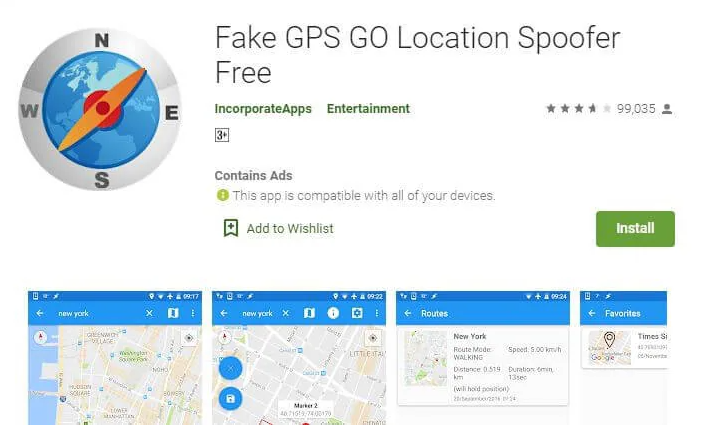
3.Fake GPS GO Location Spoofer Free
A solid alternative with a focus on ease of use.
- Pros: Offers joystick mode and automated movement. It has good integration with other apps and is generally easy to set up.
- Cons: Some advanced features are locked behind a paid version.
By not naming a specific app, other guides leave you to guess from the Play Store, risking malware or non-functional software. We recommend starting with one of these three reputable options, then checking whether your Android version can still run a standard mock-location setup without Error 12 or rubber-banding.
Pokémon GO Joystick Methods Compared: No Root, Root & PC-Assisted
Not all GPS spoofing methods are created equal. The right approach for a Pokémon GO movement joystick depends on your device, Android version, and technical comfort level. On modern phones, the simple no-root methods that once worked are now less reliable, but advanced root methods also come with serious device and account risks.
The table below compares the three major Pokémon GO joystick setup paths.
| Method Type | Best For | Time Cost | Technical Skill | Main Risk |
| Standard Mock Location App | Basic Android joystick testing | 10–15 minutes | Beginner | Error 12, rubber-banding, unstable GPS behavior |
| System-Level Android Setup | Advanced Android users only | 2–4 hours | Advanced | Rooting risk, device compatibility issues, account risk |
| PC-Assisted GPS Tool | No-root joystick and route control from a computer | 10–20 minutes | Beginner to intermediate | Still violates game rules if used for spoofing |
Method 1. Standard Mock Location App:
This is the simplest method. You enable Android developer options and select an app to provide mock GPS data. It is easy to reverse, but modern Android and Pokémon GO may detect it, often leading to Error 12 or rubber-banding.
Method 2. System-Level Android Setup:
This is an advanced option some users discuss for newer Android devices. It may reduce certain compatibility problems, but it requires rooting or system-level modification, which can void your warranty, create device security issues, and still does not remove Pokémon GO account risk.
Method 3. PC-Assisted GPS Tool:
This option uses a computer to manage device location and joystick-style movement. It can be easier than rooting and may work on both Android and iPhone, but it should still be treated as a location-management method with account risk, not as a guaranteed safe way to spoof.
How to Use a GPS Joystick for Pokémon GO: Basic Workflow
The basic workflow is simple: choose a GPS joystick or location app, enable the required Android location settings, select a starting point, set a realistic movement speed, launch Pokémon GO, and stop if you see Error 12, rubber-banding, or account warnings.
The steps below show the most common no-root Android method. Be aware that its success rate has dropped on devices with recent security patches and updated Google Play Services. If you encounter the “Failed to detect location (12)” error, the method may not be reliable on your device.
Step 1: Enable Developer Options
First, you must unlock the developer options menu, which is hidden by default.
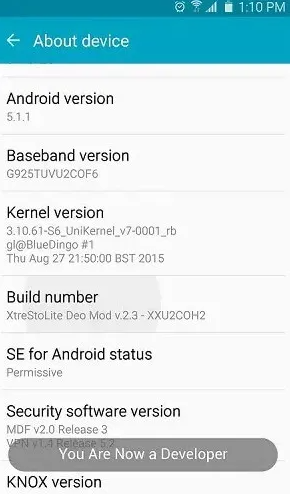
- Navigate to Settings > About phone.
- Scroll down to the Build number entry.
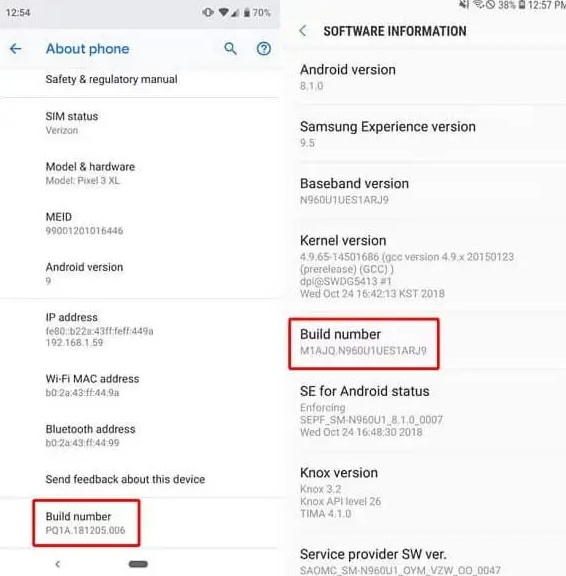
- Tap on Build number seven times in quick succession.
- Enter your device’s PIN or password when prompted. You will see a confirmation message: “You are now a developer!”
Step 2: Select Your Mock Location App
Now, you can grant your chosen joystick app permission to provide location data.
- Go to Settings > System > Developer options.
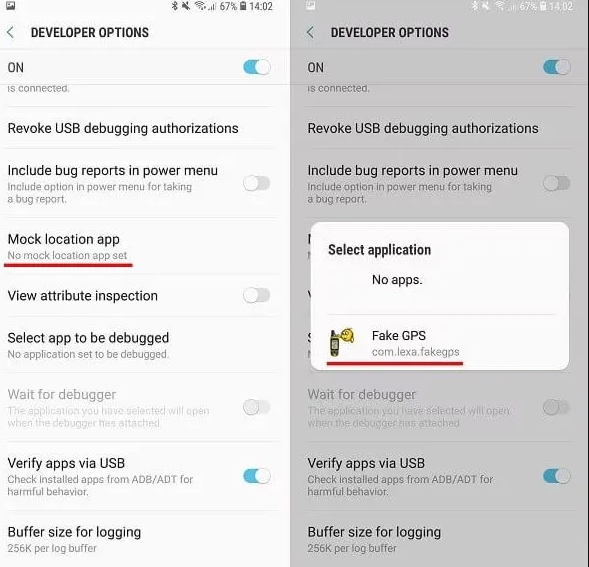
- Scroll to the Debugging section and find Select mock location app.
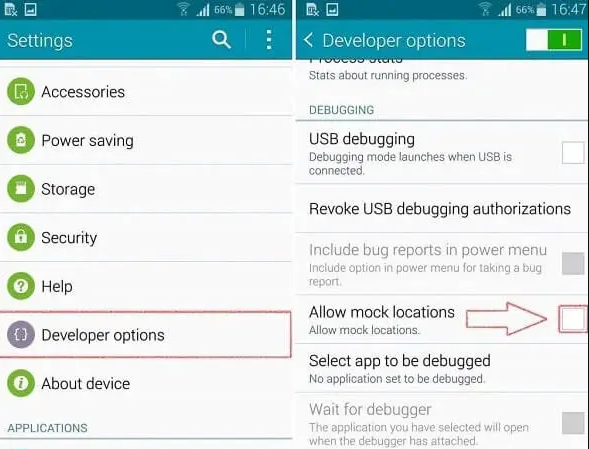
- Tap it and choose the gps joystick for pokemon go app you installed, such as GPS Joystick or Fake GPS Location.
Step 3: Configure the App and Launch Pokémon GO
- Set a Realistic Speed: Open your joystick app and configure the movement speed to a walking or jogging pace, such as 4-8 km/h.
- Start the Service: Select a starting location on the map and start the mock location service.
- Launch Pokémon GO: Open Pokémon GO. Your character should now appear at the mocked location. If it works, continue cautiously. If you get an error, proceed to the troubleshooting section or consider another method.
Advanced Android Option: System-Level Joystick Setup
If your GPS joystick stopped working after updating to Android 13 or Android 14, you are not alone. Many older Pokémon GO joystick methods now trigger Error 12, rubber-banding, or inconsistent location behavior on modern devices.
Some advanced Android users discuss system-level setups as a way to reduce compatibility issues with basic mock location apps. However, this approach is technical, risky, and not recommended for casual players. It usually involves bootloader unlocking, rooting, or system modification.
Rooting your device can void your warranty and, if done incorrectly, may damage your phone’s software. Proceed with caution and only after backing up your data.
How It Works: Instead of relying only on Android’s standard mock location setting, this method integrates the joystick app more deeply into the system. This may reduce some compatibility conflicts, but it does not make joystick use safe, undetectable, or free from account risk.
Conceptual Steps:
Step1.Unlock the Bootloader: This is the first step for any major system modification and will wipe your device’s data.
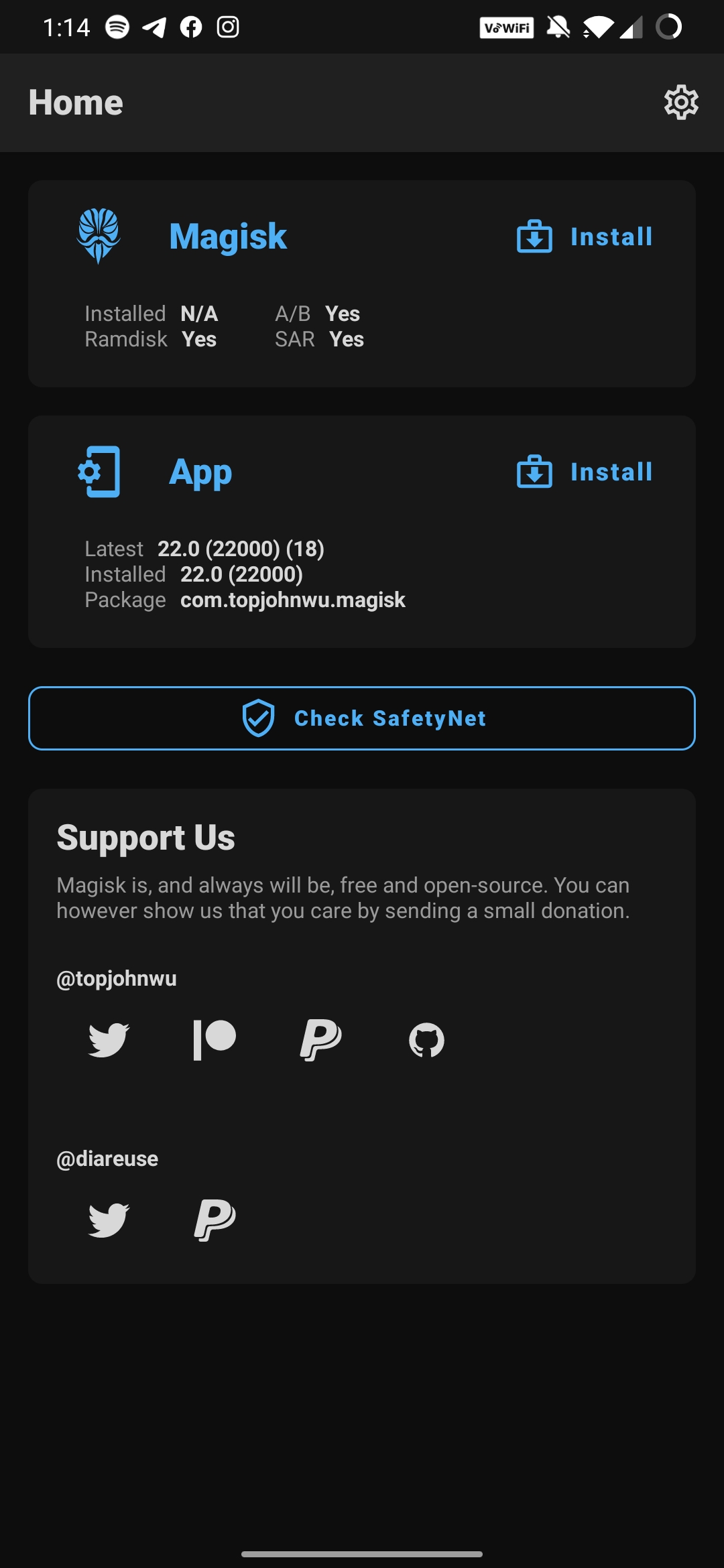
Step2.Root with Magisk: Install Magisk, the standard tool for modern Android rooting. It allows you to modify the system without permanently altering it.
Step3.Install the Joystick App as a System App: Some advanced users move the joystick app into the system partition so it behaves differently from a standard mock location app. This requires technical experience and may not work on every device.
Step4.Configure Advanced Root Settings: Some advanced users configure Magisk settings to reduce root-related compatibility conflicts with Pokémon GO and Google Play Services. This does not remove account risk and should not be treated as a guaranteed fix.
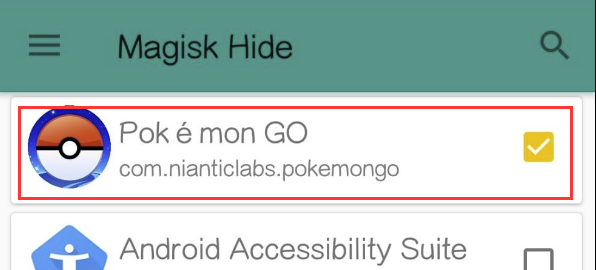
Because the exact steps for unlocking a bootloader and rooting differ for every phone model, your best resource is the XDA Developers forums. Search for your specific device model, such as “Google Pixel 7 root guide XDA,” to find a detailed, peer-reviewed tutorial from experts.
PC-Assisted Pokémon GO Joystick Alternative
If basic Android mock location apps keep triggering Error 12, rubber-banding, or unstable movement, a PC-assisted GPS tool may be easier to manage than a rooted Android setup. This type of tool runs on a computer and helps manage device GPS location through a USB or Wi-Fi connection.
A PC-assisted option is especially useful for users who want joystick-style movement, route planning, or device-location testing without unlocking the bootloader or rooting the phone. However, it should still be treated as a GPS location management method, not as a guarantee of Pokémon GO account safety.
One option is Fonelora Location Changer, which supports joystick movement, route planning, and device GPS management for Android and iPhone without root or jailbreak.
Fonelora Location Changer
Manage GPS location on Android and iPhone from a computer. Useful for joystick-style movement, route planning, GPS behavior checks, and location-based app testing without root or jailbreak.
Can You Use a GPS Joystick for Pokémon GO on iPhone?
iPhone does not support Android-style mock location apps, so most mobile joystick APK methods do not apply to iOS. iPhone users usually need a desktop-based GPS location tool that changes device location through a computer connection. This can support joystick-style movement or route simulation, but it still carries Pokémon GO account risk.
Important: No GPS joystick, mock location app, rooted setup, or PC-assisted tool can guarantee account safety in Pokémon GO. If you use any location-changing method, understand the risks before playing.
How Niantic Detects GPS Joystick Movement in Pokémon GO
Many players think avoiding a soft ban is only about respecting cooldown time. This is a critical misunderstanding. Here’s an expert insight most guides miss: Niantic detection algorithms do not just track where you are, but how you move. A shadow ban can be triggered even when moving short distances if the movement itself is unnatural.
Movement Patterns That Trigger Detection
- Perfectly Straight Lines: Humans don’t walk in geometrically perfect lines. Good apps, like GPS Joystick by The App Ninjas, have settings for “indirect” or “curved” paths. Use them.
- Constant, Unchanging Speed: Your pace naturally varies. Look for settings like “Variable Speed” or “Walk/Run/Cycle” modes that introduce slight fluctuations. A robotic, single-speed movement is a major red flag.
- Instantaneous, Sharp Turns: Slow down before turning or use curved paths. Turning on a dime at a 90-degree angle is not how people move.
- Lack of Pauses: Real players stop. Manually pause your movement every few minutes to simulate checking your inventory or catching a Pokémon.
Pro-Tip from Our Testing: On Samsung phones, you may experience persistent rubber-banding unless you disable “Find My Mobile” in Samsung’s settings, as it can periodically request the real GPS location. This kind of device-specific detail is what makes joystick use tricky.
Understanding Cooldown Time Rules
Cooldown time is the mandatory wait after an action before you can perform another action in a new, distant location. If you’re unsure how cooldown timers work after teleporting, check our complete Pokémon GO cooldown guide for travel timing recommendations. The duration depends on the distance traveled. Always wait for the cooldown to expire after you teleport and before you interact with anything.
| Distance Traveled | Minimum Cooldown Time |
| 1 km | 30 Seconds |
| 10 km | 7 Minutes |
| 100 km | 45 Minutes |
| 500 km | 1 Hour 15 Minutes |
| 1,300+ km | 2 Hours (Max) |
How to Fix Rubber-Banding and Error 12 in Pokémon GO
1.Problem: Location “Rubber-Banding” or Drifting
This happens when your phone’s real GPS signal overrides the mock location.
Solutions:
- Improve Signal Blocking: Use your device in a basement or a room with thick walls. This gives the mock location priority.
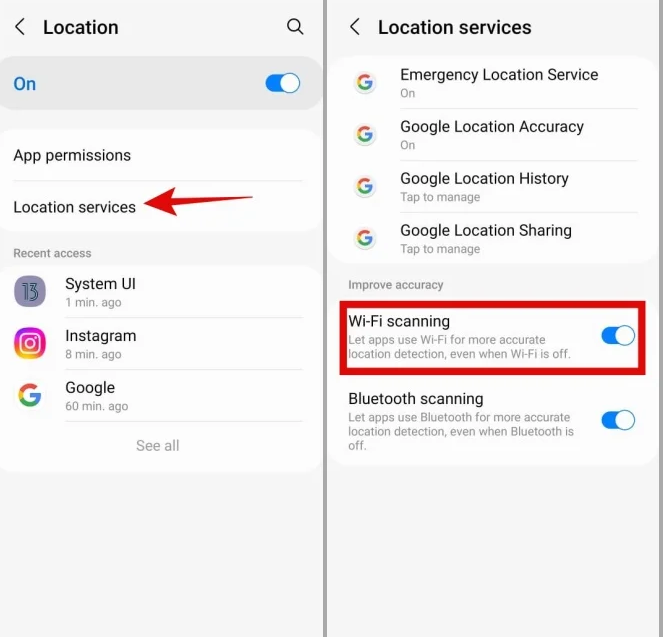
- Disable Accuracy Enhancers: In Settings > Location, turn off Wi-Fi scanning and Bluetooth scanning. These interfere with GPS spoofing.
- Use Tin Foil (Last Resort): This is an old-school trick that can work, but use it carefully. Wrapping the back of your phone in a small piece of tin foil can physically block the GPS antenna. However, it can also interfere with your cellular and Wi-Fi signals. Use it only if other methods fail.
2.Problem: “Failed to detect location. (12)” Error
This means Pokémon GO knows you are using a mock location.
Solutions:
- Try a Different Method: This error is the most common sign that the standard non-root method is insufficient for your device’s security patch. You may need to stop using that setup or consider a different location-management option.
- Check Play Services Version: Newer versions of Google Play Services often break compatibility with older joystick apps.
High-Risk Warning: Some advanced users downgrade Google Play Services to an older, less secure version. We do not recommend this for beginners. Downgrading can break many other essential apps on your phone, including Google Maps, Gmail, and banking apps, and can create security vulnerabilities.
- Clear App Cache: As a basic step, try clearing the cache for both Pokémon GO and your joystick app in your phone’s settings.
Your Pokémon GO Joystick Questions Answered
1.Does a GPS joystick still work with Pokémon GO?
Yes, but with major qualifications. On older Android versions, non-root methods are more reliable. On Android 10 and newer, success varies more widely because modern security features can trigger Error 12, rubber-banding, or account warnings.
2.Can I get banned for using a GPS joystick?
Yes. Using any form of GPS spoofing is a direct violation of Niantic’s Terms of Service and carries a real risk. The penalty can include warnings, temporary suspension, and permanent account loss. You must proceed with this understanding.
3.Why does Pokémon GO detect joystick movement?
Niantic detection is sophisticated. It analyzes your movement patterns for non-human behavior, such as constant speed, perfectly straight travel, and instant turns. These robotic movements are a clear indicator that mock location software is being used.
4.What is cooldown time and why does it matter?
Cooldown time is the waiting period you must observe after teleporting before interacting with the game, such as catching Pokémon or spinning PokéStops. The time is based on the distance. Failing to wait can trigger a soft ban, making the game temporarily unplayable.
5.Does the Android version affect GPS joystick safety?
Absolutely. Newer Android versions have stronger location security and may make standard joystick apps easier to detect. They can cause issues like rubber-banding, which alerts the game to real and mocked locations at the same time, increasing detection risk.
Conclusion
Finding a GPS joystick for Pokémon GO that still works in 2026 is more complicated than it used to be. Basic mock location apps may still work on some Android devices, but newer Android versions often create Error 12, rubber-banding, or unstable movement problems.
The best setup depends on your device, technical skill, and risk tolerance. Some users start with no-root GPS joystick apps, advanced users may explore system-level Android setups, and others may consider a PC-assisted option like Fonelora Location Changer for device GPS management and joystick-style movement.
Whichever method you choose, remember that any Pokémon GO joystick or location-changing method may violate game rules and can carry account risk. The goal is not simply to teleport faster, but to understand how GPS joystick apps work, what can go wrong, and which option fits your device best.
More Related Articles