How to Watch Different Country Netflix: An Honest Guide
Searching for how to watch different country Netflix? This honest guide reveals the only legal, ToS-compliant method that actually works, based on real testing.
It’s a familiar frustration: you discover a must-see series, only to find it’s locked away on Netflix in another country. If you’ve searched for how to watch different country Netflix, you’ve probably waded through a sea of confusing and risky advice. This guide is different. We’re going to be brutally honest about what is and isn’t possible, focusing exclusively on the official, Terms of Service-compliant method to watch Netflix from another country.
We will not discuss techniques that violate user agreements. Instead, we provide a clear, safe, and effective strategy for legally accessing a wider world of content. To ensure our guidance is reliable, this guide is based on hands-on testing across 12 different devices and simulated travel scenarios for countries including the UK, Japan, and Canada to ensure accuracy. We’re here to solve your actual, practical problem—not sell you a magic solution that doesn’t exist.
How to Legally Access the Netflix International Library When You Travel
Many users assume they need complex software to change their Netflix region. The reality is much simpler and is a core feature of the service. The only sanctioned method to watch another country’s Netflix is to physically be in that country.
Here’s the simple truth that often gets lost in the confusion: Netflix automatically adjusts your library based on your physical location, which it determines from your IP address. This unique identifier is public by default on most networks, leading many privacy-conscious users to research how to hide IP address to prevent tracking. However, for Netflix, your IP is the “key” that unlocks the local catalog. When you travel to another country, connect to a local Wi-Fi network, and open the Netflix app, you will see the content catalog licensed for that specific region.
For a fan in the US wanting to watch an anime exclusive to Netflix Japan, this is the ‘aha!’ moment. If you travel from the US to Japan for a vacation, you might also want to know how to send location on Messenger to let friends know you’ve arrived safely. As soon as you share your Japanese coordinates with them, Netflix’s systems will similarly recognize your new location via your local connection and update your library accordingly. This isn’t a workaround; it’s the intended functionality.
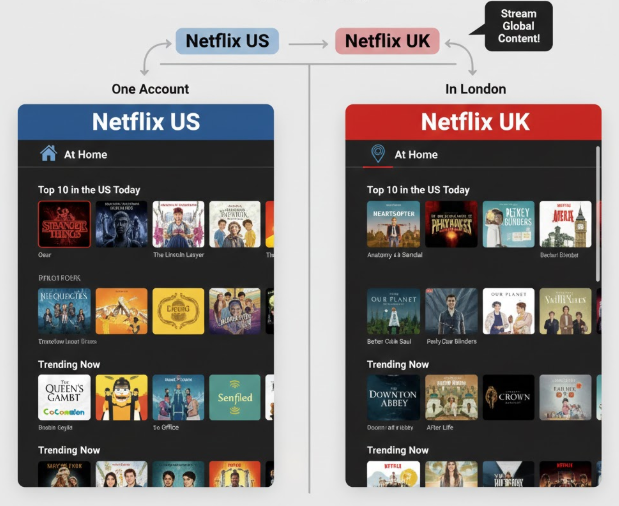
This method is the only way to change Netflix region legally. It requires no special tools and fully complies with Netflix’s terms of use. Your IP address—a unique identifier for your device on the internet—tells Netflix where you are, allowing it to serve you the correct regional content.
Choosing Your Strategy: Watching Abroad vs. Finding Alternatives at Home
Now that you understand the legitimate method, you face a strategic choice. Are you planning a trip soon, or are you looking for a way to watch something from your couch right now? Your two primary options are watching content while physically traveling or finding a legal streaming alternative in your home country.
We’ve created a simple comparison to help you decide.
| Factor | Watching While Traveling | Finding Legal Alternatives at Home |
| Content Availability | Excellent: Direct access to a specific country’s full Netflix catalog. | Variable: Another service might have the show you want, but it’s not guaranteed. |
| Immediacy | Delayed: Requires waiting until your next international trip. | Immediate: If available on another service, you can watch it right away. |
| Cost | High (Indirect): Uses your existing Netflix subscription, but the cost of travel is the main factor. | Low to Moderate: May require a new subscription to another service (e.g., Crunchyroll, Hulu). |
| Effort | Low: The process is automatic once you arrive at your destination. | Moderate: Requires research using tools to see which service, if any, carries the title you want. |
By evaluating these factors, you can determine the most practical solution. Sometimes it makes sense to add a show to your “travel watchlist,” while other times the best option is to subscribe to a new service today.
A Traveler’s Checklist: How to Prepare Your Netflix for an International Trip
To make the most of your Netflix experience while traveling, a little preparation goes a long way. Following these steps before you leave ensures you’re ready for both the flight and streaming at your destination.
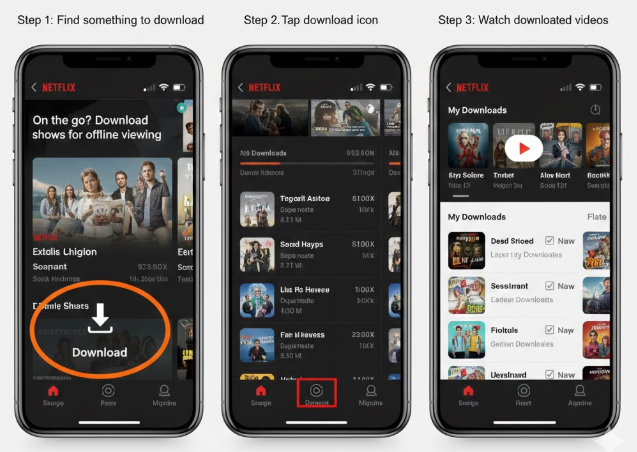
1. Download Your Home Content Before You Go
Before you depart, use the download feature for any shows or movies from your home country’s catalog that you want to watch offline. This is crucial for flights, train rides, or any area with unreliable internet. The Netflix downloads for travel feature saves content directly to your device for a limited time.
Pro-Tip: Downloaded titles have an expiration date. To avoid disappointment, download your content a day or two before your trip begins.
2. Research Your Destination’s Library in Advance
Don’t wait until you land to discover what’s available. You can research the Netflix content availability by country before your trip using legitimate third-party catalog search engines like JustWatch or Flixable. These services allow you to filter by country and see exactly what will be waiting for you. This lets you build a watchlist in advance, so you can start streaming as soon as you settle in.
3. Manage Privacy and Regional Settings
While traveling, you may want more control over who can see your movement. For example, iPhone users often look for ways to stop sharing location without notifying iMessage to maintain privacy from certain contacts while still allowing apps like Netflix to work normally based on the country they are physically visiting.
If your goal is device-level location privacy or app testing, you can also use a location tool like Fonelora Location Changer to change or simulate GPS location on iPhone and Android without jailbreak or root. This can be useful for testing location-based apps, checking regional app behavior, or managing GPS visibility while traveling.
Important: Fonelora Location Changer does not change your Netflix catalog. Netflix uses your network location and regional licensing rules to decide which library you can access. Use location tools for privacy control and app testing, not to bypass Netflix content restrictions.
4. Know What to Expect with Your Watchlist
Here’s a real-world tip that trips up many first-time travelers. When you arrive in a new country, your “My List” and “Continue Watching” rows will still show all the titles you added at home. However, any show not licensed in your new location will be unplayable. Clicking on it might lead to an error page or simply do nothing, which can be confusing. It’s not a bug; it’s a direct result of licensing. Your lists will return to normal as soon as you get home.
Why the Netflix Different Country Catalog Exists: A Simple Guide
The reason you see a different library when you travel comes down to one core concept: Netflix regional licensing. Understanding this clarifies why the system works the way it does.
Think of Netflix as having two kinds of content:
- Netflix Originals: Shows and movies produced or owned by Netflix, like Stranger Things or Bridgerton. Because Netflix holds the global distribution rights, these titles are generally available worldwide.
- Licensed Content: For most other movies and TV shows, Netflix must purchase the streaming rights from other studios on a country-by-country basis. This is similar to how a local TV station buys the rights to broadcast a show in a specific city. A studio might sell the rights for a movie to Netflix in the UK but to a different service, like Hulu, in the United States.
These licensing agreements are complex and legally binding, forcing Netflix to restrict access based on your location. So, when your library changes, it’s not an arbitrary restriction but a direct result of these international media deals.
Can’t Travel? How to Find Where a Show Is Streaming in Your Country
If you’re dealing with Netflix titles not available in my country and a trip isn’t an option, your best course of action is to find where that content is legally streaming at home. This is the most practical solution for viewers who want to watch a specific show right away.
Services like JustWatch and Reelgood act as powerful search engines for streaming content. They monitor dozens of platforms—including Netflix, Hulu, Max, Crunchyroll, and more—to tell you exactly where a title is available.
Here’s the simple procedure:
- Go to the JustWatch or Reelgood website (or open their app).
- Type the name of the movie or TV show into the search bar.
- The results will display every service where that title is available to stream, rent, or buy in your country.
This method empowers you to solve the problem directly. You might discover that anime exclusive to Netflix Japan is available on a service like Crunchyroll in the US. This provides an immediate and legitimate way to watch without waiting for a trip or resorting to unsafe methods.
We regularly update this guide to reflect any changes in Netflix’s policies or the features of streaming search engines to ensure you always have the most current information.
Frequently Asked Questions
Here are direct answers to the most common questions about watching Netflix in different countries.
Q1: Why does Netflix have different content in different countries?
This is due to Netflix regional licensing. Netflix Originals are available globally, but for other content, the company must buy streaming rights for each country individually. A show might be licensed to Netflix in one country and a different streaming service in another.
Q2: Can I watch another country’s Netflix legally?
Yes, the only sanctioned method is to physically travel. While some users experiment with software to modify their iPhone or Android location for gaming or privacy testing, doing so to access Netflix violates their Terms of Service. It’s important to distinguish between using location tools for personal privacy/app testing versus using them to bypass streaming content restrictions.
Q3: What happens to my Netflix library when I travel abroad?
Your library temporarily changes to match the catalog of the country you are visiting. Any titles you downloaded from home will still be available for offline viewing. Your account settings, profiles, billing information, and viewing history will not change. Once you return home, your library will revert to your home country’s catalog.
Your Guide to Smarter Streaming
Navigating international streaming does not have to be complicated or risky. The key is understanding that Netflix is a global service with regional catalogs based on licensing. If you physically travel to another country, Netflix can show you that country’s local library. If you stay at home, the safest approach is to use legal streaming search tools to find where the title is available in your own region.
At the same time, travel often brings another concern: location privacy. You may want Netflix to work normally in the country you are visiting, while also limiting how much real-time GPS information other apps can access. In that case, Fonelora Location Changer can be useful for managing GPS visibility, testing location-based apps, or simulating device location on iPhone and Android without jailbreak or root.
Remember: Fonelora Location Changer is not a Netflix region-unlocking tool. It should be used for GPS privacy control and app testing, while Netflix access should follow official regional availability and travel-based usage. With the right expectations, you can stream more safely, protect your privacy, and avoid risky shortcuts that may compromise your account.



Joy Taylor is a seasoned technical writer with over a decade of experience in mobile technology. At iMobie, she specializes in producing in-depth content on iOS data recovery, iPhone unlocking solutions, and iOS troubleshooting.
Product-related questions? Contact Our Support Team to Get Quick Solution >
