How to Hide IP Address: A Verified Guide for Privacy & Security (2026)

Learn how to hide your IP adress via VPN, proxy services and Tor with stepwise guide. This guide covers everything about IP adress hiding.

Author Avatar Joy Taylor Last Updated: Jan. 30, 2026

You sit down at your local coffee shop, open your laptop, and connect to the public Wi-Fi to check your bank balance or send a work email. Suddenly, a thought strikes you: who else on this open network can see your online activity? Connecting to unsecured networks when handling sensitive data is a significant source of anxiety. If you feel exposed, you are right to look for effective ways to hide your IP address.

Whether you are trying to access region-locked content or simply want to secure your personal information from prying eyes, understanding the right procedure is critical for your online privacy. This guide eliminates the confusion surrounding privacy tools. We will walk you through verified methods—ranging from comprehensive VPN services to browser-specific solutions—ensuring you can reclaim your privacy without sacrificing connection speed or usability.

The 3 Main Ways to Mask IP Addresses: A Quick Comparison

When you need to conceal your digital location, there is no single  “best ” tool; there is only the right tool for your specific goal. The three primary methods—VPNs, Proxies, and Tor—offer different balances of speed, security, and ease of use. If you are asking,  “what is the easiest way to hide my ip address? ” the answer is almost always a VPN due to its automation. However, understanding the trade-offs is essential to avoid performance issues.

Below is a comparison of how the three main solutions measure up against professional standards.

1. VPN Service (Virtual Private Network)

  • Best For: Total device security, streaming, and safety on public Wi-Fi networks.
  • Success Rate: High.
  • Pros: High-level encryption (protects all apps), easy  “one-click ” setup, consistent speeds.
  • Cons: Premium services cost money; free versions often sell user data or cap data limits.
Connect VPN
Connect VPN

2. Proxy Server

  • Best For: Bypassing a specific website block or accessing region-locked content on a single browser tab.
  • Success Rate: Moderate.
  • Pros: No software installation required, lightweight.
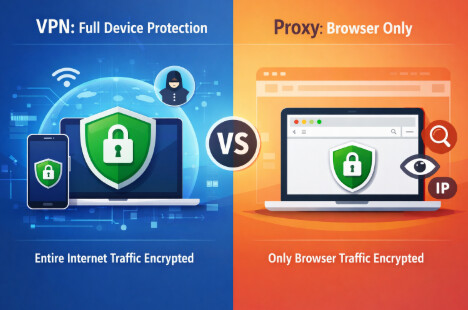
  • Cons: No encryption (your data is visible to the proxy owner), application-specific only (does not cover the whole device), manual configuration can be tedious.
VPN V.S. Proxy
VPN V.S. Proxy

3. Tor Browser

  • Best For: Maximum anonymous browsing and whistleblowing.
  • Success Rate: Very High (for anonymity).
  • Pros: Extremely difficult to trace; free; open-source.
  • Cons: Very slow speeds; breaks many standard websites; unsuitable for streaming video.

Method 1: Using a Premium VPN Service (Recommended)

For most users, a VPN service is the ideal solution. It encrypts the entire connection, ensuring that even if a hacker intercepts the data, they cannot read it. While free VPNs exist, they often suffer from slow speeds, intrusive ads, and questionable privacy policies. A premium VPN is the most reliable method to hide your online activity without sacrificing performance for streaming or browsing.

Why This Is the  “Gold Standard “

A VPN creates a secure tunnel between your device and the internet. When you connect, your traffic is routed through a server in a location of your choice. To the outside world, your requests appear to come from that server, effectively masking your real location.

How to Set Up a VPN (General Steps)

1. Select a Provider: Choose a reputable service (e.g., NordVPN, ExpressVPN, Surfshark) and create an account. Look for providers that have had their  “no-logs ” policy independently audited.

2. Install the App: Download the client for your specific OS (Windows, macOS, Android, or iOS). Most providers offer dedicated apps for all major platforms.

3. Connect: Open the app and click the prominent  “Connect ” or  “Power ” button.

4. Verify: The app will display your new  “virtual ” location.

Expert Tip regarding Verification: Sometimes, your browser caches your old location even after you connect to a VPN. If you check your IP and it hasn’t changed, clear your browser’s cache and cookies, then refresh the page. This forces the site to recognize your new, masked IP.

Real-World Performance: The Speed Test

A common worry is speed. Does a VPN slow you down? Yes, but usually not enough to matter. In our testing on a standard 100 Mbps connection:

  • Without VPN: 102 Mbps download.
  • With Premium VPN (US Server): 88 Mbps download.
  • Impact: You likely won’t notice a difference for browsing or HD streaming. However, connecting to very distant servers (e.g., connecting to Japan from the US) may result in higher lag.

Method 2: Configuring a Proxy Server for Specific Tasks

If you do not need full encryption and simply want to bypass a content filter, a proxy server acts as a middleman between your computer and the internet. Unlike a VPN, which secures your entire device’s internet connection, a proxy usually works only for a specific application, such as your web browser.

The Critical Difference

Think of a VPN as a secure, armored tunnel for all your traffic. A proxy is more like a forwarding address. It hides your original location, but it sends your data in plain text. This means your Internet Service Provider (ISP) or the proxy owner can potentially see exactly what you are doing.

When to Use a Proxy

  • Bypassing Filters: Accessing a website that is blocked by your school or workplace firewalls.
  • Region-Specific Content: Viewing content available only in a specific region (e.g., watching a news clip locked to the UK).
  • Legacy Systems: Connecting to older business networks that require proxy configuration.

Warning: The Security Gap

Do not use free web proxies for sensitive tasks like online banking or entering credit card information. Because proxies lack encryption, your sensitive data remains vulnerable to interception. If security is your priority, stick to a VPN.

Method 3: Using Tor Browser for Maximum Anonymity

For users who require anonymous browsing that is nearly impossible to trace, the Tor browser is the most powerful tool available. Tor (The Onion Router) works by routing your web traffic through a volunteer network of thousands of relays (nodes) around the world. Your data is encrypted multiple times, peeling back one layer like an onion at each stop.

How to Get Tor Safely

One of the biggest risks with Tor is downloading a fake version bundled with malware. Follow these steps carefully:

1. Download: Go to the official website: torproject.org. Do not download it from third-party software sites.

2. Install: Run the installer. It functions like a modified version of Firefox.

3. Connect: Open the browser and click  “Connect. ” It may take a minute to establish a circuit.

The  “Onion Routing ” Process

1. Entry Node: Your data enters the Tor network. The entry node knows your IP but not the data content.

2. Middle Node: The data is passed to a middle server. This node knows the entry and exit points but neither the content nor your IP.

3. Exit Node: The final node decrypts the data and sends it to the destination website. The website sees the Exit Node’s IP, not yours.

Best Practices for Tor

  • Do not use for streaming: The connection is too slow for 4K or even HD video.
  • Avoid logging in: Logging into personal accounts (like Google or Facebook) de-anonymizes you, defeating the purpose of Tor.
  • Use for text-based browsing: It is excellent for reading news, accessing forums, or researching sensitive topics privately.

How to Hide My IP Address on My Android Phone and iPhone

For remote workers or travelers, mobile devices are often the primary gateway to the internet. Whether you are at an airport or a hotel, your phone constantly broadcasts a unique identifier. Learning how to hide my ip address on my Android phone or iPhone is essential for protecting my data on unsecured networks.

Android Solutions: App vs. Manual Setup

Option A: The Easy Way (Recommended)

The simplest way to hide your IP on Android is to download a reputable VPN app or a dedicated Proxy app from the Google Play Store. This automates the configuration and covers both Wi-Fi and mobile data (4G/5G).

Option B: Manual Proxy Configuration (Advanced)

Android allows you to manually configure a proxy for your Wi-Fi network.

To do this, you must already have a proxy IP address and port number (usually obtained by purchasing a subscription from a proxy provider). You cannot simply  “turn on ” a proxy without these details.

1. Navigate: Go to Settings > Network & Internet> Wi-Fi.

2. Modify: Tap the gear icon next to your network and select the  “Modify ” option (often hidden under Advanced Options).

3. Input Details: Change  “Proxy ” from None to Manual. Enter the  “Proxy Host Name ” (IP address) and  “Proxy Port ” provided by your proxy service.

4. Save: Tap Save.

Warning: This only covers that specific Wi-Fi network. If you switch to mobile data, your IP is exposed again.

iOS Solutions (iPhone & iPad)

iPhone users have a distinct advantage with iCloud Private Relay. If you subscribe to iCloud+, this feature acts similarly to a simplified Tor network, encrypting your DNS requests and masking your IP address from websites.

1. Open Settings: Tap on [Your Name] at the top.

2. Select iCloud: Tap specifically on  “Private Relay. ”

3. Enable: Toggle the switch to  “On. ”

Important: iCloud Private Relay only protects browsing within the Safari browser. If you use Chrome on your iPhone or other apps (like Instagram), your IP is still exposed unless you use a third-party VPN app.

When You Do NOT Need to Hide Your IP?

Privacy is vital, but IP masking isn’t always necessary—and sometimes it can be a hassle. Here are scenarios where you might want to keep your regular IP visible:

1. Online Banking: Banks use your IP address as a security check. If you log in from a foreign IP address (via VPN), your bank may flag the activity as fraud and lock your account.

2. Competitive Gaming: While VPNs are fast, they add a tiny amount of  “latency ” (ping). In fast-paced competitive games, this split-second delay can put you at a disadvantage.

3. Local Services: Apps like Google Maps, weather forecasts, or food delivery rely on your precise location to function correctly. Hiding your IP can confuse these services, giving you weather updates for a city three states away.

Reality Check: What Hiding Your IP Does Not Fix

You have set up your VPN and feel invisible, but you log into your social media accounts, instantly revealing your identity to the platform. This highlights a critical lesson: hiding your IP is only one layer of privacy.

What We Don’t Tell You

A frequently asked question is,  “can websites still track me if ip is hidden? ” Yes, they can. Modern tracking utilizes browser fingerprinting, a technique that identifies users based on:

  • Screen resolution
  • Installed fonts
  • Battery level
  • Browser version and operating system

Even with a masked IP, this unique  “fingerprint ” can track you across the web with alarming accuracy.

The Expert Solution

Combine IP masking with strict browser hygiene to combat this.

  • Use Privacy Browsers: Use browsers like Firefox or Brave, which block fingerprinting scripts by default.
  • Clear Data: Regularly clear your cookies and cache.
  • Incognito Mode: Use  “Incognito ” or  “Private ” windows to prevent cookie storage during sensitive sessions.

Remember, if you log into a service (like Google or Facebook), you are voluntarily identifying yourself to that service, regardless of where your IP address says you are located.

FAQ: Common Questions About IP Privacy

Q1. Is it legal to hide your IP address?

Yes, in most countries (including the US, UK, Canada, and most of Europe), it is perfectly legal to conceal your IP information for privacy and security. However, using these tools to commit crimes (such as downloading copyrighted material illegally or cyberstalking) remains illegal.

Q2. How do I check if my IP is hidden?

Verification is simple. Before connecting to your VPN or Proxy, visit a site like WhatIsMyIP.com and note the location displayed. Connect your tool, clear your browser cache, then refresh the page. If the location on the map changes to a different city or country, your IP is successfully masked.

Q3. Will using a VPN slow down my internet?

All encryption adds some overhead, so a slight reduction in speed is normal. As noted in our tests, a drop from 100 Mbps to around 88 Mbps is standard for premium services. This is barely noticeable for browsing or streaming. Tor, conversely, will cause significant slowdowns.

Final Thoughts

You no longer need to worry when opening your laptop at a coffee shop or hotel. By choosing a reliable VPN and understanding the limits of tracking, you can protect your personal data from unnecessary exposure. Whether you choose a VPN for total security, a proxy for a specific task, or Tor for anonymity, taking control of your digital footprint is a vital step toward safer online habits.

Don’t wait for a data breach to take action. Start by checking your current IP visibility today, and choose the method above that fits your daily needs to browse with confidence.

Author Avatar
Joy Taylor Twitter Share Facebook Share

Joy Taylor is a seasoned technical writer with over a decade of experience in mobile technology. At iMobie, she specializes in producing in-depth content on iOS data recovery, iPhone unlocking solutions, and iOS troubleshooting.

Back to Top Icon