Quick Answer: The core difference between iPhone MDM (managed via Apple Business Manager) and Android Enterprise lies in ecosystem control. Apple offers a tightly unified, closed ecosystem where hardware, OS, and deployment are identical across all devices. Android Enterprise provides a standardized management framework designed to handle a highly fragmented ecosystem of different hardware manufacturers and varying OS update schedules.
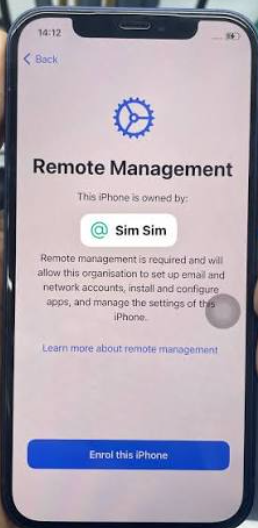
However, while many IT admins search for this comparison to choose a fleet management platform, a large number of readers arrive here for a completely different reason: they just bought a second-hand corporate phone and found it locked.
In this article, we will first provide an objective comparison of how Apple and Android handle enterprise device management. Then, we will pivot to the consumer reality: what happens when these devices are retired, and how second-hand buyers can bypass a leftover iOS MDM lock on a lawfully purchased device.
Understanding Apple MDM and Android Enterprise
To understand the differences between these platforms, it helps to look at how they are fundamentally built.
Apple MDM and Apple Business Manager (ABM)
Apple’s enterprise ecosystem is deeply integrated with its hardware and software. Apple Business Manager (ABM) acts as a centralized backend portal where IT admins can deploy devices, manage Apple IDs, and distribute apps.
- Uniform OS Updates: Because Apple controls both the hardware manufacturing and the iOS/iPadOS code, updates and security patches are pushed simultaneously to all supported devices.
- Seamless Deployment: ABM offers a highly uniform management experience. Device enrollment is often frictionless, and IT policies apply consistently across the entire Apple fleet.
Android Enterprise
Unlike Apple, Android devices are manufactured by dozens of different companies (Samsung, Google, Motorola, etc.). To solve the challenge of managing such fragmented hardware, Google created Android Enterprise. This framework standardizes management across different original equipment manufacturers (OEMs).
- Hardware Flexibility: Android Enterprise allows companies to tailor hardware to specific job roles, deploying rugged devices for warehouse workers or budget-friendly phones for large teams.
- Strict Containerization: Features like Android Zero-Touch Enrollment allow for bulk deployment, while “Work Profiles” securely separate corporate data from personal data on the same device.
Importantly, both ABM and Android Enterprise are robust backend fleet management ecosystems—not just simple settings you can toggle off in the device menu. They dictate how devices communicate with corporate servers from the moment they are turned on.
Key Differences: Deployment, Security, and BYOD
For IT administrators evaluating which platform to adopt, the decision usually comes down to deployment ease, security architecture, and BYOD (Bring Your Own Device) flexibility.
| Feature | Apple MDM (Apple Business Manager) | Android Enterprise |
|---|---|---|
| Device Deployment | Automated Device Enrollment (Zero-Touch) tightly linked to Apple’s supply chain. | Android Zero-Touch Enrollment, which relies on a network of authorized reseller portals. |
| Security & OS Updates | Closed ecosystem. Updates are pushed uniformly and simultaneously to all supported devices. | Hardware-backed security varies by OEM. OS update schedules depend on the manufacturer and carrier. |
| BYOD Handling | Uses “User Enrollment” to separate managed corporate Apple IDs from personal Apple IDs. | Uses “Work Profiles” to strictly containerize work apps and data away from personal apps. |
| Hardware Fragmentation | None. Admins only manage iOS/iPadOS devices. | High. Admins must account for different device capabilities, screen sizes, and OEM-specific features. |
While Apple’s ecosystem offers predictable uniformity, OS fragmentation remains a common pain point for Android admins. Conversely, Android Enterprise is often praised for its hardware flexibility, allowing companies to deploy a much wider variety of devices.
What Happens When Corporate Devices Are Sold or Retired?
While IT admins focus on deployment, an entirely different problem occurs at the end of a corporate device’s lifecycle.
When companies upgrade their fleets, older phones and tablets are often sold to refurbishers, donated, or given to employees. However, a massive lifecycle gap exists: companies frequently wipe the devices locally but forget to release the hardware serial numbers from Apple Business Manager or the Android Zero-Touch portal.
As a result, a second-hand buyer purchases the phone legally, turns it on, connects to Wi-Fi, and is immediately hit with a screen stating “Remote Management” or “This device is managed by [Company Name].”
Because these enterprise ecosystems are server-side, a typical consumer factory reset does not remove the enrollment. The moment the device checks in with Apple or Google’s activation servers, the corporate lock is reapplied, leaving the new owner entirely blocked from using their device.
Stuck with a Leftover MDM Lock on a Used iPhone/iPad?
If you have purchased a used corporate device and are blocked from setting it up, it is important to identify your exact lock state before looking for solutions.
The recovery options below apply strictly to Apple devices (iOS/iPadOS), as desktop bypass tools generally do not support Android Enterprise.
Checklist: Identifying an iOS MDM Lock
- Are you stuck on a screen that says “Remote Management” during the initial device setup?
- Can you access the home screen, but find that certain apps, camera features, or settings are restricted by a “Supervision Profile”?
- Does your device say “This iPhone is supervised and managed by…” at the top of your Settings menu?
The Official Path: Contacting the IT Admin
If you see these signs, the official and most permanent solution is to contact the IT department of the original organization. If you can provide proof of lawful purchase, they can log into Apple Business Manager and release the device’s serial number. Once released, a quick factory reset will clear the lock forever.
The Limitation for Second-Hand Buyers
Unfortunately, reaching a corporate IT department for a device they wrote off months ago is often impossible. Small businesses may have closed down, and large corporations rarely respond to third-party consumer requests. This leaves buyers stuck with a seemingly bricked device despite a lawful purchase, requiring a third-party local bypass solution to regain access.
How to Bypass an iOS MDM Profile Locally (For Authorized Owners)
When IT support is unavailable and you need to use your lawfully purchased second-hand iPhone or iPad, AnyUnlock provides a practical desktop-guided solution.
AnyUnlock is an iOS access recovery toolkit that includes a dedicated module for bypassing leftover MDM restrictions locally. It is important to understand the boundaries of this tool: AnyUnlock helps you bypass the local profile to regain full access to your device’s features. It does not hack into enterprise servers or permanently delete the device’s record from Apple Business Manager.

AnyUnlock – Unlock Any iOS Password
Quickly and easily unlock your iPhone/iPad/iPod touch from various locks such as screen lock, MDM lock, iCloud activation lock, Apple ID, iTunes backup password, and more.
Because the device remains registered on Apple’s servers, performing a factory reset or flashing the firmware in the future may cause the Remote Management screen to reappear. However, you can simply use AnyUnlock to bypass it again as needed.
Here is how to bypass the iOS MDM lock locally:
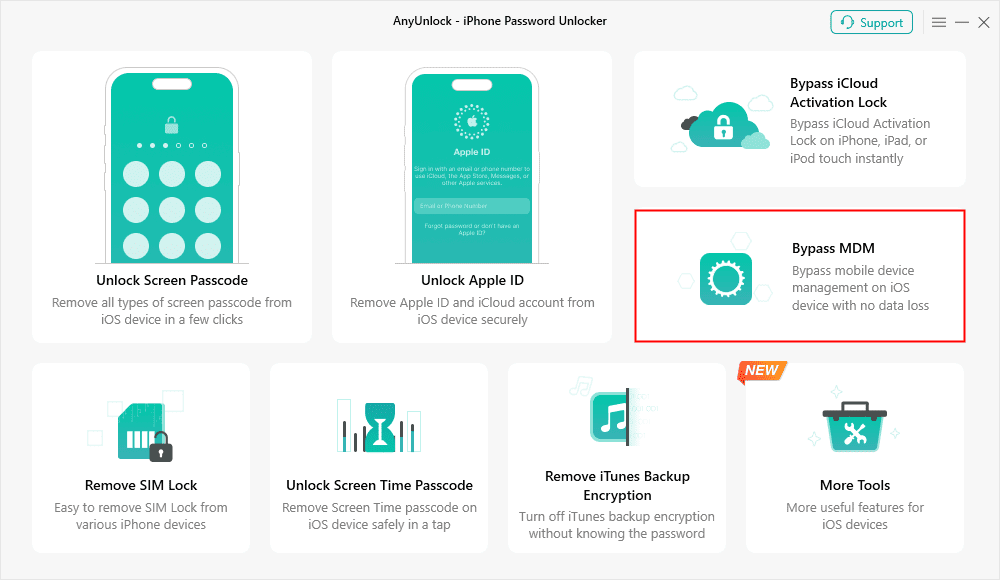
1. Download and Open AnyUnlock: Install the software on your Mac or Windows PC and select the “Bypass MDM” module.
2. Connect Your Device: Plug your locked iPhone or iPad into the computer using a compatible USB cable.
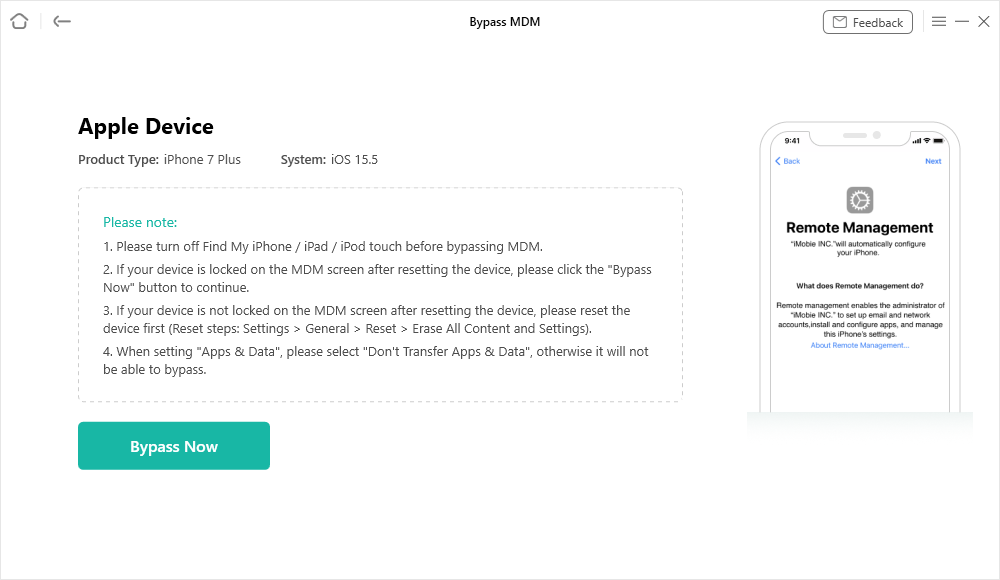
3. Review Permissions: Ensure the device is powered on and sitting at the Remote Management screen (or unlocked if bypassing a local supervision profile).
4. Start the Bypass: Follow the on-screen guided workflow to initiate the MDM bypass process.
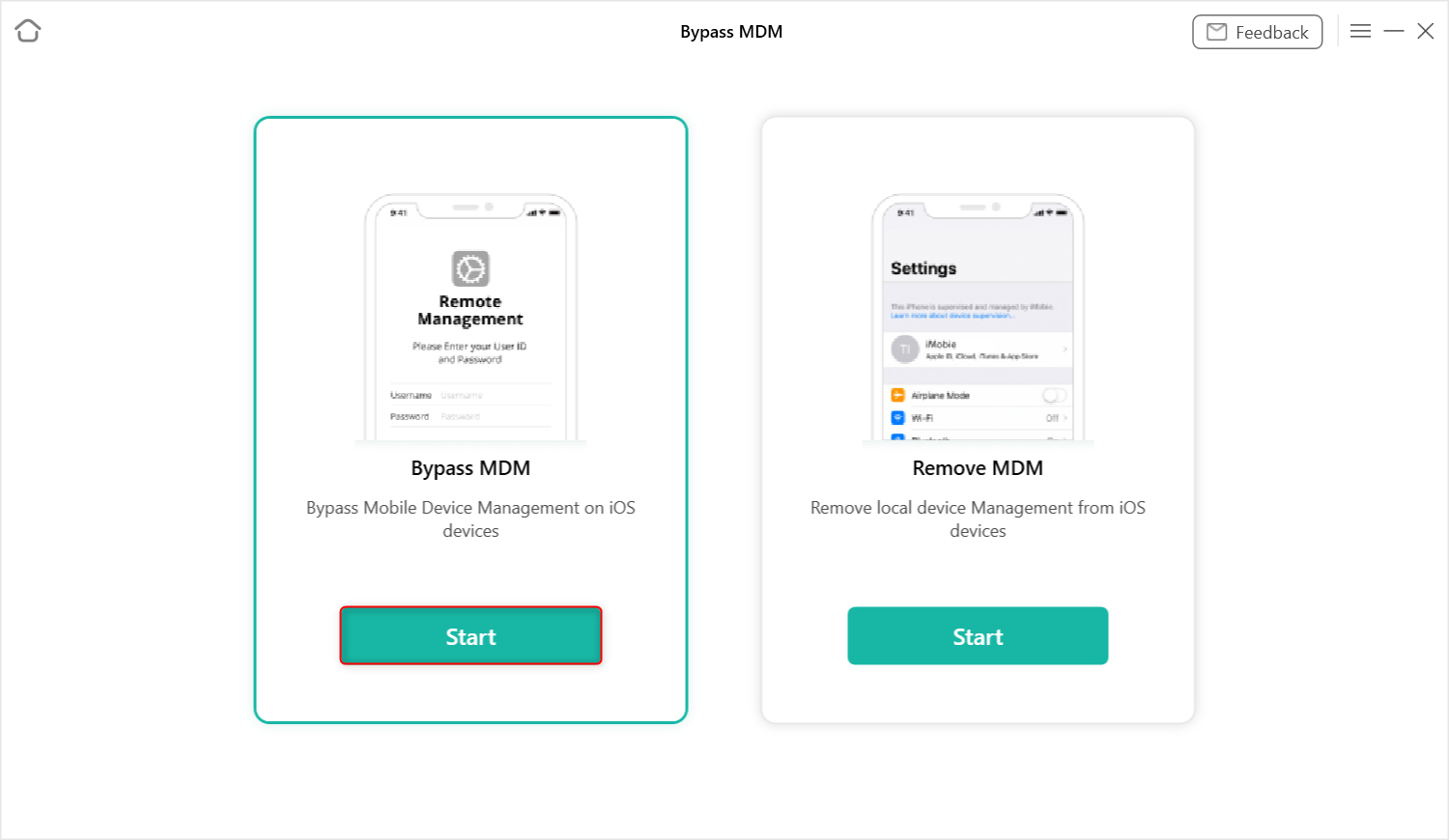
5. Regain Access: Once the process completes, the local MDM restrictions will be removed, allowing you to set up and use the device normally without company supervision.
Frequently Asked Questions
Q1: Which is more secure for enterprise use, iOS or Android?
Both offer robust security, but in different ways. iOS provides a highly uniform, closed ecosystem where updates are instantly available to all users. Android Enterprise relies on hardware-backed security, but update schedules and specific security features can vary depending on the device manufacturer.
Q2: Is it easier to manage Android devices or iPhones?
For IT admins prioritizing a seamless, uniform experience, Apple’s tight integration with Apple Business Manager (ABM) is often easier to manage. Android Enterprise is slightly more complex due to OEM fragmentation, but it offers far more flexibility if a company needs specialized or varied hardware.
Q3: How do I bypass or remove an MDM profile from a used iPhone?
Ideally, you should contact the original company to have them release the device officially. If they are unreachable and you lawfully own the device, you can use a desktop toolkit like AnyUnlock to perform a local bypass. If you are comparing desktop methods, you can explore the top MDM removal tools for iPhone or read reviews of specific software like the 3uTools MDM bypass method to understand your options.
Summary: Managing Fleets vs. Managing Leftover Locks
Comparing iPhone MDM and Android Enterprise requires looking at two entirely different audiences. For businesses and IT admins, both Apple and Google offer powerful fleet management tools. The right choice depends on your budget, your need for hardware variety, and how highly you value OS uniformity.
However, for consumers, enterprise management ecosystems often represent a frustrating hurdle. If you are in the market for a used phone, always check the device’s status and ensure you can reach the home screen without seeing a “Remote Management” prompt before you hand over your money.
If you have already purchased a second-hand iOS device and find yourself stuck with an MDM lock you cannot officially remove, you don’t have to throw the device away. As long as you are the authorized or lawful owner, a desktop toolkit can help you bypass the profile locally. Check out AnyUnlock to see if your device and iOS version are supported, and regain access to your iPhone or iPad today.
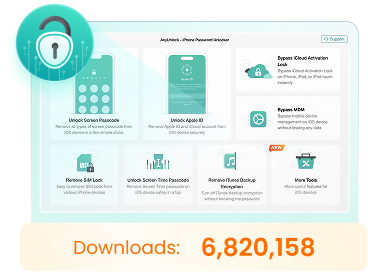
AnyUnlock – Unlock Any iOS Password
- Remove all types of screen locks and bypass Apple ID/iCloud Activation lock instantly.
- Disable “Find My” on iOS devices without password.
- Remove MDM restrictions and Screen Time passcodes securely.
- Recover, back up, and manage all iOS passwords in 1 handy place.


 AnyUnlock