How to Recover Deleted Emails Yahoo: A Tested Guide (2026 Update)
Deleted Yahoo emails aren’t always gone forever—even if they disappeared from your Trash folder. This tested 2026 update walks you through the most reliable ways to recover deleted Yahoo Mail messages, including checking Trash, restoring from backups, and using Yahoo’s official recovery request options. Follow the steps in order to maximize your chances of getting your emails back quickly.
Opening your inbox to find critical travel confirmations or work documents missing triggers an immediate pit in your stomach. It is a feeling of helplessness, much like the experience of Linda, a user we recently assisted. Linda opened her account to find a specific folder containing all her upcoming flight tickets had vanished. By the time she realized the mistake, the Trash folder appeared empty.
If you are facing deleted Yahoo emails not in Trash, struggling with sync errors, or worried your account was compromised, do not panic. Panic creates hesitation, and time is your most valuable asset right now. Whether you are missing a single confirmation number or an entire year of correspondence, learning how to recover deleted emails in Yahoo requires acting fast and using the correct PC reocvery tools.
This guide details the exact procedures verified through our hands-on testing on Windows 11, macOS, and mobile devices to help you resolve this crisis.
Assessment: Choosing the Right Yahoo Mail Deleted Emails Recovery Method
Before attempting recovery, it is important to understand that no external data recovery software can directly scan Yahoo’s servers. You may see advertisements for downloadable tools claiming to “scan your inbox,” but these are often misleading or pose a security risk. You are limited to the official tools Yahoo provides because the data resides on their cloud infrastructure, not your hard drive.
Your success in Yahoo Mail deleted emails recovery depends entirely on choosing the correct method based on how much time has passed since the deletion.
There are three primary solutions: the Immediate Folder Check, the Basic Trash Check, and the Official Restore Request. The Trash folder is your first line of defense, designed for the immediate recovery of items deleted within the last week. The Restore Request is an administrative tool used to roll back your account to a previous state, which is necessary when the Trash has been emptied.
Use the table below to determine which procedure fits your current situation:
| Method | Best For | Time Limit | Success Probability |
| Method 0: Archive/Spam | Emails missing due to mis-clicks or filters. | Indefinite (until purged manually). | High (Common oversight). |
| Method 1: Trash Folder | Recently deleted emails (manual or accidental). | 7 days (auto-delete cycle). | High (if within the window). |
| Method 2: Restore Request | Recover permanently deleted emails Yahoo servers have purged. | Must be requested immediately; restores to a point within the last 7 days. | Moderate (Time-sensitive). |
If you simply hit “delete” yesterday, start with Method 1. If your Trash is empty or the emails vanished mysteriously, briefly check Method 0 before proceeding directly to Method 2.
The “False Alarm” Check (Before You Panic)
Before assuming the data is gone forever, we must rule out the most common reason for “missing” emails: accidental archiving. On mobile devices, a simple swipe left or right can instantly move an email from the Inbox to the Archive or Spam folder without a clear notification.
Before proceeding to server recovery, perform this comprehensive search:
1. Check “All Mail” or “Archive”: Yahoo creates an Archive folder that is distinct from the Trash. Emails here are never automatically deleted.
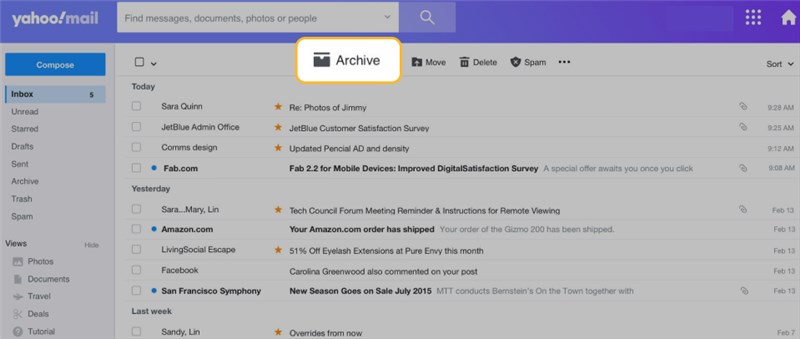
2. Check the “Spam” Folder: Sometimes legitimate emails are aggressively filtered. Note that Spam is auto-deleted after 30 days.
3. Use Advanced Search Operators:
- Go to the search bar at the top of the Yahoo Mail interface.
- Click the arrow (or filter options) to open advanced search.
- Select “All Folders” (by default, Yahoo often searches only the current folder).
- Type keywords from the missing email. If you know the sender, search specifically for from:airline@example.com.
If the email appears here, simply move it back to your Inbox. If the search yields nothing, the email has likely been deleted. Proceed immediately to Method 1.
Method 1: How to Retrieve Deleted Emails from Yahoo Trash (7-Day Window)
The most effective way to restore deleted emails in Yahoo Mail is to check the Trash folder immediately. Yahoo has a strict email retention period for this folder: items are automatically and permanently deleted after 7 days. This is the first step Linda took; she searched her Trash and was able to locate and restore about 80% of her travel documents instantly.
How to Recover from Desktop (Web Browser)
If you are accessing your mail via Chrome, Firefox, or Edge, follow these steps:
1. Log in: Access your Yahoo Mail account.
2. Navigate: Click on the Trash folder in the left-hand navigation pane.
3. Search: Locate the missing email. If the list is long, use the search bar at the top and select “Trash” in the search options to filter the results.
4. Select: Check the box next to the email(s) you wish to retrieve.
5. Restore: Click Restore to Inbox in the toolbar.
How to Recover from Mobile App (iOS/Android)
The interface on the Yahoo Mail app is slightly different but follows the same logic:
1. Open the Yahoo Mail app.
2. Tap the “Inbox” icon or the navigation menu to view your folder list.
3. Select Trash.
4. Open the email you need to save.
5. Tap Move (folder icon) and select Inbox.
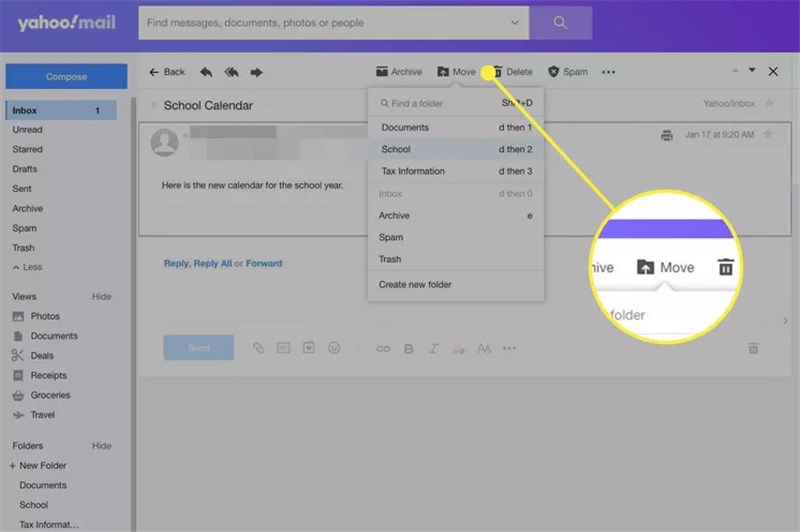
If your deleted Yahoo emails are not in Trash, or if the 7-day window has passed, the emails have been purged from your view. In this case, you must proceed to the advanced Restore Request method below.
You may also like: How to Recover Permanently Deleted Emails >
Method 2: Recover Permanently Deleted Emails via Yahoo Support (After Trash is Emptied)
If you need to recover permanently deleted emails Yahoo has already removed from the Trash, you must submit an official Restore Request. This feature asks Yahoo Support to roll back your inbox to a previous state using a backup snapshot. This was the critical final step for Linda; after finding her Trash partially empty, she utilized this tool to recover the remaining 20% of her missing travel files.
Important: This process is time-sensitive. You can only request a restore to a timeline within the last 7 days. If you wait longer than a week after the data loss occurred, this method will likely fail.
Step-by-Step Restore Request Guide
Step 1: Access the Recovery Form
Do not search for “Yahoo support phone numbers” on Google, as these are often scams. Use the direct, official link to the recovery form here: Official Yahoo Mail Restore Request Form
We strongly recommend doing this on a desktop browser (Chrome or Edge). Our testing showed that the recovery form can sometimes glitch or fail to load correctly on mobile browsers (Safari/Chrome on iOS).
Step 2: Initiate the Request
Once on the Help page, look for the button labeled Send a Restore Request. If you do not see it, ensure you are logged into the correct account.
Step 3: Categorize the Issue
Describe the problem using the dropdown menu. You must select “Mail: Accidentally deleted messages on webMail.”
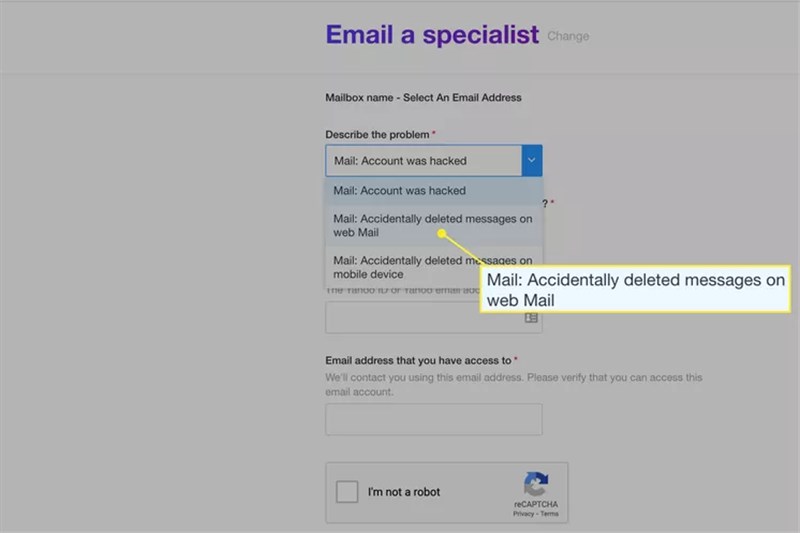
Why this matters: Selecting other options (like “receiving issues”) may route your ticket to a generic troubleshooting bot rather than the data recovery team.
Step 4: Select Timeframe
Select the time range when the emails were last seen (e.g., “0-24 hours ago” or “7 days ago”). Be as accurate as possible. If you are unsure, choose the widest window available (7 days).
Step 5: Submit
Enter your Yahoo email address, confirm the CAPTCHA, and click Create Request.
⚠️ CRITICAL WARNING: DATA OVERWRITE RISK
The restoration process reverts your inbox to a specific snapshot in time. This means emails received after that snapshot date but before the restoration completes may be overwritten and lost.
Action Required: Before clicking “Submit,” you must manually forward or back up any important emails you received today or in the last 24 hours to a different email address (like a Gmail or Outlook account). Do not skip this step.
Once submitted, the restoration process is automated. It typically takes anywhere from 30 minutes to 8 hours. If successful, the restore deleted emails in Yahoo Mail function will repopulate your folders with the data available from the backup snapshot.
Method 3: Troubleshooting IMAP Sync Errors (Why Emails Vanish)
Sometimes, emails aren’t deleted by you, but by the software you use to access them. A significant number of users face Yahoo Mail folder recovery issues due to IMAP sync settings.
Here is a critical expert insight that many guides overlook: Deletions often propagate across devices through IMAP (Internet Message Access Protocol). If you use a third-party client like Outlook or the Apple Mail app, deleting an email on your phone sends a command to the Yahoo Server to delete it everywhere.
Furthermore, if a third-party email client malfunctions or is configured to “remove from server after download” (common with older POP3 settings), your emails will vanish from the web interface without you ever touching the delete button.
How to Recover Emails from Third-Party Apps
If you use Outlook, Apple Mail, or Thunderbird, the email might still exist locally on that specific device, even if the Yahoo server says it is gone.
1. Check Local Trash/Deleted Items: Open the specific app (e.g., Outlook on your laptop). Look in its “Trash” or “Deleted Items” folder. This folder is often stored locally on the device.
2. Force Re-Sync (The “Drag-Back” Trick): If you find the missing email in a local Trash folder on Outlook or Apple Mail:
- Do not just leave it there.
- Action: Drag and drop the email from the Trash folder back into the Inbox.
- Result: This action forces the mail client to “push” the email back up to the Yahoo server, making it visible again on your phone and web browser.
3. Review POP vs. IMAP: If you use POP3 settings, emails are downloaded to one device and often deleted from the server automatically. We recommend switching to IMAP, which ensures emails stay on the server and sync correctly across all devices. [Internal Link Suggestion: Link the preceding phrase to ‘/pop3-vs-imap-explained’]
Understanding the Email Retention Period and Security Risks
To prevent future data loss, it is vital to understand the hard limits of the email retention period. Yahoo maintains a strict policy: emails in the Trash folder are kept for exactly 7 days. Once that period expires, or if you manually empty the Trash, the emails enter a short restoration window accessible only via the Yahoo support ticket system (Method 2). Beyond this window, the data is overwritten and becomes unrecoverable.
Security: Was Your Account Compromised?
If you did not delete the emails yourself and they are not in the Trash (and Method 0 yielded no results), unauthorized access is a possibility. Hackers often delete emails to hide password reset notifications from other services (like banking or social media).
If you suspect foul play:
1. Change your password immediately.
2. Enable Two-Step Verification (2SV) in your Account Security settings.
3. Review recent activity in your Yahoo account settings to see if unknown devices have logged in.
Understanding these policies clarifies the answer to “can deleted Yahoo emails be recovered?”—the answer is yes, but only within a finite window of opportunity defined by Yahoo’s server maintenance protocols.
Frequently Asked Questions: Yahoo Mail Restore Emails
Q1. Can deleted Yahoo emails be recovered after 30 days?
Generally, no. Yahoo’s Trash retention is 7 days. Even the Yahoo mail restore request form is limited to restoring a mailbox to a state within the last 7 days. If the email was permanently deleted months ago, it is likely unrecoverable unless you have a local backup saved to your hard drive.
Q2. Why can’t I find the Restore Request option?
If you cannot locate the Yahoo Mail help form for restoration, ensure you are logged into the correct account. Additionally, this feature is sometimes restricted on specific account types. If the link in Method 2 redirects you to a generic help page, try clearing your browser cache or accessing the page via “Incognito” or “Private” mode.
Q3. How do I retrieve deleted emails from Yahoo if I emptied the Trash?
You must use the “Restore Request” feature immediately (Method 2). This is the only mechanism available to recover deleted Yahoo emails after the trash is emptied. Do not wait, as the success rate drops significantly with every passing hour.
Q4. Does Yahoo have a specific “Deleted Items” recovery tool like Outlook?
No. Yahoo relies on the Trash folder and the Restore Request form. It does not have a secondary “Recover Deleted Items” holding tank accessible to the user interface like Microsoft Outlook does.
Conclusion
Losing important data feels chaotic, but by following the methods above, you have the best chance to regain control. Start with a calm check of your Archive and Spam folders (Method 0). If that fails, check your Trash immediately. If the files are truly gone, submit the time-sensitive support ticket outlined in Method 2.
Remember, once the 7-day server window closes, the data is often gone forever. Don’t wait. Verify your sync settings, and if necessary, submit that restore request immediately to recover your deleted Yahoo emails before the clock runs out. And even if files were removed locally, with the right tools, recovering files deleted from Recycle Bin is still possible in many cases.



Joy Taylor is a seasoned technical writer with over a decade of experience in mobile technology. At iMobie, she specializes in producing in-depth content on iOS data recovery, iPhone unlocking solutions, and iOS troubleshooting.
Product-related questions? Contact Our Support Team to Get Quick Solution >
