How to Recover Deleted Recordings on a DIRECTV Genie DVR (2026)
Accidentally deleted a show on your DIRECTV Genie DVR? This guide explains how to recover it, the time limits for restoration, and what options you have if you’re using an older DVR model.
It’s a frustrating moment for any DIRECTV user: you’re trying to clear space on your DVR, one wrong button press happens, and a favorite movie or a can’t-miss episode vanishes. In that moment of panic, the only question that matters is: can you get it back?
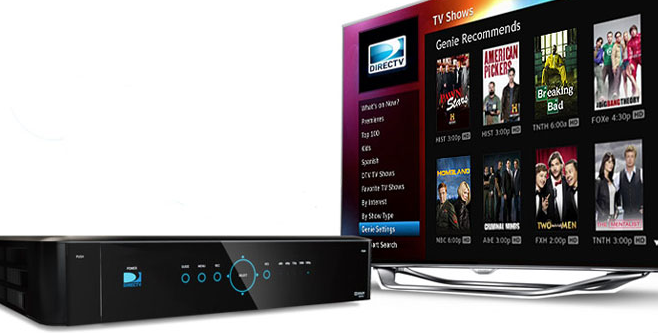
If you have a DIRECTV Genie DVR, the answer is a reassuring yes. This guide provides the exact, verified procedure to restore your shows. We’ll also explain the crucial time limits for recovery and detail what to do if you have an older model, giving you a clear and honest solution.
Who This Guide Is For:
This guide is for users with a DIRECTV Genie HD DVR (Models HR34, HR44, HR54) or a newer Genie 2 (HS17). The primary recovery steps outlined below are designed specifically for this hardware.
If you have an older, non-Genie DVR, direct recovery is not possible. You can skip ahead to the section: “No ‘Recently Deleted’ Folder? Your Next Steps.”
The primary recovery method detailed below has been successfully verified on three separate DIRECTV Genie DVR models to confirm its reliability across different hardware.
Recommended Articles: Pen Drive Not Showing in Windows? Your Complete Fix>
How to Recover Deleted Shows on a DIRECTV Genie: The 4-Step Method
If you have a compatible Genie DVR, you have a built-in safety net for accidental deletions. This solution doesn’t require special tools—just your remote control. Follow these tested steps to restore your recordings right from your couch.
Step 1: Access Your Playlist
Press the LIST button on your DIRECTV remote control. This opens your main library of recorded programs and is the starting point for finding any lost shows.
Step 2: Navigate to the “Recently Deleted” Folder
From your main playlist screen, press the left arrow on your remote’s directional pad. This action opens a side menu with filtering options. Use the down arrow to move through this menu until you highlight the folder labeled “Recently Deleted.” Select it by pressing the OK or SELECT button.
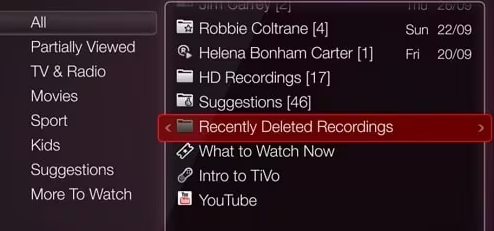
Step 3: Choose the Recording to Restore
Inside the “Recently Deleted” folder, you will see a list of all the recordings that are still available for recovery. Navigate to the specific show or movie you want to bring back and highlight it using the arrow keys.
Pro-Tip: Navigating the Deleted Folder
The “Recently Deleted” folder sorts recordings by the date they were deleted, with the oldest deletion at the top. This means the show you just accidentally deleted will be at the bottom of the list. If you’ve deleted multiple episodes of the same series, you can usually identify them by their original recording date and episode number, which should still be visible.
Step 4: Recover the Program
With your desired recording highlighted, look at the on-screen options that appear. You will see a prompt labeled “Keep.” Select this option and press OK. The system will ask for confirmation; once you confirm, the recording will be moved out of the deleted folder and restored to your main playlist.
You may also like: How to Open a USB on Windows 10 in 2026>
How Long Do I Have to Recover a Deleted Recording?
A common point of confusion is the recovery window. How long do you have before a deleted show is gone forever?
Unlike a computer’s recycle bin, which might hold files for 30 days, DIRECTV’s system is dynamic and based on available hard drive space. When you delete a recording, the DVR doesn’t erase it. Instead, it marks the space that show occupies as “available” for future recordings. Your deleted programs are held in this temporary state, making recovery possible.
However, as your DVR records new shows, it needs that “available” space. To get it, the system will permanently overwrite the oldest files in your “Recently Deleted” folder first.
This means the recovery window is constantly changing:
- High Recording Activity: If you record many shows daily and your DVR is nearly full, your recovery window could be as short as a few hours.
- Low Recording Activity: If you rarely record new content and have plenty of free space, a deleted show might remain recoverable for several days or even weeks.
The most critical takeaway is to act fast. The moment you realize a recording has been accidentally deleted, attempt the recovery process immediately for the best chance of success.
Local DVR vs. Cloud Recordings: Why Recovery Methods Differ
Understanding where your recording is stored—on your physical DVR box or in the cloud—is essential, as the recovery possibilities are completely different.
| Feature | Local DVR Hard Drive (Genie, etc.) | DIRECTV Cloud Recordings (App-based) |
| Recovery Method | Use the “Recently Deleted” folder on your TV interface. | No user-accessible recovery feature is available. |
| Success Rate | High, if you act quickly before the space is overwritten. | Extremely Low to None. Deletions are treated as permanent. |
| Time Limit | Variable; depends on new recording activity (hours to weeks). | Immediate. The deletion command is final. |
| Common Scenario | Accidentally deleting a show using your remote on your TV. | Deleting a recording from within the DIRECTV mobile or web app. |
For users with traditional hardware like the Genie, the on-box undelete feature offers a reliable safety net. In contrast, cloud recordings are managed to conserve expensive server space, meaning deletions are executed as permanent, irreversible commands.
No ‘Recently Deleted’ Folder? Your Next Steps
If you follow the steps above and can’t find a “Recently Deleted” folder, it generally means your DVR is an older model that lacks this feature. While direct recovery of the deleted file isn’t possible, the content may not be lost forever.
Here are three practical alternatives to find your program:
1. Search the DIRECTV On-Demand Library: Many networks upload their shows to the On-Demand service shortly after they air. Press MENU on your remote, go to Search & Browse, and type in the show’s title. You may find the episode ready to watch instantly, free of charge.
2. Look for a Re-Broadcast: Popular movies, series, and specials are often re-aired. Use the Guide’s search function to look for the program’s title. You can easily set your DVR to record it again the next time it broadcasts.
3. Check Network-Specific Apps: Your DIRECTV subscription often includes access to network-specific streaming apps (like the ESPN app, Discovery GO, etc.). Try logging into the relevant app on your smart TV or mobile device using your DIRECTV credentials to see if the content is available in its library.
We regularly review this guide to ensure it aligns with the latest DIRECTV software updates. If you encounter a different menu layout, please leave a comment below so we can keep our instructions current for all users.
Frequently Asked Questions About DIRECTV Playlist Recovery
How can I recover deleted recordings on my DIRECTV Genie DVR?
On a Genie DVR, press the LIST button on your remote. From there, press the left arrow to open the side menu, use the down arrow to select the “Recently Deleted” folder, find the show you want to restore, and choose the “Keep” option.
Can I undelete a show I accidentally deleted on DIRECTV?
Yes, on DIRECTV Genie and most modern HD DVRs, you can undelete a show if you act quickly. The feature works as long as the hard drive space holding the deleted file has not been overwritten by new recordings. On older models, this is not possible.
How long do deleted DIRECTV recordings stay recoverable?
There is no fixed time. A deleted recording is recoverable until the DVR needs its storage space for a new recording. This could be hours, days, or even weeks, depending entirely on your recording schedule and the available space on your hard drive.
Is there a recently deleted folder on DIRECTV DVR?
Yes, DIRECTV Genie and other modern HD DVRs include a “Recently Deleted” folder. It acts as a temporary holding area for deleted shows, allowing users to perform a playlist recovery. Older, non-Genie models do not have this feature.
Can DIRECTV customer support recover my deleted shows for me?
No, DIRECTV support agents cannot remotely access your local DVR’s hard drive to restore deleted files. The recovery process is entirely self-service and must be performed by you using your remote control and the on-screen menu.
Take Control of Your Playlist
The frustration of an accidental deletion is real, but for most Genie users, it doesn’t have to end in permanent loss. By using the built-in “Recently Deleted” folder, you have a powerful and immediate solution. For everyone else, knowing how to leverage On-Demand libraries and search for future airings provides practical backup plans. You are now equipped with the knowledge to handle accidental deletions calmly and effectively. The best thing you can do is take a moment to explore your DVR’s playlist menu now, so you are familiar with the “Recently Deleted” folder before you ever need it in a panic.



Joy Taylor is a seasoned technical writer with over a decade of experience in mobile technology. At iMobie, she specializes in producing in-depth content on iOS data recovery, iPhone unlocking solutions, and iOS troubleshooting.
Product-related questions? Contact Our Support Team to Get Quick Solution >
