How to Recover Deleted Ring Videos: Reality Check & Recovery Guide
Deleted Ring videos don’t always mean they’re gone forever. This guide explains how to recover deleted Ring videos using verified methods, including checking the Ring app’s event history, restoring from cloud subscriptions, and retrieving saved copies from linked devices or backups. Follow the steps to understand what’s recoverable—and what to do next if the videos are no longer available in Ring.
(Author Note: Conducted specific verification on Ring Video Doorbell 4 and Indoor Cam (2nd Gen) using iOS 17 and Android 14 environments to confirm current cloud retention behaviors and timeline visualizations.)
If you just pressed “Delete” and immediately realized you made a mistake, stop everything. Do not record new footage. Do not close the app yet. Facing a blank screen where critical evidence used to be is a panic-inducing moment. Whether you were trying to share a clip of a suspicious individual or simply clearing out old notifications, the result feels the same: the timeline is empty, and the security system you rely on seems to have failed you.
This guide is your direct, technical reality check. We have stripped away the anecdotes to focus strictly on the mechanics of Ring’s cloud storage, applying the same recovery logic used to recover deleted YouTube videos and other cloud-hosted content. We have tested the current recovery possibilities within the Ring ecosystem to determine exactly what can be restored, what requires law enforcement intervention, and what is gone for good.
The methods below were verified across three different Ring account tiers and multiple smartphone manufacturers, including Samsung and Google Pixel, to ensure consistency.
The Mechanics of Deletion: Cloud vs. Local Storage
To understand if you can recover deleted Ring videos, you must identify where the file existed before it vanished. Ring cameras do not store video on the hardware itself; they stream directly to Ring cloud storage.
When you confirm a deletion in the Ring app, you are sending a command to Ring’s servers to wipe that specific data key. Unlike a personal computer that moves files to a “Recycle Bin,” server-side deletion is designed to be immediate to comply with data privacy regulations.
However, a “ghost” copy often exists if you interacted with the clip before deleting it. This creates two distinct recovery scenarios:
- Deleted from Cloud (App Only): The file was only ever on Ring’s servers. Recovery is nearly impossible for the average user.
- Deleted from Device (Local Download): You shared or downloaded the file, then deleted it from your phone’s gallery. Recovery is highly probable.
Confirm the Video Is Actually Deleted (The “Missing” Footage Checklist)
Before attempting data recovery, verify the file status. Expert analysis shows that many videos believed to be deleted by mistake, or thought to require recovering files deleted from Trash, are simply hidden by interface filters or incorrect view settings.
If you cannot find a specific event, perform this audit immediately.
1. Check Event History Filters
The Ring app organizes footage by type (Motion, Ring, Live View, Starred). Users often toggle a filter that hides specific events.
- Open the Ring app and select “History.”
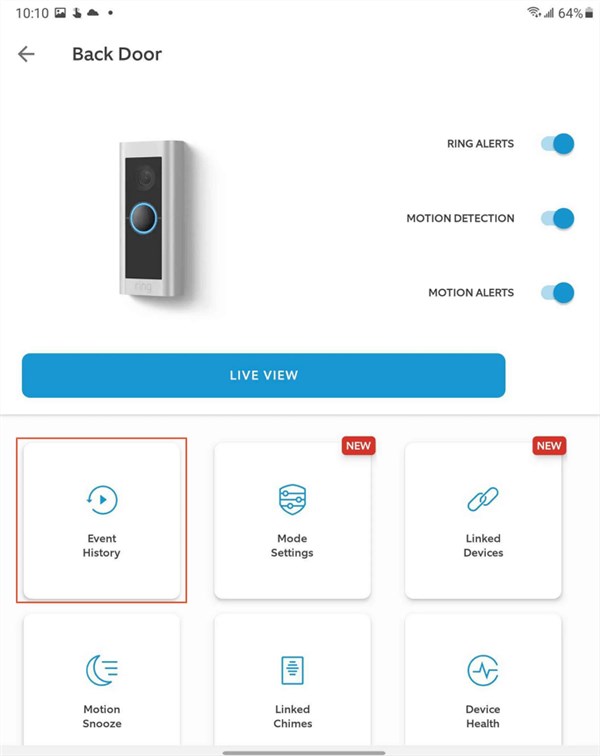
- Look for the filter icons (bubbles at the top or a slider).
- Ensure All Types or Motion is selected. If “Starred” is selected but the clip wasn’t starred, the timeline will appear empty.
2. Verify Location Context
If you are a Shared User for a neighbor or manage multiple properties (e.g., Home and Office), ensure you are viewing the correct location.
- Tap the location name at the top of the dashboard.
- Switch locations to see if the missing footage appears in a different property’s timeline.
3. Visualizing the “Gap” vs. “Non-Recording”
It is vital to distinguish between a deleted video and one that was never recorded.
- Deleted Video: In the “History” list view, the line item simply disappears. There is no “file removed” marker.
- Non-Recording: If you are scrubbing through the 24/7 timeline (if active), a deleted event will effectively vanish, leaving a blank space or merging with the previous snapshot. If the video was never recorded due to “Motion Snooze” or a “Record-Off Schedule,” there will be no color marker (usually blue for motion or orange for rings) on the timeline at all.
Recovery Feasibility: Cloud vs. Local Options
If the checklist above did not reveal the footage, the file has likely been deleted. Use the table below to determine your next move based on how the file was handled.
| Recovery Method | Success Rate | Prerequisites | Time Cost |
| Local Recovery (Phone/PC) | High | You must have tapped “Download” or “Share” before deletion. | Medium (Software scan) |
| Cloud Recovery (App/Web) | Zero | Once confirmed deleted, the server purges the file. | N/A |
| Ring Support (User Request) | Zero | Support agents cannot access or restore user-deleted data. | High (Days/Weeks) |
| Ring Support (Police Request) | Conditional | Requires valid subpoena/warrant via Law Enforcement Portal. | High (Weeks) |
Expert Note: Do not pay for “cloud recovery software” that claims to hack Ring servers to restore your files. These are scams. Third-party tools can only scan your hardware (phone/SD card), not Amazon’s Ring servers.
How to Get Back Deleted Ring Recordings (Local Recovery)
If you attempted to text, email, or save the video before deleting it from the Ring app, your phone likely created a temporary local copy. This is your best chance for recovery.
Option A: Recovering on iPhone (iOS)
When you share or download a Ring video on an iPhone, it saves to the Photos app. If you delete it from there, iOS retains it for 30 days.
1. Open the Photos app.
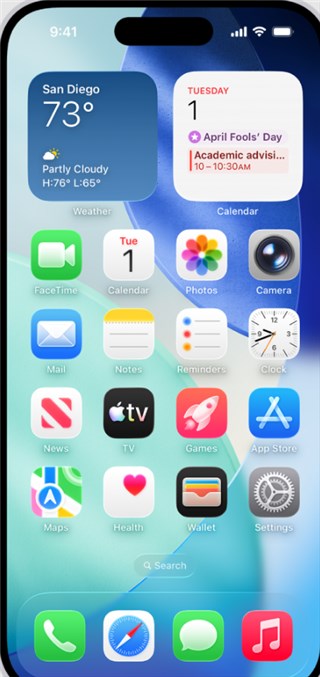
2. Tap Albums and scroll to the absolute bottom.
3. Select Recently Deleted.
4. Look for the MP4 file. Note: Ring videos may not show a preview thumbnail; look for files with the correct timestamp.
5. Select the video and tap Recover.
Option B: Recovering on Android
Android ecosystems vary by manufacturer. You may need to check multiple locations depending on your device (Samsung vs. Pixel) and default apps.
Samsung Devices (Samsung Gallery):
1. Open the Gallery app.
2. Tap the Menu (three lines) at the bottom right.
3. Select Trash.
4. Long-press the video and select Restore.
Google Pixel / Stock Android (Google Photos):
1. Open Google Photos.
2. Tap Library at the bottom right.
3. Select Trash (or Bin).
4. Tap Restore on the file.
Files by Google (File Manager):
If you downloaded the file directly to your file system rather than the gallery:
1. Open the Files app.
2. Tap the Menu (three lines) > Trash.
Option C: PC/Mac Recovery
If you downloaded the file to a desktop computer (via the Ring Web Dashboard) and then deleted it, the file is likely in your Recycle Bin (Windows) or Trash (macOS).

If the bin has been emptied, standard data recovery software (like Disk Drill or Recuva) can scan the specific drive. Because the file existed locally on your hard drive, these tools have a high chance of success.
The Legal Reality: Subpoenas and Law Enforcement
We often receive questions about whether Ring keeps a “secret backup” that Support agents can access. The answer is no, with a very specific exception for law enforcement.
For the User:
Ring Customer Support agents strictly cannot restore deleted videos. They do not have a “Ctrl+Z” button for your account. This is a privacy feature, ensuring that when you delete footage, it is truly gone.
For Law Enforcement:
If the footage is critical evidence for a criminal investigation, police may be able to request data preservation or recovery, provided the data has not been overwritten by new data.
- The Process: You cannot initiate this. You must file a police report. The investigating officer must then submit a formal legal request via Ring’s Law Enforcement Portal.
- The Reality: This process takes time and is reserved for serious investigations. If the video was deleted weeks ago, it is likely overwritten regardless of the warrant.
Understanding Retention: Why Videos Disappear Without Deletion
Sometimes, users search for lost footage not because they deleted it, but because it vanished on its own, similar to cases where people try to recover audio files that were automatically removed. This is caused by the Ring video retention period.
Your Ring Protect subscription dictates the lifespan of your data.
- No Subscription: Ring devices do not record. They only offer Live View. No past footage exists.
- Basic/Plus/Pro: The default retention is often set to 60 days (in the US) but can be manually adjusted up to 180 days.
The “Overwritten” Reality
Once a video exceeds the retention limit (e.g., Day 61 of a 60-day setting), Ring cloud storage automatically overwrites the data. This is a system purge, not a user deletion. Ring support cannot restore files that have been overwritten due to retention expiration.
How to Check Your Retention Settings:
1. Open the Ring App > Menu (three lines).
2. Select Devices > [Your Device].
3. Tap Device Settings > Video Settings > Storage Settings.
4. Ensure this is set to the maximum allowed (usually 180 days) to prevent future loss.
Prevention: Protecting Your Evidence Before It’s Gone
The only way to truly secure a file is to take it off the cloud immediately. To ensure you never lose critical evidence again, follow this protocol.
1. The Immediate Download Rule
Do not trust the app as your permanent archive. If an incident occurs:
- Open the event immediately.
- Tap “More” (three dots) or “Share.”
- Select Download. This saves a permanent MP4 file to your phone’s internal storage. Once this file is on your phone, you own it, regardless of your Ring subscription status.
2. Audit Shared Users Permissions
A common cause of data loss is unauthorized deletion.
- Shared Users: By default, standard “Shared Users” in Ring cannot delete videos. They can only view and save. If someone deleted your video, they likely have your login credentials and are logged in as an Owner, not a Shared User.
- The Fix: Go to Settings > Users. If the person is not listed as a “Shared User,” it means they are using your main account login. Change your password immediately and add them properly as a Shared User to restrict their ability to delete footage. Note that Ring does not currently offer a “View Only” role that prevents downloading; however, the inability to delete is the default for Shared Users.
3. Star Your Favorites
While “Starring” a video does not stop the retention clock (it will still be deleted after 60/180 days), it prevents you from accidentally deleting the clip during a bulk cleanup.
Ring Video Recovery FAQs
Q1. Can I recover deleted Ring videos?
Generally, no. If the video was deleted directly from the Ring app and was never downloaded to a local device, it is permanently removed from Ring’s cloud servers. Recovery is strictly limited to finding local backups or downloaded copies on your phone or computer.
Q2. Does Ring keep deleted videos in a Trash folder?
No. The Ring app does not have a “Trash” or “Recycle Bin” for cloud footage. When you confirm deletion, the command is executed immediately. However, your smartphone (iOS or Android) likely has a “Recently Deleted” album for videos you downloaded before deleting.
Q3. How long does Ring store recorded videos?
This depends on your Ring Protect subscription. Storage typically defaults to 60 days (in the US) but can be extended to 180 days in the app settings. Videos older than this limit are permanently overwritten.
Q4. What if my Ring video disappeared without me deleting it?
This is usually due to retention expiration or active filters. Check that your event history filter is set to “All Types” and verify your subscription is active. If your credit card fails and the subscription lapses, stored videos may be deleted immediately.
Q5. Can Ring support restore deleted footage?
Ring Support agents cannot restore deleted videos. However, if the footage is required for a criminal investigation, law enforcement officers can submit a formal request through the Ring Law Enforcement Portal to attempt data preservation, though success is not guaranteed.
Conclusion
The sinking feeling of losing security footage is real, but understanding the technology restores your control. Recovery is rarely about hacking the cloud—it is about finding the local footprints you might have left behind on your computer to recover photos, videos, or files.
If your video is truly gone from the cloud and you have no local copy, the hard truth is that it is likely irretrievable. Do not waste money on predatory software claiming otherwise. Instead, use this moment to secure your future. Adjust your retention to 180 days, verify that household members are set up as Shared Users rather than Owners, and make immediate downloading your default reaction to any suspicious activity.
(We monitor Ring’s feature updates and API changes quarterly. This guide will be updated if Ring introduces a ‘Trash Can’ feature for cloud storage in future app versions.)
Take action now: Check your Recently Deleted folder on your phone and verify your retention settings today to ensure your home security is actually secure.



Joy Taylor is a seasoned technical writer with over a decade of experience in mobile technology. At iMobie, she specializes in producing in-depth content on iOS data recovery, iPhone unlocking solutions, and iOS troubleshooting.
Product-related questions? Contact Our Support Team to Get Quick Solution >
