If you are trying to track down every fire dog Pokémon, here is the complete list across all generations:
- Growlithe (Generation 1)
- Arcanine (Generation 1)
- Houndour (Generation 2)
- Houndoom (Generation 2)
- Entei (Generation 2)
- Hisuian Growlithe (Generation 8 – Legends: Arceus)
While it is fun to know their trivia and lore, catching them in location-based games like Pokémon GO is a completely different challenge. Finding them requires navigating specific weather boosts, egg pools, and raid rotations rather than just looking at a Pokédex.
Where to Find Fire Dog Pokémon in Pokémon GO (Mechanics Explained)
To catch these Pokémon in Pokémon GO, you need to know exactly how their spawn mechanics work. They do not all just appear randomly on the map. Here is how you can find each one:
| Pokémon | Primary Catch Method | Key Requirement |
|---|---|---|
| Growlithe / Arcanine | Wild Spawns, Field Research | Encounter rates are boosted heavily in Sunny/Clear in-game weather. |
| Houndour / Houndoom | Wild Spawns, Team GO Rocket | Often found in Sunny weather or Dark-type biomes at night. |
| Hisuian Growlithe | 7km Eggs | Requires receiving a 7km egg from a friend’s gift and physically walking 7 kilometers to hatch it. |
| Entei | Level 5 Raids | Requires an active gym raid and usually a group of local players to defeat it (rarely spawns in the wild). |
Knowing these mechanics is the first step, but executing them locally is where many players hit a wall, often leading them to consult various Pokémon GO location guides for help.
Why Catching Them Locally Can Be Frustrating
Even if you know where these fire types are supposed to spawn, your physical location can make catching them incredibly frustrating. Wild spawns for Growlithe and Houndour are heavily dependent on biomes and real-world weather. If you live in an area that rarely sees Sunny or Clear weather, your encounter rates will plummet, leaving you stuck waiting for the seasons to change.
Regional variants like Hisuian Growlithe present a different physical hurdle: they are locked behind 7km eggs. Hatching them requires walking long distances repeatedly, which causes physical fatigue or simply takes too much time out of a busy day. Finally, rural players face a massive disadvantage when hunting Entei. Because Entei is historically tied to Level 5 Raids, you need access to multiple active gyms and a local community to battle it—something that is often impossible outside of major cities.
How Fonelora Location Changer Bypasses Physical Game Restrictions
When your local weather is working against you or you lack the gyms needed for legendary raids, a virtual location tool can help bridge the gap. Fonelora Location Changer is a guided desktop software for supported iOS and Android devices that helps you bypass these physical limits to change location in Pokémon GO and simulate movement.
Fonelora Location Changer
Realistic GPS movement simulation, flexible route control, easy no-modification setup, and support for gaming, social, privacy, and location-based testing in one platform.
Here is how its features map directly to catching fire dog Pokémon:
Scenario 1: Waiting for Sunny Weather for Wild Spawns
If you need Growlithe but it’s raining outside, you can use Fonelora’s Teleport Mode to instantly change your location to a known sunny nest in another city or country, allowing you to catch weather-boosted wild spawns.
Scenario 2: Walking 7km for Hisuian Growlithe
Instead of physically walking for hours to hatch a 7km egg, you can use Route Simulation (Multi-Spot Mode). This lets you set a customized, realistic walking speed along a virtual route to hatch your eggs right from your computer without leaving your house.
Scenario 3: Finding Active Entei Raids
Instead of driving around hoping to find an active Entei raid, you can teleport to high-density gym locations, like downtown areas in major cities, to join active raids with full lobbies.
Fonelora also includes a built-in Cooldown Timer to remind you to pause between long jumps, helping you manage your game-related movement more safely.
Step-by-Step: Teleporting to Nests and Simulating Egg Hatches
If you want to use Fonelora Location Changer to bypass your local restrictions, here is a quick look at how the guided workflow works for both wild encounters and egg hatching on supported devices.
Depending on your device model and OS version, completing the initial connection may require specific setup steps, such as enabling Developer Mode on supported iOS versions or turning on USB Debugging for Android.
Strategy 1: Teleporting to a Sunny Weather Nest
1. Launch Fonelora Location Changer on your computer and connect your iOS or Android device.
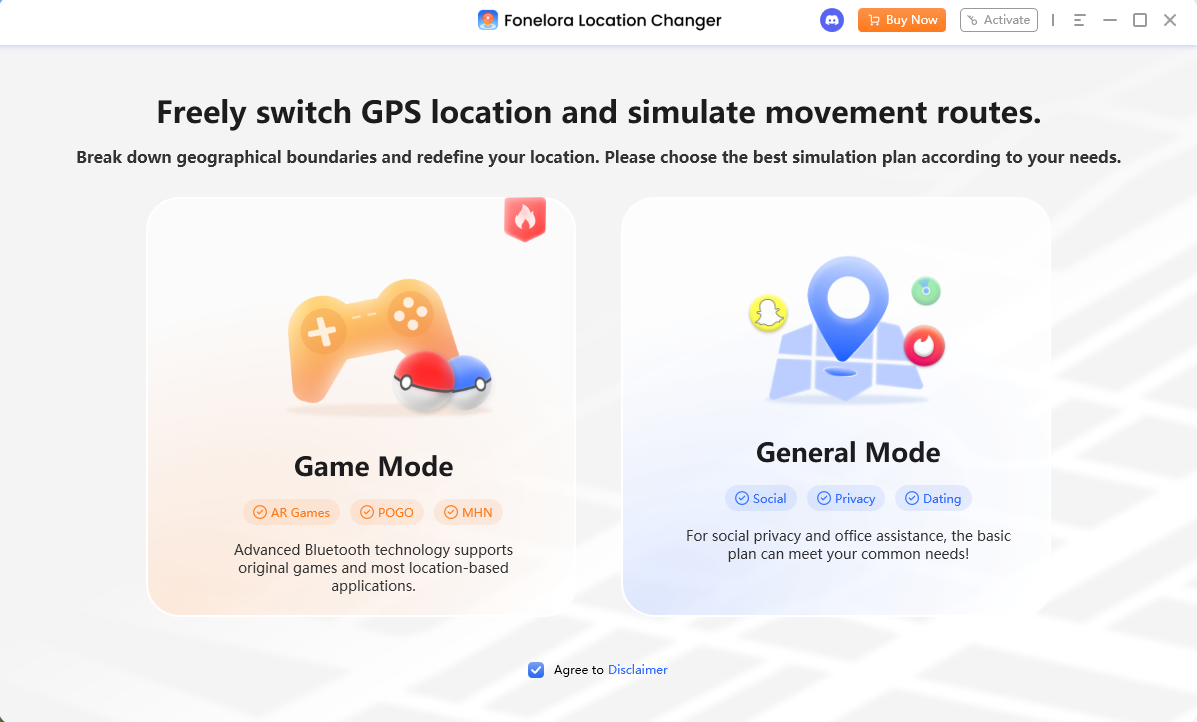
2. Select Game Mode and choose Teleport Mode from the interface.
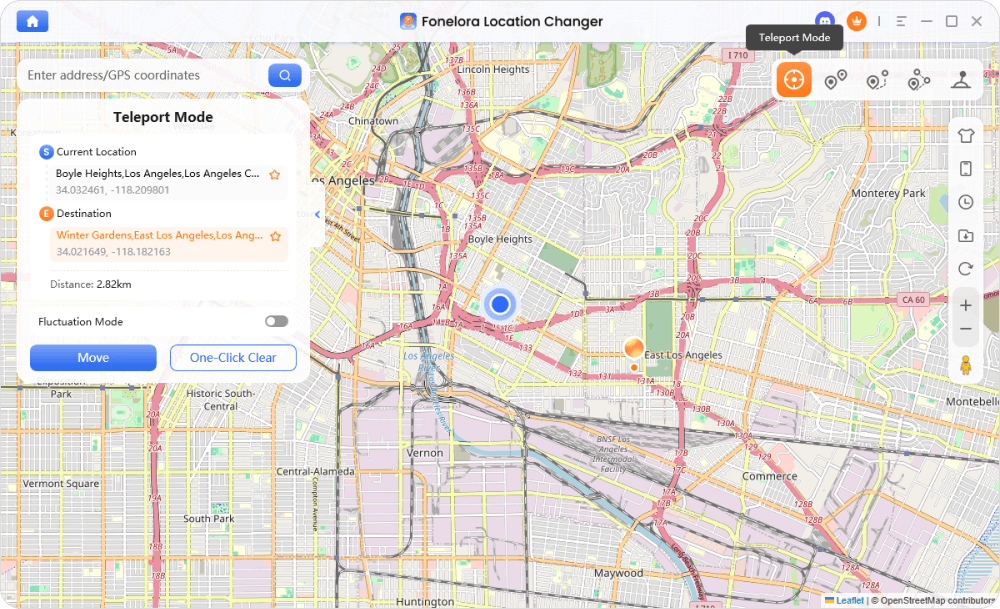
3. Enter the coordinates of a known Growlithe or Houndour nest currently experiencing Sunny weather.
4. Click to change your location. Your in-game GPS will update instantly, allowing you to check for wild spawns.
Strategy 2: Simulating Walking to Hatch 7km Eggs
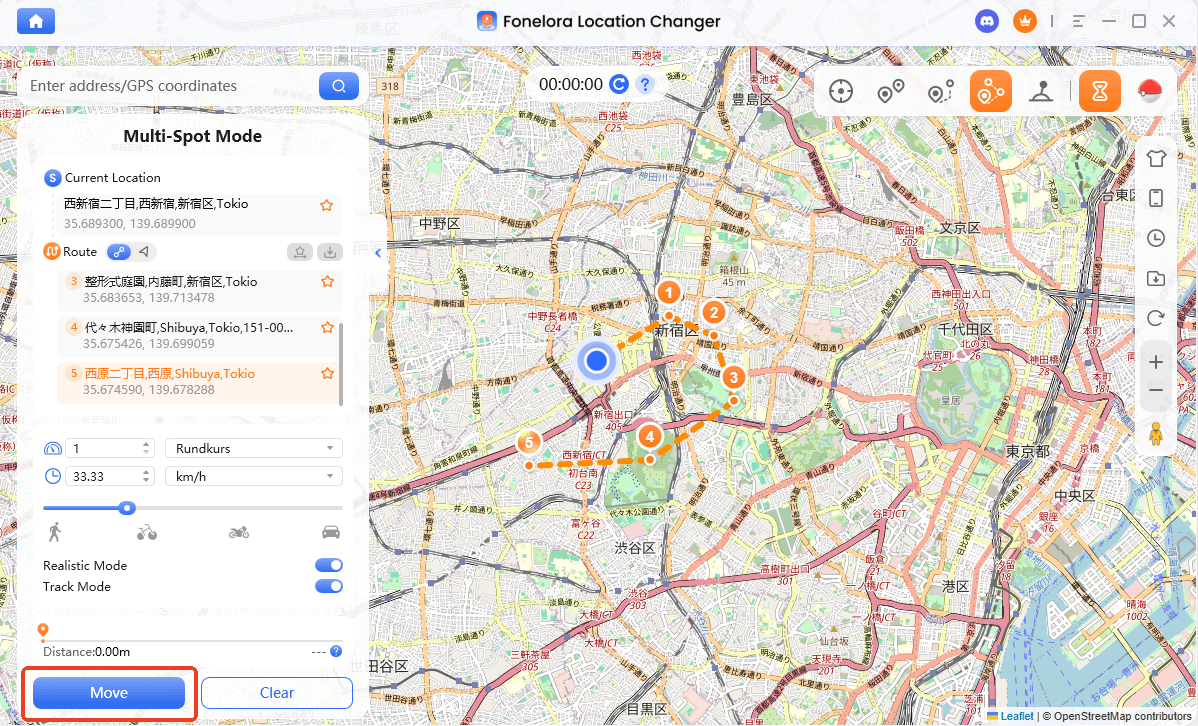
1. With your device connected, select Multi-Spot Mode from the interface.
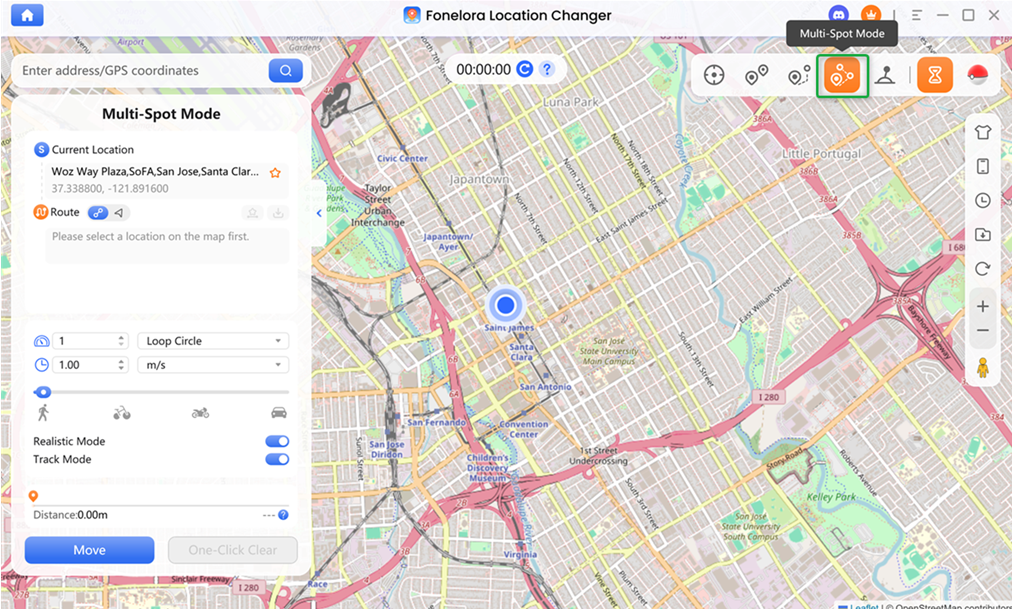
2. Click a few points on the map to create a walking route.
3. Set a realistic walking speed (e.g., 4 to 6 km/h) so the game registers the distance accurately.
4. Start the movement simulation. Your avatar will walk the route, adding distance to your incubated 7km egg for Hisuian Growlithe.
Simulating movement requires patience for eggs, as instant teleporting does not add distance. Furthermore, remember that no tool can guarantee a 100 IV or shiny catch.
Common Mistakes When Hunting Legendary Beasts (Like Entei)
A major mistake many players make when using location tools is assuming they can simply teleport to a random set of coordinates to catch a wild Entei. Historically in Pokémon GO, Entei and the other legendary beasts are raid bosses. Unless there is a highly specific, limited-time roaming event (like a Pokémon GO Tour), teleporting to wild coordinates will not spawn an Entei.
Instead of frantic, random jumping, you should use your location changer strategically. Move your GPS location to Pokémon GO hotspot locations—such as major city centers, famous parks, or sponsored gym locations—where Level 5 raids are actively hatching and other players are waiting in lobbies. This saves time and prevents you from misusing your teleport features on wild goose chases.
Safety First: Understanding Cooldown Timers and Account Risk
Before you jump across the globe to catch that sunny weather Growlithe, it is crucial to understand the rules of location-based games. No spoofing tool is 100% safe or undetectable, so managing your account risk is your responsibility. Always follow these safety checks:
- Understand the Cooldown Rule: If you interact with the game (catching a Pokémon, spinning a PokéStop) in one location, you must wait a specific amount of time before interacting in a faraway location. Jumping immediately will result in a soft ban (fleeing Pokémon and un-spinnable stops). Familiarize yourself with standard Pokémon GO cooldown rules to minimize risks.
- Use Built-in Reminders: Utilize Fonelora’s built-in Cooldown Timer. It calculates the necessary wait time based on how far you just teleported.
- Simulate Realistic Speeds: When hatching 7km eggs, keep your speed at a normal walking pace. Speeding through a route at 60 km/h will not count toward your egg distance and looks highly suspicious.
- Play Responsibly: Always evaluate third-party app terms and realize that repeated reckless jumping increases account risk.
Frequently Asked Questions
Q1: What are the fire dog Pokemon?
The notable fire dog Pokémon include Growlithe, Arcanine, Houndour, Houndoom, Entei, and the regional variant Hisuian Growlithe.
Q2: Which generation introduced the fire dog Pokemon?
Growlithe and Arcanine were introduced in Generation 1. Houndour, Houndoom, and Entei debuted in Generation 2. Hisuian Growlithe was introduced much later in Generation 8 (Legends: Arceus).
Q3: Is Entei a dog or a cat?
Entei is part of the Legendary Beasts trio. While their designs blend various animal traits, Entei is heavily inspired by a lion (a feline), though many fans colloquially refer to the trio as the “legendary dogs.”
Q4: How do I catch Hisuian Growlithe in Pokemon GO?
Hisuian Growlithe is typically exclusive to hatching 7km eggs (received from friend gifts) during specific events. You must walk the required distance to hatch it, or use a location tool like Fonelora Location Changer to simulate walking distance if you are unable to go outside.
Final Thoughts on Catching Your Favorite Fire Dog Pokémon
Catching every fire dog Pokémon in Pokémon GO comes down to knowing their specific spawn mechanics. Whether you need to find Sunny weather for a wild Growlithe, walk 7km to hatch a Hisuian Growlithe, or group up at an active gym for an Entei raid, your physical location plays a huge role in your success.
If local weather, rural surroundings, or a busy schedule are keeping you from completing your Pokédex, you don’t have to miss out. Fonelora Location Changer provides a safer, guided desktop workflow to bypass these physical biome and movement limits on supported iOS and Android devices. By using its Teleport Mode for wild spawns and Route Simulation for egg hatching, you can finally track down your favorite fire dogs.
Ready to overcome your local biome restrictions? Download Fonelora Location Changer today to check your device compatibility, set up your first virtual route, and finally catch the fire dog Pokémon missing from your Pokédex.

Fonelora Location Changer
- Bluetooth Hardware Simulation for Safer GPS Spoofing
- Realistic Movement & Route Simulation
- No Root or Jailbreak Required
- All-in-One Solution for Games, Social Apps & Privacy



