You’ve likely invested years building your Pokémon GO collection, and the fear of losing that progress is significant. When you search for information on IP address changer like iPOGO, you’re met with a confusing mix of glowing reviews and dire warnings of permanent account bans. This leaves you stuck, wondering if iPogo is safe for Pokémon Go, or if it’s a risk that could cost you everything. The core problem is that most discussions fail to separate the risk to your game account from the risk to your phone’s security.
This guide cuts through that confusion. We will provide a clear, structured analysis of iPOGO’s safety, breaking it down into three distinct categories: your account, your device, and your data. This is the straightforward explanation you need to make an informed decision.
This analysis is based on a hands-on evaluation of the latest iPOGO version on an iPhone 14 (iOS 26) and a Samsung Galaxy S23 (Android 14) to provide a real-world perspective on installation and performance.
The Bottom Line: Is iPOGO Safe? A 3-Layer Risk Scorecard
Let’s get straight to the answer. Based on our analysis, using iPOGO is a high-risk activity, but that risk is almost entirely focused on your Pokémon GO account, not your device. If you’re asking, should I use iPOGO? This scorecard gives you the essential information to decide.

iPOGO Safety Scorecard
1. Account Ban Risk: High
Explanation: Using any third-party app that modifies the original game or manipulates GPS data is a direct and serious violation of Niantic’s Terms of Service. Their anti-cheat detection systems are specifically designed to identify this behavior. An account strike, suspension, or permanent ban is not just a possibility; it is a probable outcome over time.
2. Device Malware Risk: Low to Moderate
Explanation: The risk to your device’s security depends entirely on your download source. When you get iPOGO from the developer’s official website, the risk of malware is low. However, the iPOGO malware risk increases dramatically if you download it from unverified third-party websites, forums, or app repositories, which may bundle it with malicious code.
3. Privacy Risk: Moderate
Explanation: For iPOGO to work, it requires access to your game account credentials and your device’s location data. As a closed-source, modded Pokémon GO app, you are placing your trust in the developers not to misuse this sensitive information. This creates an inherent privacy risk that does not exist when using the official app.
Understanding the High iPOGO Ban Risk: Can You Lose Your Account?
The single most critical question for any player is about the iPOGO ban risk. The answer is unequivocally yes—using iPogo can and does lead to account bans. This isn’t based on opinion; it’s a direct result of violating the official Niantic policy. The Pokémon GO Terms of Service explicitly prohibit using modified or unofficial software, which includes any application that falsifies your location or alters the game client.
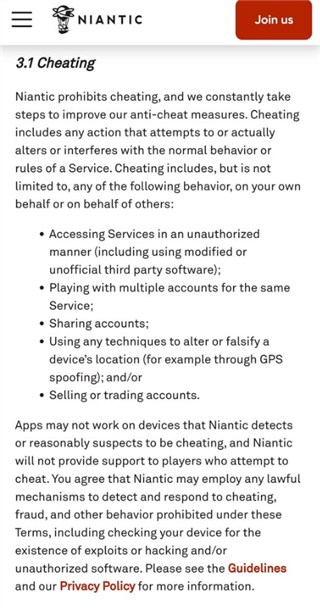
Niantic employs sophisticated anti-cheat detection methods to enforce these rules. These systems don’t just look for impossible travel; they can also detect signatures of a modded Pokémon GO app or other unauthorized software running alongside the game. This is why some users report that iPOGO seems unsafe even when it functions perfectly—the danger isn’t about app crashes, it’s about being detected by Niantic’s systems.
To manage infractions, Niantic uses a clear Three-Strike Discipline Policy:
- First Strike (Warning): You’ll see a warning message in the app, and your gameplay might be limited for about 7 days. You may not be able to see rare Pokémon.
- Second Strike (Suspension): Your account is suspended, typically for 30 days. During this time, you cannot log in to your Pokémon GO account.
- Third Strike (Termination): Your account is permanently banned. You lose access to all your Pokémon, items, and hard-earned progress forever.
Every time you log in using a tool like iPOGO, or MocPOGO Location Changer, you are taking a gamble that could trigger this disciplinary process. It’s also important to remember that Niantic continuously updates its anti-cheat detection systems. A method that seems to work today may trigger a ban wave tomorrow. Always check the iPOGO community for recent reports of disciplinary action before using the app.
Device Security: Is iPOGO Malware or Just a Modded App?
A major point of confusion for players is the difference between an app being “unsafe for your account” versus “unsafe for your phone.” Answering whether iPOGO is legit from a technical standpoint requires separating these two concerns.
iPOGO itself is not considered malware. It is a modded Pokémon GO app—developers took the original game and added code to enable features like joystick movement, teleportation, and enhanced Pokémon scanning. The primary concern for your device security isn’t the official version of iPOGO, but where you download it from.
The potential iPOGO malware risk skyrockets when you search for and download the app from unofficial websites, file-sharing services, or YouTube tutorials linking to dubious sources. These locations often host tampered versions of the app injected with spyware or adware. To minimize this risk, you must only download the software directly from the developer’s official website.
The Installation Hurdle: Sideloading, Signing, and Hidden Risks
Answering “Is iPOGO safe?” must include the safety of the installation method itself, not just the final app. Installing iPOGO requires app sideloading, which means installing it from outside the official Apple App Store or Google Play Store. This process is more complex than a standard download and comes with its own set of risks and frustrations.
For iPhone users, the process is particularly involved. You cannot just download and install the app. You must use a computer and a program like Sideloadly or AltStore to “sign” and install the app onto your phone. If you use a free Apple Developer account, this signature only lasts for seven days.
Here’s a real-world detail I wish I’d known before starting: you have to repeat that entire installation process with your computer every single week. Forgetting to do it meant the app would suddenly stop working and crash right when I was about to join a remote raid, which was incredibly frustrating. Some users turn to paid third-party signing services to avoid this, but that introduces a major privacy risk, as you may be required to provide your Apple ID credentials to an unknown entity.
For Android users, the process is simpler but still requires you to disable a key security feature. You must download the iPOGO APK file and enable “Install from Unknown Sources” in your device settings. While easier, this opens a door for potentially malicious apps to be installed if you aren’t careful about your download sources.
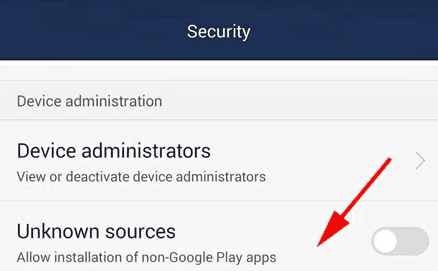
Regardless of your device, pay close attention to app permissions. While iPOGO obviously needs Location access to function as a location spoofing tool, it should not need permission to access your Contacts, Messages, or personal files. Granting unnecessary permissions creates a serious privacy risk.
Making Your Choice: iPOGO vs. Official Gameplay
To help you decide if the features justify the risks, here is a direct comparison between using iPOGO and playing Pokémon GO as intended. Whether iPOGO is trustworthy for you depends entirely on your personal priorities.
If your main goal is to access every Pokémon and feature with minimal physical effort, iPOGO offers a powerful, though risky, solution. However, if your primary concern is protecting the years of time and effort invested in your account, official gameplay is the only method that guarantees you are safe from policy-related bans.
| Feature | Official Pokémon GO | iPOGO |
|---|---|---|
| Account Safety | 100% Safe: No risk of policy-related bans. | High Risk: Direct violation of Niantic’s ToS. |
| Feature Set | Standard in-game features. | Enhanced features: joystick, teleport, auto-catch, etc. |
| Geographic Access | Limited to your physical location. | Global access from anywhere. |
| Time Required | Significant time for walking and travel. | Minimal time; gameplay can be automated. |
| Technical Skill | None required beyond basic app usage. | Moderate skill for installation and configuration. |
Safe Alternatives to iPOGO for Pokémon GO
If the high account ban risk and installation hassles are dealbreakers, you can still play Pokémon GO effectively and flexibly. If you’ve decided the risks are too high, here are the official, 100% safe ways to play. Several legitimate, in-game features serve as the safest alternatives to any Pokémon GO third-party app.
Niantic-Approved Gameplay Methods
- Remote Raid Passes: These let you join any raid you can see on your map or accept invitations from friends across the globe. This is the best official method for catching legendary Pokémon without traveling.
- Adventure Sync: Enable this feature to hatch eggs and earn candy by tracking your daily steps, even when the Pokémon GO app is closed. It syncs with Apple Health or Google Fit to credit you for all your movement.
- Incense and Lure Modules: An Incense attracts Pokémon directly to you, making it ideal for playing from a stationary location. Lure Modules can be attached to PokéStops to boost spawns for all nearby players.
- Community Events: Participating in Community Days, Raid Hours, and other special events provides incredible bonuses and chances to catch rare and shiny Pokémon, no mods required.
Frequently Asked Questions About iPOGO’s Safety
- Is iPOGO safe to install on my phone?
- Installing the official version of iPOGO from its developer’s website is generally safe for your device and does not contain malware. The risk comes from downloading it from untrusted third-party sources. The installation process itself, known as sideloading, requires disabling some security features on Android or involves a complex, weekly re-installation on iPhone.
- Can iPOGO get my Pokémon GO account banned?
- Yes, absolutely. Using iPOGO is a direct violation of Niantic’s Terms of Service. Niantic’s anti-cheat systems are designed to detect such modifications and behaviors, which can lead to warnings, temporary suspensions, or a permanent ban of your Pokémon GO account.
- Is iPOGO a legitimate app or a third-party modification?
- iPOGO is a third-party modification, often called a modded app. It is not an official or legitimate application endorsed or created by Niantic. It works by altering the original Pokémon GO code to add features not present in the standard game.
- Is iPOGO safer on iPhone or Android?
- The risk to your Pokémon GO account is equally high on both iPhone and Android. Niantic’s detection focuses on the prohibited behavior, not the operating system. However, the installation process for iPOGO is often considered more of a technical hassle for iPhone users due to the 7-day signing requirement.
Final Thoughts: Protecting Your Progress
You now have a clear framework for understanding the question: Is iPOGO safe or not? The answer is not a simple yes or no. While the app itself is unlikely to harm your phone if downloaded from the official source, it poses a severe and ongoing threat to your Pokémon GO account. You must also consider the technical hurdles and security choices involved in the installation process.
You must weigh the advanced features it offers against the very real possibility of losing years of progress. Even if tools like a Pokémon GO raid finder can make gameplay feel more efficient, the best next step is to prioritize your account’s long-term health by using Niantic’s in-game tools like Remote Raid Passes and Adventure Sync, which provide flexibility without violating the rules and putting your collection at risk.
Fonelora Location Changer
- Bluetooth Hardware Simulation for Safer GPS Spoofing
- Realistic Movement & Route Simulation
- No Root or Jailbreak Required
- All-in-One Solution for Games, Social Apps & Privacy


Hot Topics