Free IP Address Changer: Safe & Working Methods for Windows PC
A free IP address changer allows users to modify or hide their current IP address to access region-restricted content, enhance online privacy, or troubleshoot network issues. It typically works through VPN services, proxy servers, or built-in network settings. By switching to a different IP location, users can browse more anonymously and access websites or apps from other regions without revealing their real IP address.
Imagine sitting down at your computer, ready to unwind with your favorite game or access a specific forum, only to find yourself blocked. It is a frustrating reality for many: you have the hardware, you have the internet connection, but a digital ban has effectively turned your expensive PC into a paperweight for the one thing you actually want to do.
If you are reading this, you might be in the same boat as Mike, a student who recently faced a “suspicious activity” ban after a weekend of gaming. Like him, you probably searched for a free IP address changer, only to be bombarded with sketchy software that slows down your system or demands a credit card. You need a solution that works without compromising your security. This guide cuts through the confusion, providing tested methods to change your IP on Windows safely.
The router methods detailed below were tested against standard dynamic IP leases. Note that success rates vary between Fiber (often instant) and Cable (often requires longer wait times) connections.
Quick Decision: Which Free IP Changer Method Matches Your Goal?
Before you attempt to change your configuration, you must identify your primary goal. Different problems require different tools, and using the wrong method wastes time. For example, a proxy server might help you access a blocked news site, but it will fail if you are trying to bypass a hardware ban on a game.
Here is a strategic breakdown of the three main methods available for a free ip changer for pc:
1. Manual Router Configuration (The “Real” Fix)
- Best For: Bypassing IP bans on forums, game servers, or avoiding rate limits.
- How it works: Forces your Internet Service Provider (ISP) to assign a new public IP address to your home network.
- Pros: Completely free; no software installation; high trust score; solves the root problem.
- Cons: Requires access to router admin settings; success depends on your ISP’s “lease time.”
2. Freemium VPN (Virtual Private Network)
- Best For: Privacy, encryption, and changing your geographic location (e.g., to watch content restricted to another country).
- Pros: Encrypts traffic; hides your location immediately; easiest setup.
- Cons: Free versions often have data caps (e.g., 10GB/month) and slower speeds.
3. Web Proxies
- Best For: One-off anonymous browsing on a specific webpage.
- Pros: No installation required; works directly in the browser.
- Cons: No encryption; extremely slow; does not work for applications outside the browser.
Best IP Changer for PC Free: Native Windows & Router Methods
The Best IP Changer for PC free of charge is often already sitting on your desk. Many guides will tell you to use the Command Prompt to type ipconfig /release and ipconfig /renew. However, it is important to understand what this actually does.
These commands only refresh the Local IP (the link between your PC and your Router). They do not change the Public IP (the link between your Router and the Internet), which is the address game servers and websites actually see. To change your Public IP, you must interact with the router itself.
Here are the two most effective ways to do this without installing software.
Method A: The “Long Wait” (Power Cycling)
Most residential internet connections use a dynamic IP address, meaning your ISP assigns you an IP temporarily from a pool. When you disconnect, that IP returns to the pool.
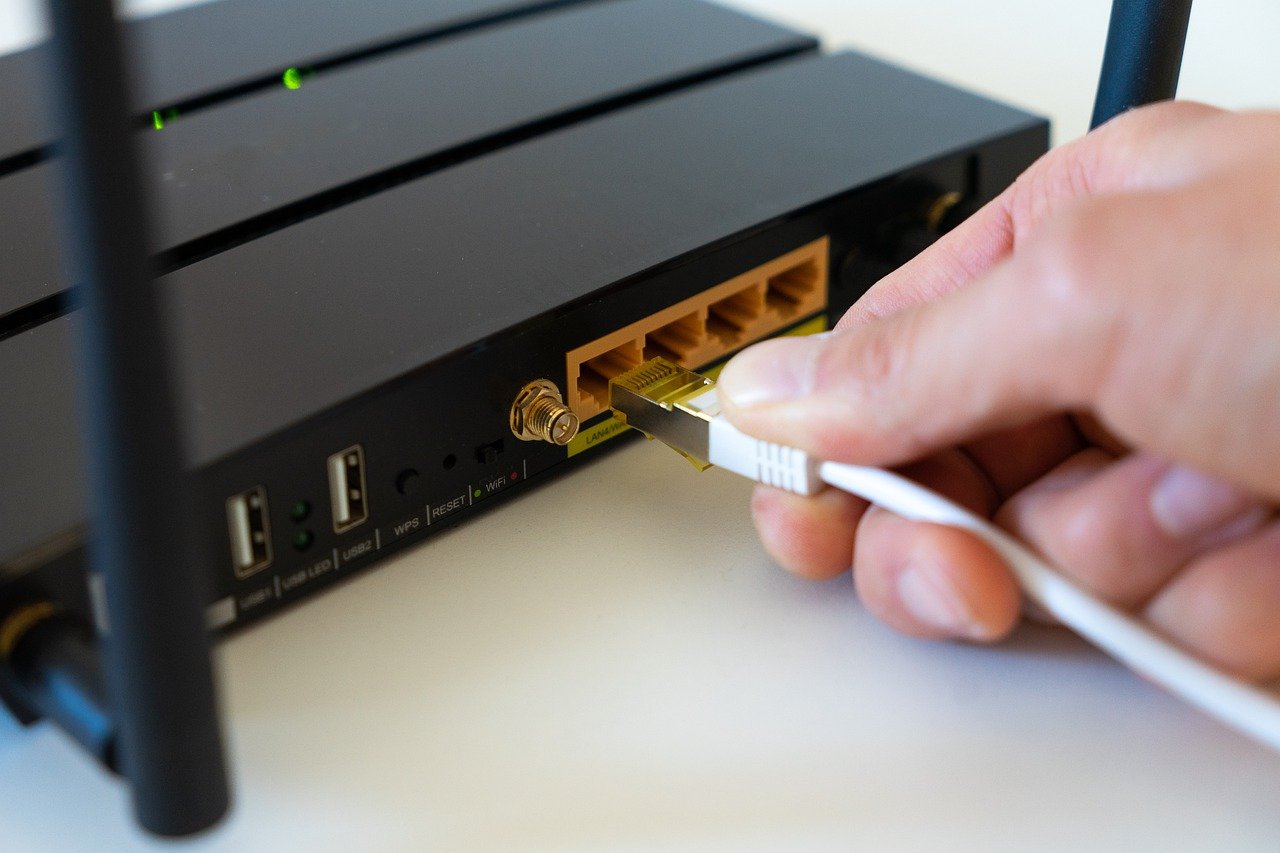
Step1. Unplug your modem and router from the power source.
Step2. Wait.
- Fiber Connections (AT&T, Verizon): Often require only 5–10 minutes.
- Cable Connections (Comcast/Xfinity, Cox): This is the tricky part. Cable ISPs often have long “DHCP lease times” (sometimes 24 hours or more). If you plug it back in too soon, the ISP recognizes your modem and hands you the exact same IP.
Step3. Plug the modem back in and wait for the lights to stabilize.
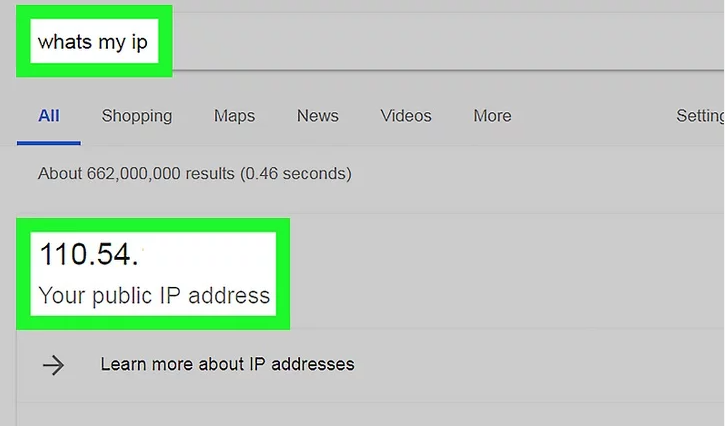
Step4. Verify: Google “What is my IP” to see if it changed.
If the “Long Wait” didn’t work, do not worry. It just means your ISP has a long memory. Proceed to Method B, which is the “Power User” trick that forces the change instantly.
Method B: MAC Address Cloning ( The “Plan B” Secret)
If unplugging your router didn’t work, this is the most reliable method for Windows users on stubborn ISPs.
Your ISP assigns an IP address based on your router’s MAC Address (a unique hardware ID). If you change that ID, the ISP thinks you have connected a brand-new router and is forced to assign a new IP address immediately.
Step1. Log into your Router: Open your browser and type your router’s IP (usually 192.168.0.1 or 192.168.1.1). You will need the admin username and password found on the sticker on the back of the device.
Step2. Find the WAN / Internet Settings: Look for a section labeled “Internet,” “WAN,” or “MAC Address Clone.”
Step3. Clone or Alter the MAC:
- Most routers have a button that says “Clone Computer MAC Address.” Click this. It replaces the router’s MAC with your PC’s MAC.
- Alternatively, if allowed, change the last digit of the MAC address manually (e.g., change A1 to A2).
Step4. Save and Reboot: Save the settings. Your router will restart.
Step5. Result: Because the hardware ID is different, your ISP treats this as a new connection and issues a fresh Public IP.
Using Free VPN IP Changers: What Works & What to Avoid
If you cannot access your router settings or simply want to hide your location temporarily, a free VPN ip changer is your next safest option. Unlike the router method, a VPN does not change the IP your ISP gave you; it masks it.
The “Freemium” vs. “Totally Free” Trap
Avoid any tool that markets itself as a “totally free, unlimited VPN.” Maintaining servers costs money. If you aren’t paying with currency, you are likely paying with your bandwidth or personal data.
Instead, use reputable “Freemium” services like Proton VPN or Windscribe. These companies offer a limited free tier (e.g., slower speeds or fewer server locations) to entice you to upgrade, but they generally adhere to strict no-logging policies.

To use this method:
- Download the client from the official vendor site.
- Install the software (avoiding any bundled “offers”).
- Select a free server location and click Connect.
This method immediately alters your public IP address visible to websites. However, be aware that some strict gaming anti-cheat systems may flag VPN for Windows usage.
What If You Need to Change GPS Location Instead of IP?
Before moving on to browser extensions and proxies, it is important to separate two ideas that are often confused: changing your IP address and changing your GPS location. A VPN or router reset changes the network address websites see. It does not change the physical GPS position reported by your iPhone or Android device.
This matters because many mobile apps, including maps, dating apps, social apps, and location-based games, rely on GPS rather than IP alone. If your real problem is that an app reads your phone’s location incorrectly, or you want to test how an app behaves in another area, an IP changer will not solve that specific issue.
For GPS-based scenarios, Fonelora Location Changer can be a more relevant option. It helps iPhone and Android users change their device GPS location from a computer without jailbreak or root access. Instead of routing your internet traffic through another server, FLC focuses on the location your phone reports to apps that depend on GPS.
The basic workflow is simple: install Fonelora Location Changer on your computer, connect your iPhone or Android device, choose a target location on the map, apply the virtual GPS location, and then open the app you want to test. When finished, you can restore your real location by using the reset option or restarting your device.
Use the right tool for the right problem. If a website or PC game blocks your public IP, use the IP methods above. If a mobile app depends on GPS location, a tool like Fonelora Location Changer is more suitable for device-level location management.
Free IP Address Changer Chrome Extensions & Proxies
Many users look for a Free IP address changer Chrome extension because it seems like the most convenient option. While these tools are useful for quickly accessing a blocked website, they have a massive limitation that is often misunderstood by gamers and app users.
This is exactly where Mike, the student mentioned earlier, faced a problem. When he was banned from his game, he installed a highly-rated Chrome proxy extension. He verified that his IP had changed by visiting a “What is my IP” website. However, the moment he launched his game client, he was still blocked.
Why did this fail? Browser extensions only tunnel traffic that occurs inside the browser (Chrome, Edge, or Firefox). They do not affect system-wide traffic.
- Browser Traffic: Goes through the proxy IP (Success).
- Game Client / Spotify / Discord: Bypasses the proxy completely and uses your real ISP IP (Fail).
If your goal is to change ip without VPN software to unban a specific application outside of your browser, a Chrome extension will not work. It is strictly a tool for web-based hurdles.
The Hidden Costs of “Totally Free” IP Changer Software
When searching for ip address changer software for pc, you will encounter dozens of generic executable files promising instant anonymity. You must exercise extreme caution here. The reality of internet infrastructure is that bandwidth is expensive. If a developer gives you unlimited bandwidth for free, they are often monetizing your connection in other ways.
One common danger is the “peer-to-peer” VPN model. In this scenario, the software turns your PC into an exit node for other users. While you use someone else’s IP, a stranger is using your IP to browse the web. If that stranger commits a crime online, it is traced back to your home connection.
Safety Checklist: The Red Flags
Before installing any unknown IP tool, check for these warning signs. If you see them, uninstall immediately.
- Requests Admin Access: A simple proxy tool should rarely need deep administrative permissions on Windows.
- Unverified Publisher: When installing, Windows warns if the publisher is “Unknown.” Take this seriously.
- HTTP-Only Connections: If the tool doesn’t explicitly support HTTPS encryption, your data is visible to anyone watching the network.
Stick to methods that provide transparency—either the manual router configuration (Method B) or widely recognized security companies with public audits.
Frequently Asked Questions About Changing IPs
1.How can I change my IP address on a PC for free without waiting?
If unplugging your router takes too long, use the MAC Address Clone method in your router’s admin settings. This forces the ISP to assign a new IP immediately because it detects “new” hardware.
2.Does ipconfig /release change my Public IP?
No. The ipconfig commands only refresh the local connection between your PC and your router. They do not change the Public IP address assigned by your ISP, which is what websites and games use to identify you.
3.Do free IP changers really work for gaming bans?
Only if they change your system-wide IP. A router reset or a full VPN client will work. Browser extensions will not work because game traffic bypasses the browser.
4.Is a free VPN the same as an IP address changer?
Technically, yes, but functionally different. A VPN masks your IP by routing traffic through a server (ideal for privacy), whereas a router reset requests a new IP directly from your ISP (ideal for bans).
5.Can I change my IP address without installing software?
Yes. The router reset methods (Method A and Method B in this guide) require no software installation on your PC and are the safest ways to change your identity.
Final Verdict: The Safest Way to Change Your IP Today
Changing your IP address does not require risky software or technical wizardry, but it does require choosing the right method for your specific problem.
If you are facing a ban from a game or forum, the MAC Address Clone (Method B) is your superior option. It provides a clean, legitimate IP directly from your ISP without the wait times of unplugging the modem, and without routing your traffic through a third-party server that might be flagged by anti-cheat systems.
If your goal is simply anonymous browsing or accessing region-locked content, a reputable Freemium VPN is the correct tool. While it has data limits, the encryption offers a layer of security that simple proxies cannot match.
If your issue is GPS-based rather than IP-based, such as testing a mobile app’s location behavior or changing the location your phone reports to apps, Fonelora Location Changer is a better fit than a VPN or Chrome proxy.
By understanding the difference between your Local and Public IP, and recognizing the limitations of browser-based tools, you can navigate around digital roadblocks safely. Choose the method that fits your goal, and regain control of your connection today.
The router configuration methods described here rely on standard networking protocols utilized by all major ISPs (Comcast, AT&T, Spectrum, etc.) and will remain effective regardless of Windows software updates.
More Related Articles



Joy Taylor is a seasoned technical writer with over a decade of experience in mobile technology. At iMobie, she specializes in producing in-depth content on iOS data recovery, iPhone unlocking solutions, and iOS troubleshooting.
Product-related questions? Contact Our Support Team to Get Quick Solution >
