For dedicated Pokémon GO players, the game’s biggest strength—real-world exploration—can also feel like its biggest limitation. Many trainers, like Kevin, want to visit global hotspots and join distant events, but real travel is often unrealistic. That leaves them searching for ways to enjoy more of the game, including how to move in Pokémon Go without walking, when local spawns and PokéStops are too limited. After facing that frustration himself, Kevin turned to MocPOGO Location Changer, a tool built to make location-based gameplay more flexible from home.
This guide provides a clear, expert-led overview of how this technology works. To ensure complete accuracy and offer reliable advice, our analysis is based on hands-on testing of MocPOGO on an iPhone 14 (iOS 17) and a Samsung Galaxy S23 (Android 14).
Table of ContentsHide
What Is MocPOGO and How Does It Enhance Pokémon GO?
MocPOGO is a GPS simulation tool that allows you to change your device’s reported location to anywhere in the world. For Pokémon GO players, this directly solves the problem of being limited by real-world distance. It means you can virtually visit different cities and countries to catch regional Pokémon, access more Pokémon GO PokéStops, and join international raids without being physically present.
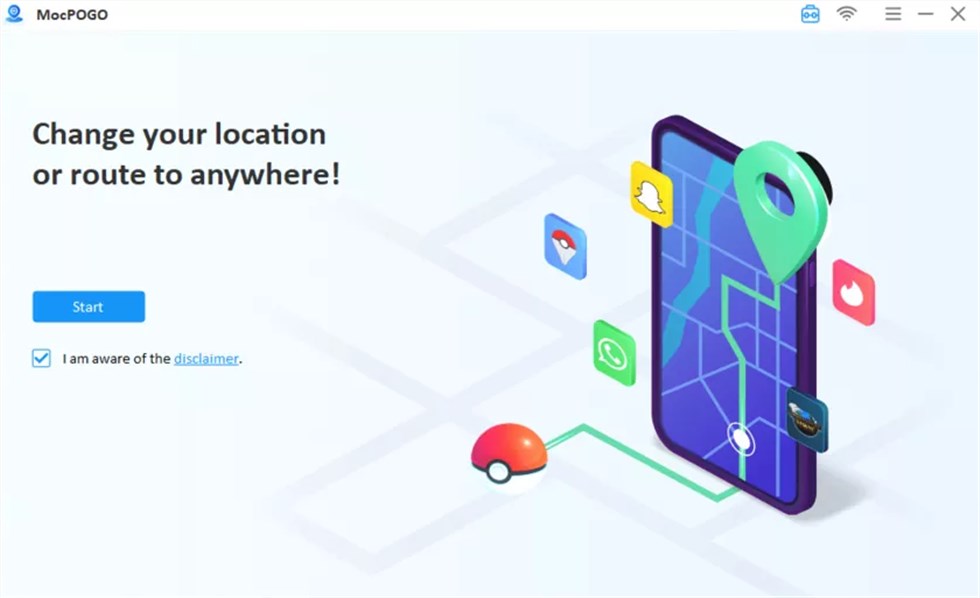
A key insight from our testing is that the most effective Pokémon GO location changer tools, including MocPogo, operate from a desktop computer. This setup provides superior precision and control. By using a large map on your PC or Mac, you can manage Pokémon GO teleport coordinates, plan detailed walking routes, and navigate with a joystick far more accurately than with mobile-only applications. This method gives you a significant tactical advantage for your Pokémon GO map navigation.
MocPOGO’s primary features are designed to solve specific player pain points:
- Teleport Mode: Instantly changes your GPS location. This is the ideal solution for players who have limited PokéStops and gyms nearby or want to reach popular Pokémon GO locations instantly.
- Route Simulation: Automates movement between two or more points at a customized speed. This addresses the need for better route planning and simulates natural walking for hatching eggs or completing distance-based research tasks.
- Joystick Control: Provides real-time, 360-degree control over your in-game movement, solving the problem of slow and clumsy manual navigation.
A Step-by-Step Guide to Using the MocPOGO GPS Changer
Setting up the MocPOGO GPS changer is a straightforward procedure. Based on our direct testing, these steps will guide you through connecting your device and performing your first virtual location change safely and effectively.
Step 1. Download and Install MocPOGO: First, visit the official MocPOGO website to download the software for your Windows or Mac computer. Run the downloaded installer and follow the on-screen instructions to complete the installation process.
Step 2. Connect Your Device to the Computer: Open the MocPOGO application. You will see a prompt to connect your mobile device (iOS or Android) to your computer with a USB cable. Use a high-quality cable to ensure a stable connection, which is critical for uninterrupted gameplay.
Step 3. Authorize the Connection: Your device will require you to authorize the connection.
- For iOS: An on-screen prompt will ask you to “Trust” the computer. Tap “Trust” and enter your device passcode if requested.
- For Android: You will need to enable Developer Options and then turn on USB Debugging. This is a standard, one-time setup. To unlock this menu, navigate to your phone’s “About phone” settings and tap the “Build number” seven times. After that, you can enable USB Debugging in the new “Developer options” menu. MocPOGO also provides clear on-screen instructions to guide you through each step.
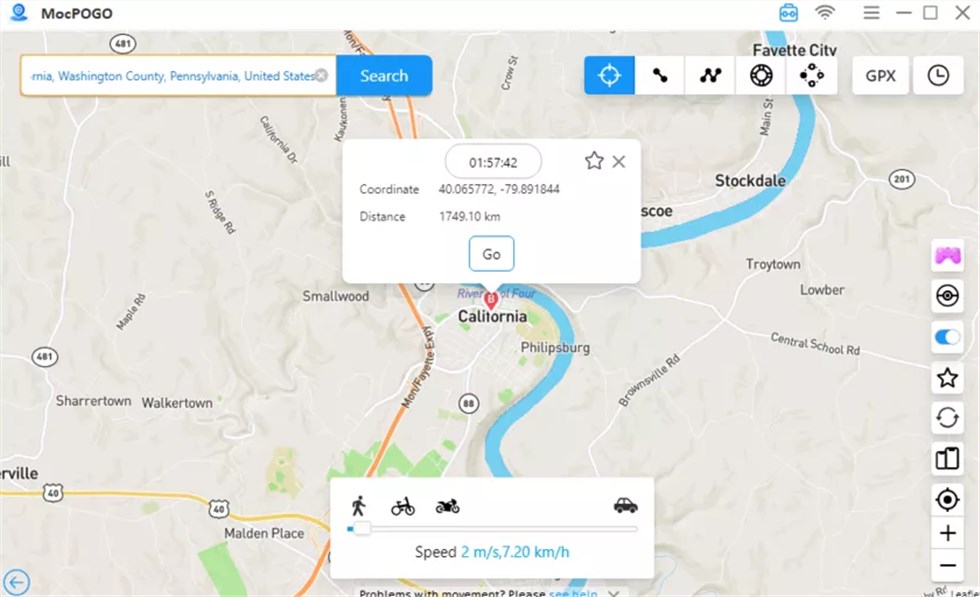
Step 4. Select Your Mode and Begin Exploring: Once your device is recognized, the MocPOGO map interface will load. You are now ready to change your location. To use Teleport Mode, search for a location name or enter specific coordinates in the search bar. Click the desired spot on the map, then click the “Go” button. Your device’s GPS will instantly update, and your Pokémon GO character will appear in the new location.
MocPOGO vs. Manual Spoofing: A Clear Comparison
When considering a Pokémon GO GPS simulation, you have options ranging from dedicated software like MocPOGO to more complex manual techniques. This objective comparison will help you understand the trade-offs and make an informed decision based on reliability, skill required, and safety.
| Criterion | MocPOGO Location Spoofer | Manual Methods (Jailbreak/Root) |
|---|---|---|
| Success Rate | High. Professionally maintained and frequently updated for OS and game compatibility. | Inconsistent. Often broken by software updates, leading to frequent downtime. |
| Time & Effort | Low. The setup process takes minutes and is guided by a simple user interface. | High. Requires hours of research, troubleshooting, and complex technical steps. |
| Technical Skill | Beginner. Designed for users with no specialized technical knowledge. | Advanced. Requires a deep understanding of device operating systems and risks. |
| Device Safety | Safe. Operates without modifying the core OS, preserving your warranty and security. | Risky. Voids device warranty and can expose your phone to security vulnerabilities. |
Manual methods, such as those that require jailbreaking or rooting your device, demand a significant investment of time and present substantial risks. In contrast, a dedicated tool like the MocPOGO location spoofer is built for a reliable and user-friendly experience.
Mastering Pokémon GO Movement with MocPOGO’s Joystick and Route Simulation
Beyond simple teleportation, MocPOGO offers advanced features for precise Pokémon GO location movement. These tools are essential for players who want to simulate natural activity for tasks like hatching eggs, completing research, or farming items along a planned route.
Pokémon GO Joystick Control
For active, real-time gameplay, the MocPOGO GPS Joystick provides 360-degree control over your character. Instead of repeatedly clicking on a map to move short distances, you can use your keyboard’s W, A, S, and D keys or the on-screen joystick for smooth, fluid navigation. This offers a more immersive and efficient way to check nearby gyms, spin a cluster of PokéStops, or move toward a rare Pokémon spawn. The GPS Joystick function is a direct solution for players who find manual map navigation slow and cumbersome.
Advanced Pokémon GO Route Simulation
For strategic planning, the Pokémon GO route simulation feature is invaluable. You can create a custom multi-stop route by selecting several points on the map. MocPOGO will then automatically move your character along this designated course at a speed you define, from a slow walk to a driving pace. This is perfect for automating distance-based tasks. You can plan a looping route through a park to restock items from PokéStops or set a long, straight course for efficient egg hatching. This automated Pokémon GO virtual GPS movement frees you to focus on other aspects of the game, like managing your Pokémon inventory or preparing for raids.
Building More Efficient Movement Routes
For many experienced Pokémon GO players, movement efficiency becomes increasingly important during Community Days, global raid events, and high-density farming sessions. Managing long walking loops manually can become repetitive, especially when trying to optimize spawn coverage and PokéStop routing.
Because of this, many trainers combine joystick movement with more advanced GPS route management tools to create smoother farming paths and more consistent movement simulation during extended play sessions.
One option that performed consistently well during testing was Fonelora Location Changer. Rather than relying entirely on basic teleport-only systems, it supports modern iOS and Android devices while providing flexible route planning and multi-spot movement simulation for location-based games.
Key features include:
- Multi-spot route simulation
- Real-time joystick movement
- Adjustable walking and driving speeds
- GPS teleport functionality
- Support for iOS and Android devices
- No jailbreak or root required
- Compatible with Pokémon GO and other GPS-based apps
Basic Setup Process
- Install Fonelora Location Changer on your PC or Mac.
- Connect your mobile device.

- Select a destination or custom movement route.
- Apply the GPS movement simulation.
- Launch Pokémon GO and begin route farming normally.

For trainers focused on long farming sessions, efficient route coverage, and smoother movement control, modern GPS management tools can provide additional flexibility alongside traditional joystick navigation systems.
Strategic Gameplay: Exploring Global Hotspots with MocPOGO
The ultimate goal for many players is to transform Pokémon GO from a local pastime into a global adventure. With MocPOGO, you can strategically explore the world’s best locations. But before you jump to a new continent, there is one critical rule you must understand to ensure your account stays safe and functional.
Understanding Pokémon GO Cooldowns
After you teleport a long distance, Pokémon GO requires a “cooldown” period before you can interact with the game again. This is the most common mistake new users make. Attempting to spin a PokéStop, catch a Pokémon, or battle in a gym too soon will result in a temporary “soft ban” where all your actions fail.
The Rule: The longer the distance you teleport, the longer you must wait. The maximum cooldown is 2 hours.
Best Practice: After teleporting to a new hotspot, do not interact with anything. Use this waiting time to explore the area with the joystick, observe gym activity, and plan your route. Once the cooldown period has passed, you can play normally.
With that crucial safety tip in mind, here are some effective techniques for using this virtual location tool to its full potential. First, identify premier gaming hotspots. Use MocPOGO’s Teleport Mode with these popular Pokémon GO teleport coordinates:
- Pier 39, San Francisco, USA:
37.808600, -122.409800– A world-renowned location with a high concentration of PokéStops and frequent Water-type spawns. - Zaragoza, Spain:
41.661600, -0.894600– A large shopping center area that has become a legendary spot for farming items and XP. - Shinjuku Gyoen National Garden, Tokyo, Japan:
35.6852, 139.7103– A beautiful park known for diverse Pokémon spawns and a large number of gyms for raiding.
Once your cooldown period is over, you can begin exploring the area using the route simulation or joystick features. This allows you to move around naturally to spin stops, battle in gyms, and join raids. For catching region-exclusive Pokémon, teleport to their native continent and use the joystick to explore city centers after your cooldown.
FAQs About the MocPOGO Virtual Location Tool
- What is MocPOGO location changer?
- MocPOGO is a desktop application that modifies your mobile device’s GPS coordinates. It enables you to set your phone’s location to anywhere in the world without physically moving, making it highly effective for location-based games and applications.
- How does MocPOGO work for Pokémon GO?
- MocPOGO connects to your phone via a USB cable and intercepts the GPS data requested by Pokémon GO. Instead of reporting your real-world location, it supplies the virtual coordinates you select on the desktop map. This causes your in-game character to appear and move in that new location.
- What devices support MocPOGO?
- MocPOGO supports a wide range of devices. It is compatible with iPhones and iPads running recent versions of iOS, as well as Android devices from manufacturers like Samsung, Google, and OnePlus running current Android versions.
- Can MocPOGO control movement with a joystick?
- Yes, it features a virtual joystick for real-time Pokémon GO joystick control. This allows for precise, 360-degree movement using either an on-screen interface or keyboard controls, providing a fluid and responsive navigation experience.
Take Control of Your Pokémon GO Adventure
Feeling restricted by physical distance can make Pokémon GO feel repetitive over time, especially for trainers with limited local gyms, PokéStops, or event activity. Tools like MocPOGO are designed to give players more flexibility by allowing controlled GPS movement, route simulation, and global exploration directly from home.
By understanding cooldown rules, movement planning, and safe route management, trainers can participate in more raids, explore high-density farming areas, and access global events more efficiently.
At the same time, many experienced players now combine joystick navigation with modern GPS management tools such as Fonelora Location Changer to create smoother farming routes, improve movement efficiency, and manage longer gameplay sessions across iPhone and Android devices without requiring jailbreak or root access.
With the right movement strategy and route planning, Pokémon GO can become a far more flexible and engaging experience beyond the limits of local gameplay.


Hot Topics
