Quick Answer: No, Snag Balls do not exist in Pokémon GO.
The Snag Ball is an exclusive item from the classic Pokémon Colosseum and Pokémon XD: Gale of Darkness console games, where players used a “Snag Machine” to steal corrupted Shadow Pokémon away from other trainers.
In Pokémon GO, the mechanics are completely different. Instead of using a specialized Snag Ball, players use Premier Balls to catch Shadow Pokémon after defeating Team GO Rocket Grunts, Leaders, or Giovanni.
Snag Balls vs. Premier Balls: How Catching Shadow Pokémon Actually Works
Because the concept of Shadow Pokémon originated in the GameCube era, many returning fans naturally assume the iconic Snag Ball carried over to the mobile game. However, Niantic adapted the lore to fit Pokémon GO’s gameplay loop.
For players seeking comprehensive Pokémon GO guides, here is how the classic games compare to the modern mobile experience:
| Mechanic | Pokémon Colosseum / XD (Classic) | Pokémon GO (Mobile) |
|---|---|---|
| Item Used | Snag Ball (modified regular Poké Balls) | Premier Ball (white and red special ball) |
| How to Obtain | Crafted using the wearable Snag Machine during battle. | Awarded based on battle performance, surviving Pokémon, and Hero/Purifier medals. |
| The Encounter | Stolen directly from opposing trainers mid-battle. | Caught in a bonus challenge after defeating Team GO Rocket and rescuing the Pokémon. |
What does “Snagging” mean in Pokémon GO today?
While the item itself isn’t in the game, you will often hear the PoGo community talk about “snagging” rare Pokémon. In modern gameplay, “snagging” has become community slang for the action of sniping, tracking down, or successfully catching a highly sought-after spawn—especially rare or high-IV Shadow Pokémon.
The Real Challenge: Finding Enough Team GO Rocket Encounters
Since you can’t simply buy a Snag Ball to guarantee a Shadow catch, your success relies entirely on volume: you have to battle as many Team GO Rocket Grunts and Leaders as possible to find the exact Shadow Pokémon you want.
This creates a massive geographical limitation. Shadow encounters require physical access to invaded PokéStops or relying on the few Team GO Rocket balloons that float by your screen every few hours.
If you live in a rural area, lack mobility, or simply don’t have dense clusters of PokéStops nearby, your chances of grinding for a rare, shiny, or high-IV Shadow Pokémon drop significantly. You are essentially locked out of the best encounters simply because of your physical location on the map, creating a frustrating bottleneck for dedicated players.
How to “Snag” Rare Shadow Pokémon Anywhere in the World
To overcome local map limitations and hunt for Shadow Pokémon efficiently, many players use a guided desktop location changer. This allows you to expand your search radius and teleport to high-density areas—like major cities or sponsored hubs—where Team GO Rocket invasions are constant.
This is where Fonelora Location Changer becomes a practical option. Designed as a guided desktop tool for supported iOS and Android devices, Fonelora helps you change location in Pokémon GO without relying on unstable or overly complex fake GPS apps.
Rather than adding unreleased items (like a Snag Ball) to the game, Fonelora simply puts your avatar in the right place at the right time. By utilizing its specialized Game Mode and built-in Cooldown Timer, you can safely navigate to new PokéStops globally, dramatically increasing your daily Rocket encounters while managing the risks associated with basic spoofing apps.
Fonelora Location Changer
Realistic GPS movement simulation, flexible route control, easy no-modification setup, and support for gaming, social, privacy, and location-based testing in one platform.
3 Steps to Snag Rare Pokémon Using Fonelora Location Changer
Setting up a virtual Shadow Pokémon hunt is straightforward with Fonelora’s guided workflow. Here is how to teleport to the best places to spoof Pokémon GO under supported conditions:
- Connect your device and launch Game Mode: Open Fonelora Location Changer on your Windows or Mac computer, connect your supported iPhone or Android device via USB or Wi-Fi, and select the game-oriented mode to initialize the connection.

- Select Teleport Mode: In the top-right corner of the map, click the Teleport icon. Enter the coordinates or the name of a major city known for dense PokéStops (e.g., Zaragoza, Tokyo, or New York) and click “Move.”
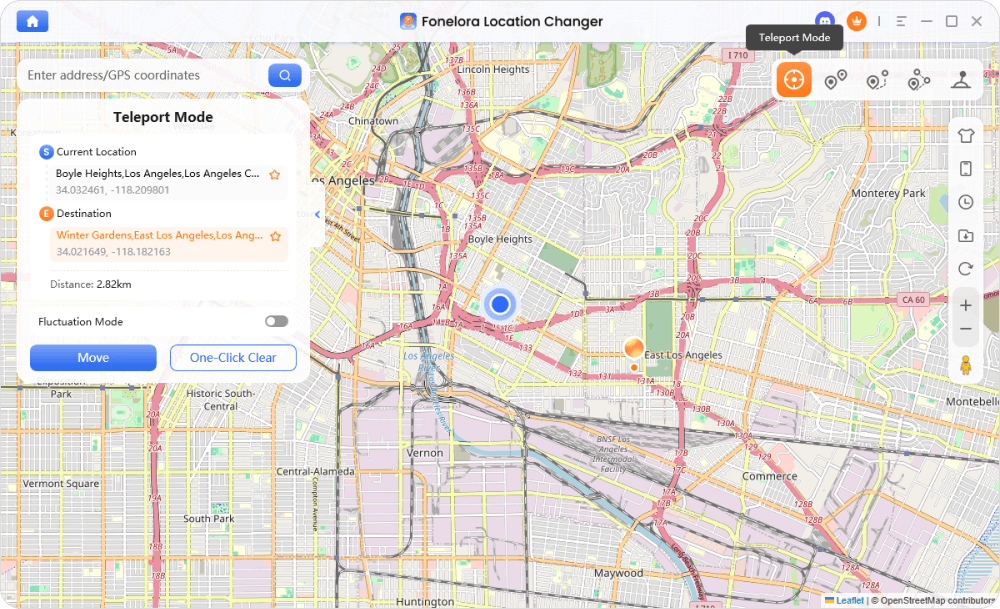
- Catch your Shadow Pokémon: Once your GPS location has changed, open Pokémon GO. You will now see the local PokéStops. Spin the stops, battle the Team GO Rocket Grunts, and snag your Shadow Pokémon using your earned Premier Balls.
Important note: Always fully close the Pokémon GO app before making large geographical jumps to prevent sudden location snapping.
Managing Cooldowns: Crucial Rules for Safely Snagging Pokémon
Whenever you teleport long distances in Pokémon GO, you must respect the game’s “Cooldown” system. A cooldown is the mandatory waiting period required between performing in-game actions at locations far apart. Failing to wait triggers a “soft ban” (often appearing as Error 12 or fleeing Pokémon).
While no location tool is 100% undetectable, Fonelora Location Changer includes a built-in Cooldown Timer to help you manage your virtual movement responsibly and follow standard Pokémon GO cooldown rules.
Actions that TRIGGER a Cooldown (You must wait before jumping):
- Catching a wild or Shadow Pokémon
- Dropping a Poké Ball on the catch screen
- Spinning a PokéStop or Gym
- Feeding a wild Pokémon a berry
- Battling in a Gym
Actions that DO NOT trigger a Cooldown (Safe to do anytime):
- Teleporting to a new location (without interacting)
- Encountering a Pokémon to check if it is Shiny or its IVs (and running away)
- Battling in Go Battle League (PvP)
- Evolving or powering up Pokémon
To hunt safely, always wait the recommended time on Fonelora’s Cooldown Timer before spinning your next invaded PokéStop.
FAQs About Snagging Shadow Pokémon
- Can you use a location changer to find more Team GO Rocket Leaders?
- Yes. By teleporting to denser areas using a tool like Fonelora Location Changer, you can scan more PokéStops to quickly find Arlo, Cliff, or Sierra, assuming you have a Rocket Radar equipped.
- What happens if I try to catch a Shadow Pokémon while on cooldown?
- If you attempt to catch a Shadow Pokémon while on cooldown, the Pokémon will immediately break out of the Premier Ball and flee. Always wait out your cooldown timer before initiating the catch sequence.
- Do I need to walk to hatch Shadow Eggs?
- Yes. To hatch 12km Strange Eggs acquired from Rocket Leaders, you must log distance. If you cannot walk physically, you can use Fonelora’s Single-Spot or Multi-Spot routing modes to simulate natural walking speeds under supported conditions.
- Is Fonelora Location Changer compatible with my device?
- Fonelora supports a wide range of iOS and Android devices via Windows and Mac desktop clients. Compatibility can vary depending on your specific OS version, device model, and connection method, so always check the official Fonelora Location Changer specifications and requirements before setting up your virtual hunt.

Fonelora Location Changer
- Bluetooth Hardware Simulation for Safer GPS Spoofing
- Realistic Movement & Route Simulation
- No Root or Jailbreak Required
- All-in-One Solution for Games, Social Apps & Privacy



