How to Use Online FRP Bypass Tool & Its Alternative
5 online FRP services tool is offered in this article. However, considering its limitations, we provide a desktop FRP Unlock software-DroidKit for you!
Online FRP bypass tools are designed to help users regain access to Android phones after a factory reset by skipping Google account verification. In this 2026 guide, you’ll learn how to use it step by step. We’ll also share a safe and easy alternative. Anyone can follow this guide, even without tech skills.
Part 1: What Does ‘Online FRP Bypass’ Mean?
FRP (Factory Reset Protection) is a security feature introduced by Google in Android 5.1 and above. When a phone is reset without proper sign-out, the system will ask for the last synced Google account credentials to prevent unauthorized access. Then what is Online FRP Bypass?
“Online FRP Bypass” refers to the process of removing or bypassing the FRP lock on an Android device using internet-based tools or services.
If you are exploring the FRP Bypass services online, please find the below 5 recommended sites.
Part 2. 5 FRP Bypass Services Online
1. UnlockJunky
UnlockJunky is a professional FRP unlocking service that works online with the help of real technicians. It supports many popular Android phones and is known for its quick and reliable results. Once you connect your phone to a computer, their team helps you complete the unlock in real time.
Supported Brands: Samsung, Motorola, ZTE, Huawei
Main Features:
- Fast unlock time (around 10 to 15 minutes)
- Support for both FRP and carrier unlocks
- Works with Windows and Mac
- Step-by-step guidance from a technician
Pros & Cons:
| Pros | Cons |
| Trusted and experienced service | Paid service (price depends on your device) |
| Friendly support to guide you | Requires a computer and internet connection |
| Works with many Android devices | May not support all Android versions |
| Quick unlocking process | No free trial available |
| Handles both FRP and network locks |
2. FRPRemoval.com
FRPRemoval.com offers a free, browser-based solution for removing Google account locks from Android phones. Unlike other services that require software downloads or technician help, this one is completely do-it-yourself. The site uses a method involving a “dummy” Google ID, a temporary login that helps you get past the FRP lock screen.
It’s a good option for people who want a fast and cost-free way to handle FRP issues, especially on older Android versions.
Supported Brands: Most Android phones (not brand-specific)
Main Features:
- Fully web-based FRP bypass method
- Free for all users
- Uses dummy Google account login
- No software, tools, or downloads required
- Simple guide suitable for non-technical users
Pros & Cons:
| Pros | Cons |
| Completely free of cost | Limited details about supported phone models or Android versions |
| There is no need to download anything on your phone or computer | May not work on newer Android phones with advanced security |
| No waiting time or appointments | No customer support or live help if you face issues |
| Works well for older Android models | The site isn’t very popular or verified by big tech forums |
| Website owner identity is hidden, which may raise trust concerns |
3. UnlockHere
UnlockHere is a reliable platform offering solutions for FRP bypass, iCloud removal, SIM unlocking, and more. While it doesn’t offer direct tools, it provides clear guides, expert tips, and safe tool recommendations. Focused on real user experiences, UnlockHere helps you understand the problem and choose the best way to fix it, whether it’s an FRP lock or an iCloud issue.
Supported Brands: Samsung, Huawei, Xiaomi, LG, Motorola, iPhone (for iCloud-related issues)
Main Features:
- In-depth FRP bypass guides
- Step-by-step tutorials for various device locks
- Solutions for carrier locks, iCloud, IMEI blacklist, and more
- Updated regularly with new tools and fixes
Pros & Cons:
| Pros | Cons |
| Very informative and updated content | No direct FRP bypass tool to download |
| Professional reviews based on real experience | Some solutions may require payment through third-party tools |
| Great for users who want to understand the process | May be overwhelming for users looking for a one-click fix |
| Works for both Android and iOS devices |
4. UnlockBoot
UnlockBoot is one of the most trusted online frp bypass service providers. From FRP locks, carrier locks, iCloud Activation Locks, and MDM profiles on Apple devices, UnlockBoot has stepwise procedures for removing any of them.
Their FRP bypass services are available for various Android brands. UnlockBoot is especially helpful for users who are not very technical but still want to solve the problem on their own with reliable guidance.
Supported Brands: Samsung, Huawei, LG, Xiaomi, Motorola, Apple (for iCloud/MDM)
Main Features:
- FRP bypass for Android phones
- iCloud, MDM, and carrier unlock solutions
- Clear instructions and video walkthroughs
- Remote services available
- IMEI check and network unlock support
Pros & Cons:
| Pros | Cons |
| Covers a wide range of devices and issues | Not all services are free |
| Step-by-step guides for easy unlocking | Some processes require remote technician help |
| Known for secure and trustworthy service | It might be slower during high demand |
| Great support for both Android and iOS | Unlocking success can vary based on device version |
| Offers paid and some free solutions |
5. GSM Flasher ADB Bypass Tool
GSM Flasher ADB Bypass Tool is a simple and free desktop app that helps remove FRP locks on Android devices using ADB commands. You just connect your phone to a computer with a USB cable and run the tool.
While it’s been used for years and still helps many users, it only works when USB debugging is already turned on, something not always possible after a factory reset. This makes it more useful for older Android models where ADB access is easier to manage.
Supported Brands: Samsung, ZTE, LG, Motorola
Main Features:
- Free FRP bypass tool
- Uses ADB commands to unlock the device
- Works on Windows and macOS
- Simple interface for advanced users
- Also works as a flashing tool for other Android tasks
Pros & Cons:
| Pros | Cons |
| Completely free to download and use | Does not support Android 14 or newer versions |
| Useful for older Android models | Requires USB debugging to be enabled before the reset |
| Supports multiple brands | Might not work on devices with strong security patches |
| No need for internet or paid services | Antivirus programs may block the tool (must be disabled temporarily) |
| Can also be used for flashing firmware | Not suitable for beginners without technical knowledge |
Part 3. Bonus. Try A Trusted FRP Bypass Tool Online Alternative -With Desktop APP
DroidKit is a desktop-based FRP bypass tool that helps you unlock Android devices—even if you forgot your Google credentials. It’s compatible with Android 6 to 15 and supports popular brands like Samsung, Xiaomi, OPPO, and OnePlus. No technical knowledge is required, just connect your device and follow simple on-screen steps.
DroidKit Key Features:
- Supports almost all Android versions from 6 to 15
- Compatible with leading brands under Samsung, Xiaomi, OPPO, Vivo, and more
- Let’s you bypass FRP without knowing the Google account password
- No rooting of the device is required, nor void your warranty.
- Fast and easy procedure to carry out at home.
- Works flawlessly on Windows and Mac systems.
- Holds your information safe under a very robust encryption.
DroidKit is not only a FRP bypass tool, but a full toolkit to unlock Android screen locks, repair system issues like boot issues, and retrieve deleted permanent files at ease.
Free Download * 100% Clean & Safe
How to Use DroidKit to Bypass FRP Lock:
Step 1: Download and install DroidKit on your computer, and run it afterward. Choose the FRP Bypass Mode to unlock Google account locking.

DroidKit FRP Bypass
Step 2: Via USB cable, connect the phone or tablet to your device, wait for the tool to be recognized, click the start button, and continue.
Step 3: You have to wait while the software detects your device and then prepares an automatic configuration file. When ready, click on “start to bypass” and follow the on-screen instructions to enter recovery mode.
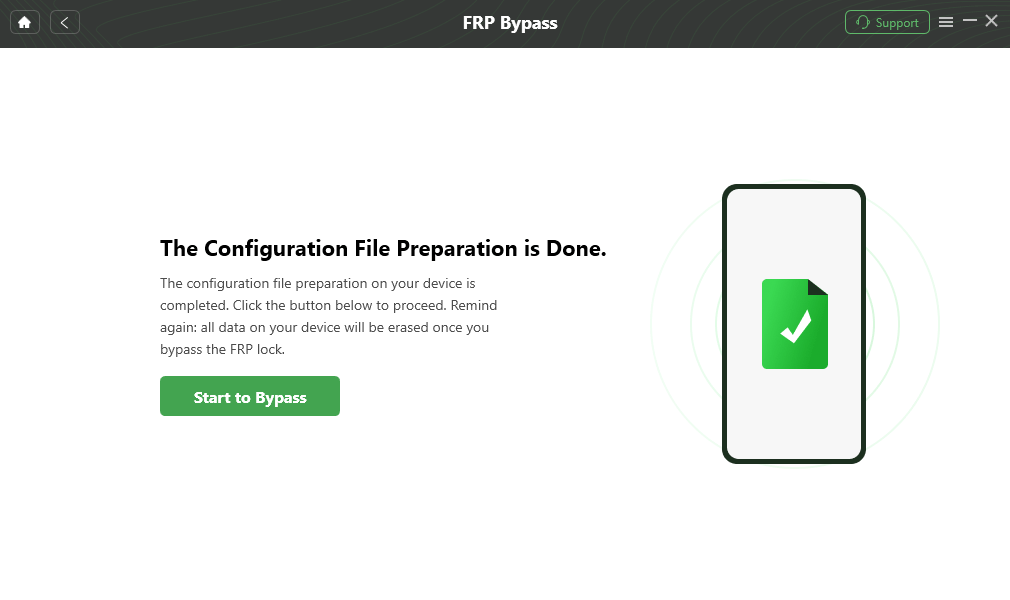
Click Start to Bypass
Step 4: Carefully follow the prompts shown on the screen to wipe the cache partition on your device.
Step 5: As soon as that is done, your phone will reboot automatically.

FRP Bypass Complete
Part 4. FAQs About Online FRP Bypass
Q1. Is it safe to use these unlocking tools online?
Yes, as long as you’re using a trusted website or tool. Avoid any tools that ask for suspicious permissions or lack proper documentation.
Q2. Will unlocking this way erase everything on my phone?
Yes. Most tools require a factory reset, which deletes all data. Be sure to back up your data beforehand.
Q3. What if the online tool doesn’t work for me?
You can try a desktop tool like DroidKit. It supports more device models and guides you step-by-step—even if you’re not tech-savvy.
Part 5. Conclusion
Online FRP bypass tools offer several ways to regain access to locked Android devices after a factory reset. While some web-based options work for older phones, their success rates and safety may vary. For a more reliable and user-friendly solution, DroidKit stands out. It supports a wide range of Android devices, offers a clear interface and robust FRP bypass function with high success rate. Try DroidKit Now!
DroidKit – Easy FRP Bypass Tool
- Bypass Samsung FRP lock if you forgot Google account password.
- Unlock all types of screen locks on an Android phone in minutes.
- Unlock 20,000+ models of Android phones & tablets.
- No technical knowledge is required; No need to root your device.
Free Download100% Clean & Safe
Free Download100% Clean & Safe
Free Download * 100% Clean & Safe


Roger Smith is a senior technical writer with years of experience in providing Android solutions. He loves to help users solve various problems such as Android unlock, Android data recovery, and Android system repair.
Product-related questions? Contact Our Support Team to Get Quick Solution >
