How to Download and Use 007 Ramdisk Tool | Step-by-step
This is the full review on Ramdisk tool, including its supported devices, features, pricing, and limitations, to how to download and use it step-by-step. Additionally, we will provide with an easier and higher success rate alternative-AnyUnlock.
When dealing with the iCloud Activation Lock on an iPhone or iPad, many users look for tools that promise a quick and simple fix. One name that often appears in jailbreak and repair communities is the 007 Ramdisk Tool.
In this guide, we’ll break down everything you need to know—from what 007 RamDisk is, its supported devices, features, pricing, and limitations, to how to download and use it step-by-step.
Part 1. What is 007 Ramdisk?
The 007 Ramdisk Tool is a Windows-based utility developed to bypass the iCloud Activation Lock on iPhone or iPad of older versions only. It achieves this by using the Checkm8 exploit, the most widely used, which enables the device to boot into a special ramdisk mode. In this mode, the tool can turn on the device, retrieve the owner’s info, or erase the data—without the need for the original Apple ID or password.
As a free community tool, 007 Ramdisk was initially released and became a fast unlocking method for iOS devices, allowing technicians to bypass the Hello screen. The later versions were renamed, but the idea remains the same: a temporary bypass solution for older iOS models.
1. Supported Devices for 007 Ramdisk Tool
| Chipset | Supported Devices | Supported iOS Versions | Performance Rating |
| A7 | iPad Air 1 (Cellular) | iOS 12.5.x | 6/10 – Works but may freeze during activation |
| A8/A8X | iPad Mini 4, iPad Air 2 (Cellular) | Up to iOS 15.7 | 3/10 – Frequent detection issues |
| A9/A9X | iPhone 6S / 6S Plus, iPhone SE (1st gen), iPad Pro 1 | Up to iOS 15.7 | 5/10 – Mixed results, sometimes stable |
| A10/A10X | iPhone 7 / 7 Plus, iPad Pro 2 | Up to iOS 16 | 8/10 – Most reliable performance |
| A11 | iPhone 8 / 8 Plus, iPhone X | Up to iOS 16.6.1 | 2/10 – Often fails at final steps |
2. Main Functions
007 Ramdisk Tool is a comprehensive package of advanced technical features used for device servicing and repair, and, in some cases, for a temporary bypass of iOS restrictions. The following is an explanatory list of the tool’s functional capabilities:
- iCloud Activation Bypass: Temporarily, iCloud Activation Lock or the Hello screen can be bypassed by users. An iPhone or iPad that, after a reset, is stuck and cannot continue without the previous owner’s Apple ID is the most common scenario in which this is used.
- Device Booting & Ramdisk Mode: In RAMDisk mode, which is required for deep operations like resets, system repairs, and the use of the activation file, supported devices (iOS 12–16) are booted.
- Passcode & Owner Information Tools: Enables reading some device owner information, backing up existing passcodes, or enabling passcode mode after a ramdisk boot.
- Hello Screen Controls: The tools to create, skip, block, or force activation on iOS 12–16 devices are included in this set of controls. Those functions can be used to fix devices that, after a reset, are stuck at the Hello screen.
- Purple Mode (Diagnostic Mode): Provides access to Apple’s diagnostic mode, allowing technicians to modify deep device data such as the serial number (SN) and perform special factory resets.
3. Pros and Cons
Pros:
- Free or low-cost for older devices
- Simple interface once set up
- Uses a powerful exploit (checkm8)
- Can perform temporary iCloud bypasses
Cons:
- Only works on older chipsets (A7–A11)
- Temporary bypass—reset will remove changes
Part 2. How to Download 007 Ramdisk Latest Version
The 007 Ramdisk Tool has not been updated for a long time, but older builds can still be found on certain jailbreak or iOS community sites. Because these versions are outdated, users may encounter problems such as freezing, boot loops, or driver failures. Therefore, it should be treated as a temporary workaround rather than a long-term solution.
What Comes with the Download Package?
The download archive generally comes with the entire application and a folder named Drivers containing crucial Windows drivers like:
- libusb
- Apple Mobile Device (DFU mode)
- Diag CDC
- SerialPORT
These are the required drivers. Without DFU mode, the tool cannot connect to the device in DFU mode, which is the only way to bypass the Ramdisk boot and activation.
How to Download and Install 007 Ramdisk
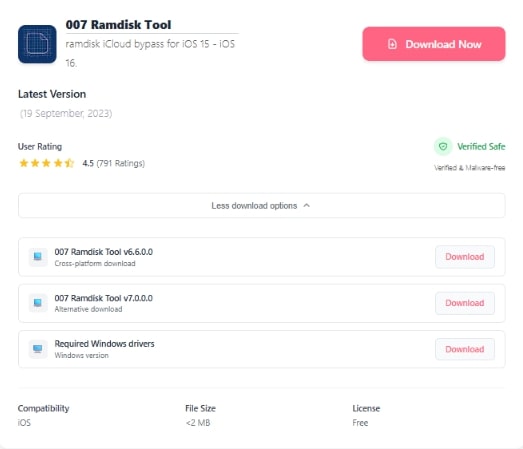
Step 1. Get the package from the download page
Go to onejailbreak.com, pick the 007 Ramdisk v6.6.0.0 Mega package, save it on your Windows PC, and unzip the folder.
Step 2. Set up the app and necessary drivers
Open the extracted folder, run the setup file, and follow the on‑screen instructions. The included drivers must be installed so the tool can correctly identify your iPhone in DFU mode.
Step 3. Launch the Tool and Connect Your Device
After installation, open 007 Ramdisk and prepare to connect your device in DFU mode.
Part 3. How to Use 007 Ramdisk (With Signal)
Step 1. Connect your device and enter DFU mode
Open the 007 Ramdisk tool on your Windows PC, then connect to your iPhone using a USB cable. In the Ramdisk Options panel, click Check Device to verify the connection. Next, select DFU Helper and follow the animated guide to place your device into DFU mode.
Step 2. Confirm device status and compatibility
After DFU mode is detected, click Check Device once more. Only continue when the tool displays a green confirmation, such as “You can use all available services.” This message indicates that the drivers are functioning correctly and the device is ready for the ramdisk operation.
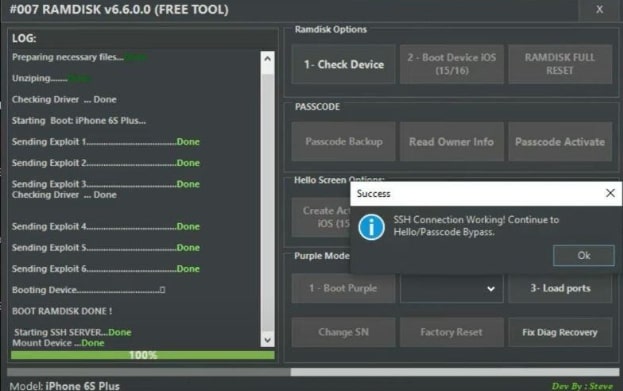
Step 3. Boot the device into the Ramdisk
On the Boot Device iOS tab, select the option suitable for your device version:
- Boot Ramdisk iOS 12–15, or
- Boot Ramdisk iOS 16
Step 4. Activate iCloud bypass
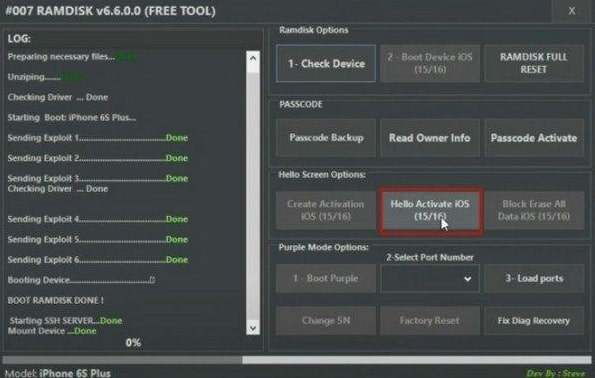
Go to Hello Screen Options, then press Hello Activate iOS (12/15/16). Choose Passcode Activate to finish the task.
Step 5. Exiting Ramdisk mode
Steps to get out of the Ramdisk mode safely include:
- iPhone 6 and older: Hold Home + Power for about 10 seconds.
- iPhone 7–X: Hold Volume Down + Power until the Apple logo appears.
Part 4. Does 007 Ramdisk Tool Really Work?
With the 007 Ramdisk Tool, you can sometimes get around iCloud Activation on certain iPhones that are a bit older (A7–A11 chips, iOS 12–16), but the success rate is very much hit or miss. The outcomes of users on Reddit who try this method are a mix of success and failure—some units can operate without an Apple ID, while most attempts fail, freeze at the Welcome screen, or cause driver errors like ‘failed check driver’.
Part 5. Best Alternative to 007 Ramdisk Tool: Bypass iCloud Activation Lock with Ease
If you are looking for a more stable and reliable option than 007 Ramdisk, then AnyUnlock – iPhone Password Unlocker is the closest substitute. It supports a wide range of iPhone, iPad, and iPod touch models and eliminates complicated technical steps.
In case you have forgotten the Apple ID password, have purchased a second-hand device that is locked to the previous owner, or cannot access the Activation Lock screen, AnyUnlock will allow you to get rid of the lock in a matter of minutes and thus have your device back.
Remove iCloud Activation Lock Easily
- Effortlessly bypass iCloud activation lock in minutes.
- Other features like screen unlock, MDM bypass, Apple ID removal, etc.
- Support the latest iPhone 17/ iPhone 17 Pro and iOS 26.
- Support on Windows & Mac.
Free Download100% Clean & Safe
Free Download100% Clean & Safe
Free Download * 100% Clean & Safe
How to Use AnyUnlock to Circumvent the iCloud Activation Lock in Detail
Step 1. Download and Install AnyUnlock
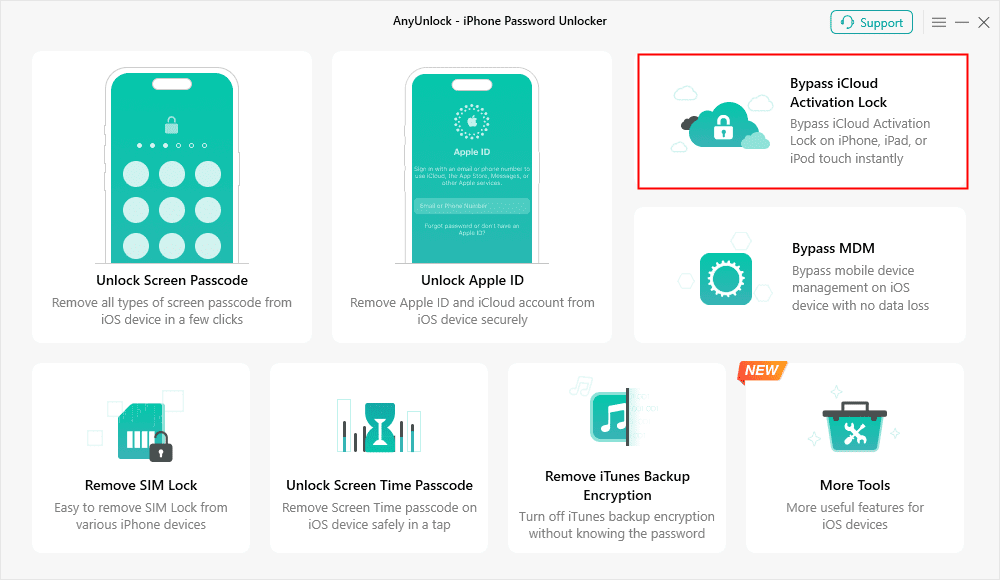
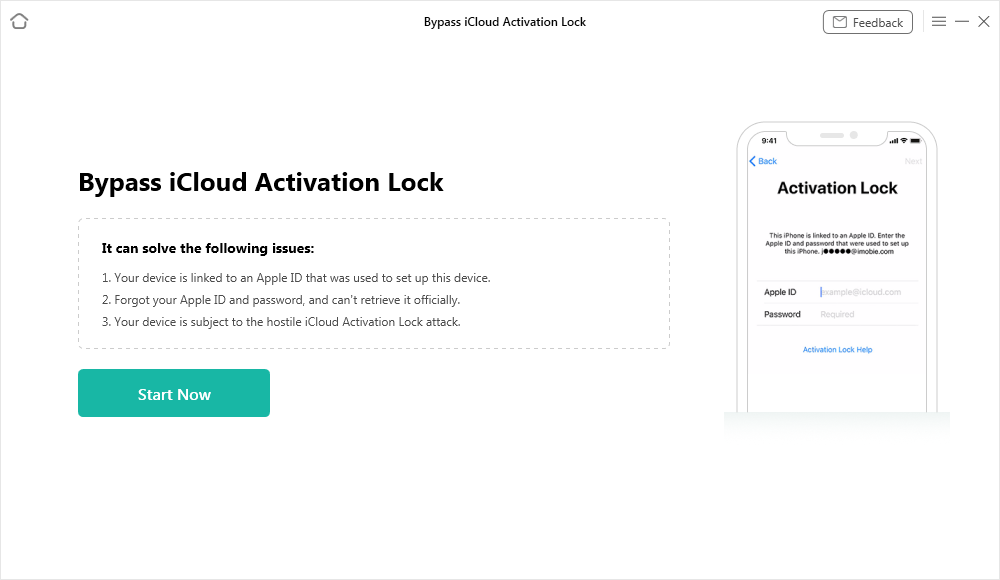
First, download and install AnyUnloc on your PC. Afterward, open the software and from the home screen, select Bypass iCloud Activation Lock.
Step 2. Connect Your Device
Now connect an iPhone, iPad, or iPod touch to a computer with a USB cable, and then click Start Now to start the operation.
Step 3. Jailbreak Your Device
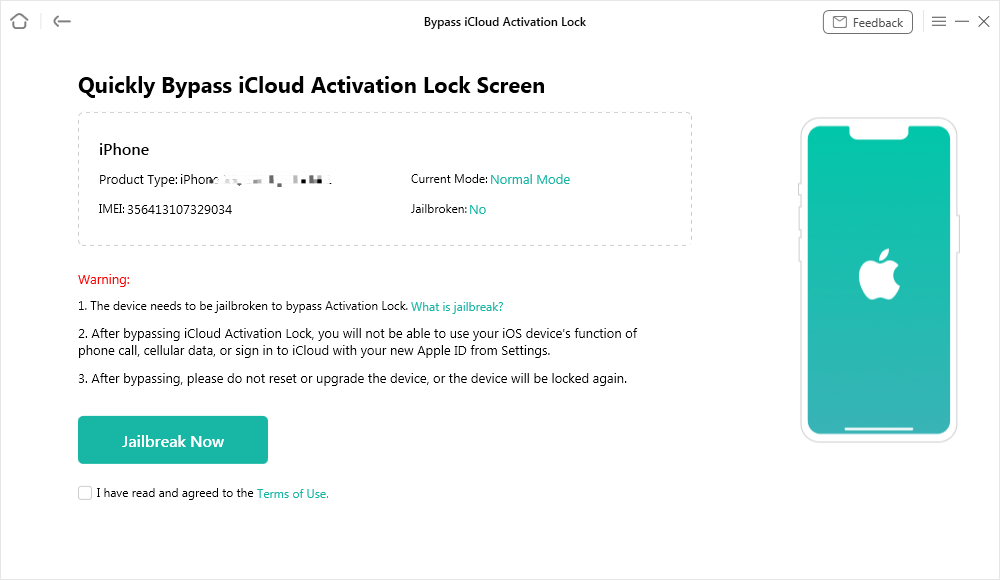
Look through the Terms of Use, tick the acceptance box, and then click Jailbreak Now.
Set your phone model and follow the instructions on the screen to manually put your device into DFU mode. Once the device is in DFU, the jailbreaking operation will be done automatically.
Step 4. Start Bypassing iCloud Activation Lock
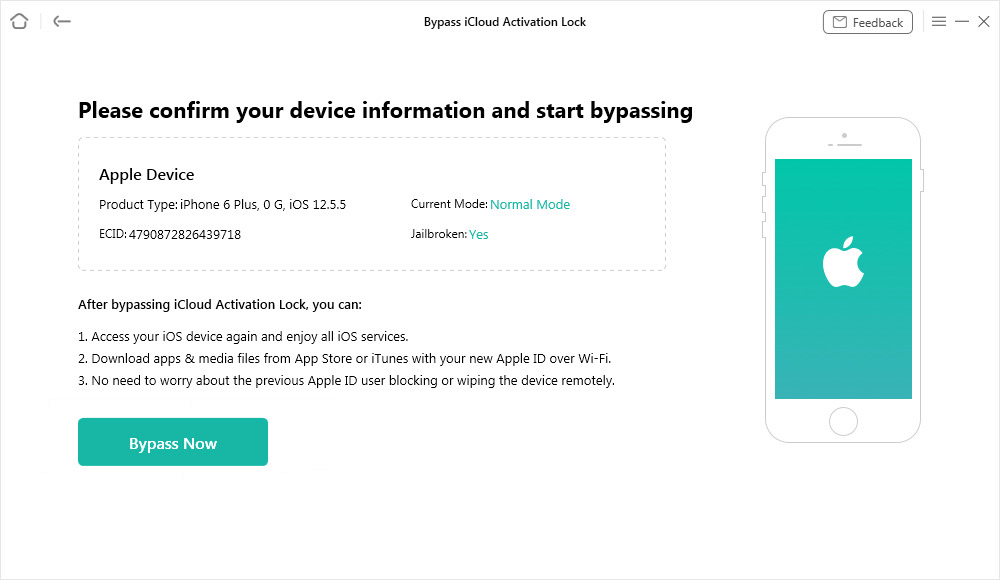
After jailbreaking, if not wrong, your device info will be there for you to confirm, and then click Bypass Now.
Step 5. iCloud Activation Lock Removed
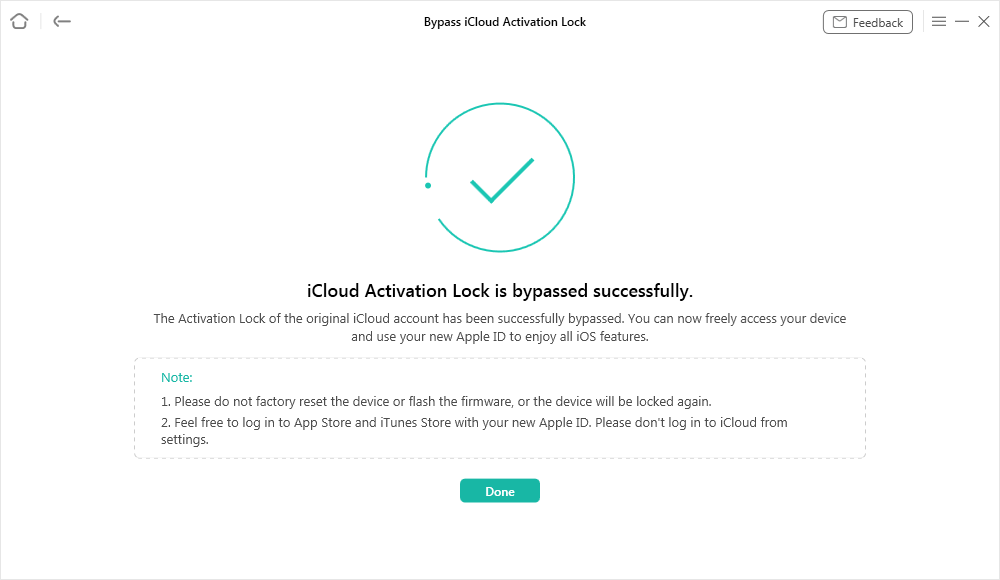
The success interface will be there once it is done. Click Done, and the device will be accessible without the previous Apple ID.
Conclusion
007 Ramdisk Tool is a short-term fix that enables you to get around the iCloud Activation Lock on iPhone, but it is an unstable tool that is prone to errors. A lot of features may be disabled, and the latest models are not compatible. In case you are looking for a more reliable, stable, and user-friendly solution, then AnyUnlock is the right choice, as it not only provides a full iCloud bypass but also includes a guide and more device support.



Wanda Norris is a junior author in iMobie specializing in iOS tips and solutions. She keeps a close eye on every iOS update to provide practical, easy-to-understand guides that help users solve problems and master their Apple devices.
Product-related questions? Contact Our Support Team to Get Quick Solution >
