Broque Ramdisk PRO Free Download [2026 Review]
Does Broque Ramdisk PRO really work to bypass iCloud? This article provides a detailed review of Broque Ramdisk PRO including its key features, safety concerns, and a software download user guide., also suggests a more reliable alternative for bypassing iCloud Activation Lock.
Broque Ramdisk PRO: Quick Answer
Broque Ramdisk PRO is a third-party iPhone and iPad servicing utility commonly associated with ramdisk-based workflows on certain older Apple devices. Depending on the Broque build, users may see functions related to device servicing, jailbreak workflows, screen-lock situations, or Activation Lock-related operations.
However, Broque Ramdisk is not an Apple tool, and a third-party “Activation Lock bypass” is not the same as Apple officially removing Activation Lock from the device owner’s account.
If you are the legitimate owner of an Activation Locked iPhone or iPad, try Apple’s official recovery options first:
- Enter the Apple Account and password associated with the device.
- Reset the Apple Account password if you forgot it.
- Ask the previous owner to remove a second-hand device from their Apple Account.
- Remove the device through Find My / iCloud if it belongs to your account.
- If you have valid proof of purchase, check whether you can submit an Activation Lock support request to Apple.
Consider Broque Ramdisk only after you have identified the exact device model, chip, iOS/iPadOS version, Broque version, and the specific operation you need.
Compatibility can vary considerably between builds. A version described as “latest” is not automatically the right version for every iPhone or iPad.
Important: Only use device-lock or account-related tools on an iPhone or iPad you own or are authorized to manage. Some third-party device-level operations can change the device state, erase data, affect activation behavior, or fail on unsupported hardware.
Table of ContentsHide
What Is Broque Ramdisk PRO?
Can Broque Ramdisk Remove Activation Lock?
Which Devices and iOS Versions Can Use Broque Ramdisk?
Try These Apple Activation Lock Options First
How to Download Broque Ramdisk More Safely
What to Check Before Using Broque Ramdisk
Common Broque Ramdisk Errors and What They Mean
When an Alternative Tool May Be Worth Comparing
FAQs About Broque Ramdisk PRO
What Is Broque Ramdisk PRO?
Broque Ramdisk PRO is a third-party iOS utility that uses ramdisk-based techniques for certain device-servicing operations on compatible iPhone and iPad models.
A ramdisk is a temporary environment loaded into device memory. Tools that use this approach may interact with compatible devices without relying only on the normally installed copy of iOS.
Broque Ramdisk has appeared in multiple Windows and macOS releases, and different versions may provide different functions.
This is why users searching for terms such as:
- Broque Ramdisk PRO latest version
- Broque Ramdisk PRO v3.2.6
- Broque Ramdisk PRO v2.5.0
- Broque Ramdisk Mac
- Broque Ramdisk Windows
- Broque Ramdisk ECID registration
- Broque Ramdisk Activation Lock
should not assume that every result refers to the same software build or compatibility list.
What Broque Ramdisk Is Not
Broque Ramdisk is not:
- An Apple-developed or Apple-supported utility.
- A universal solution for every iPhone and iPad.
- A guarantee that Activation Lock will be permanently removed from Apple’s activation system.
- A substitute for recovering an Apple Account that belongs to you.
- A reliable solution for newer devices simply because a download page calls the software the “latest version.”
Can Broque Ramdisk Remove Activation Lock?
The practical answer is: it depends on what you mean by “remove,” and on the exact device and Broque build.
Third-party and community sources describe Broque Ramdisk as providing Activation Lock-related workflows on certain compatible devices. These reports are generally concentrated around older checkm8-compatible Apple hardware, and compatibility varies by release.
However, you should distinguish two very different outcomes:
| Outcome | What It Means |
|---|---|
| Apple officially removes Activation Lock | The device is no longer associated with the previous Apple Account in Apple’s activation system. This can happen through the correct Apple Account, Find My/iCloud removal, previous-owner removal, or an approved Apple support request. |
| Third-party bypass workflow | A tool attempts to make a supported device usable through a device-specific technical process. The result, persistence, available services, and compatibility may differ from Apple’s official removal process. |
This distinction matters because a successful third-party workflow on one device does not mean:
- The Apple Account relationship has been officially removed.
- The same result will survive every restore or update.
- Cellular, Apple services, notifications, or other features will work identically.
- The same method will work on another model or iOS version.
Best first step: If you know the Apple Account associated with the device, or can contact the previous owner, use Apple’s official process instead of beginning with a third-party bypass utility.
Which Devices and iOS Versions Can Use Broque Ramdisk?
Broque Ramdisk compatibility is one of the most important areas to verify because online references do not always agree.
Community and third-party documentation commonly associates Broque Ramdisk workflows with older Apple devices using hardware generations affected by the checkm8 exploit, including some A7–A11 devices.
Examples often mentioned online include older models such as:
- iPhone 6s / 6s Plus
- iPhone SE (1st generation)
- iPhone 7 / 7 Plus
- iPhone 8 / 8 Plus
- iPhone X
- Selected older iPad and iPad Pro models
However, the supported iOS version, available functions, and exact device list can change between Broque releases.
Do not treat the list above as universal support.
Check These 5 Things Before Downloading
| Check | Why It Matters |
|---|---|
| Exact iPhone/iPad model | Two devices running the same iOS version may use different chips and may not support the same ramdisk workflow. |
| Chip generation | Many Broque-related workflows are hardware-dependent. |
| iOS/iPadOS version | A Broque release that works with one iOS version may fail after an update. |
| Broque version | v2.x, v3.x, Windows, and macOS releases may not provide identical compatibility or features. |
| Function required | Device detection, jailbreak, passcode-related functions, and Activation Lock-related workflows may have different requirements. |
Should You Always Download the Newest Broque Version?
No.
A newer build may add compatibility or fix bugs, but “newer” does not automatically mean “better for your specific device.”
If you are searching specifically for Broque Ramdisk PRO v2.5.0, v2.8.4, v3.2.6, or another release, first find out why that version is needed.
Choose based on:
- Your device model.
- Your device chip.
- Your iOS/iPadOS version.
- Your computer platform.
- The function you actually need.
Avoid downloading an older version merely because a tutorial used it several years ago.
Try These Apple Activation Lock Options First
If the problem is Activation Lock, Apple’s official options are usually the best place to start.
Option 1. Enter the Apple Account Used on the Device
If the Activation Lock screen belongs to your own Apple Account, follow the onscreen instructions and sign in with the Apple Account and password originally associated with the device.
If you forgot the password, use Apple’s account-recovery process instead of repeatedly entering random credentials.
Option 2. Remove the Device from Find My
If the device belongs to your Apple Account but you no longer have the device in normal usable condition, you may be able to remove it through Apple’s Find My / iCloud service.
Apple allows the owner of the associated account to remove Activation Lock from eligible devices through Find My or iCloud.com.
Option 3. Ask the Previous Owner to Remove a Used iPhone or iPad
If you bought the device second-hand and it still shows the previous owner’s Apple Account, contact the seller.
The previous owner can remove the device from their account without physically having the iPhone or iPad in front of them.
Apple advises against taking ownership of a used iPhone or iPad that remains associated with someone else’s account.
Option 4. Submit an Activation Lock Support Request
If you are the legitimate owner and have valid proof of purchase, Apple provides an Activation Lock support-request process.
The purchase documentation may need to identify the device and demonstrate legitimate ownership.
If none of these options apply: be cautious before using a third-party tool. First confirm what the tool can actually do on your exact hardware and whether the result is a true account-side removal or only a device-specific bypass workflow.
How to Download Broque Ramdisk More Safely
Broque Ramdisk download links appear across community pages, file-hosting services, social channels, and third-party download websites.
Because there are multiple versions and repackaged copies online, the biggest question is not simply “Where is the download button?” but whether the file is actually the build you intended to obtain.
Before downloading:
- Confirm the version number.
- Check whether it is a Windows or macOS build.
- Compare the listed device support with your iPhone or iPad.
- Check whether the release information comes from the Broque developer/community rather than only a download mirror.
- Avoid packages that unnecessarily instruct you to permanently disable antivirus, firewall, or other system protection.
- Scan the downloaded file using your normal computer security tools.
Broque Ramdisk Device Registration and ECID
Some Broque workflows use the connected device’s ECID during registration.
ECID is a unique identifier associated with Apple hardware.
Treat it as device information:
- Do not publish it unnecessarily.
- Enter it only into a service or tool you have intentionally chosen to use.
- Verify the software source before registering your device.
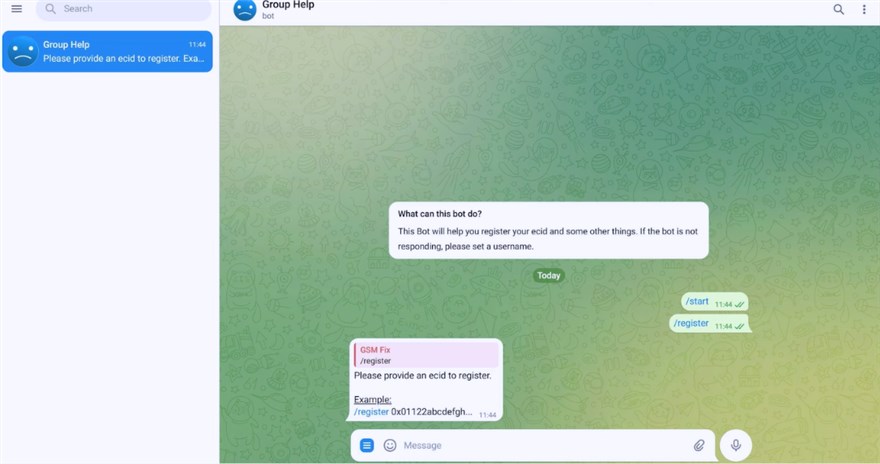
Some Broque workflows use ECID during device registration.
Installing on Windows
If you have verified the download:
- Extract the downloaded package if necessary.
- Check the extracted files before opening the executable.
- Launch the Broque application.
- If Windows Security or another security product displays a warning, verify the source and file rather than immediately turning protection off.
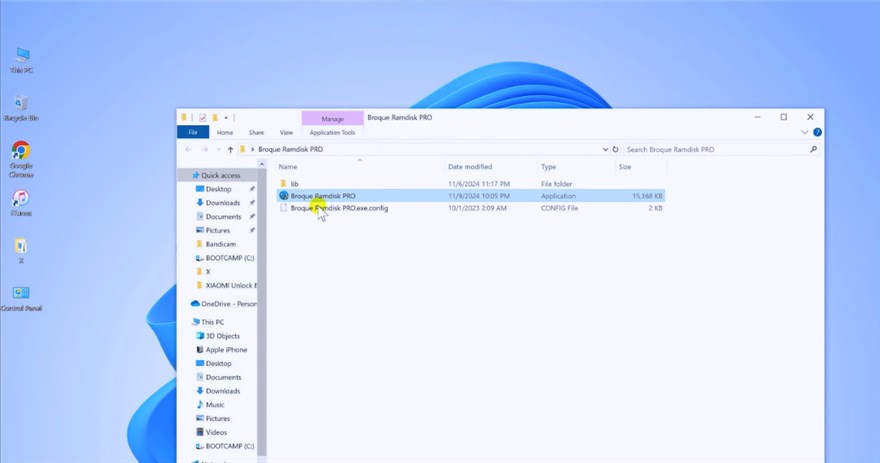
Verify the file and version before completing installation.
Installing on macOS
Broque’s macOS versions may not match its Windows releases in version number or feature availability.
Before attempting installation:
- Confirm that the Broque release explicitly supports macOS.
- Check compatibility with your macOS version.
- Verify the source before overriding Gatekeeper or developer-verification warnings.
Do not disable macOS security controls simply because an old tutorial tells you to do so.
What to Check Before Using Broque Ramdisk
Before starting any device-level process, answer the following questions.
| Question | Why It Matters |
|---|---|
| Do I own or have authorization to manage this device? | Lock-related operations should only be performed on devices you are authorized to use. |
| Is this actually Activation Lock? | A screen passcode, Apple Account login issue, MDM restriction, and Activation Lock are different problems. |
| Can I recover the Apple Account instead? | Official account recovery is usually preferable to a third-party device workaround. |
| Can the previous owner remove the device? | This is usually the cleanest solution for a legitimately purchased second-hand device. |
| Does my exact device/chip/iOS version match the Broque build? | Unsupported combinations are a common source of failed operations. |
| Do I have a backup? | Some device-level operations may erase data or change device state. |
| Am I prepared for partial functionality? | A bypass-style result may not provide the same state as Apple officially removing Activation Lock. |
Broque Ramdisk Risks and Limitations
Users should understand several limitations before relying on Broque.
- No universal compatibility: support can vary between Broque releases, chips, iOS versions, and individual functions.
- No guaranteed success rate: a workflow demonstrated on one device does not guarantee the same outcome on another.
- Possible data loss: some restore, servicing, jailbreak, or lock-related processes can erase data.
- Device-state changes: jailbreak or ramdisk operations may alter the device’s temporary or persistent state.
- Post-update uncertainty: restoring or updating iOS may affect a third-party bypass result.
- Apple service limitations: third-party bypass results may not provide the same access to Apple services as a normally activated device.
- Third-party software risk: Broque is not distributed or supported by Apple.
Common Broque Ramdisk Errors and What They Mean
If Broque fails, avoid immediately repeating the same device-level operation.
Use the error to narrow down the likely cause.
| Error or Symptom | Likely Area to Check | What to Do First |
|---|---|---|
| Stuck on “Connecting to iDevice” | USB connection, driver, or device detection | Try another known-good cable/port and confirm the computer can normally detect the device. |
| Driver check freezes | Apple device drivers or software conflict | Restart the computer and verify that the required Apple device components are installed correctly. |
| Bootfile download fails | Network, server availability, or Broque version | Verify the internet connection and whether that Broque release is still supported. |
| Cannot enter the required device mode | Incorrect DFU/recovery sequence or device incompatibility | Confirm the correct procedure for your exact iPhone/iPad model. |
| Filesystem mount fails | Device mode or unsupported hardware/software combination | Recheck device, chip, iOS, and Broque-build compatibility. |
| Operation repeatedly fails at the same point | Unsupported device/version or incompatible workflow | Stop repeating the process and verify whether that combination is actually supported. |
| Operation finishes but expected services do not work | Limitation of the selected third-party workflow | Check what functionality that particular method is expected to preserve rather than assuming full normal activation. |
Failure boundary: If the device is unsupported, Apple’s activation servers still require the original account, or the Broque workflow does not support the device’s hardware/iOS combination, repeatedly running the same process is unlikely to solve the underlying problem.
When an Alternative Tool May Be Worth Comparing
Broque Ramdisk is relatively technical and its compatibility depends heavily on the exact device, chip, system version, and software build.
If your device is not supported or you prefer a more guided interface, you may compare another tool for the specific lock type you are dealing with.
For example, AnyUnlock provides guided lock-related workflows for supported iPhone and iPad scenarios on Windows and Mac.
However, it should be treated as an alternative only when its current compatibility list includes your device, iOS/iPadOS version, and lock type.
- Consider it when: you own the device, Broque is incompatible or too technical, and AnyUnlock explicitly supports the relevant lock scenario.
- Do not treat it as a universal alternative: one AnyUnlock function does not apply to every Apple Account, passcode, MDM, or Activation Lock situation.
- Official Apple recovery still comes first: if you can recover the Apple Account, remove the device through Find My, contact the previous owner, or submit an Apple support request, those are cleaner ownership-resolution paths.
- Compatibility is a hard boundary: if the current AnyUnlock version does not support the device/iOS/function combination, using it will not solve the issue.
- Results depend on the selected function: check data-loss implications and device limitations before proceeding.
Bottom line: choose between Broque, AnyUnlock, or another tool based on the exact device and supported scenario—not because one tool has a simpler interface or a stronger marketing claim.
FAQs About Broque Ramdisk PRO
Q1. Is Broque Ramdisk PRO an official Apple tool?
No. Broque Ramdisk is third-party software and is not developed, endorsed, or supported by Apple.
Q2. Can Broque Ramdisk permanently remove Activation Lock?
Do not assume that a third-party bypass is equivalent to Apple officially removing Activation Lock from the associated Apple Account.
The actual result depends on the Broque version, device hardware, iOS version, and method being used.
Q3. What is the safest way to remove Activation Lock from my own iPhone?
Use the Apple Account linked to the device. If necessary, reset the account password, remove the device through Find My/iCloud, or use Apple’s Activation Lock support process when you have valid proof of purchase.
Q4. What should I do if a used iPhone is locked to the previous owner?
Ask the previous owner to remove the device from their Apple Account.
If the seller cannot or will not do this, returning the device is generally safer than relying on a third-party bypass.
Q5. Is Broque Ramdisk PRO free?
Free Broque builds have been distributed online, but available features, registration requirements, supported platforms, and version numbers can vary.
Verify the exact build rather than assuming every file labeled “Broque Ramdisk PRO free” is identical.
Q6. What is Broque Ramdisk v3.2.6?
v3.2.6 is one of the Windows Broque releases referenced by third-party and community sources. Do not assume its compatibility applies to all iPhones, iPads, or modern iOS versions.
Q7. Can Broque Ramdisk run on macOS?
Mac builds have been referenced, but macOS releases can differ from Windows in version number and feature availability. Verify the exact build and macOS compatibility first.
Q8. Why doesn’t Broque Ramdisk detect my iPhone?
Possible causes include the USB cable or port, Apple device drivers, incorrect device mode, unsupported hardware, or incompatible iOS/Broque versions.
Q9. What is ECID registration in Broque Ramdisk?
ECID is a unique hardware identifier for an Apple device. Some Broque workflows use it for device registration. Avoid sharing your ECID publicly unless necessary.
Q10. Is AnyUnlock better than Broque Ramdisk?
There is no universal answer.
Broque may suit users comfortable with a more technical, version-specific workflow. AnyUnlock may be easier to follow for a supported scenario, but its effectiveness still depends on the device, iOS version, and lock type.
Q11. What if neither Broque nor another tool supports my iPhone?
Do not keep retrying unsupported methods.
Return to the official Apple options: recover the associated Apple Account, ask the previous owner to remove the device, use Find My/iCloud when applicable, or contact Apple with proof of purchase.
Conclusion
Broque Ramdisk PRO can be useful to technically experienced users working with certain compatible iPhone and iPad models, but it should not be treated as a universal iCloud or Activation Lock solution.
Before downloading anything, identify:
- Your exact iPhone or iPad model.
- The device’s chip generation.
- Your iOS/iPadOS version.
- The Broque release you intend to use.
- The exact problem you are trying to solve.
If the issue is Activation Lock, start with Apple’s official options whenever possible: use the associated Apple Account, recover the password, remove the device through Find My/iCloud, contact the previous owner, or submit a support request with valid proof of purchase.
Only after those paths have been considered should you evaluate a third-party tool.
If Broque does not support your device or you prefer a guided workflow, a tool such as AnyUnlock can be compared for a supported scenario. Check compatibility and limitations first, and do not assume that any third-party program can resolve every Apple Account or Activation Lock condition.



Joy Taylor is a seasoned technical writer with over a decade of experience in mobile technology. At iMobie, she specializes in producing in-depth content on iOS data recovery, iPhone unlocking solutions, and iOS troubleshooting.
Product-related questions? Contact Our Support Team to Get Quick Solution >
