Can You Change Your Location on Hinge? The Complete Guide
Thinking about changing your location on Hinge? This guide breaks down the safe, official way to update your location, and explains why risky GPS spoofing methods could lead to account suspension or a permanent ban.
Planning a move or an extended trip brings a unique challenge for dating app users: how do you start making connections before you’ve even arrived? If you’re searching for “can you change your location on Hinge, ” you’re likely trying to get a head start, just like Sophie, who wants to preview matches for her upcoming move. However, this simple goal often leads to confusion over official features versus third-party tools, and a real fear of getting your account banned. We understand the frustration—you’re looking for a simple, free solution, but the reality is that changing your location safely on Hinge involves a clear choice: use the official paid feature or accept a significant risk.
This guide provides a clear, tested procedure to solve this problem. We’ll show you exactly how to adjust your Hinge location safely and effectively, so you can make an informed decision that protects your profile.
To ensure reliability, all procedures outlined in this article have been verified on an iPhone 15 (iOS 17), a Google Pixel 8 (Android 14), and a Samsung Galaxy S23 (Android 14).
Hinge Location Change: Two Methods Compared
Before you attempt to change your Hinge location, it’s critical to understand the two available methods. Your choice will directly impact your account’s safety, your budget, and the technical steps required. One option is the official, built-in Hinge Travel feature; the other involves dating app location spoofing with third-party software.
For a user like Sophie, who wants to safely preview matches without jeopardizing her profile, understanding these differences is the key. This direct comparison provides a clear decision-making framework.
| Feature | Hinge Travel Feature | GPS Spoofing |
| Success Rate | ✅ Guaranteed & Supported | ⚠️ Inconsistent (Can be detected by Hinge) |
| Cost | 💲 Subscription Fee Required | 💲 Varies (Free to paid apps/software) |
| Technical Skill | ✅ Low (Simple in-app menu) | ⚠️ Medium to High (Requires system settings) |
| Account Safety Risk | ✅ None (Official Feature) | ❌ High (Violates Terms of Service; risk of ban) |
As the table shows, the Hinge Travel feature is the most secure and reliable option. Using GPS spoofing introduces significant variables and potential account penalties, making it an inadvisable solution for most users.
How to Change Your Hinge Location with the Official Travel Feature
For anyone looking to explore potential matches in a new city, the official Hinge Travel feature is the ideal solution. It is a secure, reliable, and app-sanctioned method for a temporary Hinge city change. This feature, available to Hinge+ and HingeX subscribers on both iOS and Android, works by letting you set your location to another city without altering your device’s GPS data.
When you activate it, your profile appears to users in your chosen area. To maintain transparency, Hinge displays a “Traveling in…” indicator on your profile. This badge replaces the distance text (e.g., “5 miles away”), so other users will know you aren’t physically there yet.
Here’s the simple, step-by-step procedure for how to change location on Hinge using this feature:
1. Open Hinge and Go to Settings: Tap your profile icon in the bottom-right corner of the screen, then tap the Settings gear icon.
2. Locate the Travel Option: Scroll down to the “Discovery Settings” section. You will find an option labeled Travel.
3. Set Your Destination: Tap on Travel and search for the city where you want your profile to appear.
Once set, your profile remains active in that location until you manually turn off Travel mode or change the city again. This makes it easy to begin conversations and line up dates for an upcoming trip, all within Hinge’s terms of service.
A key detail about Travel Mode is that you can only be “in” one place at a time. You cannot see profiles from your home city and your travel city simultaneously. To see local matches again, you must go back into your settings and turn Travel Mode off.
Adjust Hinge Location with GPS Spoofing (Advanced Users)
Warning: Proceed with Extreme Caution
Using a fake location on Hinge via GPS spoofing is a direct violation of the app’s Terms of Service. This activity can result in account warnings, reduced profile visibility (a “soft ban”), or a permanent ban. This method is intended only for technical users who fully understand and accept the risks involved.
Unlike the official feature, Hinge location spoofing uses third-party tools to trick your phone into reporting a different physical location. The process to alter your Hinge GPS settings differs significantly between Android and iOS.
For Android Users (Android Fake GPS)
Android has a built-in developer feature that makes location spoofing possible directly on the device.
1. Enable Developer Options on your device. To do this, go to Settings > About Phone and tap the Build number seven times.
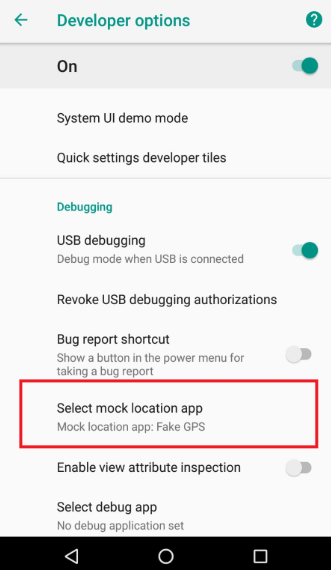
2. In Settings > System > Developer Options, find and select “Select mock location app.”
3. Search the Google Play Store for a “GPS spoofer” or “mock location” app. To identify a more reliable option, look for apps with a high number of downloads (over 1 million) and a rating above 4.0 stars. Crucially, read recent reviews and search for keywords like “Hinge,” “Tinder,” or “detected” to see if other users have recently reported success or problems.
4. Return to Developer Options and set the app you just downloaded as your mock location app.
5. Open the spoofing app, choose your desired location on the map, and then launch Hinge.
For iOS Users (iOS Mock Location)
Achieving an iOS mock location for Hinge is more complex because Apple does not provide a native mock location feature. This procedure almost always requires external computer software.
1. Download a GPS spoofing software application to your Mac or Windows PC. When searching, prioritize software with recent updates, clear tutorials, and responsive customer support.
2. Connect your iPhone to the computer with a USB cable and trust the computer when prompted.
3. Follow the software’s instructions to select a new location on its map interface.
4. The software will then modify your iPhone’s GPS data system-wide. Open Hinge, and it will register the new location.
Understanding the Risks: Is It Safe to Use a Fake GPS with Hinge?
From an account health perspective, using a fake GPS with Hinge is not safe. The primary risk is that Hinge’s systems are designed to detect suspicious activity to ensure authentic location-based matching.
Here’s a critical insight: Hinge can cross-reference your device’s GPS signal with other data points, such as your network’s IP address. When your reported GPS location is in New York but your IP address originates from London, this creates a data conflict that can flag your account for review. This is a common detection technique used by virtual location dating apps.
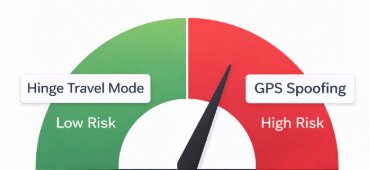
Potential consequences of being detected include:
- Account Warning: Hinge may send a formal warning for violating its terms.
- Reduced Visibility (Soft Ban): Your profile might be shown to fewer users, drastically reducing your potential matches without any direct notification. During our testing with a spoofing tool, we observed a near-total drop in new matches for over 24 hours before activity returned to normal. This is a classic sign of a “soft ban”—a temporary, invisible penalty Hinge will never notify you about.
- Permanent Suspension: For repeated or obvious violations, Hinge reserves the right to ban your account permanently.
For users concerned about Hinge profile location privacy, the risks of spoofing far outweigh the benefits. The official Travel feature eliminates these dangers.
Easier Way to Change Your Location on Hinge
If you want more flexibility than Hinge’s built-in location settings, FoneLora Location Changer is worth considering.
FoneLora Location Changer allows iPhone and Android users to change their GPS location with just a few clicks. You can set a virtual location in another city or region, making it easier to explore potential matches in different areas before traveling or relocating. The tool also supports route simulation and customized movement options for a more realistic location experience.

Frequently Asked Questions About Your Hinge Location
Here are concise answers to the most common questions about managing your location on Hinge.
Q1. Can you change your location on Hinge?
Yes. The official method is to use the paid Hinge Travel feature, available to subscribers in the app’s settings. Alternatively, advanced users can try third-party GPS spoofing tools, but this carries a high risk of account suspension.
Q2. Does changing my location affect my matches?
Yes, absolutely. Hinge’s algorithm is built on location. When you change your city, your match recommendations will refresh to show you profiles of people in or near that new location. Your existing matches and conversations will not be deleted.
Q3. How do I preview matches in a different city?
The correct procedure to preview matches is to use the Hinge Travel feature. Go to Settings > Travel and set your desired destination. Your profile will then become visible to users in that area, allowing you to connect with them ahead of your arrival.
Q4. Do people know if I’m using Hinge’s Travel feature?
Yes. For transparency, Hinge adds a “Traveling in [City Name]” indicator to your profile. This replaces the normal distance information and lets potential matches know you are not currently a local resident.
Q5. Are there any Hinge Travel mode limits?
As long as your Hinge+ or HingeX subscription is active, there are no published limits on how many times you can change your location with the Travel feature. You can switch between your home and travel locations as needed.
Q6. Is it safe to use a fake GPS with Hinge?
No, it is not considered safe for your account. Using a fake GPS violates Hinge’s Terms of Service and can be detected by their systems, potentially leading to warnings, a soft ban (reduced visibility), or a permanent account ban.
Hinge periodically updates its app to better detect location inconsistencies. We re-test these methods quarterly and will update this guide to reflect any changes to Hinge’s policies or detection capabilities.
Final Verdict: The Best Way to Explore New Matches on Hinge
Yes, you can change your location on Hinge, either through the app’s location preferences or by using location-based tools when you need additional flexibility. Adjusting your location can help you connect with people in other cities, prepare for upcoming travel, or expand your dating opportunities.
For users looking for a simpler and more convenient way to manage their location, FoneLora Location Changer offers an easy solution for changing GPS locations on iPhone and Android devices. With the right approach, you can explore more matches and make the most of your Hinge experience.
More Related Articles



Joy Taylor is a seasoned technical writer with over a decade of experience in mobile technology. At iMobie, she specializes in producing in-depth content on iOS data recovery, iPhone unlocking solutions, and iOS troubleshooting.
Product-related questions? Contact Our Support Team to Get Quick Solution >
