Full Guide to Follow a Route in Pokémon Go in 2 Methods
Learn how to follow routes in Pokémon GO safely on iOS and Android. This guide explains how to auto-walk efficiently to hatch eggs faster while minimizing ban risk.
Are you tired of the slow grind of hatching eggs in Pokémon Go? Many dedicated players find their progress stalls because manual walking is so time-consuming. You might want to explore automated solutions, but the fear of account suspension makes the process feel incredibly risky. We understand that frustration. Searching for a safe tool often leads to confusing advice and a dead end.
This guide provides a clear, tested procedure for setting up automated routes safely. We will recommend specific, reliable tools we’ve tested and show you exactly how to configure them to mimic natural movement and avoid detection. Learning how to follow a route in Pokémon Go this way allows you to consistently gain distance for eggs and buddy candy without needing to physically travel for hours.
Why Is Pokémon GO Not Tracking My Route?
If Pokémon GO is not tracking your Route, it’s usually due to GPS accuracy issues, missing location permissions, or the route not being started correctly. Make sure your phone’s Location Services are set to “Always Allow”, enable Adventure Sync in the game settings, and start the route from its official starting point. Poor GPS signal, walking too fast, or temporary bugs from Niantic servers can also prevent progress from being recorded. Restarting the app or updating it to the latest version often fixes the issue.
How to Follow Routes in Pokémon GO-GPS Tools vs. In-Game Routes
Before you begin, it’s important to understand the two primary methods for following a route in Pokémon Go: using the official in-game Routes feature and employing third-party GPS simulation tools. Each approach has different benefits and drawbacks. Making an informed decision here is key to achieving your goals, whether you need an efficient Pokémon Go egg hatching route or want to explore new areas virtually.
- In-Game Routes (Official Feature): This is Niantic’s intended method. You physically walk along pre-approved paths created by other players to earn in-game rewards like Zygarde Cells. It is 100% safe but offers no automation and requires you to be present.
- GPS Simulation Tools (Third-Party): These are external applications that let you create a custom Pokémon Go walking path on a map and simulate your character’s movement. This method provides complete Pokémon Go movement automation, making it highly efficient for hatching eggs or earning candy from home. The primary consideration is the safety risk if not used correctly.
To help you decide which approach fits your needs, consult the comparison table below. It confirms that for automation, GPS tools are the correct choice.
| Feature | In-Game Routes | GPS Simulation Tools |
| Automation | None (Manual Walking) | Full (Automated Movement) |
| Efficiency | Low | High |
| Account Safety | 100% Safe | Safe with Precautions |
| Physical Effort | High | None |
| Best For | Earning Zygarde Cells | Hatching Eggs, Earning Candy |
Pokémon Go GPS Route Guide for iPhone (iOS)
For iPhone users, setting up a custom route requires a dedicated desktop application that connects to your iPhone with a USB cable. This method does not require jailbreaking your device, keeping it secure. The main function is to create a controlled, simulated movement between two or more points on the map.
This is where Fonelora Location Changer fits naturally into the workflow. Instead of relying on unstable mobile GPS apps or risky jailbreak methods, FLC allows you to manage your iPhone or Android GPS location from a computer. For route-based Pokémon GO gameplay, it can help you select a starting point, create a walking path, adjust movement speed, and simulate more natural movement for egg hatching or buddy candy progress.
We recommend using Fonelora Location Changer for players who want a cleaner desktop-based setup. It offers practical route planning, location changing, and movement simulation without needing to modify the device system. The key is to use it carefully: keep the walking speed realistic, avoid sudden long-distance jumps, and always follow cooldown rules.
Step-by-Step iPhone Setup with Fonelora Location Changer
- Download and Install: Download Fonelora Location Changer from its official website and install it on your Mac or PC.
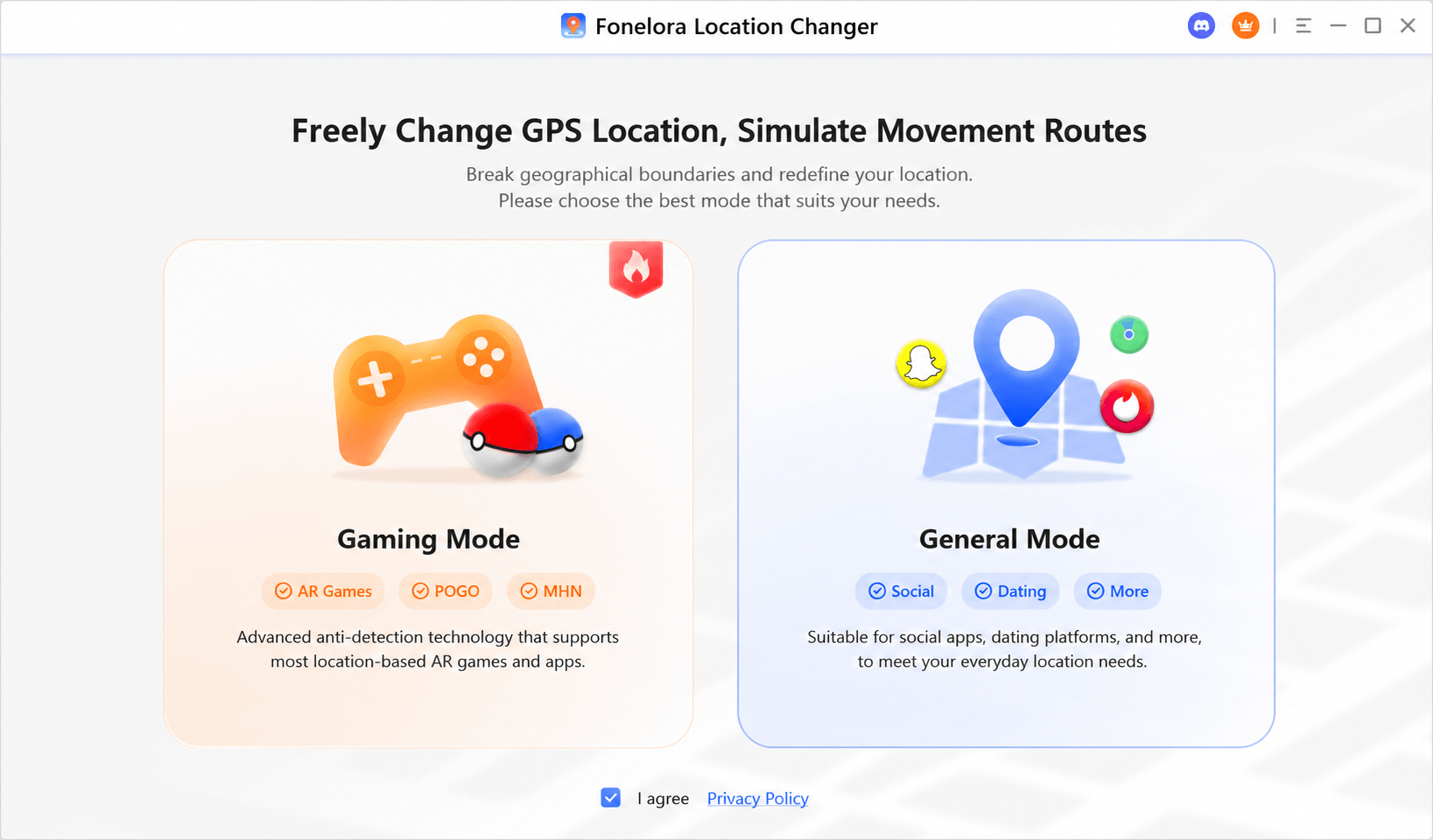
- Connect Your iPhone: Use a USB cable to connect your iPhone to your computer. When prompted on your phone, tap “Trust This Computer” and enter your device passcode.

- Select a Route Mode: Open FLC and choose a mode that supports route simulation or movement control. This is more suitable for auto walking than a simple one-point teleport.
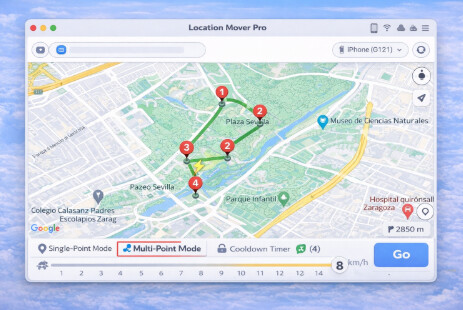
- Create Your Route: Use the map to select a starting point and add one or more destination points. For egg hatching, a simple loop through a park, campus, or long street usually works best.
- Set a Realistic Speed: Adjust the movement speed to a natural walking or jogging pace, ideally under 10 km/h. This helps the movement look more realistic.
- Start the Simulation: Start the route in Fonelora Location Changer, then open Pokémon GO on your iPhone to check whether your character follows the planned path.
Your character inside Pokémon Go will now begin moving along the specified route on your iPhone, accumulating distance for your eggs and buddy.
Important: Fonelora Location Changer is a GPS simulation tool, not an official Pokémon GO feature. Use it responsibly, avoid unrealistic jumps, and prioritize account safety when planning any route.
How to Set Up a Pokémon Go Auto Walk Route on Android
Android users can set up a Pokémon Go auto walk route directly from their device using a mock location app from the Google Play Store. The process involves enabling a standard Android feature called Developer Options, which does not require rooting your phone or compromising its security.
For Android, you can use a mock location app from Google Play, or choose a desktop-based tool like Fonelora Location Changer if you want a more controlled setup from your computer. Free Android mock GPS apps may work for simple walking routes, but they can sometimes cause the “rubber-banding” effect where your location snaps back and forth. A desktop tool is often easier to manage if you want smoother route control across both iOS and Android.
Step-by-Step Android Setup with GPS Path Go
- Enable Developer Options: Navigate to Settings > About phone. Find the Build number and tap on it seven times consecutively. You will see a small pop-up message confirming, “You are now a developer!”
- Install GPS Path Go: Open the Google Play Store, search for “GPS Path Go,” and install the application.
- Assign the Mock Location App: Go back to the main Settings menu, then tap System > Developer options. Scroll down and find the Select mock location app option. Tap it and choose GPS Path Go from the list.
- Create Your Route: Open GPS Path Go. Use the search bar to find your starting area. Tap on the map to place your first point (A), then tap again to place your second point (B) and any subsequent points.
- Configure and Launch: Once your route is set, tap the play icon. A small menu will appear where you can select your speed. Choose a walking or jogging speed under 10 km/h. Tap “Start.” Now, open Pokémon Go. Your character will be at the starting location and will automatically begin moving along the route you created.
Expert Tip: Preserve Your Session
Before starting a long route, close all other background apps on your phone. Some Android systems have aggressive memory management that can shut down the mock GPS app if it’s running in the background for a long time, which would halt your progress. Keeping other apps closed helps ensure your session runs without interruption.
Safe Pokémon Go Route Walking: How to Avoid Detection
Using GPS simulation tools always involves some risk, but you can minimize it significantly by making your simulated activity as human as possible. Niantic’s anti-cheat systems are designed to detect unnatural movement like instantaneous travel over long distances (“teleporting”) or perfectly constant speeds over long periods.
The most critical insight for safety is this: following a route is safest when the movement is smooth, gradual, and imperceptible. Simulating a realistic walking speed along a planned route is the best way to avoid triggering warnings.
The 5 Rules of Safe Route Simulation
- Maintain Realistic Speeds: Keep your simulated speed between 5-10 km/h (3-6 mph). This range is ideal for hatching eggs and earning buddy candy, as it mimics a natural walking or jogging pace.
- Obey Cooldown Times: If you change your location to a different city or country, do not interact with the game (catch Pokémon, spin PokéStops, or join raids) for a set period. A common rule is to wait two hours for any long-distance jumps.
- Plan Realistic Routes: Create your routes along actual roads, sidewalks, and pedestrian areas. Avoid drawing straight lines that cut through buildings or across large bodies of water.
- Avoid Instant Teleporting: Do not jump your location from one continent to another and immediately start playing. This is the single most common reason accounts get flagged.
- Pause Your Activity: Just as a real person would, occasionally pause the automated movement for a few minutes every hour or so. This simple action adds another layer of realism to your activity and breaks up the pattern.
Whether you use a mobile mock location app or a desktop option like Fonelora Location Changer, the same principle applies: the route should look like a real person walking, not a bot drawing perfect lines across the map.
Bonus Tip: Planning an Efficient Route for Egg Hatching and Resources
Once you have mastered the technical setup with a reliable tool, the next step is strategic planning. An efficient route is one designed to meet a specific goal. Simply walking in a random direction is less effective than planning a route to maximize rewards for the time invested.
Strategies for Optimal Route Planning
- The Egg Hatcher’s Loop: For a dedicated Pokémon Go egg-hatching route, the best design is a simple loop or a long, straight line of 2-5 kilometers. Large parks, university campuses, or quiet suburban neighborhoods are excellent choices. The goal is an uninterrupted walk where you can maintain a steady, optimal speed.
- The Resource Run: If you need to restock Poké Balls and other items, use an online map tool to identify areas with a high density of PokéStops and Gyms. Plan a Pokémon Go walking path that connects as many of these points as possible in a continuous loop. Downtown districts and popular public parks are often perfect for this.
- Community-Sourced Routes: Before creating your own route, check community resources like Reddit or Discord. Players frequently share coordinates for high-density spawn points, nests, and pre-planned farming routes. You can import these coordinates into your GPS simulation tool for a proven, effective session.
Frequently Asked Questions
Q1. What happens if my internet connection drops mid-route?
Most simulation tools will pause your movement. When you reconnect, your character in Pokémon Go should reappear at the last registered location. It is generally safe, but you may need to restart the route simulation in your tool.
Q2. Can I run this in the background while using other apps?
On iPhones, since the tool runs on a computer, your phone is free to use. On Android, it’s possible, but as mentioned in our expert tip, heavy multitasking can cause the operating system to close the GPS app to save memory. For long sessions, it’s best to let it run without other intensive apps open.
Q3. Are there any free tools you recommend?
We generally advise against free tools. Many are unreliable, filled with ads, or, in some cases, contain malware. More importantly, they often lack the sophisticated features like variable speed and smooth movement simulation that are critical for avoiding detection. Investing in a reputable, paid tool is an investment in your account’s safety.
Q4. What is the safest speed to simulate walking?
A speed between 5 km/h and 10 km/h (about 3-6 mph) is both safe and effective for hatching eggs and earning buddy candy. This range closely mimics a natural walking or jogging pace and is unlikely to trigger anti-cheat systems.
Q5. Does following a route hatch eggs faster?
Absolutely. A planned, automated route ensures you are constantly accumulating distance at an optimal speed without interruption. This is far more efficient and consistent than manual walking, which often involves stops, starts, and inconsistent speeds.
Conclusion: Take Control of Your Pokémon Go Progress
The frustration of slow egg hatching and the time required for manual walking doesn’t have to hold back your progress. By following the clear procedures in this guide, you can safely and effectively automate your movement, turning what was once a time-consuming chore into an efficient background activity. The key is to choose a reliable tool and prioritize safety by simulating realistic, human-like movement.
For iPhone users, or for Android players who want a more controlled desktop setup, Fonelora Location Changer offers a practical way to create routes, adjust movement speed, and manage GPS simulation from a computer without jailbreak or root. Combined with careful route planning and safe movement habits, it can make Pokémon GO route walking easier to manage.
You no longer have to worry about account suspension or the risk of downloading unsafe software. Take control of your gameplay and start hatching eggs more efficiently today.
More Related Articles



Joy Taylor is a seasoned technical writer with over a decade of experience in mobile technology. At iMobie, she specializes in producing in-depth content on iOS data recovery, iPhone unlocking solutions, and iOS troubleshooting.
Product-related questions? Contact Our Support Team to Get Quick Solution >
